
1. Gabatarwa
This user manual provides comprehensive instructions for the setup, operation, and maintenance of your new Microsoft Wired Keyboard, Samfura ANB-00021. Please read this manual thoroughly before using the product to ensure optimal performance and longevity.

Figure 1: Microsoft Wired Keyboard (Model ANB-00021)
This image displays the Microsoft Wired Keyboard from an angled perspective, showcasing its full layout, including the numeric keypad and special function keys. The keyboard is black with a standard QWERTY layout and a wired USB connection.
2. Kayan Samfura
The Microsoft Wired Keyboard is designed for efficiency and durability, offering a comfortable typing experience. Key features include:
- Black, English/International Layout: Standard QWERTY layout suitable for various regions.
- Haɗin USB: Simple and reliable wired connection.
- Ultra-Flat Design: Slim profile for a modern aesthetic and comfortable wrist position.
- Short Key Travel: Responsive keys with a short actuation distance for efficient typing.
- Fasa-Resistant: Designed to withstand minor spills, protecting internal components.
- Dedicated Hotkeys: Includes 5 special keys for quick access to common functions.
- Calculator Key: Instant access to the calculator application.
- Gently Inclined Key Block: Ergonomic design for reduced strain during extended use.
- Classic Keyboard Layout: Familiar and intuitive key arrangement.
- Toshe kuma Kunna: No software installation required; simply connect and use.
3. Saita
Setting up your Microsoft Wired Keyboard is a straightforward process due to its Plug and Play functionality.
- Cire Allon madannai: A hankali a cire madannai daga cikin marufinsa.
- Haɗa zuwa tashar USB: Locate an available USB port on your computer (desktop PC, laptop, or compatible device). Insert the USB connector of the keyboard firmly into the USB port.
- Gane tsarin: Your operating system (Windows, macOS, Linux, etc.) will automatically detect and install the necessary drivers. This process usually takes a few seconds.
- Shirye don Amfani: Once the drivers are installed, the keyboard is ready for immediate use. No additional software or configuration is typically required.
For optimal performance, ensure the USB cable is not kinked or strained.
4. Umarnin Aiki
The Microsoft Wired Keyboard operates like any standard QWERTY keyboard, with additional convenience features.
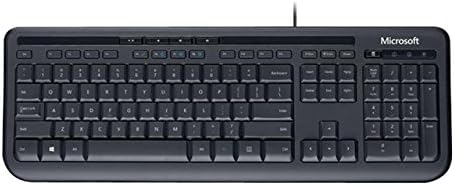
Hoto 2: Sama-sama view of the keyboard layout
Wannan hoton yana nuna yadda ake nuna sama-ƙasa view of the Microsoft Wired Keyboard, highlighting the full QWERTY key layout, function keys, numeric keypad, and the row of special hotkeys located above the function keys.
Standard Key Functions
- Alphanumeric Keys: Ana amfani da shi wajen rubuta haruffa, lambobi, da alamomi.
- Maɓallan Ayyuka (F1-F12): Perform various tasks depending on the active application or operating system.
- Maɓallin Lamba: Located on the right, for efficient data entry.
- Maɓallan kewayawa: Arrow keys, Home, End, Page Up, Page Down for cursor movement and scrolling.
- Modifier Keys: Shift, Ctrl, Alt, Windows key for combination shortcuts.
Special Keys (Hotkeys)
The keyboard features a row of dedicated hotkeys above the function keys for quick access to multimedia and system functions:
- Maɓallan Kula da Mai jarida: Kunna/Dakatar, Tsaya, Waƙar da ta gabata, Waƙar da ke tafe.
- Volume Control Keys: Mute, Volume Down, Volume Up.
- Calculator Key: Instantly launches the system's calculator application.
- Other Programmable Keys: Some models may include additional keys that can be customized through operating system settings or Microsoft keyboard software (if available).
Familiarize yourself with these keys to enhance your productivity.
5. Kulawa
Proper care and maintenance will extend the life of your Microsoft Wired Keyboard.
- Tsaftacewa:
- Cire haɗin allon madannai daga kwamfutarka kafin tsaftacewa.
- Yi amfani da laushi, yadi mara lint a hankali dampened with water or a mild, non-abrasive cleaning solution.
- Wipe the surface of the keys and the keyboard casing.
- Don ƙura da tarkace tsakanin maɓalli, yi amfani da matsewar iska.
- Kar ka immerse the keyboard in water or use harsh chemicals.
- Juriyar Fashewa: While the keyboard is splash-resistant, it is not waterproof. Avoid exposing it to excessive liquids. In case of a spill, disconnect immediately, wipe dry, and allow to air dry completely before reconnecting.
- Ajiya: When not in use for extended periods, store the keyboard in a clean, dry environment away from extreme temperatures.
- Kulawar Kebul: A guji lanƙwasawa ko karkacewa a cikin kebul na USB don hana lalacewa.
6. Shirya matsala
Idan ka ci karo da matsaloli da madannai, duba waɗannan matsaloli da mafita na yau da kullun:
| Matsala | Dalili mai yiwuwa | Magani |
|---|---|---|
| Allon madannai baya amsawa | Loose USB connection, incorrect USB port, driver issue. | Ensure the USB cable is securely plugged into a working USB port. Try a different USB port. Restart your computer. |
| Maɓallan musamman ba sa aiki | Debris under the key, key mechanism damage. | Use compressed air to clear debris. If the key is physically damaged, contact support. |
| Hotkeys not functioning | Software conflict, operating system settings. | Ensure your operating system is up to date. Check keyboard settings in your OS control panel. |
| Unexpected behavior after liquid exposure | Internal components affected by liquid. | Immediately disconnect the keyboard. Allow it to dry completely for at least 24-48 hours in a well-ventilated area before attempting to reconnect. If issues persist, the keyboard may be damaged. |
If the problem persists after trying these solutions, please refer to the Support section.
7. Ƙayyadaddun bayanai
Detailed technical specifications for the Microsoft Wired Keyboard (Model ANB-00021):
| Siffa | Daki-daki |
|---|---|
| Lambar Samfura | ANB-00021 |
| Alamar | Microsoft |
| Fasahar Haɗuwa | USB (Mai waya) |
| Bayanin Allon madannai | Standard QWERTY, USB |
| Siffa ta Musamman | Mai jure fantsama |
| Launi | Baki |
| Yawan Maɓallai | 600 (Note: This number is as per product specifications and may refer to total keypresses lifespan or a specific internal metric, not physical keys.) |
| Allon baya na allo | None (Single Color support listed, but typically implies no backlighting for this model) |
| Salo | Na zamani |
| Kayan abu | Filastik |
| Girman samfur (L x W x H) | 8.66 x 3.15 x 1.18 inci (22 x 8 x 3 cm). |
| Nauyin Abu | 1.31 fam (kimanin 0.59 kg) |
| Na'urori masu jituwa | Laptop, PC, Tablet, Smartphone (via appropriate adapters if needed) |
| Mai ƙira | Microsoft |
| Kwanan Wata Farko Akwai | Maris 9, 2011 |
8. Garanti da Tallafawa
For warranty information and technical support regarding your Microsoft Wired Keyboard, please refer to the official Microsoft support channels.
- Taimako kan layi: Visit the official Microsoft Support webshafin yanar gizo don Tambayoyin da ake yawan yi, jagororin magance matsaloli, da kuma saukar da direbobi.
- Tuntuɓi Support: For direct assistance, contact Microsoft customer service through their provided contact methods (phone, chat, email).
- Tabbacin Sayi: Koyaushe riƙe takardar shaidar siyan ku don da'awar garanti.
Specific warranty terms and conditions may vary by region and purchase date. Please consult the documentation included with your product or the Microsoft website for the most accurate and up-to-date warranty details.