
1. Gabatarwa
The SPL 2Control is a compact and user-friendly stereo monitor controller designed to provide comprehensive control over your digital audio workstation's (DAW) monitoring functions. It ensures high-quality audio reproduction through both studio monitors and headphones, allowing you to hear every detail of your mix. Key features include a precise speaker volume potentiometer, active circuitry for sound integrity, and a unique Crossfeed control for accurate headphone monitoring that simulates a stereo speaker image.
2. Umarnin Tsaro
- Karanta waɗannan umarnin sosai kafin aiki da na'urar.
- Ajiye wannan littafin don tunani na gaba.
- Kada a bijirar da naúrar ga ruwan sama ko danshi don hana gobara ko girgiza wutar lantarki.
- Tabbatar da samun iska mai kyau; kar a toshe duk wani buɗewar samun iska.
- Yi amfani da haɗe-haɗe/na'urorin haɗi kawai da mai ƙira ya ƙayyade.
- Cire igiyar wutar lantarki a lokacin guguwar walƙiya ko kuma lokacin da ba a yi amfani da ita na dogon lokaci ba.
- Koma duk hidima ga ƙwararrun ma'aikatan sabis.
- Guji sanya naúrar kusa da tushen zafi kamar radiators, rajistan zafi, murhu, ko wasu na'urori (ciki har da amplifiers) masu samar da zafi.
3. Abubuwan Kunshin
Upon unpacking, please verify that the following items are included:
- 1 x SPL 2Control Module
- 1 x Carfin Wuta
- Wannan Jagorar Mai Amfani
4. Samfurin Ya Ƙareview
4.1 Gudanar da Panel na gaba da Manuniya
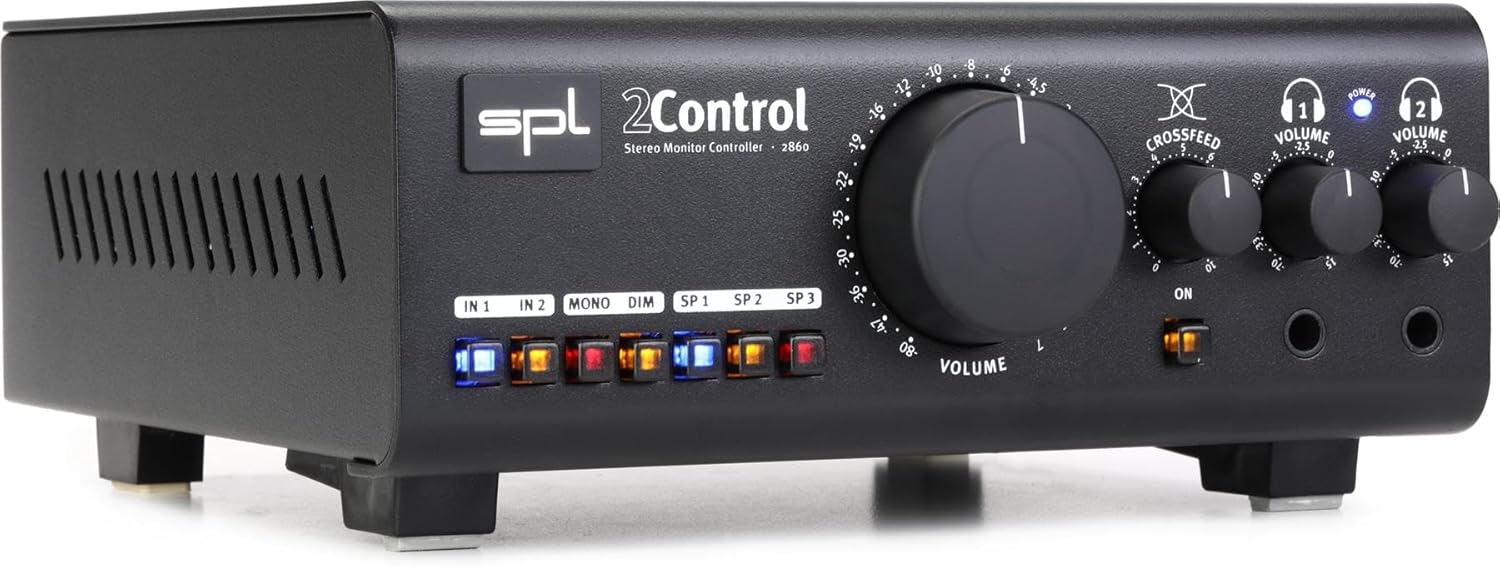
Hoto na 1: Front Panel of the SPL 2Control Stereo Monitor Controller.
This image displays the front panel of the SPL 2Control. From left to right, it features input selection buttons (IN 1, IN 2), function buttons (MONO, DIM), speaker output selection buttons (SP 1, SP 2, SP 3), a large central master VOLUME knob, a CROSSFEED knob, and two individual headphone VOLUME knobs with corresponding headphone output jacks. A power indicator LED is visible above the headphone controls.
- IN 1 / IN 2 Buttons: Selects the active stereo input source.
- MONO Button: Sums the stereo signal to mono for compatibility checking.
- Maɓallin DIM: Reduces the output volume by a fixed amount (e.g., -20dB) for temporary level reduction.
- SP 1 / SP 2 / SP 3 Buttons: Selects the active stereo speaker output pair.
- BABBAN BABBAR: Master volume control for selected speaker outputs.
- CROSSFEED Knob: Adjusts the stereo panorama for headphone monitoring to simulate a speaker listening environment.
- HEADPHONE VOLUME 1 / 2 Knobs: Independent volume controls for the two headphone outputs.
- HEADPHONE 1 / 2 Jacks: 1/4-inch stereo headphone outputs.
- WUTA LED: Yana nuna cewa na'urar tana aiki.
4.2 Rear Panel Connections (Inferred)
The rear panel typically houses the audio input and output connections, as well as the power input. Based on common audio equipment and product specifications, you can expect:
- Abubuwan Analog: Balanced XLR or TRS inputs for connecting your audio interface or mixer.
- Sakamakon Majalisa: Multiple sets of balanced XLR or TRS outputs for connecting up to three pairs of studio monitors.
- Shigar da Wuta: Connector for the included power cord.
5. Saita
- Wuri: Position the SPL 2Control on a stable, flat surface, ensuring adequate ventilation around the unit.
- Haɗin Wuta: Connect the provided power cord to the power input on the rear panel of the 2Control and then to a suitable AC power outlet.
- Haɗin shigarwa: Connect the stereo outputs of your audio interface, mixer, or other audio source to the IN 1 and/or IN 2 inputs on the rear panel using balanced XLR or TRS cables.
- Haɗin Magana: Connect your studio monitors to the SP 1, SP 2, and/or SP 3 outputs on the rear panel using balanced XLR or TRS cables. Ensure correct left and right channel connections.
- Haɗin Kai: Plug your headphones into the HEADPHONE 1 and/or HEADPHONE 2 jacks on the front panel.
- Ƙarfin Farko A Kunna: Ensure all volume controls are set to their minimum positions before powering on the unit. Then, connect the power cord to the wall outlet. The POWER LED on the front panel will illuminate.
6. Umarnin Aiki
- Zabar abin shigarwa: Danna ko dai 1 or 2 button to select your desired audio source. The active button will illuminate.
- Selecting Speaker Outputs: Danna maɓallin SP 1, SP 2, ko SP 3 button to route the audio to the corresponding pair of studio monitors. Only one speaker output can be active at a time.
- Adjusting Master Volume: Slowly turn the large MURYA knob clockwise to increase the listening level for the selected speaker outputs. Turn counter-clockwise to decrease.
- Mono Summing: Danna maɓallin MONO button to sum the stereo signal to mono. This is useful for checking phase compatibility and mix balance. Press again to return to stereo.
- Ayyukan Dim: Danna maɓallin DIM button to temporarily reduce the output volume. This is useful for quick conversations or when you need to lower the volume without losing your main volume setting. Press again to restore the original volume.
- Kula da Lasifikan kai:
- Plug your headphones into the desired headphone jack (HEADPHONE 1 or 2).
- Daidaita mutum ɗaya HEADPHONE VOLUME 1 or 2 knob to set the listening level for your headphones.
- Yi amfani da KURCI knob to adjust the stereo image for headphone listening. Turning it clockwise increases the crossfeed, simulating a more natural speaker-like stereo field by blending the left and right channels slightly.
7. Kulawa
- Tsaftacewa: Yi amfani da kyalle mai laushi da busasshe don tsaftace wajen na'urar. Kada a yi amfani da masu tsaftace ruwa ko abubuwan da ke narkewa.
- Samun iska: Ensure that the ventilation slots are kept clear of dust and debris to prevent overheating.
- Ajiya: Idan adana naúrar na tsawon lokaci, cire haɗin ta daga wuta kuma adana shi a wuri mai sanyi, busasshiyar.
8. Shirya matsala
| Matsala | Dalili mai yiwuwa | Magani |
|---|---|---|
| Babu sauti daga masu magana. |
|
|
| Babu sauti daga belun kunne. |
|
|
| Karkataccen sauti. |
|
|
9. Ƙayyadaddun bayanai
| Siffar | Daki-daki |
|---|---|
| Sunan Samfura | 2 Control (also known as 2860) |
| Alamar | Farashin SPL |
| Nau'in Kakakin | Saka idanu |
| Shawarwari Amfani | Control, Volume for Monitors |
| Na'urori masu jituwa | Monitors, Speakers |
| Kewaye Sauti Kanfigareshan | 2.0 |
| Launi | Baki |
| Abubuwan da aka haɗa | 1 x SPL Control Module |
| Girman samfur (D x W x H) | 8.66" x 8.46" x 3.15" |
| Nauyin Abu | 7.06 fam (kimanin 3.2 kg) |
| Tushen wutar lantarki | Corded Electric |
| Fasahar Haɗuwa | TRS, XLR |
| Yanayin Fitarwa na Audio | Sitiriyo |
| Nau'in hawa | Dutsen Tabletop |
| Mai ƙira | Sound Performance Lab |
10. Garanti da Tallafawa
The SPL 2Control Monitor Controller comes with a limited warranty. For specific warranty terms, duration, and conditions, please refer to the documentation provided with your purchase or visit the official SPL website. For technical support, service, or inquiries, please contact the manufacturer, Sound Performance Lab, or your authorized dealer.
Mai ƙira: Sound Performance Lab