
Gabatarwa
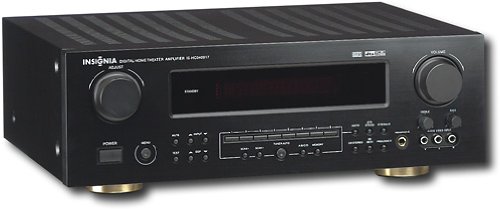
This manual provides essential instructions for the setup, operation, maintenance, and troubleshooting of your Insignia 6.1-Channel 600W Digital Home Theater Receiver, model IS-HC040917. Please read this manual thoroughly before using the receiver to ensure proper and safe operation.
Muhimman Umarnin Tsaro
- Kar a toshe kowane buɗewar samun iska. Shigar daidai da umarnin masana'anta.
- Kada a shigar kusa da kowane tushen zafi kamar radiators, rajistan zafi, murhu, ko wasu na'urori (ciki har da amplifiers) masu samar da zafi.
- Kare igiyar wutar lantarki daga tafiya a kai ko a dunƙule, musamman a matosai, madaidaitan ma'auni, da wurin da suke fita daga na'urar.
- Yi amfani da haɗe-haɗe-haɗe-haɗe/na'urorin haɗi kawai da mai ƙira ya ƙayyade.
- Cire wannan na'urar yayin guguwar walƙiya ko lokacin da ba a yi amfani da ita na dogon lokaci ba.
- Koma duk sabis ɗin zuwa ƙwararrun ma'aikatan sabis. Ana buƙatar yin hidima lokacin da na'urar ta lalace ta kowace hanya.
Jagorar Saita
1. Ana kwashe kaya
Carefully remove the receiver and all accessories from the packaging. Ensure all components are present:
- Insignia IS-HC040917 Receiver
- Ikon nesa
- AM Loop Antenna
- Eriyar Waya ta FM
- Jagorar mai amfani (wannan takaddar)
2. Haɗa Lasifika
The IS-HC040917 receiver supports a 6.1-channel speaker configuration. Connect your speakers to the corresponding terminals on the rear panel. Ensure correct polarity (+ to + and - to -) for each speaker.
- Gaba Hagu/Dama: For main stereo sound.
- Cibiyar: For dialogue.
- Surround Left/Right: For ambient sound effects.
- Kewaye Baya: For additional rear channel effects in 6.1 setups.
- Subwoofer (Pre-out): Connect to a powered subwoofer's LFE input.
Note: The receiver is designed for speakers with an impedance of 8 ohms.
3. Connecting Audio/Video Sources
Connect your external devices (e.g., DVD player, Blu-ray player, game console, cable box) to the appropriate input jacks on the receiver.
- HDMI: Use HDMI cables for high-definition audio and video signals. The receiver has 3 HDMI input ports.
- Digital Audio (Optical/Coaxial): For digital audio from devices like CD players or set-top boxes.
- Analog Audio (RCA): For standard stereo audio connections from devices like VCRs or older CD players.
- S-Bidiyo: For video signals from compatible devices.
4. Haɗin Antenna
Connect the supplied AM loop antenna and FM wire antenna to their respective terminals on the rear panel for radio reception.
5. Haɗin Wuta
Once all audio/video and speaker connections are made, plug the receiver's power cord into a standard AC wall outlet.
Hoto: Rear panel of the Insignia IS-HC040917 receiver, showing various input and output connections for speakers, audio/video sources (HDMI, RCA, S-Video, Digital), and antenna terminals. This diagram is crucial for correctly wiring the home theater system.
Umarnin Aiki
1. Kunnawa / Kashewa
Danna maɓallin WUTA maɓalli a kan gaban panel ko na'urar sarrafawa ta nesa don kunna ko kashe mai karɓar.
2. Zaɓin Input
Yi amfani da MAI GABATAR DA MA'AIKATA knob/buttons on the front panel or the remote control to choose the desired audio/video source (e.g., HDMI 1, DVD, CD, Tuner).
3. Sarrafa ƙara
Daidaita ƙarar maigidan ta amfani da babba MURYA matsi a gaban panel ko MAGANA +/- maɓalli a kan ramut.
4. Yanayin Sauti
The receiver supports various audio modes, including 6.1-channel surround sound. Use the MODE or DSP buttons on the remote to cycle through available sound modes (e.g., Stereo, Dolby Digital, DTS, Pro Logic).
5. Tuner Operation (AM/FM Radio)
Select the "Tuner" input. Use the BAND button to switch between AM and FM. Use the TUNE +/- buttons to manually tune to stations or GABATARWA +/- to select stored stations. Refer to the remote control for specific tuner functions.
Kulawa
1. Tsaftacewa
Wipe the exterior of the receiver with a soft, dry cloth. Do not use liquid cleaners or aerosol sprays, as they may damage the finish or internal components. Ensure the unit is unplugged before cleaning.
2. Samun iska
Ensure that the ventilation openings on the top and sides of the receiver are not blocked. Proper airflow is essential to prevent overheating and ensure long-term performance.
3. Gudanar da Cable
Periodically check all cable connections to ensure they are secure. Loose connections can lead to poor audio or video quality.
Shirya matsala
| Matsala | Dalili mai yiwuwa | Magani |
|---|---|---|
| Babu iko | Power cord unplugged; power outlet not active. | Duba haɗin igiyar wuta; gwada hanyar fita daban. |
| Babu sauti | Incorrect input selected; speaker wires loose; volume too low; mute activated. | Select correct input; check speaker connections; increase volume; deactivate mute. |
| Babu bidiyo | Incorrect input selected; video cables loose or incorrect. | Select correct input; check video cable connections (HDMI, S-Video, RCA). |
| Ikon nesa baya aiki | Batteries depleted; obstruction between remote and receiver; incorrect remote mode. | Replace batteries; remove obstructions; ensure remote is in the correct operating mode. |
Ƙayyadaddun bayanai
- Samfura: IS-HC040917
- Alamar: INSIGNIYA
- Ƙarfin fitarwa: 600 Watts
- Adadin Tashoshi: 6.1 channel
- Yanayin fitarwa na sauti: Kewaye
- Jimillar tashoshin jiragen ruwa na HDMI: 3
- Nau'in Haɗawa: 3.5mm Jack, HDMI, RCA, USB
- Na'urori masu jituwa: Mai magana
- Hanyar sarrafawa: Nisa
- Launi: Baki
- UPC: 799530659962
- ASIN: B0075C3DN2
Garanti da Taimako
For warranty information and customer support, please refer to the warranty card included with your product or visit the official Insignia website. Ajiye rasidin sayan ku don da'awar garanti.
For further assistance, you may contact Insignia customer service. Contact details are typically available on the manufacturer's webshafin ko a cikin marufi na samfur.