
1. Gabatarwa
This manual provides essential information for the proper setup, operation, and maintenance of your Sony SLV-FT5 VHS Video Cassette Recorder (VCR). Please read these instructions thoroughly before using the unit to ensure optimal performance and safety.
2. Bayanin Tsaro
Koyaushe bi ƙa'idodin aminci na asali lokacin amfani da wannan samfur don rage haɗarin wuta, girgiza wutar lantarki, da rauni.
- Kada a bijirar da naúrar ga ruwan sama ko danshi.
- Kar a bude majalisar ministocin. Koma hidima ga ƙwararrun ma'aikata kawai.
- Tabbatar da samun iska mai kyau; kar a toshe buɗewar samun iska.
- Yi amfani da wutar lantarki da aka ƙayyade don wannan naúrar.
- Ka kiyaye naúrar daga tushen zafi da hasken rana kai tsaye.
3. Saita
3.1 Buɗewa
Carefully remove the VCR and all accessories from the packaging. Verify that all components are present: the SLV-FT5 VCR unit, remote control, and necessary connection cables (e.g., RCA audio/video cables).
3.2 Haɗa zuwa Talabijin
To connect the VCR to your television, use the provided RCA audio/video cables. Match the colored plugs to the corresponding colored jacks on both the VCR and your TV (Yellow for Video, White for Left Audio, Red for Right Audio).

Hoto na 1: Rear panel of the Sony SLV-FT5 VCR. This image displays the various input and output ports, including RCA jacks for audio and video, and the power input. The product label with model number SLV-FT5 and power specifications (100V 18W 50/60Hz) is also visible.
3.3 Haɗin Wuta
Plug the VCR's power cord into a standard electrical outlet (AC 100V, 50/60Hz). Ensure the power outlet is easily accessible.
3.4 Saitin Gudanar da Nesa
Open the battery compartment on the back of the remote control and insert two AA batteries, observing the correct polarity (+/-). Close the compartment securely.

Hoto na 2: The Sony RMT-V219 remote control, designed for the SLV-FT5 VCR. This image also shows the included RCA audio/video cables, which are typically used for connecting the VCR to a television.
4. Operating the VCR
4.1 Kunnawa / Kashewa
Danna maɓallin WUTA button on the VCR's front panel or the remote control to turn the unit on or off.
4.2 Loading and Unloading a VHS Tape
- Ana lodi: Insert a VHS cassette into the tape slot on the front of the VCR with the tape window facing forward. The VCR will automatically pull the tape in.
- Ana saukewa: Danna maɓallin FITARWA button on the VCR or remote control. The tape will be ejected.
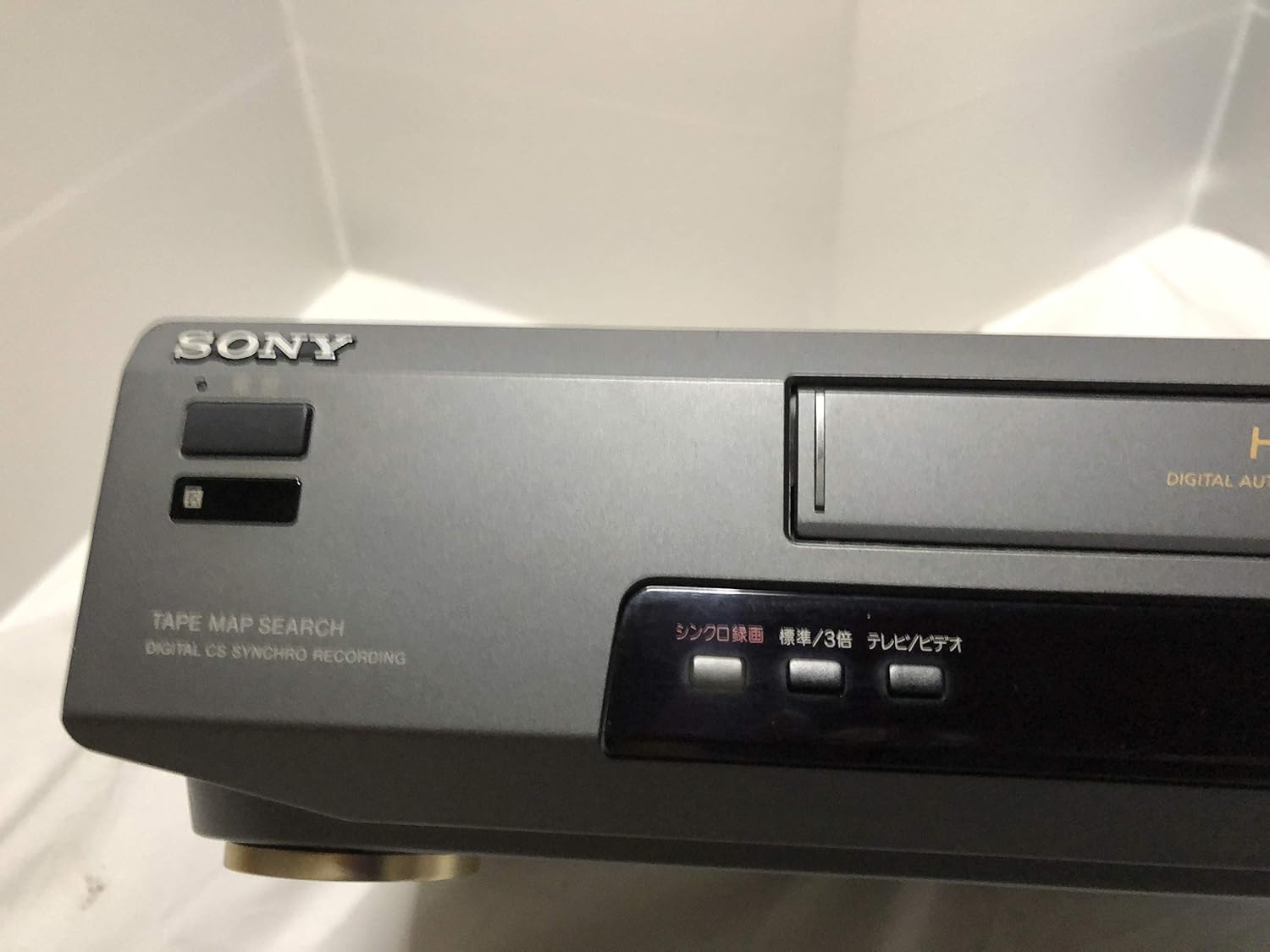
Hoto na 3: Front left section of the Sony SLV-FT5 VCR. This view highlights the tape loading slot and the 'TAPE MAP SEARCH' feature, which assists in navigating recorded content on a tape.
4.3 sake kunnawa
After loading a tape, press the WASA button (►) on the VCR or remote control to begin playback. Use the TSAYA (∥), TSAYA (■), SAKEWA (◀◀), and SAURI GABA (►►) buttons to control playback.

Hoto na 4: Front right section of the Sony SLV-FT5 VCR. This image displays the main playback controls (Play, Stop, Rewind, Fast Forward, Pause) and additional buttons for 'Quick Timer' and 'Tracking' adjustments.
4.4 Yin rikodi
To record, ensure a blank or recordable tape is inserted. Select the desired input source (e.g., TV channel). Press the REC (●) button on the VCR or remote control. Press TSAYA (■) don ƙare rikodi.
4.5 Tracking Adjustment
If the picture quality during playback is poor (e.g., horizontal lines or noise), use the BINCIKE buttons on the front panel or remote control to fine-tune the tape's alignment with the VCR's heads.
5. Kulawa
5.1 Tsabtace Sashen
Wipe the exterior of the VCR with a soft, dry cloth. For stubborn stains, use a cloth lightly dampened with a mild detergent solution, then wipe dry. Do not use abrasive cleaners or solvents.
5.2 Tsabtace kai
Over time, VCR heads can accumulate dirt, leading to poor picture and sound quality. Use a commercially available dry-type VHS head cleaning cassette according to its instructions. Avoid wet-type cleaners as they can damage the heads.
5.3 Adana
When not in use for extended periods, disconnect the VCR from the power outlet. Store the unit in a cool, dry place, away from dust and direct sunlight.
6. Shirya matsala
If you encounter issues with your VCR, refer to the following common problems and solutions before seeking professional service.
| Matsala | Dalili mai yiwuwa | Magani |
|---|---|---|
| Babu iko | Power cord disconnected; power outlet issue | Duba haɗin igiyar wuta; gwada hanyar fita daban. |
| Babu hoto/sauti | Incorrect TV input; loose A/V cables | Select correct TV input (e.g., Video 1, AV); ensure A/V cables are securely connected. |
| Poor picture quality (snowy, lines) | Dirty VCR heads; tracking issue; old/damaged tape | Clean VCR heads; adjust tracking; try a different tape. |
| Tape won't eject | Power issue; mechanical malfunction | Ensure power is on; try pressing EJECT multiple times. If issue persists, seek service. |
| Ikon nesa baya aiki | Dead batteries; obstructed sensor | Replace batteries; ensure no obstacles between remote and VCR sensor. |
7. Ƙayyadaddun bayanai
| Siffar | Ƙayyadaddun bayanai |
|---|---|
| Alamar | Sony |
| Lambar Samfura | SLV-FT5 |
| Nau'in Mai jarida | VHS |
| Ƙaddamarwa | 720 x 480 pixels |
| Nauyin samfur | 4160g ku |
| Yanayin Fitarwa na Audio | Sitiriyo |
| Tsarin Sauti masu goyan baya | Monaural, Stereo |
| Rubutun Bidiyo | Analog |
| Na'urori masu jituwa | Talabijin |
| Daidaitawar Bidiyon Shigarwa | NTSC |
| Bukatun Wuta | 100V, 18W, 50/60Hz |
8. Garanti da Tallafawa
For warranty information and customer support, please refer to the documentation included with your purchase or visit the official Sony website. Ajiye shaidar siyan ku don da'awar garanti.