
DigiTech TRIO
DigiTech TRIO Band Creator Pedal Instruction Manual
Samfura: GASKIYA | Alamar: DigiTech
Gabatarwa
The DigiTech TRIO is an innovative electric guitar multi-effect pedal designed to be your personal band. It listens to your guitar playing and automatically generates accompanying bass and drum parts. This manual provides comprehensive instructions for setting up, operating, and maintaining your TRIO pedal, ensuring you get the most out of its unique features.
Mabuɗin Siffofin
- Seven Music Genres and Twelve Song Styles Per Genre to Choose From
- The TRIO can learn up to three different song parts that can be recalled on-the-fly
- Adjustable Tempo & Alternate Half Time/Double Time Variants Bass & Drum Level Controls
- Hands-Free Control Using a DigiTech FS3X Footswitch (optional)
- Amp & Mixer Outputs Headphone Output w/Level Control Power Supply Included
Jagorar Saita
Follow these steps to set up your DigiTech TRIO pedal:
- Haɗa wutar lantarki ta DC 9V da aka haɗa zuwa WUTA input on the pedal and plug it into a power outlet.
- Haɗa gitar lantarki ɗinka zuwa GUITAR IN jack ta amfani da kebul na kayan aiki na 1/4-inch na yau da kullun.
- Haɗa da AMP FITA jack to your guitar ampShigar da lifier ta amfani da wani kebul na kayan aiki mai inci 1/4.
- For connecting to a mixer or PA system, use the Gauraye jak.
- Don aiki na sirri, haɗa belun kunne zuwa FITAR FATA jak.
- Optionally, connect a DigiTech FS3X Footswitch to the Sarrafa IN jack for extended hands-free control.
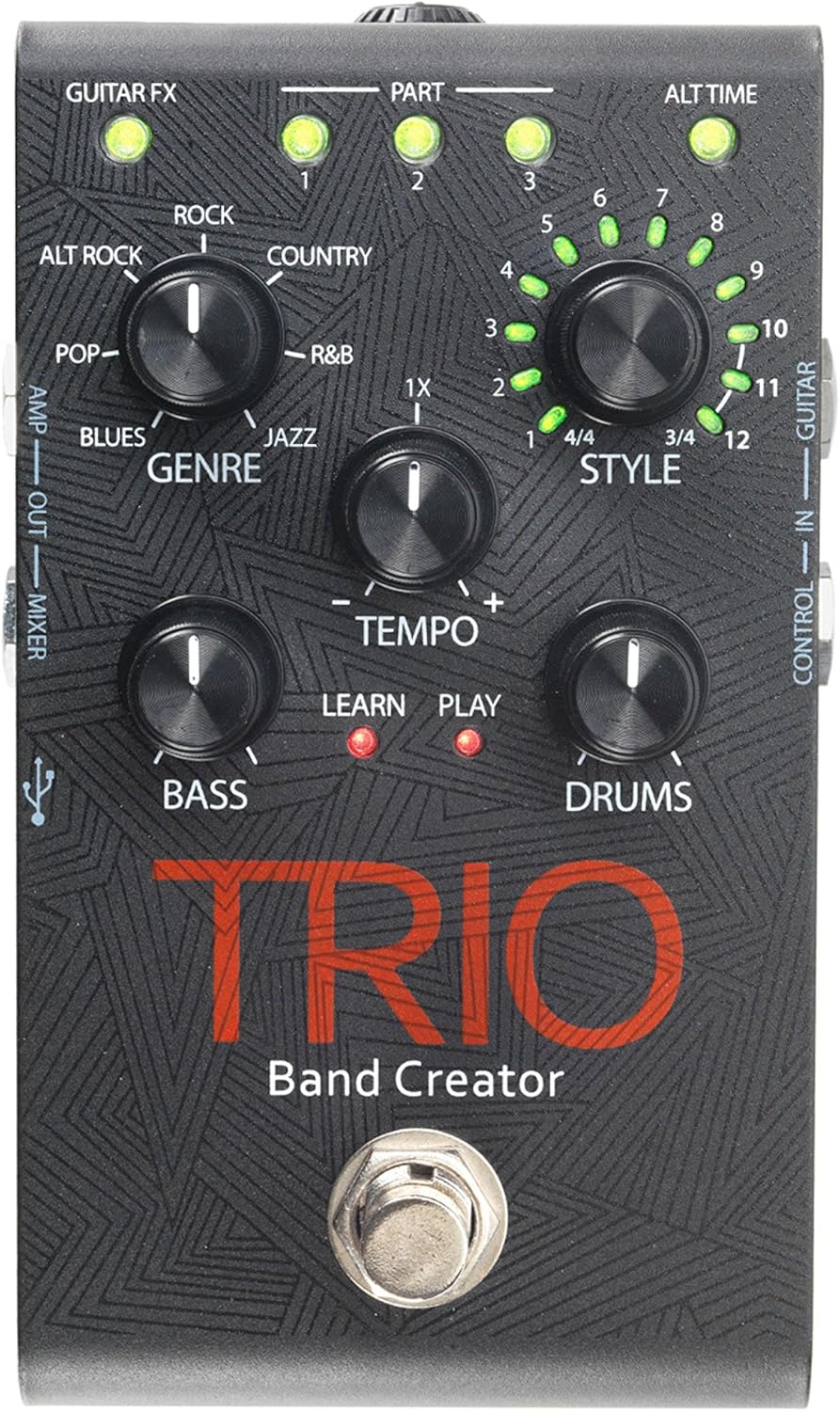
Hoto 1: Sama view of the DigiTech TRIO pedal, showing the main controls and footswitch.
Umarnin Aiki
Basic Operation: Teaching the TRIO a Song
- Danna maɓallin BAND footswitch once to enter 'Listen' mode. The KOYI LED zai haskaka.
- Play your desired chord progression and rhythm clearly. The TRIO will analyze your playing.
- Danna maɓallin BAND footswitch again to stop 'Listen' mode. The WASA LED will illuminate, and the TRIO will immediately begin playing generated bass and drum parts.
- You can now play along with your virtual band.
Genre and Style Selection
- Yi amfani da SAUKI knob to select from Blues, Pop, Alternative Rock, Rock, Country, R&B, and Jazz. The genre affects the overall feel of the generated bass and drum parts.
- Yi amfani da SALO knob to choose from twelve different song styles available for each genre. This allows for further customization of the rhythm and feel.
- The ALT TIME button allows you to switch between 3/4 and 4/4 time signatures.
Looping and Song Parts
- The TRIO can learn up to 3 different song parts. To record a new part, select an empty KASHI slot (1, 2, or 3) using the corresponding buttons.
- Follow the 'Basic Operation' steps to teach the TRIO the new song part.
- During playback, you can switch between learned song parts on-the-fly by pressing the corresponding KASHI maballin.
- The MAI KAUNA footswitch allows you to record and playback your own guitar loops. Press once to start recording, press again to stop recording and start playback, and press and hold to clear the loop.
Adjusting Levels and Tempo
- The TEMPO knob adjusts the playback speed of the band and loops.
- The bass knob controls the volume level of the generated bass line.
- The GANGANUWA knob controls the volume level of the generated drum track.
- The MAƊAKI knob controls the volume level of your recorded guitar loop.

Hoto 2: Angled view of the DigiTech TRIO pedal, highlighting the control knobs and input/output jacks.
Sarrafa da Haɗin kai
The DigiTech TRIO pedal features a user-friendly layout with clearly labeled controls and versatile connection options:
Ikon Gabatarwa:
- GUITAR FX: Activates built-in guitar effects tailored to the selected genre.
- PART 1, 2, 3: Buttons to select and recall different learned song parts.
- ALT TIME: Toggles between 3/4 and 4/4 time signatures.
- TEMPO Knob: Adjusts the overall playback speed.
- GENRE Knob: Selects the musical genre (Blues, Pop, Alt Rock, Rock, Country, R&B, Jazz).
- STYLE Knob: Selects one of twelve styles within the chosen genre.
- LOOP Knob: Controls the volume of your recorded guitar loop.
- BASS Knob: Controls the volume of the generated bass line.
- DRUMS Knob: Controls the volume of the generated drum track.
- Maɓallin Tafin Hannu: Records/plays/clears guitar loops.
- BAND Footswitch: Enters 'Listen' mode to learn chords/rhythm, or starts/stops band playback.
Side and Rear Panel Connections:
- GUITAR A: 1/4-inch input for your electric guitar.
- AMP FITA: 1/4-inch output to your guitar ampmai sanyaya wuta.
- MIXER OUT: 1/4-inch output for connecting to a mixer or PA system.
- KAUFIN FITO: 1/8-inch stereo output for headphones.
- Sarrafa A: 1/4-inch input for optional DigiTech FS3X Footswitch.
- WUTA: 9V DC input for the included power supply.
- USB: Mini-USB port for firmware updates.

Hoto 3: Na baya view of the DigiTech TRIO pedal, showing the power input and headphone jack.
Ƙayyadaddun bayanai
| Siffar | Daki-daki |
|---|---|
| Nauyin Abu | 10.6 oz (0.3 kg) |
| Girman samfur | 4.63 x 3.19 x 2.13 inci (11.76 x 8.10 x 5.41 cm) |
| Lambar Samfurin Abu | GASKIYA |
| Baturi | 1 9V battery required (for internal use, not primary power) |
| Interirƙirar Abun Taɗi | 1/4-inch Audio |
| Tsarin sigina | Analog |
| Tushen wutar lantarki | Corded Electric (9V DC adapter included) |
| Voltage | 9 Volts |
| Ampzamanin | miliyan 300amps |
Kulawa
- A tsaftace feda ta hanyar goge shi da kyalle mai laushi da busasshe. A guji amfani da masu tsaftace goge ko abubuwan da ke rage zafi.
- Ajiye feda a wuri mai sanyi da bushewa, nesa da hasken rana kai tsaye da kuma yanayin zafi mai tsanani.
- Ensure all cables are securely connected to prevent signal loss or damage.
- A guji jefar da fedal ko kuma sanya shi cikin mawuyacin hali.
Shirya matsala
- Babu Sauti: Check all cable connections (guitar, amp, power). Ensure the pedal is powered on and the volume knobs are not set to zero.
- Rashin ingancin Sauti: Verify that your instrument and amplifier are functioning correctly. Check for damaged cables.
- Band Not Generating Correctly: Ensure you are playing clear, distinct chords during the 'Listen' phase. Try different genres and styles to see if a different setting better interprets your playing.
- Footswitch Unresponsive: Disconnect and reconnect the power supply. If using an optional FS3X footswitch, ensure it is properly connected.
Garanti da Taimako
Don samun bayanai game da garanti da tallafin fasaha, da fatan za a koma zuwa ga DigiTech na hukuma website ko tuntuɓi sabis na abokin ciniki. Ajiye shaidar siyan ku don da'awar garanti.
Ask a question about this manual
Ask about setup, troubleshooting, compatibility, parts, safety, or missing instructions. Manuals+ will review the question and use this page’s manual context to help answer it.