
Wharfedale WH-S8
Jagorar Mai Amfani da Wharfedale WH-S8 Active Subwoofer
Model: WH-S8
1. Gabatarwa
Na gode da siyaasing the Wharfedale WH-S8 Active Subwoofer. This manual provides essential information for the safe and efficient operation of your new subwoofer. Please read this manual thoroughly before installation and use, and retain it for future reference. The WH-S8 is designed to enhance the low-frequency performance of your audio system, delivering powerful and clear bass.
2. Bayanin Tsaro
Koyaushe kiyaye matakan tsaro masu zuwa don hana girgiza wutar lantarki, gobara, ko lalacewa ga naúrar:
- Tushen wutar lantarki: Connect the subwoofer only to an AC power outlet of the specified voltage. Ensure the power cord is securely plugged in.
- Samun iska: Do not block any ventilation openings. Ensure adequate space around the unit for proper airflow to prevent overheating.
- Ruwa da Danshi: Kada a fallasa na'urar ga ruwan sama, danshi, diga, ko kuma fesawa. Kada a sanya abubuwan da aka cika da ruwa, kamar tukwane, a kan na'urar.
- Zafi: Ka kiyaye naúrar daga tushen zafi kamar radiators, rajistan zafi, murhu, ko wasu na'urori (ciki har da amplifiers) masu samar da zafi.
- Tsaftacewa: Cire naúrar daga mashin bango kafin tsaftacewa. Yi amfani da bushe bushe kawai.
- Hidima: Kada kayi yunƙurin yiwa wannan samfur sabis da kanka. Koma duk sabis ɗin zuwa ƙwararrun ma'aikatan sabis.
- Wuri: Place the subwoofer on a stable, level surface to prevent it from falling.
3. Abubuwan Kunshin
Please check that all items are present in the box:
- Wharfedale WH-S8 Active Subwoofer Unit
- Wutar Wuta
- Jagorar mai amfani (wannan takaddar)
Idan wasu abubuwa sun ɓace ko sun lalace, da fatan za a tuntuɓi dillalin ku nan take.
4. Samfurin Ya Ƙareview
The Wharfedale WH-S8 is a compact yet powerful active subwoofer designed to deliver deep and impactful bass. Below are images illustrating the product's appearance.

Hoto 4.1: Gaba View (Driver Exposed)
This image shows the front of the Wharfedale WH-S8 active subwoofer with its main driver visible. The driver is centrally located, indicating the primary source of low-frequency sound. The Wharfedale logo is positioned at the bottom center of the unit.
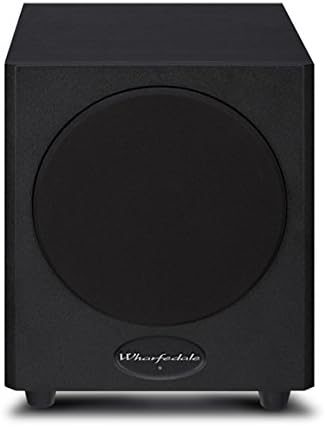
Hoto 4.2: Gaba View (Grille Attached)
This image displays the Wharfedale WH-S8 active subwoofer with its protective grille attached. The grille covers the main driver, providing protection and a more discreet aesthetic. The Wharfedale logo remains visible at the bottom center.
While not pictured, the rear panel typically features controls for volume, crossover frequency, and phase, along with input connections for audio signals and the power input.
5. Saita
5.1 Wuri
The placement of your subwoofer can significantly affect its performance. Experiment with different locations to find the best sound for your room. Generally, placing the subwoofer in a corner can enhance bass output, but may also lead to boomy sound. Placing it near the front speakers can improve integration with the main soundstage.
- Avoid placing the subwoofer directly against a wall or in a cabinet without proper ventilation.
- Ensure the subwoofer is on a stable, level surface.
5.2 Haɗi
Before making any connections, ensure all audio equipment is turned off and unplugged from the power outlet.
- Shigar Sauti: Connect the subwoofer output (LFE or Subwoofer Out) from your AV receiver or amplifier to the LFE/Line In input on the WH-S8 using a single RCA cable. If your receiver does not have a dedicated subwoofer output, you may use the stereo line-level outputs (left and right) and connect them to the corresponding inputs on the subwoofer.
- Haɗin Wuta: Once all audio connections are made, connect the supplied power cable to the AC IN socket on the subwoofer and then to a suitable wall power outlet.
Lura: Always connect the audio cables before connecting the power cable.
6. Umarnin Aiki
6.1 Kunnawa / Kashewa
After connecting the subwoofer, locate the power switch on the rear panel. Flip the switch to the 'ON' position. The subwoofer may have an auto-standby feature, which will automatically turn the unit on when an audio signal is detected and off after a period of inactivity.
6.2 Adjusting Controls
The WH-S8 typically features the following controls on its rear panel:
- Volume/Gain: Yana daidaita matakin fitarwa na subwoofer. Fara da ƙaramin saiti kuma a hankali ƙara har sai bass ɗin ya haɗu ba tare da matsala ba tare da manyan lasifikan ku.
- Mitar Crossover: This control determines the highest frequency the subwoofer will reproduce. Set it to match the low-frequency capabilities of your main speakers. A common starting point is 80Hz-100Hz. If your receiver has a built-in bass management system, set the subwoofer's crossover to its maximum setting or bypass it if possible, and manage the crossover through the receiver.
- Tsarin lokaci: This switch (0° or 180°) helps to ensure the subwoofer's output is in phase with your main speakers. Experiment with both settings to find the one that produces the most impactful and coherent bass.
Tukwici: Play a familiar piece of music with strong bass and adjust the controls until the bass sounds natural and integrated, not overpowering or disconnected.
7. Kulawa
Proper maintenance ensures the longevity and optimal performance of your subwoofer.
- Tsaftacewa: Use a soft, dry, lint-free cloth to clean the cabinet. Do not use liquid or aerosol cleaners, as they may damage the finish.
- kura: Regularly dust the unit to prevent accumulation, which can affect ventilation.
- Ajiya: If storing the subwoofer for an extended period, disconnect it from power, clean it, and store it in a cool, dry place, preferably in its original packaging.
8. Shirya matsala
If you experience issues with your Wharfedale WH-S8 subwoofer, refer to the following common problems and solutions:
| Matsala | Dalili mai yiwuwa | Magani |
|---|---|---|
| Babu sauti daga subwoofer |
|
|
| Distorted or boomy bass |
|
|
| Humming ko hayaniya |
|
|
If the problem persists after trying these solutions, please contact your dealer or qualified service personnel.
9. Ƙayyadaddun bayanai
The following are the technical specifications for the Wharfedale WH-S8 Active Subwoofer:
| Lambar Samfura | WH-S8 |
| Nau'in Kakakin | Subwoofer mai aiki |
| Matsakaicin Ƙarfin fitarwa | 150 Watts |
| Nauyin Abu | 8.6 kg (18.96 lbs) |
| Launi | Baki |
| Tushen wutar lantarki | Corded Electric |
| Mai ƙira | Wharfedale |
10. Garanti da Tallafawa
Wharfedale products are manufactured to the highest standards. For information regarding warranty coverage, terms, and conditions, please refer to the warranty card included with your product or visit the official Wharfedale website. For technical support or service inquiries, please contact your authorized Wharfedale dealer or distributor.
Albarkatun Kan layi: For the latest information, FAQs, and support, please visit the official Wharfedale website: www.wharfedale.co.uk
Ask a question about this manual
Ask about setup, troubleshooting, compatibility, parts, safety, or missing instructions. Manuals+ will review the question and use this page’s manual context to help answer it.