
1. Gabatarwa
The AIMS Power 3600 Watt Modified Sine Power Inverter converts 12 Volt DC battery power to 120 Volt AC household power. This unit is ETL Listed and conforms to UL 458 Standards, as well as CSA Standard C22.2 No. 107.1-01 in Canada. It is designed for various applications including mobile power, backup systems, or off-grid power solutions in homes, RVs, cabins, boats, and vehicles.
Key features include 3600W continuous power and 7200W surge capability, dual GFCI outlets, and an AC direct connect terminal block for full wattage delivery. The inverter incorporates soft start technology and comprehensive protections against overload, over temperature, high/low voltage, and short circuits. Integrated volt and amp meters allow for performance monitoring, complemented by LED indicators for power and fault conditions.
2. Muhimman Umarnin Tsaro
GARGAƊI: Rashin bin waɗannan umarni na iya haifar da mummunan rauni ko lalacewar dukiya.
- Samun iska: Ensure the inverter is installed in a well-ventilated area to prevent overheating. Do not block ventilation openings.
- Danshi: Do not expose the inverter to rain, snow, spray, or bilge water. Do not install in a wet environment.
- Kayayyakin wuta: Do not install the inverter in compartments containing flammable materials or where flammable fumes may accumulate.
- Haɗin Baturi: Always connect the inverter to a 12V DC battery system. Ensure correct polarity (red to positive, black to negative) to avoid damage. Use appropriate gauge cables for connections.
- Kasa: Dole ne a yi amfani da na'urar inverter yadda ya kamata. Haɗa tashar ƙasa zuwa ƙasa mai dacewa.
- Ma'aikata Masu cancanta: Installation and servicing should be performed by qualified personnel familiar with electrical systems and safety procedures.
- Yara: Keep the inverter and all associated wiring out of reach of children.
3. Abubuwan Kunshin
Your AIMS Power 3600 Watt Modified Sine Power Inverter package includes the following items:
- AIMS Power 3600 Watt Modified Sine Power Inverter
- Jagoran Jagora
- DC Battery Terminal Covers (Red and Black)
4. Siffofin Samfur da Abubuwan da aka gyara
The AIMS Power 3600 Watt Modified Sine Power Inverter is engineered for robust performance and user convenience. Below are its primary features and components:
- Fitar Wuta: 3600W maximum continuous power, 7200W surge capability, with soft start technology.
- Wuraren AC: Dual 20 Amp GFCI (Ground Fault Circuit Interrupter) outlets for enhanced safety.
- AC Terminal Block: Direct connect AC terminal block capable of delivering the full 3600 watts to a single source.
- DC shigarwar: Rugged DC terminals for secure battery connections.
- Siffofin Kariya: Overload, over temperature, high voltage, ƙaramin ƙaratage, short circuit, internally fused, low and high voltage alarm, cooling fan, and isolated ground neutral.
- Kulawa: Integrated Volt and Amp meters to monitor inverter performance. LED indicators for power and fault conditions.
- Sauyawa Mita: A switch to select between 50Hz and 60Hz output, if needed.
- Port mai nisa: Dedicated port for an optional remote switch (adapter cable included).
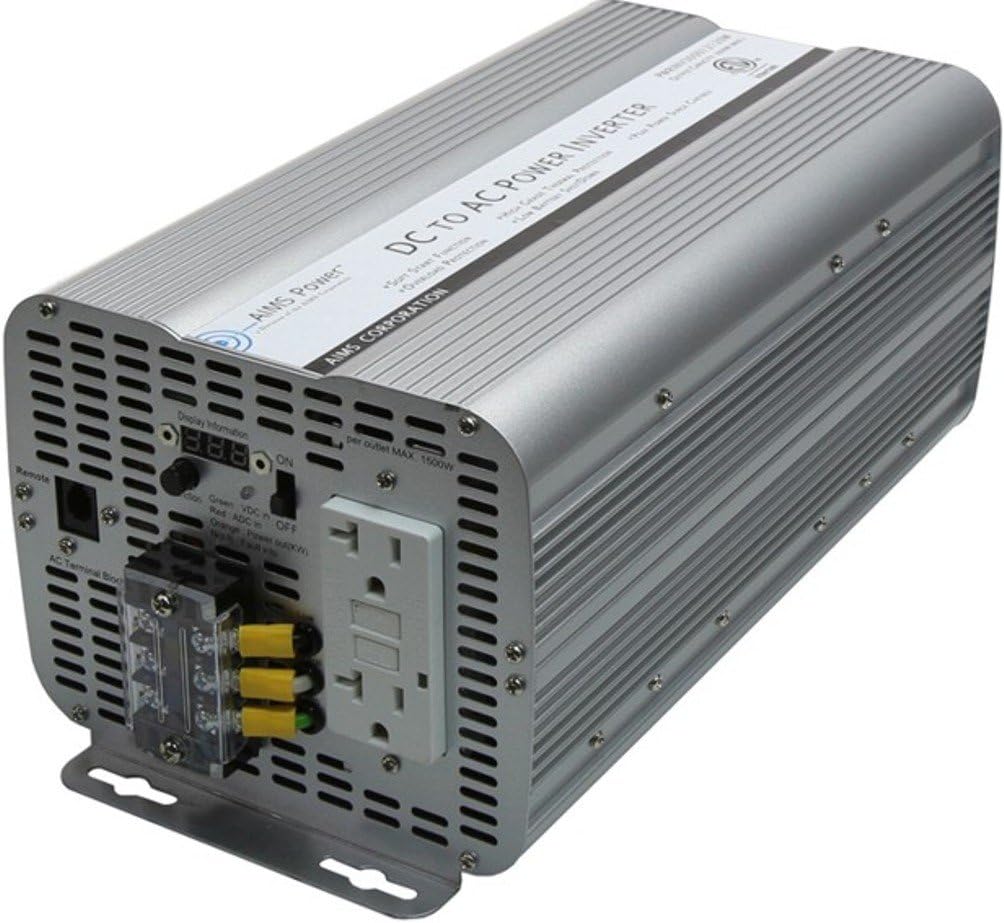
Hoto 4.1: Gabaɗaya view of the AIMS Power 3600 Watt Modified Sine Power Inverter.
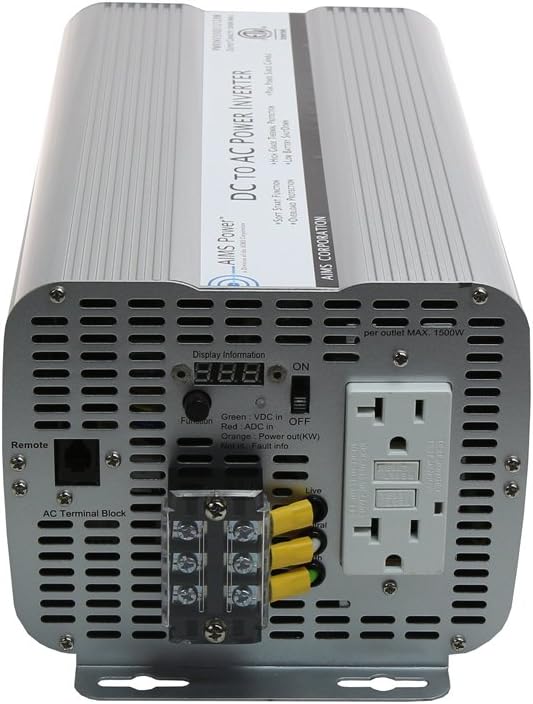
Figure 4.2: Front panel showing AC outlets, terminal block, and controls.

Figure 4.3: Rear panel displaying the DC input terminals and cooling fans.

Hoto 4.4: Cikakken bayani view of the dual GFCI outlets and the AC direct connect terminal block.

Hoto 4.5: Cikakken bayani view of the DC input terminals with protective covers.
Bidiyo 4.1: An gamaview of the AIMS Power 3600 Watt Modified Sine Inverter, highlighting its features and connection points.
5. Saita da Shigarwa
Proper installation is crucial for the safe and efficient operation of your inverter. Follow these steps carefully:
5.1 Zaɓi Wuri
- Install the inverter in a dry, well-ventilated area, away from direct sunlight, heat sources, and moisture.
- Ensure adequate clearance around the inverter for proper airflow to the cooling fans.
- Mount the inverter securely on a stable, non-flammable surface.
5.2 DC Input Connection (Battery)
- Tabbatar da wutar inverter tana cikin KASHE.
- Connect the supplied DC battery terminal covers to the appropriate terminals on the inverter: red to positive (+), black to negative (-).
- Connect the other end of the DC cables to your 12V DC battery bank, ensuring correct polarity. Use heavy-gauge cables suitable for the inverter's wattage.
- Tighten all connections securely to prevent loose connections, which can cause overheating and damage.
5.3 Haɗin Fitar AC
- GFCI Kantuna: For standard AC appliances, plug them directly into the dual 20A GFCI outlets on the front panel.
- AC Terminal Block: For applications requiring the full 3600W or a hardwired connection, use the AC direct connect terminal block. Consult a qualified electrician for proper wiring to this block. Ensure all wiring adheres to local electrical codes.
5.4 Remote Switch Connection (Optional)
If using an optional remote switch, connect its cable to the dedicated remote port on the inverter's front panel. An adapter cable is included for this purpose.
6. Umarnin Aiki
Once the inverter is properly installed and connected, follow these steps for operation:
6.1 Kunnawa / Kashewa
- Ensure all AC loads are disconnected or turned off before powering on the inverter.
- Flip the main power switch on the inverter to the "ON" position. The green LED indicator should illuminate, and the volt/amp meters will display readings.
- If using a remote switch, ensure the inverter's main switch is ON, then use the remote switch to control the inverter's power.
- To power off, first disconnect or turn off all AC loads, then flip the inverter's main power switch to "OFF."
6.2 Aikin Kulawa
- The integrated volt and amp meters provide real-time feedback on your system's performance. Monitor these displays to ensure stable operation and prevent overloading.
- LED indicators will show green for normal operation and red for fault conditions (e.g., overload, over temperature).
6.3 Zaɓin Mitar
A switch is provided on the unit to change the output frequency between 50Hz and 60Hz. Adjust this setting according to the requirements of your connected appliances.
7. Kulawa
Regular maintenance ensures the longevity and optimal performance of your AIMS Power Inverter:
- Tsaftacewa: A riƙa tsaftace wajen inverter ɗin lokaci-lokaci da busasshen zane. A tabbatar cewa wuraren samun iska ba su da ƙura da tarkace. Kada a yi amfani da masu tsaftace ruwa.
- Duban haɗi: Regularly inspect all DC and AC connections for tightness. Loose connections can lead to power loss, overheating, and potential fire hazards.
- Lafiyar Baturi: Monitor your battery bank's health and charge level. A healthy battery system is essential for inverter performance.
- Ajiya: Idan kana adana inverter na tsawon lokaci, tabbatar an cire shi daga dukkan hanyoyin wutar lantarki kuma an adana shi a wuri mai sanyi da bushewa.
8. Shirya matsala
Idan kun haɗu da matsaloli tare da inverter ɗinku, duba waɗannan matsaloli da mafita na yau da kullun:
| Matsala | Dalili mai yiwuwa | Magani |
|---|---|---|
| Babu Fitar AC / Inverter Ba Ya Kunnawa | Loose DC connections, low battery voltage, blown fuse, inverter switch off. | Check DC cable connections and battery voltage. Ensure inverter switch is ON. Replace internal fuses if necessary (consult manual or qualified technician). |
| Overload Alarm / Red Fault LED | Connected load exceeds inverter's continuous or surge rating. | Reduce the total load connected to the inverter. Disconnect some appliances and restart the inverter. |
| Sama da Ƙararrawar Zazzabi | Inadequate ventilation, blocked cooling fans, high ambient temperature. | Ensure inverter is in a well-ventilated area. Clear any obstructions from cooling fans. Allow inverter to cool down before restarting. |
| Ƙananan Voltage Ƙararrawa | Baturi voltage yayi ƙasa da ƙasa. | Recharge or replace the battery bank. Ensure battery cables are of adequate gauge and length. |
| GFCI Tripping | Ground fault detected in connected appliance or wiring. | Disconnect all appliances from the GFCI outlets. Reset the GFCI. Reconnect appliances one by one to identify the faulty device. |
9. Ƙayyadaddun bayanai
| Ƙayyadaddun bayanai | Daraja |
|---|---|
| Sunan Samfura | Saukewa: PWRINV360012120W |
| Ƙarfin Ci gaba | 3600 watts |
| Ƙarfin Ƙarfafawa | 7200 watts |
| Input DC Voltage | 12 Volts |
| Fitarwa AC Voltage | 120V AC |
| Fitar Waveform | Gyaran Sine Wave |
| Takaddun shaida | ETL Certified to UL 458, CSA Standard C22.2 No. 107.1-01 |
| Wuraren AC | Dual GFCI Outlets (20 Amp kowanne) |
| Additional AC Output | Tashar Terminal AC |
| Nauyin Abu | 9.04 fam |
| Girman samfur | 14.5 x 6.62 x 5.6 inci |
| Shawarwari Amfani | Home, Office, RV, Cabin |
| Tushen wutar lantarki | Ana Karfin Batir |
10. Garanti da Tallafawa
AIMS Power stands behind its products. This inverter comes with a Garanti na shekaru 2. All technical support, warranty claims, and sales inquiries are handled directly from our support center in Nevada, USA. For assistance, please refer to the contact information provided in your product packaging or visit the official AIMS Power website.