
1. Gabatarwa
The Amkette Trubeats S50 is a versatile smart wireless Bluetooth speaker designed to enhance your audio experience. It features multiple connectivity options including Bluetooth, USB, Micro SD card, and AUX input, along with an integrated FM radio. The speaker also includes a digital clock with alarm functions and can be controlled via a dedicated smartphone application. Additionally, it can function as a power bank to charge your mobile devices.
2. Abubuwan Kunshin
Da fatan za a duba akwatin don abubuwa masu zuwa:
- Amkette Trubeats S50 Smart Wireless Bluetooth Speaker
- Kebul na Caji
- AUX Cable
- Jagorar mai amfani (wannan takaddar)
3. Samfurin Ya Ƙareview
Familiarize yourself with the various parts and controls of your Amkette Trubeats S50 speaker.
3.1 Gaba View

Hoto 1: Gaba view of the Amkette Trubeats S50 speaker, showing the speaker grille and LED display.
3.2 Babban Kwamitin Kulawa

Figure 2: Labeled diagram of the Amkette Trubeats S50 speaker's top control buttons: Mode, Volume Down/Previous, Play/Pause/Answer Call, Volume Up/Next, Clock, and Microphone.
- Maɓallin MODE: Press to switch between Bluetooth, FM, AUX, USB, and Micro SD modes.
- K-/ Button: Press to decrease volume; long press for previous track/station.
- Play/Pause/Answer Call Button: Press to play/pause audio; press to answer/end calls.
- +/N Button: Press to increase volume; long press for next track/station.
- Maballin Agogo: Press to set time and alarms.
- Makarafo: Don kiran wayar hannu kyauta.
3.3 Rear Ports and Switch

Figure 3: Labeled diagram of the Amkette Trubeats S50 speaker's rear ports: AUX, Micro SD, USB Host, USB DC, and On/Off switch.
- Shigar da AUX: Connect external audio devices using the 3.5mm AUX cable.
- Ramin katin SD Micro: Insert a Micro SD card for audio playback.
- USB Mai watsa shiri Port: Insert a USB drive for audio playback or use as a power bank.
- USB DC Input: Connect the USB charging cable to power the speaker.
- KASHE/KASHE KASHE: Power the speaker on or off.
4. Saita
4.1 Cajin Shugaban Majalisa
- Connect the small end of the USB charging cable to the USB DC Input port on the rear of the speaker.
- Haɗa babban ƙarshen kebul na cajin USB zuwa adaftar wutar USB (ba a haɗa ba) ko tashar USB ta kwamfuta.
- Alamar LED zata nuna halin caji. Cikakken caji yawanci yana ɗaukar kusan awanni 4.
Lura: The speaker does not have a visible battery level indicator. It is recommended to charge fully before first use and when the battery is low.
4.2 Kunnawa / Kashewa
- Don kunna wuta, zame Kunnawa/kashe Canjawa on the rear of the speaker to the 'ON' position.
- Don kashe wuta, zame shi Kunnawa/kashe Canjawa to the 'OFF' position.
5. Umarnin Aiki
5.1 Haɗin Bluetooth

Figure 4: Speaker in Bluetooth pairing mode, indicated by 'BT' on the display.
- Power on the speaker. It will automatically enter Bluetooth pairing mode, indicated by 'BT' flashing on the LED display.
- Kunna Bluetooth akan wayoyinku ko wata na'urar.
- Bincika available devices and select "Amkette S50" from the list.
- Once paired, the speaker will emit a confirmation tone, and 'BT' will stop flashing.
- Yanzu kuna iya kunna sauti daga na'urar ku ta lasifikar.
5.2 Amfani da Shigarwar AUX

Figure 5: Speaker connected to a smartphone via AUX cable for wired audio playback.
- Connect one end of the 3.5mm AUX cable to the Shigar da AUX port on the rear of the speaker.
- Connect the other end of the AUX cable to the audio output jack of your external device (e.g., smartphone, MP3 player, laptop).
- Danna maɓallin Maɓallin MODE repeatedly until the speaker enters AUX mode.
- Play audio from your connected device.
5.3 Using USB/Micro SD Card
- Insert a USB drive into the Kebul Mai watsa shiri Port or a Micro SD card into the Katin Micro SD Ramin a bayan lasifikar.
- Tabbatar da sautin ku files (MP3 format recommended) are stored on the drive/card.
- Danna maɓallin Maɓallin MODE repeatedly until the speaker enters USB or Micro SD mode. Playback will begin automatically.
- Yi amfani da K-/ kuma +/N buttons for track navigation and volume control.
5.4 FM Radio Aiki

Figure 6: Speaker displaying FM frequency, with app control for station selection.
- Danna maɓallin Maɓallin MODE repeatedly until the speaker enters FM radio mode.
- Ana dubawa ta atomatik: In FM mode, long press the Kunna/Dakata button to initiate an automatic scan for available FM stations. The speaker will save detected stations.
- Maning Tunani: Yi amfani da K-/ kuma +/N maballin don kewaya ta hanyar tashoshin da aka adana.
- For precise tuning and station management, use the Amkette Trubeats Smart Speaker App (see section 5.7).
5.5 Digital Clock and Alarm Setup

Figure 7: Speaker displaying the current time on its LED screen.
- Lokacin Saita: Latsa ka riƙe Maɓallin CLOCK. The hour display will flash. Use the K-/ kuma +/N maɓallan don daidaita sa'a. Danna Maɓallin CLOCK again to set minutes, and adjust with K-/ kuma +/N. Latsa Maɓallin CLOCK once more to confirm.
- Saita Ƙararrawa: A taƙaice danna maɓallin Maɓallin CLOCK to cycle through Alarm 1 and Alarm 2 settings. When an alarm time is displayed, long press the Maɓallin CLOCK to enter alarm setting mode. Adjust hour and minute using K-/ kuma +/N, confirming each with a short press of the Maɓallin CLOCK. You can also set the alarm source (FM/SD Card/USB) via the app.
5.6 Amfani azaman Bankin Wuta
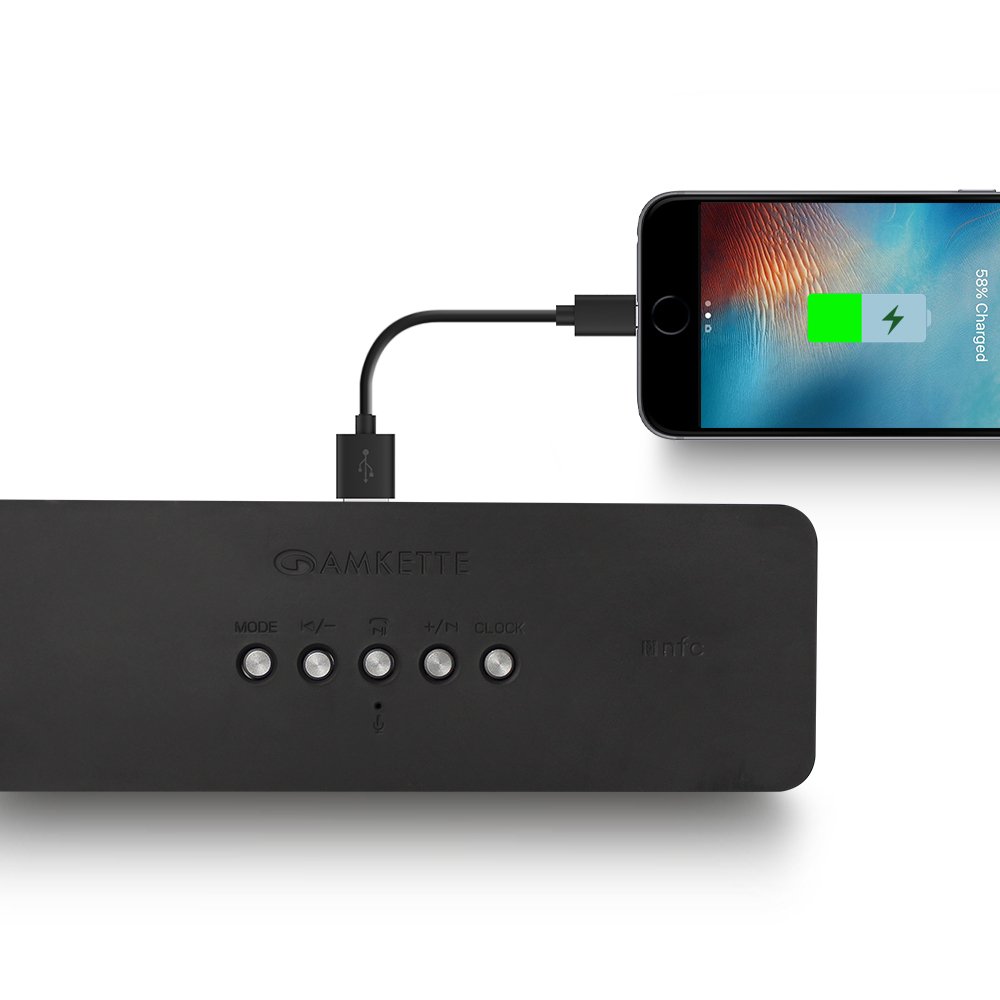
Figure 8: Speaker providing power to a smartphone through its USB Host port.
The Amkette Trubeats S50 can charge your smartphone or other USB-powered devices. Connect your device's charging cable to the Kebul Mai watsa shiri Port on the rear of the speaker. The speaker's internal battery will then supply power to your device.
5.7 App Control (Android Only)

Figure 9: Smartphone displaying the Amkette Trubeats Smart Speaker App interface.
For enhanced control, download the Amkette Trubeats Smart Speaker App from the Google Play Store (for Android phones). The app allows you to:
- Switch between different audio modes.
- Control volume and track playback.
- Manage FM radio stations and perform precise tuning.
- Set and customize alarms, including alarm source.
Ensure your speaker is connected via Bluetooth to your smartphone for app functionality.
5.8 Kiran Kira
When connected via Bluetooth to a smartphone, the speaker can be used for hands-free calling:
- Amsa Kira: Danna maɓallin Play/Pause/Answer Call Button sau ɗaya.
- Ƙarshen Kira: Danna maɓallin Play/Pause/Answer Call Button sau ɗaya yayin kira.
- Karɓar Kira: Dogon danna Play/Pause/Answer Call Button.
6. Kulawa
- A kiyaye lasifikar daga yanayin zafi mai tsanani, hasken rana kai tsaye, da danshi.
- A wanke lasifikar da kyalle mai laushi da busasshe. Kar a yi amfani da masu tsaftace kayan gogewa ko kuma masu narkewa.
- Ka guji jefar da lasifikar ko sanya shi ga tasiri mai karfi.
- Idan ba a amfani da lasifikar na tsawon lokaci, a ajiye lasifikar a wuri mai sanyi da bushewa sannan a yi mata caji lokaci-lokaci domin kiyaye lafiyar batirin.
7. Shirya matsala
| Matsala | Dalili mai yiwuwa | Magani |
|---|---|---|
| Kakakin ba ya kunna wuta. | Baturi ya ƙare. | Cajin lasifika cikakke. |
| Babu sauti daga lasifika. | Ƙarar ta yi ƙasa sosai; an zaɓi yanayin da bai dace ba; ba a haɗa na'urar yadda ya kamata ba. | Increase speaker and source device volume. Ensure correct mode (Bluetooth, AUX, etc.) is selected. Reconnect the device. |
| Haɗin Bluetooth ya kasa. | Lasifika ba ta cikin yanayin haɗawa; na'urar ta yi nisa sosai; tsangwama. | Ensure speaker is in pairing mode ('BT' flashing). Move device closer to speaker. Turn off other Bluetooth devices. |
| Mara kyau liyafar rediyon FM. | Sigina mara ƙarfi; tsangwama ga muhalli. | Relocate the speaker to an area with better reception. Perform an auto-scan again. |
| App not connecting to speaker. | Bluetooth not connected; app issue. | Ensure speaker is paired via Bluetooth to your phone. Restart the app and try again. |
8. Ƙayyadaddun bayanai
- Samfura: S50
- Alamar: Amkette
- Nau'in Kakakin: Portable Bluetooth Speaker (Outdoor)
- Haɗin kai: Bluetooth, USB, Micro SD, AUX, FM Radio
- Fasahar Sadarwa mara waya: Bluetooth
- Hanyar sarrafawa: Buttons, App (Android)
- Yanayin fitarwa na sauti: Sitiriyo
- Audio Wattage: 10 Watts
- Tushen wutar lantarki: Ana Karfin Batir
- Rayuwar Baturi: Har zuwa awanni 12 (matsakaici)
- Lokacin Caji: Kusan awanni 4
- Na'urori masu jituwa: Laptop, Mobile, Tablet
- Girma (LxWxH): 26.7 x 10.9 x 7.9 cm
- Nauyin Abu: 703 Grams
- Mai hana ruwa: Ee
- Nau'in hawa: Dutsen Tabletop
9. Garanti da Tallafawa
The Amkette Trubeats S50 Smart Wireless Bluetooth Speaker comes with a Garanti na shekaru 1 daga ranar siye. Wannan garantin yana rufe lahani a masana'anta yayin amfani da shi na yau da kullun.
For warranty claims, technical assistance, or any other support inquiries, please contact Amkette customer support through their official webshafin ko bayanin tuntuɓar da aka bayar tare da takaddun siyan ku.
Da fatan za a riƙe rasidin sayan ku a matsayin shaidar siyan don dalilai na garanti.