
DigiTech TRIOV01
DigiTech TRIO Band Creator Pedal User Manual
Model: TRIOV01
Gabatarwa
The DigiTech TRIO Band Creator Pedal is an innovative device designed to automatically generate bass and drum parts that complement your guitar playing. It listens to your chords and rhythm, then creates a virtual band to accompany you. This manual provides detailed instructions for setting up, operating, maintaining, and troubleshooting your TRIO pedal.
The TRIO offers seven distinct music genres and twelve song styles within each genre, allowing for versatile musical accompaniment. It supports both 3/4 and 4/4 time signatures.
Samfurin Ƙarsheview
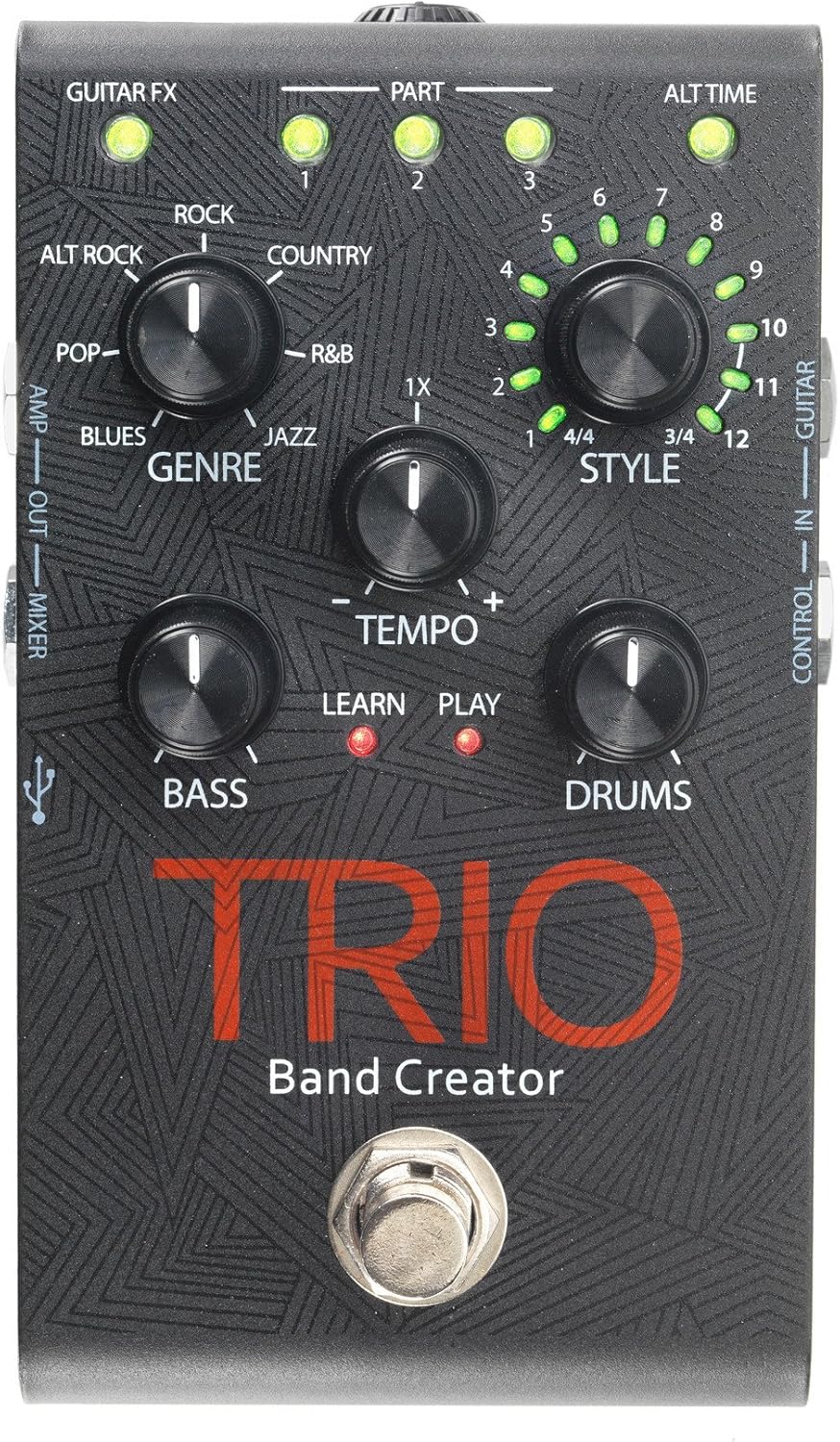
Figure 1: DigiTech TRIO Band Creator Pedal Front Panel. This image displays the pedal's layout, including the Genre, Style, Tempo, Bass, and Drums knobs, the footswitch, and various LED indicators and input/output jacks.
The TRIO pedal features a robust design with intuitive controls. Key components include:
- Genre Knob: Selects one of seven music genres (Blues, Pop, Alternative Rock, Rock, Country, R&B, Jazz).
- Style Knob: Chooses from twelve song styles within the selected genre, and also indicates 3/4 or 4/4 time signatures.
- Tempo Knob: Adjusts the playback speed of the generated band.
- Bass Knob: Controls the volume level of the generated bass line.
- Drums Knob: Controls the volume level of the generated drum track.
- Macijin ƙafa: Used for teaching the pedal your song, starting/stopping playback, and switching song parts.
- Alamar LED: Provide visual feedback for Guitar FX, Part (1, 2, 3), Alt Time, Learn, and Play status.
- Jacks na shigarwa/fitarwa: Include Guitar In, Control In, Amp Out, Mixer Out, and Headphone Out.
- Tashar USB: Don sabunta firmware.
Saita
Before using your DigiTech TRIO pedal, ensure all connections are made correctly.
- Haɗin Wuta: Connect the included 9V DC power supply (300mA minimum) to the TRIO's power input jack. Plug the power supply into a standard AC outlet.
- Shigar da Guitar: Haɗa guitar ɗin ku zuwa GUITAR IN jack on the TRIO pedal using a standard 1/4-inch instrument cable.
- Fitowa zuwa Ampmai lifi/haɗawa:
- For connecting to a guitar amplifier, use the AMP FITA jack. This output includes your guitar signal and is optimized for guitar amps.
- For connecting to a mixing console, PA system, or headphones, use the Gauraye jack. This output provides a full-range signal suitable for these devices.
- Fitar da lasifikan kai: Don aiki na sirri, haɗa belun kunne zuwa FITAR FATA jack. Adjust the headphone level using the dedicated control.
- Optional Footswitch (DigiTech FS3X): If using an optional FS3X footswitch for extended control, connect it to the Sarrafa IN jak.
Ensure all cables are securely connected before powering on your amplifier ko tsarin sauti.
Umarnin Aiki
Basic Operation: Creating a Song
- Zaɓi Nau'i: Juya da SAUKI knob to choose your desired musical style (e.g., Rock, Blues, Jazz).
- Select Style: Juya da SALO knob to select a specific song style within the chosen genre. The LEDs around the knob indicate the style number (1-12) and the time signature (3/4 or 4/4).
- Teach the TRIO:
- Press the TRIO's footswitch once. The KOYI LED will illuminate red.
- Play your guitar chords and rhythm for the first section of your song. Play clearly and consistently for 4-8 measures.
- Press the footswitch again to stop teaching. The KOYI LED will turn off, and the WASA LED will illuminate red. The TRIO will then generate and play the bass and drum parts based on what you played.
- Play with the Band: Once the band starts playing, you can play along with your guitar.
Abubuwan Ci gaba
- Adjusting Tempo: Yi amfani da TEMPO knob to increase or decrease the speed of the generated band.
- Adjusting Bass and Drum Levels: Yi amfani da bass kuma GANGANUWA knobs to set the individual volume levels of the bass and drum parts relative to your guitar.
- Song Parts: The TRIO can learn up to three distinct song parts. After teaching the first part, press the footswitch twice quickly to enter "Part 2" learn mode, and three times for "Part 3". You can then switch between these parts during playback by pressing the footswitch. The PART 1, 2, 3 LEDs indicate the active part.
- Alternate Time: Some styles offer an "Alternate Time" option (e.g., half-time or double-time). The ALT TIME LED will illuminate when this option is available and active.
- Guitar FX: The GUITAR FX LED indicates if the TRIO is applying a subtle guitar effect (e.g., compression, chorus) to your signal, which is often genre-dependent.
- Using the FS3X Footswitch: The optional DigiTech FS3X footswitch provides hands-free control over various functions, such as cycling through song parts, stopping/starting playback, and more. Refer to the FS3X manual for detailed usage.
Kulawa
Proper care will ensure the longevity and optimal performance of your DigiTech TRIO pedal.
- Tsaftacewa: Use a soft, dry cloth to clean the pedal's exterior. Avoid using abrasive cleaners, solvents, or waxes, as these can damage the finish and internal components.
- Ajiya: Idan ba a amfani da feda na tsawon lokaci, a ajiye feda a wuri mai sanyi da bushewa, nesa da hasken rana kai tsaye da kuma yanayin zafi mai tsanani.
- Tushen wutan lantarki: Always use the specified 9V DC power supply. Using an incorrect power supply can damage the unit and void the warranty.
- Haɗin kai: Periodically check all cable connections for wear and tear. Replace damaged cables to prevent signal loss or short circuits.
Shirya matsala
If you encounter issues with your TRIO pedal, refer to the following common problems and solutions:
| Matsala | Dalili mai yiwuwa | Magani |
|---|---|---|
| No sound from pedal. | Incorrect power supply; loose cables; incorrect input/output connections. | Ensure correct 9V DC power supply is used and connected. Check all instrument cables are securely plugged into the correct jacks (Guitar In, Amp Out/Mixer Out). Verify amplifier/mixer is on and volume is up. |
| Band not generating or sounds incorrect. | Poor "teaching" performance; incorrect genre/style selected; low input signal. | Ensure you play clearly and consistently during the "Learn" phase. Try re-teaching the song part. Experiment with different Genres and Styles. Ensure your guitar's volume is adequate. |
| Bass or Drums are too loud/quiet. | Bass/Drums knob setting. | Daidaita bass kuma GANGANUWA knobs to your desired levels. |
| Tempo is too fast/slow. | Tempo knob setting. | Daidaita TEMPO knob to increase or decrease the playback speed. |
| LEDs not illuminating. | No power; pedal malfunction. | Check power connection. If power is confirmed and LEDs still don't light up, contact customer support. |
Ƙayyadaddun bayanai
| Siffar | Daki-daki |
|---|---|
| Lambar Samfura | TRIOV01 |
| Nauyin Abu | 1.32 fam |
| Girman Kunshin | 17.24 x 9.25 x 6.5 inci |
| Launi | Baki |
| Interirƙirar Abun Taɗi | HP-HSC |
| Tsarin sigina | Analog |
| Tushen wutar lantarki | Corded Electric |
| Voltage | 9 Volts |
| Ampzamanin | miliyan 300amps |
Garanti da Taimako
Don samun bayanai game da garanti da tallafin fasaha, da fatan za a koma zuwa ga DigiTech na hukuma website ko tuntuɓi sashen sabis na abokin ciniki. Ajiye rasidin siyan ku azaman tabbacin siyan kowane da'awar garanti.
You can often find additional resources, FAQs, and firmware updates on the manufacturer's support pages.
Ask a question about this manual
Ask about setup, troubleshooting, compatibility, parts, safety, or missing instructions. Manuals+ will review the question and use this page’s manual context to help answer it.