
1. Gabatarwa
Na gode da siyaasing the ELECOM TK-FDP099TWH Wireless Compact Pantograph Keyboard. This manual provides essential information for the proper setup, operation, and maintenance of your new keyboard. Please read this manual thoroughly before use and retain it for future reference.

Image: The ELECOM TK-FDP099TWH Wireless Compact Pantograph Keyboard in white, showcasing its full layout.
2. Abubuwan Kunshin
Tabbatar cewa duk abubuwan da aka jera a ƙasa suna cikin kunshin ku:
- ELECOM TK-FDP099TWH Wireless Compact Pantograph Keyboard x 1
- Mai karɓar USB x 1
- AAA Alkaline Dry Batteries x 2
- User's Manual (this document) x 1
3. Kariyar Tsaro
To ensure safe and proper use of this product, please observe the following precautions:
- Do not expose the keyboard or receiver to water, moisture, or extreme temperatures.
- Guji faduwa ko ƙaddamar da na'urar zuwa tasiri mai ƙarfi.
- Kada kayi ƙoƙarin ƙwace ko gyara samfurin. Wannan na iya ɓata garanti kuma ya haifar da lalacewa.
- A kiyaye batura daga wurin yara. Idan an haɗiye, nemi kulawar likita nan da nan.
- Zubar da batura masu amfani bisa ga ƙa'idodin gida.
- Use only the specified battery type (AAA).
4. Saita
Follow these steps to set up your ELECOM wireless keyboard:
- Shigar da Batura: Open the battery compartment cover on the back of the keyboard. Insert two AAA alkaline batteries, ensuring correct polarity (+/-). Close the cover securely.
- Haɗa Mai karɓar USB: Insert the compact USB receiver into an available USB port on your computer (Windows or Macintosh). The system will automatically detect and install the necessary drivers.
- Kunna Wuta: Locate the power switch on the keyboard (usually on the top right edge) and slide it to the 'ON' position. The keyboard is now ready for use.
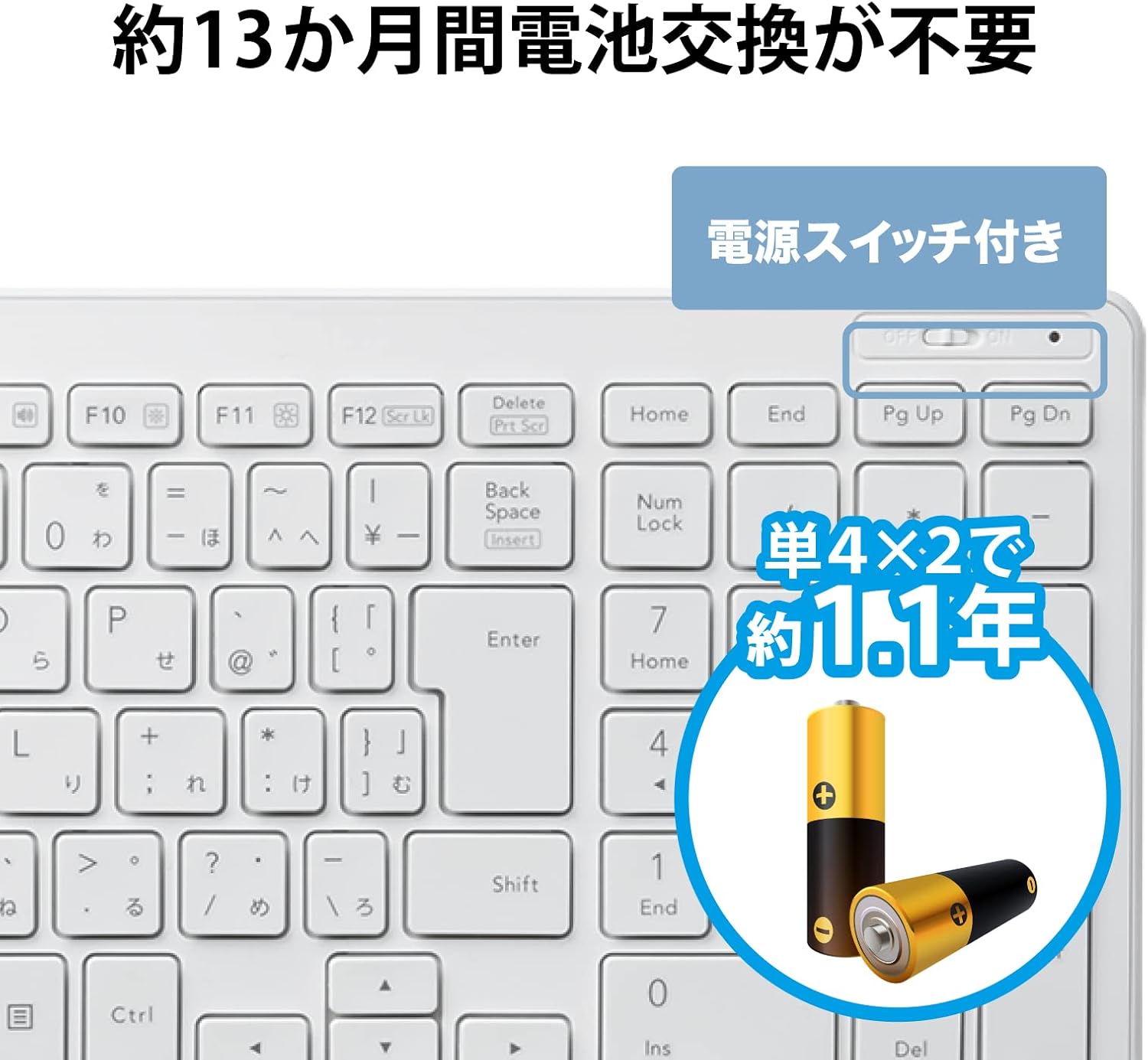
Hoto: Rufewa view of the keyboard's power switch and battery compartment, indicating where to insert two AAA batteries.

Image: A compact USB receiver is shown next to a keyboard, illustrating its small size and indicating compatibility with both Windows and Mac operating systems.
5. Umarnin Aiki
The ELECOM TK-FDP099TWH keyboard offers a comfortable typing experience and convenient function keys.
5.1 Buga na asali
Simply begin typing. The keyboard uses a standard Japanese 104-key layout. The pantograph key mechanism provides a light and responsive feel, similar to laptop keyboards.
5.2 Function Keys (Fn Key Combinations)
The keyboard features multimedia and system control functions accessible via the 'Fn' key in combination with the F1-F12 keys. Press and hold the Fn maɓalli, sannan danna maɓallin aikin da ake so.
- Fn+F1: Kunna/Dakata kafofin watsa labarai
- Fn+F2: Waƙar da ta gabata
- Fn+F3: Waƙa ta gaba
- Fn+F4: Sautin Audio
- Fn+F5: Saukar da ƙara
- Fn+F6: Ƙara girma
- Fn+F7: Bude Web Browser
- Fn+F8: Open Mail Application
- Fn+F9: Open Search Function
- Fn+F10: Kashe Nuni
- Fn+F11: Kunna Nuni
- Fn+F12: Open 'My Computer' or equivalent file mai bincike
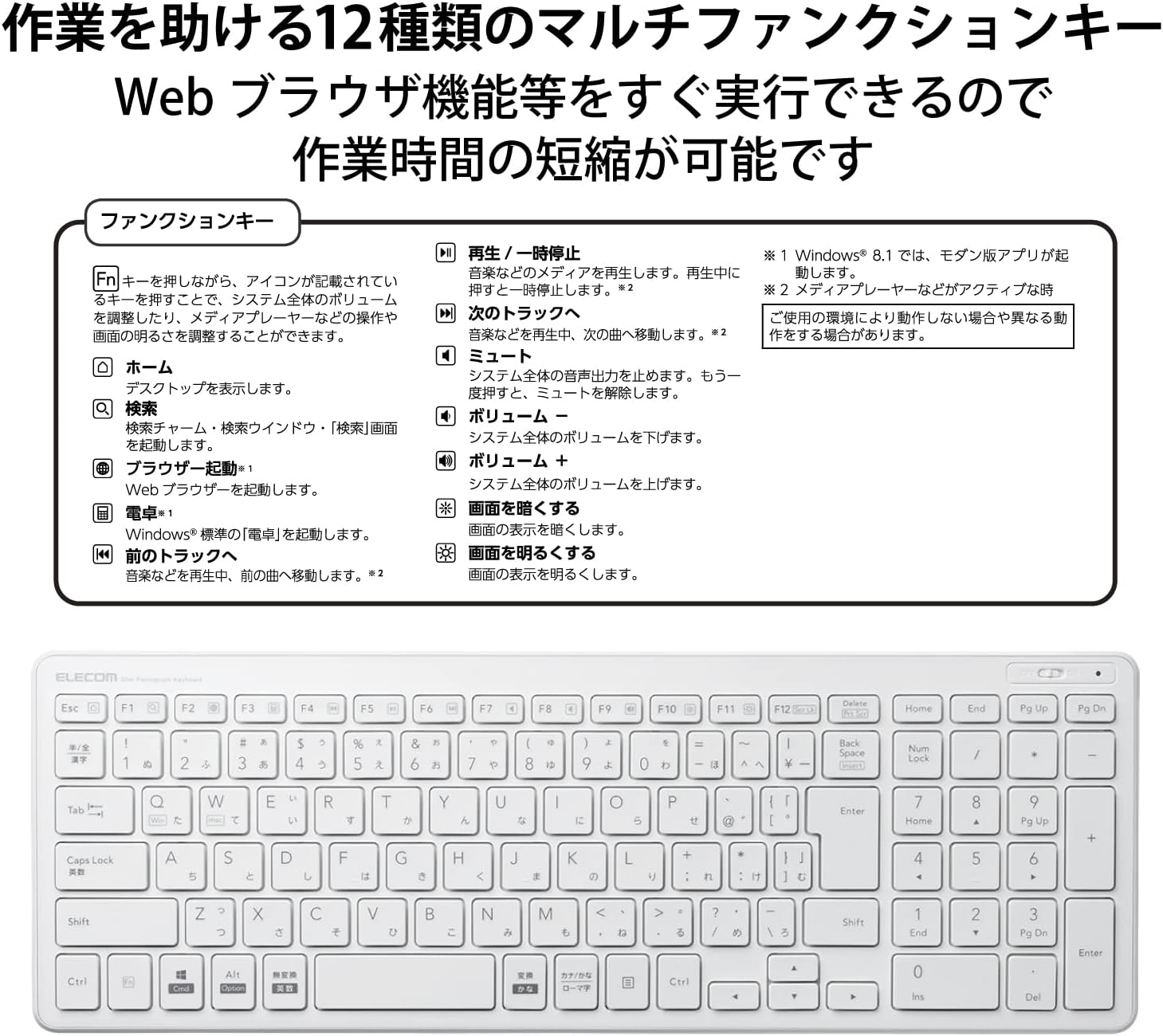
Hoto: cikakken bayani view of the keyboard's function keys (F1-F12) with their corresponding multimedia and system control icons, along with a diagram explaining their use with the Fn key.
6. Kulawa
Proper maintenance ensures the longevity of your keyboard:
- Tsaftacewa: Use a soft, dry cloth to wipe the keyboard surface. For stubborn dirt, slightly dampen the cloth with water or a mild cleaning solution. Do not spray cleaners directly onto the keyboard.
- Madadin Baturi: When the keyboard's performance degrades or it stops responding, replace both AAA batteries. The estimated battery operating period is approximately 1.1 years with alkaline batteries.
- Ajiya: When not in use for extended periods, turn off the keyboard to conserve battery life. Store in a cool, dry place away from direct sunlight.
7. Shirya matsala
Idan ka ci karo da matsaloli da madannai, duba waɗannan hanyoyin magance matsalolin gama gari:
- Allon madannai baya amsawa:
- Tabbatar cewa an kunna madannai.
- Bincika idan an shigar da batura daidai kuma suna da isasshen caji. Sauya idan ya cancanta.
- Tabbatar cewa an haɗa mai karɓar USB ɗin da aminci cikin tashar USB mai aiki a kwamfutarka.
- Gwada toshe mai karɓar USB zuwa wani tashar USB na daban.
- Sake kunna kwamfutarka.
- Keys not working or typing incorrectly:
- Tsaftace kewaye da maɓallan da abin ya shafa don cire duk wani tarkace.
- Ensure the keyboard is connected and powered on.
- Check your operating system's keyboard settings to ensure the correct layout is selected.
- Matsalolin haɗi mara waya:
- Matsar da madannai kusa da mai karɓar USB.
- Avoid placing the receiver near other wireless devices or large metal objects that might cause interference.
8. Ƙayyadaddun bayanai
Detailed specifications for the ELECOM TK-FDP099TWH Wireless Compact Pantograph Keyboard:
| Siffar | Ƙayyadaddun bayanai |
|---|---|
| Lambar Samfura | TK-FDP099TWH |
| Girma (Allon madannai) | 367.1mm (W) x 127.5 mm (D) x 21.2 mm (H) (14.45" L x 5.02" W x 0.83" H) |
| Weight (Keyboard) | Approx. 488 g (1.29 lbs) (excluding batteries) |
| Girma (Mai karɓa) | 19.5mm (W) x 15.7 mm (D) x 6.5 mm (H) |
| Weight (Receiver) | Kimanin 2g ku |
| Hanyar haɗi | Wireless (2.4 GHz band) |
| Nau'in Maɓalli | Pantograph |
| Maɓallin maɓalli | mm2.0 ku |
| Maɓallin Maɓalli | mm19.0 ku |
| Tushen wutar lantarki | AAA dry battery x 2 |
| Battery Operating Period | Approx. 1.1 years (using alkaline batteries, ELECOM test value) |
| OS mai goyan baya | Windows OS, Macintosh OS |
| Kayan abu | Acrylonitrile Butadiene Styrene (ABS) |
| Launi | Fari |

Image: The keyboard's dimensions (367.1mm width, 127.5mm depth) are illustrated, emphasizing its compact and lightweight design for easy portability.

Image: A diagram illustrating the pantograph key mechanism, showing the keycap, rubber dome, and the scissor-like structure that provides stable and quiet keystrokes.
9. Garanti da Tallafawa
ELECOM products are designed for reliability and performance. For warranty information, please refer to the warranty card included with your purchase or visit the official ELECOM website. For technical support or further inquiries, please contact ELECOM customer service through the contact information provided on the official website.