
1. Samfurin Ya Ƙareview
The Maxwest Nitro 5N is an Android 7.0 smartphone designed for reliable communication and multimedia use. It features a 5-inch display, a Quad Core processor, and dual SIM capability, making it suitable for various global GSM networks.

Hoto 1.1: Gaba da baya view of the Maxwest Nitro 5N smartphone, showcasing its sleek black design and display.
2. Abin da ke cikin Akwatin
Upon opening your Maxwest Nitro 5N package, please ensure all the following items are present:
- Maxwest Nitro 5N Smartphone
- Baturi (2000mAh)
- Adaftar Caja
- Kebul na USB
- Protective Case Cover
3. Saitin Farko
3.1. Saka Katin SIM da Baturi
- Kashe Wuta: Ensure your Maxwest Nitro 5N is powered off before proceeding.
- Cire Rufin Baya: A hankali cire murfin baya na wayar.
- Saka Katin SIM: Locate the SIM card slots. This device supports dual SIM cards. Insert your GSM SIM card(s) into the designated slots with the gold contacts facing down. Ensure they are securely seated.
- Saka Baturi: Place the 2000 mAh battery into its compartment, aligning the gold contacts on the battery with those in the phone.
- Sauya Murfin Baya: Carefully reattach the back cover until it clicks into place.
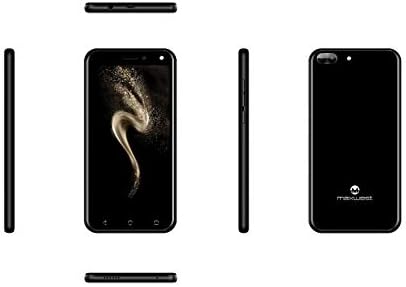
Hoto 3.1: Gefe views of the Maxwest Nitro 5N, illustrating the location of buttons and ports for SIM/battery access.
3.2. Kunnawa da Ƙaddamarwa na Farko
- Kunna Wuta: Press and hold the Power button (usually on the side) until the Maxwest logo appears.
- Zaɓin Harshe: Bi faɗakarwar kan allo don zaɓar yaren da kuka fi so.
- Haɗin Wi-Fi: Haɗa zuwa cibiyar sadarwar Wi-Fi don kammala aikin saitin da zazzage sabuntawa masu mahimmanci.
- Asusun Google: Shiga tare da asusun Google ko ƙirƙirar sabo. Wannan yana da mahimmanci don shiga Google Play Store da sauran ayyukan Google.
- Kwanan Wata & Lokaci: Saita daidai kwanan wata da lokaci, ko ƙyale cibiyar sadarwar ta saita ta ta atomatik.
- Tsaro: Configure screen lock options such as PIN, pattern, or password for device security.
Muhimmiyar Bayani: This device is designed to work with GSM carriers such as AT&T, T-Mobile, and Metro PCS. It will NOT work with CDMA carriers like Verizon, Sprint, or Boost Mobile.
4. Operating Your Maxwest Nitro 5N
4.1. Navigation na asali
- Kariyar tabawa: Interact with the device by tapping, swiping, pinching, and spreading on the 5-inch LCD display.
- Allon Gida: Babban cibiyar aikace-aikacenku da widgets ɗinku. Danna hagu ko dama don samun damar shiga ƙarin allo.
- Kwamitin Sanarwa: Doke ƙasa daga saman allon don samun damar sanarwa da saituna masu sauri.
- Maɓallan kewayawa: Use the on-screen navigation buttons (Back, Home, Recent Apps) at the bottom of the display.
4.2. Yin Kira da Aika Saƙonni
- Manhajar Waya: Tap the Phone icon to access the dialer, call logs, and contacts.
- Manhajar Saƙonni: Tap the Messages icon to send and receive SMS/MMS messages.
4.3. Amfanin Kamara
Your Nitro 5N is equipped with 5MP front and rear cameras.
- Buɗe Kyamara: Matsa alamar kamara akan allon gida ko aljihunan app.
- Canja kyamarori: Danna alamar makullin kyamara don canzawa tsakanin kyamarorin gaba da na baya.
- Ɗauki Hoto/Bidiyo: Danna maɓallin rufewa don ɗaukar hoto ko fara/dakatar da rikodin bidiyo.
4.4. Screen Pinning Feature
Screen Pinning allows you to lock your phone to a single application, preventing others from accessing other apps or settings. This is useful when sharing your phone temporarily.
- Enable Screen Pinning: Je zuwa Settings > Security > Screen pinning kuma kunna shi.
- Pin an App: Open the app you wish to pin. Tap the Recent Apps button (square icon). Swipe up on the app's preview and tap the pin icon.
- Unpin an App: To unpin, simultaneously press and hold the Back and Recent Apps buttons. You may need to enter your PIN/pattern/password if required by your security settings.
5. Kulawa da Kulawa
5.1. Kula da baturi
- Cajin: Use only the provided charger and USB cable. Avoid overcharging by disconnecting the charger once the battery is full.
- Zazzabi: Avoid exposing the phone to extreme temperatures, as this can degrade battery life.
- Ajiya: If storing the phone for an extended period, ensure the battery is partially charged (around 50%).
5.2. Tsabtace Na'urarka
- Allon: Yi amfani da yadi mai laushi, mara lint, dan kadan dampened with water or a screen cleaner, to gently wipe the display.
- Jiki: Use a soft, dry cloth to clean the phone's body. Avoid harsh chemicals or abrasive materials.
5.3. Sabunta software
Periodically check for system updates to ensure optimal performance and security. Go to Saituna > Game da waya > Sabunta tsarin don bincika da shigar da abubuwan sabuntawa.
6. Shirya Matsalar gama gari
| Matsala | Magani mai yiwuwa |
|---|---|
| Waya baya kunnawa. | Tabbatar an saka batirin daidai kuma an yi masa caji. Haɗa caja sannan a sake gwadawa. |
| Babu siginar cibiyar sadarwa. | Verify SIM card insertion. Check if you are within network coverage. Ensure your carrier is GSM compatible (e.g., AT&T, T-Mobile). Restart the phone. |
| Apps are slow or crashing. | Rufe manhajojin bango. Share cache na manhaja (Saituna> Apps> [Sunan App]> Ajiye> Share cache). Restart the phone. Ensure sufficient storage space. |
| Baturi yana gudu da sauri. | Reduce screen brightness. Disable Wi-Fi, Bluetooth, and GPS when not in use. Close unnecessary background apps. Check battery usage in settings to identify power-hungry apps. |
| Ba za a iya haɗi zuwa Wi-Fi ba. | Tabbatar an kunna Wi-Fi. Sake kunna na'ura mai ba da hanya tsakanin hanyoyin sadarwa da wayar ku. Manta hanyar sadarwar kuma sake haɗawa. |
7. Ƙayyadaddun samfur
| Siffar | Daki-daki |
|---|---|
| Sunan Samfura | Nitro 5N |
| Tsarin Aiki | Android 7.0 |
| Mai sarrafawa | Quad Core 1.2 GHz (1.2GHz Cortex A9 Processor) |
| RAM | 1 GB |
| Ma'ajiyar Ciki | 8 GB (approximately 5.6 GB user available) |
| Nunawa | 5.0 inch LCD, 480 x 854 pixels, 2.5D TP |
| Kamara ta baya | 5 MP |
| Kamara ta gaba | 5 MP |
| Ƙarfin baturi | 2000mAh Lithium Ion |
| Dacewar hanyar sadarwa | 3G H+ 850/1900/2100 MHz, 2G: 850/900/1800/1900 MHz (GSM Carriers only) |
| Haɗuwa | USB, Cellular, GPS, Wi-Fi, Bluetooth (Wireless) |
| Audio Jack | mm3.5 ku |
| Girma (L x W x H) | 5.73 x 2.83 x 0.38 inci |
| Nauyi | 5.4 oz (153 grams) |
| Launi | Baki |
8. Garanti Bayani
The Maxwest Nitro 5N comes with a one-year parts and labor warranty from the date of purchase. This warranty covers manufacturing defects and workmanship under normal use. It does not cover damage caused by misuse, accidents, unauthorized repairs, or normal wear and tear.
Da fatan za a riƙe shaidar siyan ku don da'awar garanti.
9. Tallafin Abokin Ciniki
For technical assistance, troubleshooting beyond this manual, or warranty inquiries, please contact Maxwest customer support. Refer to the contact information provided with your product packaging or visit the official Maxwest webshafin don cikakkun bayanan tallafi na zamani.
When contacting support, please have your product model (Nitro 5N) and proof of purchase readily available.