
1. Gabatarwa
This manual provides essential information for the safe and effective operation of the Mark-10 EKM5-200 Myometer Kit. The EKM5-200 Myometer Kit is designed to facilitate a wide range of strength assessments and ergonomics studies. It features a Series 5 force gauge with a 200 lbF (1,000 N) range, a tabletop mount, a strap, and various accessories. This kit is suitable for ergonomists and other professionals requiring precise force measurement.
2. Bayanin Tsaro
Please read all instructions carefully before using the EKM5-200 Myometer Kit. Failure to follow these instructions may result in injury or damage to the equipment.
- Ensure the device is used within its specified force capacity of 200 lbF (1,000 N). Exceeding this limit can damage the force gauge.
- Only use the provided AC adapter/charger for powering and charging the device.
- A ajiye na'urar nesa da ruwa da yanayin zafi mai tsanani.
- Kada ka yi ƙoƙarin wargaza ko gyara na'urar. Ka miƙa duk wani gyara ga ma'aikata masu ƙwarewa.
- Always secure the force gauge properly when using the tabletop mounting kit to prevent accidental detachment.
- When performing strength assessments, ensure the subject is positioned safely and comfortably.
3. Abubuwan Kunshin
The Mark-10 EKM5-200 Myometer Kit includes the following components:
- M5-200 Advanced Force Gauge
- Harkar Dauka
- Tabletop Mounting Kit (for vertical or horizontal orientations)
- Adjustable Length Looped Strap
- AC Adapter/Charger (110V)
- MESUR Lite Data Collection Software
- Kebul na USB
- NIST-traceable Certificate of Calibration with Data
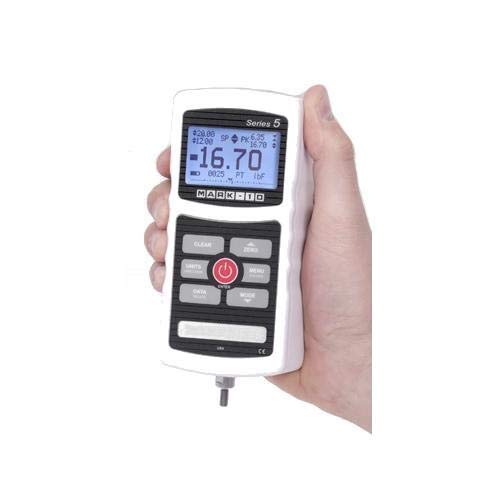
Figure 1: The M5-200 Advanced Force Gauge, a key component of the EKM5-200 kit. It features a digital display and control buttons.
4. Samfurin Ya Ƙareview da Features
The EKM5-200 Myometer Kit is designed for precise force measurement in various applications. Its core component, the M5-200 force gauge, offers advanced capabilities.
Mabuɗin fasali:
- Measures real-time, average, and peak pull and push forces.
- Force capacity: 200 lbF (1,000 N).
- Accuracy: ±0.1% of full scale.
- Sampling rate: 7,000 Hz.
- Output options: USB, RS-232, and analog.
- High/low limit indicators for pass/fail and minimum force testing.
- 1,000-point data memory with statistical calculations.
- Data can be bulk downloaded to the included MESUR Lite data collection software.
- Force gauge is compatible with other Mark-10 grips and attachments.
5. Saita
5.1 Charging the Force Gauge
- Connect the AC adapter/charger to the force gauge's power input port.
- Plug the AC adapter into a standard 110V electrical outlet.
- Allow the device to charge fully before initial use. The charging indicator on the gauge will provide status.
5.2 Assembling the Tabletop Mounting Kit
- Identify the components of the tabletop mounting kit.
- Attach the force gauge securely to the mounting bracket. Ensure all fasteners are tightened.
- Mount the assembly to a stable tabletop or surface, ensuring it is firm and does not wobble. The kit supports both vertical and horizontal orientations.
- Attach the adjustable length looped strap to the force gauge or an appropriate attachment point on the mounting kit, depending on the test setup.
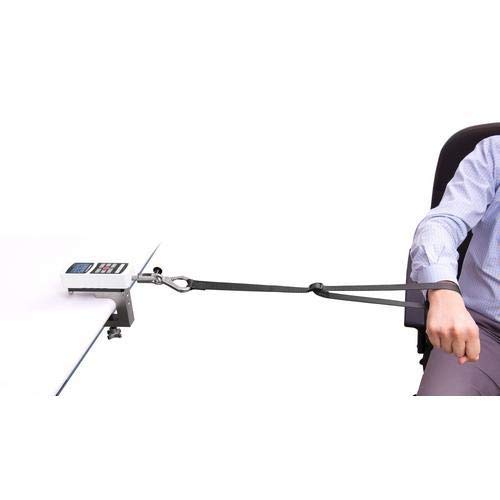
Hoto na 2: Example setup of the EKM5-200 Myometer Kit for an ergonomics study, showing the force gauge mounted on a table and connected to a subject via a strap.
6. Umarnin Aiki
6.1 Kunnawa / Kashewa
- Don kunna, latsa ka riƙe maɓallin WUTA maɓalli har sai allon ya haskaka.
- Don kashe wuta, latsa ka riƙe WUTA button har sai nuni ya kashe.
6.2 Ma'auni na asali
- Ensure the force gauge is powered on and properly calibrated (refer to NIST certificate).
- Danna maɓallin ZERO button to tare the current reading before applying any force.
- Apply force to the sensor via the strap or other attachment. The display will show the real-time force.
- The gauge can display peak force, average force, and real-time force. Use the MODE button to cycle through display modes.
- Observe the high/low limit indicators for pass/fail testing, if configured.
6.3 Zaɓin Naúra
Danna maɓallin RAKA'A button to cycle through available measurement units (e.g., lbF, N, kgF).
7. Gudanar da Bayanai
7.1 Internal Data Memory
The M5-200 force gauge can store up to 1,000 data points internally, along with statistical calculations. Refer to the force gauge's dedicated manual for detailed instructions on saving and reviewing data directly on the device.
7.2 MESUR Lite Data Collection Software
- Install the MESUR Lite data collection software on your computer using the provided media or by downloading it from the Mark-10 website.
- Connect the force gauge to your computer using the supplied USB cable.
- Launch the MESUR Lite software. The software will detect the connected force gauge.
- Follow the on-screen instructions within MESUR Lite to bulk download stored data, perform real-time data acquisition, and analyze measurements.
8. Kulawa
8.1 Tsaftacewa
- Wipe the exterior of the force gauge and accessories with a soft, damp zane.
- Do not use abrasive cleaners or solvents, as these may damage the finish or internal components.
- Ensure no moisture enters the device's ports.
8.2 Adana
- When not in use, store the EKM5-200 Myometer Kit in its provided carrying case to protect it from dust, impacts, and environmental factors.
- Ajiye a wuri mai sanyi, bushe, nesa da hasken rana kai tsaye da matsanancin zafi.
8.3 Calibration
The force gauge comes with a NIST-traceable certificate of calibration. Regular recalibration is recommended to maintain accuracy, especially for critical applications. Refer to Mark-10's guidelines or contact their support for recalibration services.
9. Shirya matsala
| Matsala | Dalili mai yiwuwa | Magani |
|---|---|---|
| Na'urar baya kunnawa. | Ƙananan baturi ko batu na adaftar wuta. | Connect the AC adapter and charge the device. Ensure the adapter is properly plugged into a working outlet. |
| Karatuttuka mara inganci. | Not zeroed before use, or device requires recalibration. | Danna maɓallin ZERO button before measurement. If problem persists, consider recalibration. |
| Cannot connect to MESUR Lite software. | USB cable issue, driver not installed, or software not running. | Ensure USB cable is securely connected. Install necessary drivers. Restart MESUR Lite software and the force gauge. |
| Display shows "OVERLOAD". | Applied force exceeds the device's capacity. | Immediately remove the excessive force. Ensure future measurements stay within the 200 lbF (1,000 N) limit. |
If you encounter issues not listed here or if the suggested solutions do not resolve the problem, please contact Mark-10 technical support.
10. Ƙayyadaddun bayanai
| Siga | Daraja |
|---|---|
| Samfura | EKM5-200 |
| Ƙarfin Ƙarfi | 200 lbF (1,000 N) |
| Daidaito | ± 0.1% na cikakken sikelin |
| SampƘimar Ring | 7,000 Hz |
| Ƙwaƙwalwar Data | 1,000 data maki |
| Abubuwan da aka fitar | USB, RS-232, Analog |
| Shigar da Wuta | 110V AC adaftar |
| Mai ƙira | Mark-10 |
| ASIN | B07D8SFSKC |
| UPC | 666758807621 |
11. Garanti da Tallafawa
11.1 Bayanin Garanti
For detailed warranty information regarding your Mark-10 EKM5-200 Myometer Kit, please refer to the documentation included with your purchase or visit the official Mark-10 website. Sharuɗɗan garanti yawanci suna rufe lahani na masana'anta na ƙayyadadden lokaci daga ranar siyan.
11.2 Tallafin Fasaha
Should you require technical assistance, troubleshooting, or service for your EKM5-200 Myometer Kit, please contact Mark-10 customer support.
- Mai ƙira: Mark-10
- Website: www.mark-10.com (Da fatan za a ziyarci jami'in website for contact details and the latest support resources.)
When contacting support, please have your model number (EKM5-200) and serial number (if applicable) ready.