
Gabatarwa
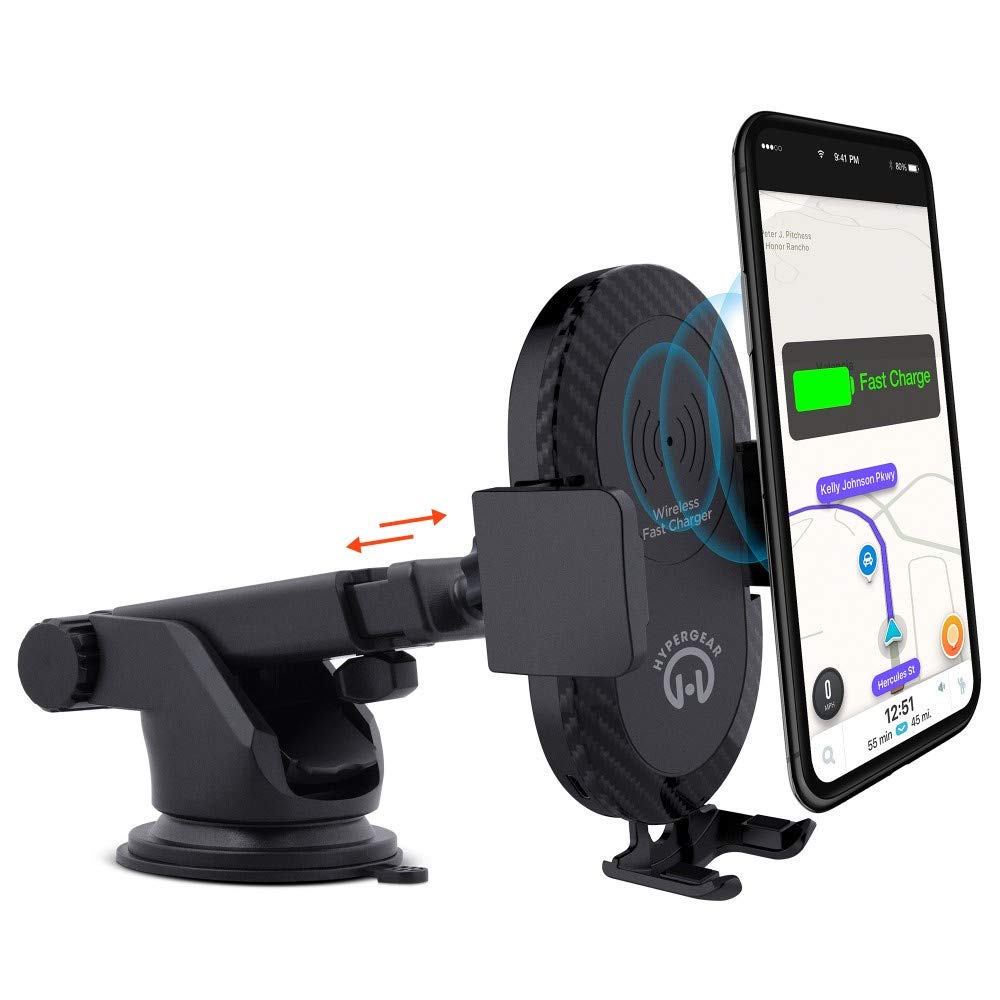
This manual provides instructions for the HyperGear HYG-14590 Wireless Fast Charging Car Dash Mount. This device is designed to securely hold and wirelessly charge Qi-enabled smartphones in your vehicle, offering hands-free navigation and communication.
Abubuwan Kunshin
Tabbatar cewa duk abubuwa suna nan a cikin kunshin:
- Telescopic Mount
- Fast Charge Car Adapter
- Micro USB Cable
- Jagorar mai amfani (wannan takaddar)
Saita Umarnin
- Zaɓi Wuri Mai hawa: Select a clean, flat surface on your dashboard or windshield. Ensure the location does not obstruct your view ko tsoma baki tare da sarrafa abin hawa.
- Haɗa Dutsen:
- Clean the chosen surface thoroughly.
- Remove the protective film from the sticky gel suction cup.
- Danna kofin tsotsa da ƙarfi a saman.
- Engage the 2-step locking lever to secure the mount in place.
- Haɗa Ikon:
- Insert the Micro USB cable into the charging port on the mount.
- Plug the other end of the Micro USB cable into the Fast Charge Car Adapter.
- Insert the Fast Charge Car Adapter into your vehicle's 12V power outlet (cigarette lighter socket).
- Adjust the Mount:
- Extend the telescopic arm up to 8 inches as needed.
- Pivot the arm up to 230° to achieve the desired angle.
- Rotate the cradle head 360° to switch between portrait and landscape orientation.
Umarnin Aiki
- Sanya Na'urarka: Gently open the adjustable padded cradle grips and place your Qi-enabled smartphone into the mount. The grips will automatically secure the device.
- Cajin mara waya: Once your device is placed in the mount and the mount is powered, wireless charging will begin automatically. Ensure your device is centered on the charging pad for optimal performance.
- Cire Na'urarku: To remove your device, gently open the cradle grips and lift your smartphone out.
- Amfani-Kyautata Hannu: The mount allows for hands-free use of navigation, calls, and other applications while driving. Always ensure your device is positioned safely and does not obstruct your view na hanya.
Kulawa
- Tsaftacewa: Use a soft, dry cloth to clean the mount. Do not use abrasive cleaners or solvents.
- Kulawar Kofin tsotsa: If the sticky gel suction cup loses adhesion, rinse it with warm water and let it air dry. This can help restore its stickiness.
- Ajiya: When not in use for extended periods, store the mount in a cool, dry place away from direct sunlight.
Shirya matsala
- Na'urar baya caji ta waya:
- Ensure your smartphone is Qi-enabled or has a Qi-enabled receiver.
- Verify the Micro USB cable is securely connected to both the mount and the car adapter.
- Check that the car adapter is firmly seated in the vehicle's 12V power outlet.
- Ensure your phone is centered on the charging pad of the mount.
- Cire duk wani akwati mai kauri na waya wanda zai iya kawo cikas ga caji mara waya.
- Mount not sticking to surface:
- Clean the dashboard or windshield surface thoroughly before attachment.
- Ensure the 2-step locking lever is fully engaged.
- Rinse the sticky gel suction cup with warm water and air dry to restore adhesion.
- Avoid mounting on textured or porous surfaces.
- Phone not held securely:
- Ensure the adjustable padded cradle grips are properly closed around your device.
- Verify that your phone's size is compatible with the mount's adjustable range.
Ƙayyadaddun bayanai
| Lambar Samfura | HYG-14590 |
| Alamar | HyperGear |
| Fasahar Haɗuwa | Mara waya |
| Nau'in Haɗawa | USB, Wireless |
| Na'urori masu jituwa | Wayoyin Salula (wanda ke aiki da Qi) |
| Samfuran Waya masu jituwa | iPhone X/8/8 Plus, Samsung Galaxy S9/S9+, S8/S8+, Note 8, and other Qi-enabled devices |
| Siffa ta Musamman | Saurin Caji, Cajin Mara waya |
| Watatage | 10 watts |
| Tushen wutar lantarki | Vehicle 12V Power Outlet |
| Nau'in Mai Haɗin Wutar Wuta | USB Type C (for car adapter) |
| Nauyin Abu | 11.84 oz |
| Kayayyakin Rufe | Gel (suction cup) |
| Launi | Baki |
| UPC | 633755145902 |
Bayanin Garanti
This HyperGear product comes with a Garanti na kwanaki 30 from the date of purchase. This warranty covers manufacturing defects. Please retain your proof of purchase for warranty claims. For further details or to initiate a claim, please refer to the HyperGear official website ko tuntuɓi goyon bayan abokin ciniki.
Tallafin Abokin Ciniki
For technical assistance, product inquiries, or warranty support, please visit the official HyperGear website ko tuntuɓi sashen sabis na abokin ciniki. Ana iya samun bayanin tuntuɓar a galibi akan marufin samfur ko kasancewar ta kan layi na hukuma.