
1. Gabatarwa
This manual provides detailed instructions for the installation, operation, and maintenance of your Sanpyl Bluetooth MP3 Decoder Board. Please read this manual thoroughly before using the product to ensure proper function and to prevent damage.
2. Bayanin Tsaro
- Tabbatar da wutar lantarki voltage matches the product's specifications (DC 7V-12V or Micro USB 5V). Incorrect voltage zai iya haifar da lalacewa.
- Kada a fallasa na'urar ga danshi, ruwan sama, ko yanayin zafi mai tsanani.
- Avoid disassembling or modifying the device, as this may void the warranty and pose safety risks.
- A kiyaye nesa da yara.
- Cire wutar lantarki kafin yin duk wani haɗi ko katsewa.
3. Abubuwan Kunshin
Tabbatar cewa duk abubuwa suna nan a cikin kunshin:
- 1 x Sanpyl Bluetooth MP3 Decoder Board
- 1 x Ikon nesa
- 1 x 2-pin Power Cable
- 2 x 3-pin Audio Cables
4. Samfurin Ya Ƙareview
The Sanpyl Bluetooth MP3 Decoder Board is a versatile audio module designed for integrating music playback and FM radio capabilities into various projects. It supports multiple audio sources including USB drives, SD/MMC cards, Bluetooth, and external line-in. It also features hands-free calling and comes with a remote control for convenient operation.
4.1 Tsarin Panel na Gaba

Hoto na 4.1: Front panel of the decoder board. This view shows the digital display, USB port, SD/MMC card slot, and control buttons for playback, volume, and mode selection.
- Nuni na Nuni: Yana nuna yanayin yanzu, lambar waƙa, mita, da sauransu.
- Tashar USB: Don haɗa kebul na USB flash drives.
- Ramin Katin SD/MMC: For inserting Secure Digital or MultiMediaCards.
- Maɓallan sarrafawa: Play/Pause, Volume Up/Next Track, Volume Down/Previous Track, Mode.
4.2 Rear Connections

Hoto na 4.2: Rear connections of the decoder board. This image highlights the various input and output terminals for power, audio, and the FM antenna.
- DC 12V+ / GND: Main power input (7V-12V DC).
- Micro USB 5V Input: Alternative 5V power input.
- L IN / R IN / GND: Stereo audio line input.
- L Output / R Output / GND: Stereo audio line output.
- FM eriya: Connection point for an external FM antenna.
4.3 Girma
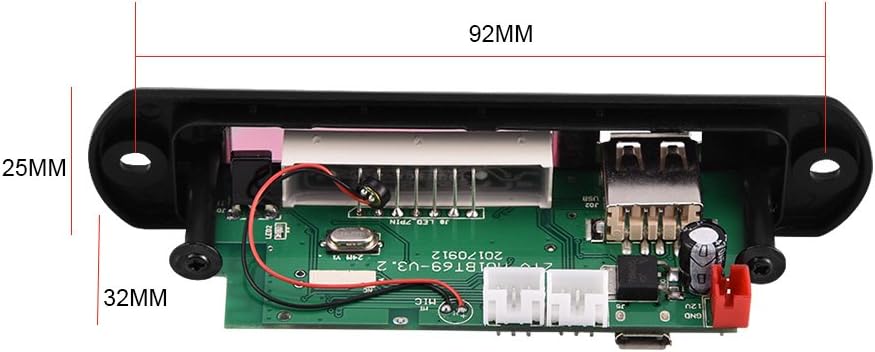
Hoto na 4.3: Physical dimensions of the decoder board. The panel length is 107mm, height is 25mm, and depth is 32mm. The mounting hole spacing is 92mm.
5. Ƙayyadaddun bayanai
| Lambar Samfura | Sanpylcw78yrodhs |
| Mai aiki Voltage | DC 7V to 12V (main), Micro USB 5V (alternative) |
| Aiki Yanzu | 800mA zuwa 1A |
| Panel Dimensions (L x H x D) | 107mm x 25mm x 32mm |
| Tazarar Hawan Ramin | 92mm ku |
| Girman allo | 45mm x 8mm |
| Kafofin watsa labarai masu goyan baya | USB Disk, SD Card, MMC Card |
| Haɗuwa | Bluetooth, FM Radio, Line-in (AUX) |
| Siffofin | Hands-free calls, Multiple EQ modes, Mute function, Digital display |
| Nauyin Abu | 2.08 oz (kimanin 59g) |
6. Saita
6.1 Haɗin Wuta
The decoder board can be powered in two ways:
- DC 7V-12V: Connect the provided 2-pin power cable to the "DC 12V+" and "GND" terminals on the rear of the board (refer to Figure 4.2). Ensure correct polarity.
- Micro USB 5V: Alternatively, connect a standard Micro USB cable to the "Micro USB 5V Input" port. This is suitable for 5V power sources.
Tsanaki: Do not connect both 12V DC and Micro USB 5V power simultaneously. Choose one power source.
6.2 Haɗin Sauti
- Fitowar Sauti: Use the provided 3-pin audio cables to connect the "L Output", "R Output", and "GND" terminals to your amplifi ko masu magana mai aiki.
- Shigar da Sauti (AUX): If you wish to use an external audio source (e.g., phone, computer), connect it to the "L IN", "R IN", and "GND" terminals. You will need to switch the mode to "LIN" for this input.
Haɗin Eriya ta FM 6.3
Connect a suitable FM antenna to the "FM Antenna" terminal for optimal radio reception (refer to Figure 4.2).
7. Umarnin Aiki
7.1 Power On / Automatic Playback
Once powered on, the decoder board will automatically start playing music if a USB disk, SD card, or MMC card is inserted. If no media is present, it will default to the last used mode.
7.2 Zaɓin Yanayin
Danna maɓallin MODE button on the front panel or remote control to cycle through available modes: USB, SD, Bluetooth, FM, and LIN (Line Input).
7.3 Haɗin Bluetooth
- Switch the decoder board to Bluetooth mode. The display will show "BT".
- On your mobile device, search for Bluetooth devices.
- Select the device named Saukewa: M01BT.
- If prompted for a password, enter 0000.
- Once paired, you can play audio from your device through the decoder board.
7.4 USB / SD / MMC Card Playback
- Saka kebul na USB flash drive a cikin tashar USB ko katin SD/MMC a cikin ramin katin.
- The board will automatically switch to the corresponding mode (USB or SD) and begin playback.
- Yi amfani da Kunna/Dakata, VOL- / Previous, kuma VOL+ / Na gaba maɓalli don sarrafa sake kunnawa.
7.5 FM Radio Aiki
- Switch the decoder board to FM yanayin.
- Latsa ka riƙe Kunna/Dakata button to initiate an automatic scan for FM stations. The board will save found stations.
- Yi amfani da VOL- / Previous kuma VOL+ / Na gaba maɓallan don kewaya tsakanin tashoshin da aka adana.
7.6 Kira marar hannu
When in Bluetooth mode and paired with a phone, the decoder board supports hands-free calling. Incoming calls can be answered or ended using the remote control or specific buttons on the board (refer to remote control diagram if available, or typically the Play/Pause button).
7.7 Ayyuka masu nisa
Na'urar sarrafawa ta nesa da aka haɗa tana ba da damar shiga ayyuka daban-daban cikin sauƙi:
- Ƙarfi: Kunna / kashe na'urar.
- Yanayin: Switch between USB, SD, Bluetooth, FM, LIN.
- Kunna/Dakata: Start or pause playback. Answer/End calls.
- Na baya/Na gaba: Skip tracks or navigate FM stations.
- Ƙarar Ƙarƙashin Ƙaƙwalwar Ƙaƙwalwa: Daidaita ƙarar sauti.
- EQ: Cycle through various equalizer sound modes.
- Yi shiru: Yi shiru ko cire sautin murya.
- Maɓallan Lamba: Direct track selection (in USB/SD mode) or FM frequency input.
8. Kulawa
- Tsaftace na'urar da kyalle mai laushi da busasshe. Kada a yi amfani da masu tsaftace ruwa ko abubuwan da ke narkewa.
- Keep the USB port and SD card slot free from dust and debris.
- Ajiye na'urar a wuri mai sanyi, busasshiyar lokacin da ba'a amfani da ita na tsawon lokaci.
9. Shirya matsala
| Matsala | Dalili mai yiwuwa | Magani |
|---|---|---|
| No power / Device not turning on. | Incorrect power connection; Insufficient voltage; Faulty power supply. | Check power cable connections and polarity. Ensure power supply is within 7V-12V DC or 5V Micro USB. Test with a different power source. |
| Babu fitarwar sauti. | Volume too low; Mute function active; Incorrect audio output connection; Ampal'amurran da suka shafi. | Increase volume. Press Mute button on remote. Verify audio output cables are correctly connected to amplifier/speakers. Test amplifier with another source. |
| Bluetooth ba ya haɗuwa. | Device not in Bluetooth mode; Incorrect pairing password; Distance too far; Interference. | Ensure decoder is in Bluetooth mode ("BT" on display). Re-enter password "0000". Move device closer. Reduce interference from other wireless devices. |
| Katin USB/SD ba ya aiki. | Card/drive not inserted correctly; Unsupported file Tsarin; Kafofin watsa labarai masu lalacewa. | Re-insert media. Ensure media contains supported audio files (e.g., MP3). Try a different USB drive or SD card. |
| Mara kyau liyafar rediyon FM. | No antenna connected; Weak signal; Interference. | Connect an external FM antenna. Reposition the antenna for better signal. Perform an auto-scan again. |
10. Garanti da Tallafawa
Sanpyl products are designed for reliability and performance. For any issues or questions regarding your Bluetooth MP3 Decoder Board, please contact your retailer or Sanpyl customer support. Please retain your proof of purchase for warranty claims.
Don ƙarin taimako, ziyarci Sanpyl Store on Amazon.