
1. Samfurin Ya Ƙareview
The Alecto WS-1560 is a wireless weather station designed to provide accurate indoor and outdoor environmental data. Featuring a clear color display and a remote outdoor sensor, it offers comprehensive weather information and additional useful functions for your home.
Mabuɗin fasali:
- Measures indoor and outdoor temperature and humidity.
- Long-range wireless outdoor sensor (up to 100 meters).
- 5.7-inch well-lit color display with animated weather forecast icons.
- Temperature and ice alarm functions.
- Agogon ƙararrawa tare da aikin ƙararrawa.
- Memory function for latest and highest readings.
- Moon phase indicator, date, day, and time display.
- Battery-operated main unit and outdoor sensor with backup batteries.

Figure 1.1: Alecto WS-1560 Main Unit and Wireless Outdoor Sensor.
2. Abubuwan Kunshin
Ensure all components are present and in good condition upon unpacking:
- Alecto WS-1560 Main Unit (Indoor Display)
- Na'urar firikwensin waje
- Manual mai amfani
- (Power adapter and batteries may be included depending on package)
Video 2.1: Illustrative video showing typical weather station components and basic setup. (Note: This video is for a related product and may not show the exact Alecto WS-1560 model.)
3. Saita da Shigarwa
3.1. Shigar da Baturi
Both the main unit and the outdoor sensor require batteries for operation. Ensure you use the correct type and polarity.
- Sensor na Waje:
- Open the battery compartment on the back of the wireless outdoor sensor.
- Insert 2x AA batteries (not included) according to the polarity markings (+/-).
- Rufe sashin baturin amintacce.
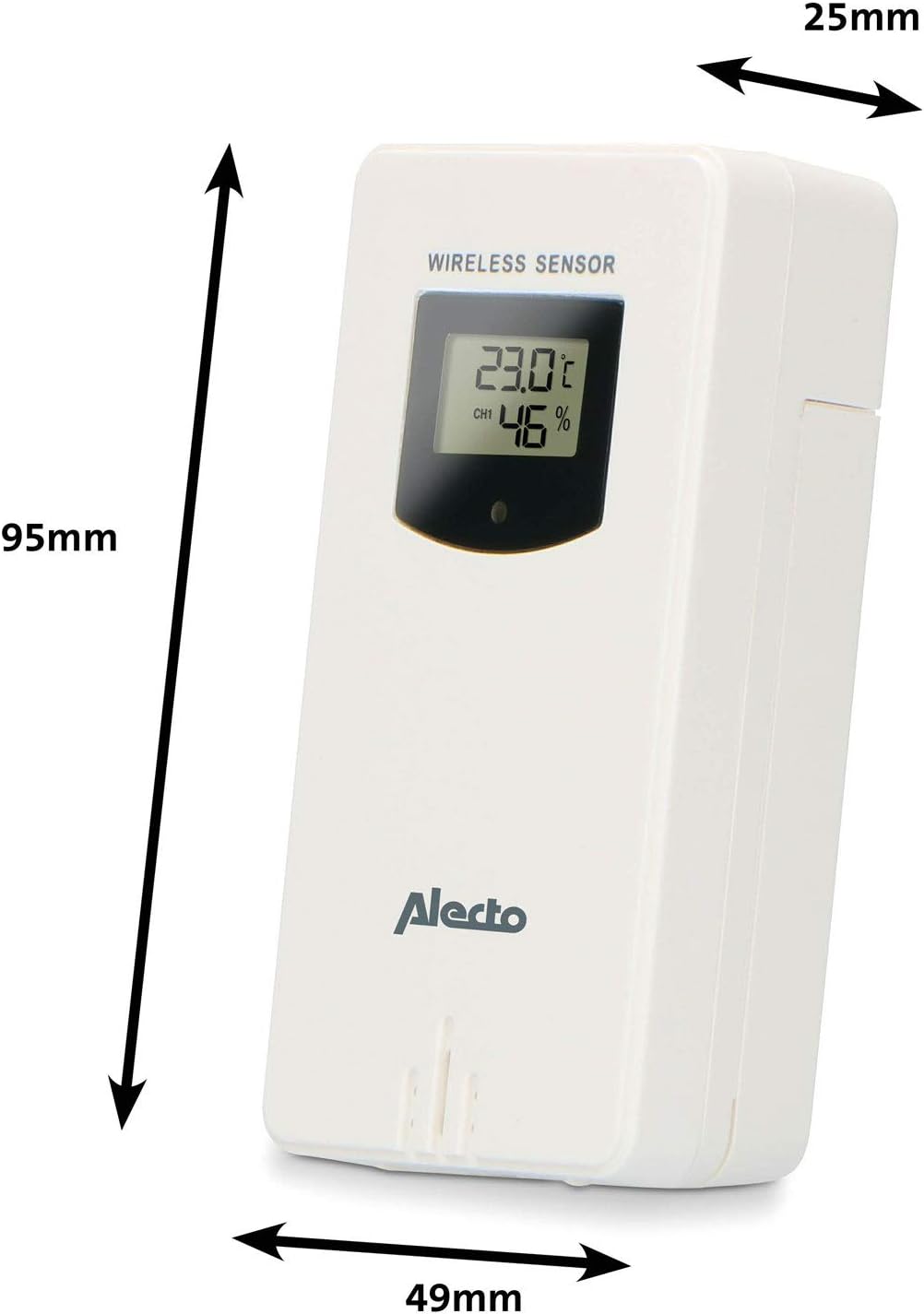
Figure 3.1: Wireless Outdoor Sensor dimensions and battery compartment location.
- Babban Sashe:
- Open the battery compartment on the back of the main unit.
- Insert 2x AA batteries (not included) according to the polarity markings (+/-). These serve as backup batteries.
- Rufe sashin baturin amintacce.
- Connect the main unit to a power outlet using the provided power adapter (if included).

Figure 3.2: Main Unit dimensions and power input.
3.2. Sanya Sensor
For accurate outdoor readings, proper placement of the wireless sensor is crucial:
- Place the sensor in a shaded area, away from direct sunlight, to prevent inaccurate temperature readings.
- Ensure good air circulation around the sensor.
- Mount the sensor vertically, approximately 1.5 to 2.5 meters (5 to 8 feet) above the ground.
- Avoid placing the sensor near heat sources (e.g., vents, windows) or moisture sources.
- The maximum transmission range is 100 meters (328 feet) in open air. Walls and other obstacles will reduce this range.

Hoto na 3.3: Example of outdoor sensor placement on a wall.
3.3. Pairing the Sensor with the Main Unit
The main unit and sensor should automatically pair once both are powered on. If pairing does not occur:
- Ensure both units have fresh batteries and are within range.
- Press the "TX" button inside the outdoor sensor's battery compartment to manually send a signal.
- On the main unit, you may need to initiate a search for the outdoor sensor (refer to the "Operation" section for specific button functions).
4. Aiki
4.1. Nuna Layout
The 5.7-inch color display provides a clear overview of all measured data. Key areas include:
- Zafin Jiki da Danshi na Waje: Displays current outdoor conditions.
- Zafin Jiki da Danshi na Cikin Gida: Yana nuna yanayin cikin gida na yanzu.
- Animated Weather Forecast: Icons predict upcoming weather (sunny, partly cloudy, cloudy, rainy, snowy).
- Lokaci & Kwanan Wata: Current time, day, and date.
- Matsalar Barometric: Matsi na yanayi na yanzu.
- Matakin Wata: Graphical representation of the current moon phase.
- Temperature/Ice Alarm Indicators: Alerts for specific temperature thresholds or potential ice conditions.

Hoto 4.1: Cikakken bayani view of the main unit's color display.
4.2. Ayyukan Button
The main unit features several buttons for setting and adjusting functions. Common buttons include:
- SAITA: Enters setup mode for time, date, and other settings.
- kwatance: Switches between display modes or confirms settings.
- UP/DOWN (or +/-): Adjusts values during setup or cycles through channels.
- ADAM: Yana saita ko kunna aikin ƙararrawa.
- MEM: Displays maximum/minimum temperature and humidity records. Long press to clear records.
- SNOOZE / haske: Activates snooze during an alarm or adjusts backlight brightness.
Video 4.2: Illustrative video demonstrating various features and settings of a weather station. (Note: This video is for a related product and may not show the exact Alecto WS-1560 model.)
4.3. Saita Lokaci da Kwanan Wata
- Press and hold the "SET" button until the time display starts flashing.
- Use the "UP" or "DOWN" buttons to adjust the hour, then press "SET" to confirm and move to minutes.
- Maimaita don mintuna, shekara, wata, da rana.
- Press "SET" again to exit the setting mode.
4.4. Saitunan ƙararrawa
- Press the "ALARM" button once to view lokacin ƙararrawa.
- Press and hold the "ALARM" button until the alarm time starts flashing.
- Use the "UP" or "DOWN" buttons to set the desired alarm hour and minute.
- Press "ALARM" to confirm.
- To activate/deactivate the alarm, press the "ALARM" button briefly when the alarm time is displayed. An alarm icon will appear/disappear.
4.5. Max/Min Records
The weather station automatically records the maximum and minimum temperature and humidity values over a 24-hour period.
- Press the "MEM" button briefly to view the maximum recorded values.
- Press "MEM" again to view the minimum recorded values.
- Press "MEM" a third time to return to current readings.
- To clear the records, press and hold the "MEM" button for a few seconds.
5. Kulawa
- Tsaftacewa: Wipe the display and unit surfaces with a soft, damp zane. Kada a yi amfani da masu tsabtace abrasive ko sauran ƙarfi.
- Madadin Baturi: Replace batteries in both the main unit and the outdoor sensor when the low battery indicator appears on the display. Always replace all batteries at the same time with new ones of the same type.
- Kulawar Sensor: Periodically check the outdoor sensor for debris or obstructions that might affect its readings. Ensure it remains in a shaded, well-ventilated area.
6. Shirya matsala
| Matsala | Dalili mai yiwuwa | Magani |
|---|---|---|
| No outdoor temperature/humidity reading (or "---" displayed) |
|
|
| Karatun zafin jiki/danshi mara daidai |
|
|
| Nuni ba shi da duhu ko sarari |
|
|
7. Ƙayyadaddun bayanai
| Lambar Samfura | WS-1560-BA |
| Alamar | Alexo |
| Tushen Wutar Lantarki (Babban Na'ura) | Power Adapter (if included) + 2x AA batteries (backup) |
| Tushen Wutar Lantarki (Firikwensin Waje) | 2 x AA baturi |
| Girman Samfura (Babban Sashe) | 5.1 x 16.5 x 12.3 cm |
| Nauyin samfur | 440g ku |
| Kewayon Firikwensin Mara waya | Up to 100 meters (open air) |
| Girman Nuni | 5.7 inci / 14.5 cm |
| Asalin | China |
8. Garanti da Tallafawa
For warranty information, technical support, or service inquiries, please refer to the warranty card included with your product or visit the official Alecto website. Ajiye rasidin siyan ku azaman shaidar siyan.
Alexo Website: www.alecto.nl (General Alecto website, specific support page may vary)