
INTRATONE HTEL2-00
INTRATONE HTEL2-00 Remote Control User Manual
Model: HTEL2-00 | Brand: INTRATONE
1. Samfurin Ya Ƙareview
The INTRATONE HTEL2-00 - 09-0102 remote control is a sophisticated device featuring 4 bi-technology 868 MHz channels. It integrates both Mifare and HF 868 MHz technologies, allowing for straightforward programming via the official www.intratone.info website or with a dedicated programmer (model 12-0115). A key security feature is its unique ten-digit identification number, ensuring personalized and secure operation. This remote offers an operating range of up to 10 meters and is broadly compatible with various electronic devices, including televisions, smartphones, cameras, and projectors. Measuring 6.5 x 3.8 x 1 cm and weighing only 30 grams, it is designed for portability and ease of use, providing optimal control over your compatible devices.
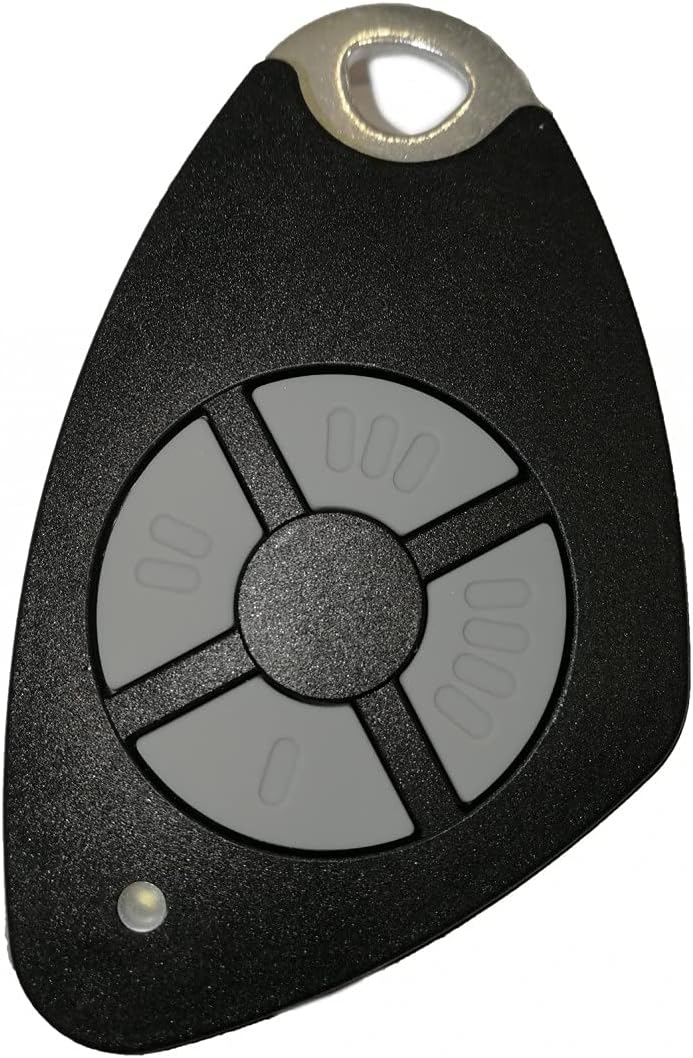
Hoto 1.1: Gaba view of the INTRATONE HTEL2-00 Remote Control.
2. Kayan Samfura
- Tashoshi 4: Provides control over up to four distinct functions or devices.
- Bi-Technology: Equipped with both Mifare and HF 868 MHz technologies for versatile use.
- Sauƙaƙe Shirye-shirye: Can be programmed via the official www.intratone.info website or using a dedicated programmer (model 12-0115).
- Unique Identification: Features a unique ten-digit engraved identification number for enhanced security and personalization.
- Faɗin Daidaitawa: Compatible with various devices including televisions, smartphones, cameras, and projectors.
- Karamin Tsara: Lightweight (30 grams) and small dimensions (6.5 x 3.8 x 1 cm) for easy portability.
3. Saita
3.1 Shigar da Baturi
The INTRATONE HTEL2-00 remote control uses an Alkaline battery. To install or replace the battery:
- Nemo sashin baturi a bayan ramut.
- A hankali buɗe murfin ɗakin.
- Insert the Alkaline battery, ensuring correct polarity (+ and -).
- Rufe murfin ɗakin baturi amintacce.
3.2 Shirye-shiryen Ikon Nesa
The HTEL2-00 remote control requires programming to function with your specific devices or access systems. Programming can be done via two methods:
- Online Programming: Visit the official INTRATONE programming websaiti a www.intratone.info. Follow the on-screen instructions to register your remote using its unique ten-digit identification number and link it to your desired system.
- Programmer Device: Use a dedicated INTRATONE programmer device (model 12-0115). Refer to the programmer's manual for specific instructions on how to transfer programming data to your HTEL2-00 remote.

Hoto 3.1: Angled view of the remote control, showing its compact form factor.
4. Umarnin Aiki
4.1 Using the Channels
The HTEL2-00 remote control features four distinct buttons, each corresponding to a channel (00, 000, 0000, and 0). Once programmed, each button will activate its assigned function. To operate:
- Point the remote control towards the receiver of the device you wish to control.
- Press the corresponding channel button (00, 000, 0000, or 0) for the desired action.
- The small LED indicator on the remote will illuminate briefly when a button is pressed, indicating signal transmission.
4.2 Rage Aiki
The remote control has a maximum operating range of 10 meters (approximately 33 feet) under optimal conditions. Factors such as obstacles (walls, furniture), radio interference, and battery level can affect the effective range.
4.3 Na'urori masu jituwa
This remote control is designed for compatibility with a range of devices, including but not limited to:
- Talabijin
- Smartphones (with compatible receivers/adapters)
- Cameras (with compatible receivers/adapters)
- Projectors (with compatible receivers/adapters)
- Access control systems (gates, garage doors, etc., if programmed accordingly)
5. Kulawa
5.1 Tsaftacewa
Don tsaftace na'urar sarrafawa ta nesa, yi amfani da kyalle mai laushi da busasshe. Don ƙura mai tauri, ɗan damp cloth with mild soap can be used, ensuring no liquid enters the device. Do not use abrasive cleaners, solvents, or harsh chemicals.
5.2 Sauya Baturi
Replace the battery when the remote's performance degrades (e.g., reduced range, inconsistent operation) or the LED indicator does not light up. Refer to Section 3.1 for battery installation instructions. Always dispose of old batteries responsibly according to local regulations.
5.3 Adana
Ajiye ikon nesa a wuri mai sanyi, busasshiyar nesa da hasken rana kai tsaye, matsanancin zafi da zafi mai zafi. Ka guji jefar da ramut ko fallasa shi ga tasiri mai ƙarfi.
6. Shirya matsala
6.1 Nesa Ba Amsa ba
- Duba Baturi: Ensure the battery is correctly installed and has sufficient charge. Replace if necessary.
- Tabbatar da Shirye-shirye: Confirm that the remote control has been correctly programmed for the intended device or system. If unsure, attempt to reprogram it via www.intratone.info.
- Layin Gani: Ensure there are no obstructions between the remote control and the receiver.
- Kusanci: Move closer to the device you are trying to control, ensuring you are within the 10-meter operating range.
6.2 Reduced Operating Range
- Ƙananan Baturi: A weak battery can significantly reduce the remote's range. Replace the battery.
- Tsangwama: Other electronic devices operating on similar frequencies (868 MHz) can cause interference. Try moving away from such devices.
- Hanyoyi: Thick walls, metal objects, or other physical barriers can block the signal.
6.3 LED Indicator Not Lighting Up
- Batun baturi: The battery may be dead or incorrectly inserted. Check and replace the battery.
- Maɓallin Maɓalli: If only one button's LED doesn't light up, that specific button might be faulty.
7. Ƙayyadaddun bayanai
| Siffar | Ƙayyadaddun bayanai |
|---|---|
| Alamar | INTRATONE |
| Lambar Samfura | HTEL2-00 |
| Fasahar Haɗuwa | Radio Frequency (868 MHz) |
| Yawan Tashoshi | 4 |
| Siffofin Musamman | Digital display, Bi-technology (Mifare, HF) |
| Na'urori masu jituwa | Television, Smartphone, Camera, Projector |
| Matsakaicin Rage | mita 10 |
| Nau'in Baturi | Alkalin |
| Girman samfur (L x W x H) | 6.5 x 3.8 x 1 cm |
| Nauyin samfur | 30g ku |
| Ganewa | Unique ten-digit engraved number |
8. Garanti da Tallafawa
Specific warranty information for the INTRATONE HTEL2-00 remote control is not provided in this manual. For details regarding warranty coverage, terms, and conditions, please refer to the product packaging or contact INTRATONE customer support directly.
For technical support, programming assistance, or any other inquiries, please visit the official INTRATONE webshafin yanar gizo ko tuntuɓi sashen kula da abokan ciniki:
- Website for Programming & Information: www.intratone.info
- Tuntuɓar mai ƙira: Please refer to the INTRATONE official webshafin don bayanan tuntuɓar takamaiman yankin ku.
Ask a question about this manual
Ask about setup, troubleshooting, compatibility, parts, safety, or missing instructions. Manuals+ will review the question and use this page’s manual context to help answer it.