
Gabatarwa
Thank you for choosing the JBL Tune 225 TWS Wireless In-Ear Headphones. This manual provides essential information for setting up, operating, and maintaining your device. Please read it carefully to ensure optimal performance and longevity of your headphones.
Me ke cikin Akwatin
Your JBL Tune 225 TWS package includes the following items:
- JBL Tune 225 TWS Wireless In-Ear Headphones (Left and Right earbuds)
- Karamin Cajin Cajin
- USB-C Cajin Cable

Image: JBL Tune 225 TWS earbuds and their charging case, showing the components included in the package.
Saita
1. Cajin belun kunne da Case
Before first use, fully charge both the earbuds and the charging case. Connect the provided USB-C cable to the charging case and a power source. The LED indicators on the case will show the charging status. A full charge typically takes approximately 2 hours.
- Rayuwar Batirin Cajin: Up to 20 hours capacity, providing an average of 25 hours of combined playtime with the earbuds.
- Rayuwar Batirin kunne: Har zuwa awanni 5 akan caji ɗaya.

Image: JBL Tune 225 TWS earbuds placed inside their open charging case, showing the LED battery indicators.
2. Haɗa Bluetooth
- Bude akwati na caji. Na'urar kunne za ta shigar da yanayin haɗin kai ta atomatik.
- A kan na'urarka (wayar hannu, kwamfutar hannu, da sauransu), je zuwa saitunan Bluetooth.
- Select "JBL Tune 225 TWS" from the list of available devices.
- Da zarar an haɗa, za ku ji tabbaci mai ji, kuma LED ɗin da ke kan belun kunne zai nuna haɗin gwiwa mai nasara.
The JBL Tune 225 TWS uses Bluetooth version 5.0 for a stable connection up to 10 meters (33 feet).
Aiki da belun kunne
Gudanar da taɓawa
The JBL Tune 225 TWS features touch controls on each earbud for managing audio playback and calls.
| Aiki | Kunnen kunne na Hagu | Kunnen Kunnen Dama |
|---|---|---|
| Kunna/Dakata | N/A | Taɓa Guda Daya |
| Waƙa ta gaba | Taɓa sau biyu | N/A |
| Waƙar da ta gabata | Taɓa Sau Uku | N/A |
| Amsa/Ƙarshen Kira | Taɓa Guda Daya | Taɓa Guda Daya |
| Karɓi Kira | Danna ka Rike (2s) | Danna ka Rike (2s) |
| Kunna Mataimakin Murya | N/A | Taɓa sau biyu |
Note: Volume control is not directly available on the earbuds and must be adjusted via your connected device.
Single or Dual Earbud Use
The JBL Tune 225 TWS allows for flexible use of either a single earbud or both earbuds simultaneously. Simply remove one or both from the charging case, and they will automatically connect to your paired device. If you place one earbud back into the case, the other will continue to play.

Hoto: Rufewa view of the left and right JBL Tune 225 TWS earbuds, highlighting their individual design.
Kulawa
Tsaftacewa
Regular cleaning helps maintain sound quality and hygiene. Use a soft, dry, lint-free cloth to wipe the earbuds and charging case. Do not use harsh chemicals or abrasive materials. For earbud grilles, gently use a dry cotton swab to remove any debris.
Adana
When not in use, always store the earbuds in their charging case to protect them and keep them charged. Store the case in a cool, dry place, away from extreme temperatures and direct sunlight.
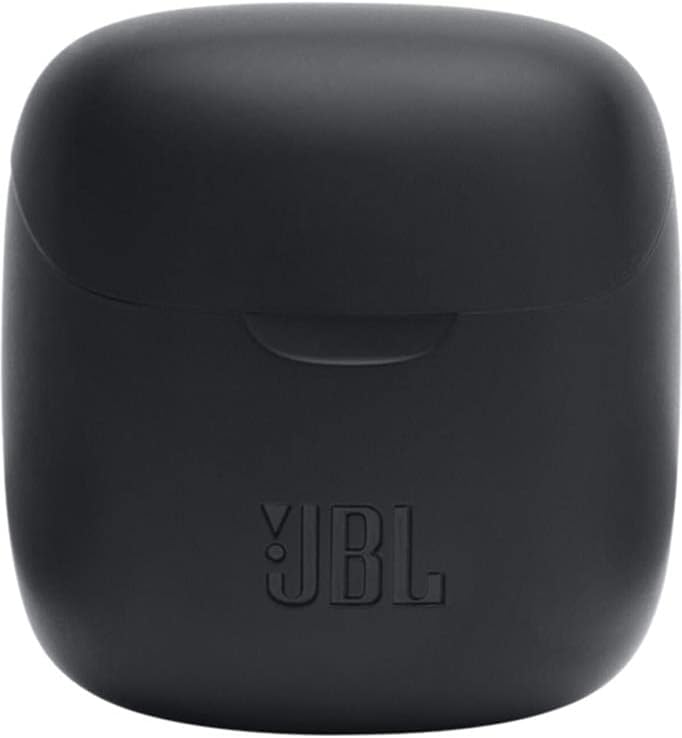
Image: The closed charging case for the JBL Tune 225 TWS, ready for storage or transport.
Shirya matsala
- Babu Matsalolin Sauti/Haɗi: Ensure both earbuds are charged. Place them back in the case, close it, then reopen to re-initiate pairing. Check your device's Bluetooth settings to ensure "JBL Tune 225 TWS" is connected. Try forgetting the device and re-pairing.
- Earbud guda ɗaya baya Aiki: Ensure both earbuds are charged. Try placing both back in the case, closing it, and then taking them out again. Sometimes a simple reset by placing them in the case can resolve this.
- Matsalolin Cajin: Ensure the USB-C cable is securely connected to both the case and the power source. Check if the charging port is clean and free of debris. Try a different USB-C cable or power adapter.
- Karancin Ƙara: Adjust the volume on your connected device. Ensure the earbuds are properly seated in your ears.
Ƙayyadaddun bayanai
| Siffar | Daki-daki |
|---|---|
| Alamar | JBL |
| Sunan Samfura | Talata 225TWS |
| Lambar Samfura | Talata 225TWS |
| Launi | Baki |
| Wurin Kunne | Cikin-Kunne |
| Factor Factor | Cikin-Kunne |
| Impedance | 32 ohm |
| Nau'in Direba | Direba mai ƙarfi |
| Girman Direba | mm12.5 ku |
| Yawan Mitar | 20 Hz - 20000 Hz |
| Hankali | 105db ku |
| Fasahar Haɗuwa | Mara waya (Bluetooth) |
| Sigar Bluetooth | 5.0 |
| Bluetooth Range | Mita 10 |
| Hanyar sarrafawa | Taɓa |
| Rayuwar Batirin kunne | 5 Awanni |
| Rayuwar Batir Cajin Cajin | Up to 20 Hours (additional) |
| Total Combined Playtime | Har zuwa Awanni 25 |
| Lokacin Caji | 2 Awanni |
| Matsayin Juriya na Ruwa | Resistant Ruwa |
| Nauyin samfur | 57 Grams |
| Cajin Nauyin Cajin | 100 Grams |
| UPC | 050036374019 |
Garanti da Taimako
Don bayanin garanti da goyan bayan abokin ciniki, da fatan za a koma zuwa JBL na hukuma website or contact your local JBL authorized dealer. Keep your proof of purchase for warranty claims.
Ana iya saukar da kwafin dijital na littafin jagorar mai amfani: JBL Tune 225 TWS User Manual (PDF)


