
Goshyda KX-T6001CID
Goshyda KX-T6001CID Big Button Corded Telephone User Manual
Model: KX-T6001CID | Brand: Goshyda
Gabatarwa
Thank you for choosing the Goshyda KX-T6001CID Big Button Corded Telephone. This manual provides detailed instructions to help you set up, operate, and maintain your new telephone. Please read this manual thoroughly before use to ensure proper functionality and to take full advantage na siffofinsa.
Bayanin Tsaro
- Do not expose the telephone to water or moisture.
- Avoid placing the telephone in direct sunlight or near heat sources.
- Use only the provided telephone line cord.
- Do not attempt to open or repair the telephone yourself. Refer all servicing to qualified personnel.
- A kiyaye nesa da yara.
Abubuwan Kunshin
Tabbatar cewa duk abubuwa suna nan a cikin kunshin:
- 1 x Handset
- 1 x Telephone Base Unit
- 1 x Handset Cord
- 1 x Igiyar Layin Waya
- 1 x Manhajar mai amfani

Image: The Goshyda KX-T6001CID telephone, showing the base unit, handset, and coiled cord.
Samfurin Ƙarsheview
Familiarize yourself with the main components and controls of your telephone.

Hoto: Gaba view of the telephone, highlighting the LCD display, large numeric keypad, and function buttons.
Keypad and Display:
- Numeric Keypad (0-9, *, #): For dialing phone numbers.
- Nuni LCD: Shows caller ID, time, date, and menu options.
- Maɓallan M1/M2: One-touch memory dialing keys.
- SET/STORE Button: Used for entering settings menu and saving entries.
- Maɓallan Sama/KASA: Navigate through menu options or adjust volume.
- RING Button: Adjust ringer volume.
- Maballin VOL: Adjust earpiece/speaker volume.
- FL/BRT (Flash/Brightness) Button: Flash function for call waiting, also adjusts LCD brightness.
- REDIAL Button: Redials the last dialed number.
- H.F (Hands-Free) Button: Activates speakerphone mode.

Hoto: Kusanci view of the large, easy-to-read buttons on the telephone's keypad.
Saita
1. Connecting the Telephone:
- Connect one end of the coiled handset cord to the handset and the other end to the handset jack on the left side of the telephone base unit.
- Connect one end of the telephone line cord to the LINE jack on the back of the telephone base unit.
- Connect the other end of the telephone line cord to your wall telephone jack.
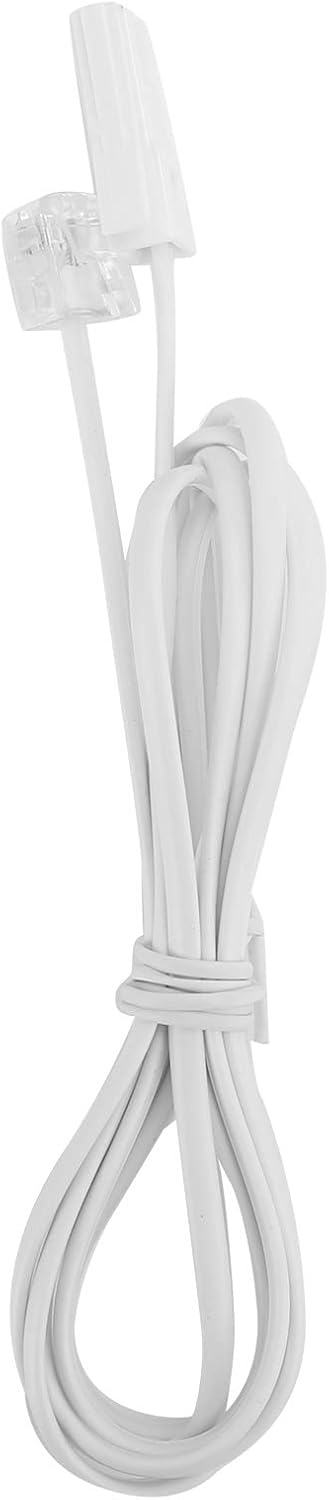
Image: The telephone line cord, used to connect the phone to the wall jack.
2. Saitunan farko:
Upon initial connection, the LCD display may prompt you to set the date and time. Follow the on-screen instructions using the UP kuma KASA buttons to adjust values and the SATA/KASUWA button don tabbatarwa.
Umarnin Aiki
Yin Kira:
- Ɗaga wayar hannu ko danna HF button for speakerphone.
- Dial the desired phone number using the numeric keypad.
- Jira kiran ya haɗa.
- Domin kawo ƙarshen kiran, maye gurbin wayar hannu ko danna maɓallin HF button sake.
Amsa Kira:
Idan wayar ta yi ƙara, ɗaga wayar ko danna HF maballin amsawa.
Sake bugawa:
Aga wayar hannu ko latsa HF, sannan danna maɓallin SAKACI maɓallin kiran lambar ƙarshe da aka buga.
Using Memory Keys (M1/M2):
Storing a Number:
- Aga wayar hannu ko latsa HF.
- Latsa SATA/KASUWA.
- Dial the phone number you wish to store.
- Latsa SATA/KASUWA sake.
- Danna ko dai M1 or M2 to save the number to that memory key.
Dialing from Memory:
Aga wayar hannu ko latsa HF, then press either M1 or M2 to dial the stored number.
Siffofin
- DTMF/FSK Dual System Caller ID: Supports both DTMF and FSK caller ID systems for displaying incoming call information.

Image: The telephone's display, showing its capability for DTMF/FSK dual system caller ID function.
- FLASH Time Adjustment: Adjustable FLASH time (90/95/100/120/180/300/600/1000ms) for compatibility with various PBX systems or call waiting services.
- 16 Ringtone Options: Zaɓi daga sautunan ringi guda 16 daban-daban.

Image: The telephone with graphic elements suggesting a choice of 16 ringtones.
- Adjustable LCD Brightness: Five levels of LCD screen brightness adjustment for optimal viewing.
- 3 Alarm Clock Functions: Set up to 3 different alarm clocks, each with unique alarm sounds.
- 10 Groups of Dual Key Memory: Store up to 10 frequently called numbers using dual-key memory functions.
- 1-99 Hours Do Not Disturb Function: Set a "Do Not Disturb" period from 1 to 99 hours.
Kulawa
- Clean the telephone with a soft, damp zane. Kada a yi amfani da masu tsabtace abrasive ko sauran ƙarfi.
- Keep the telephone away from dust and extreme temperatures.
- Ensure cords are not tangled or pinched to prevent damage.
Shirya matsala
| Matsala | Dalili mai yiwuwa | Magani |
|---|---|---|
| Babu sautin bugun kira | Telephone line cord is disconnected or faulty. | Check all cable connections. Try a different telephone line cord. Test the wall jack with another phone. |
| Ba za a iya yin ko karɓar kira ba | Line issue, or phone is in "Do Not Disturb" mode. | Verify phone line service. Check if "Do Not Disturb" is active and disable it. |
| Ba a nuna ID na mai kira ba | Caller ID service not subscribed or incompatible system. | Contact your telephone service provider to ensure Caller ID service is active. |
| Nuni ba shi da duhu ko sarari | LCD brightness setting is too low. | Adjust the LCD brightness using the FL/BRT button or menu settings. |
Ƙayyadaddun bayanai
| Siffar | Daki-daki |
|---|---|
| Samfura | KX-T6001CID |
| Alamar | Goshida |
| Kayan abu | Acrylonitrile Butadiene Styrene (ABS) |
| Launi | Fari |
| Nau'in | Wayar Waya |
| Nau'in bugun kira | faifan maɓalli guda ɗaya |
| ID mai kira | Yes (DTMF/FSK Dual System) |
| Lokacin Flash | 90/95/100/120/180/300/600/1000ms |
| Sautunan ringi | 16 zabin |
| Hasken LCD | 5 matakan daidaitacce |
| Ayyukan Ƙararrawa | kungiyoyi 3 |
| Ayyukan ƙwaƙwalwa | 10 groups of dual key memory |
| Kar a damemu | 1-99 hours |
| Nauyin Abu | 481 Grams |
| Girma (L x W x H) | 10 x 10 x 10 millimeters (approximate) |
| Tushen wutar lantarki | Battery Powered (likely referring to LCD/memory backup, as corded phones are line-powered for basic functions) |
Garanti da Taimako
This Goshyda product is covered by a standard manufacturer's warranty. For specific warranty details, please refer to the documentation included with your purchase or contact Goshyda customer support.
For technical assistance or further inquiries, please contact Goshyda customer service through their official webshafin ko bayanin lamba da aka bayar tare da samfurin ku.
Ask a question about this manual
Ask about setup, troubleshooting, compatibility, parts, safety, or missing instructions. Manuals+ will review the question and use this page’s manual context to help answer it.