
1. Gabatarwa
This manual provides detailed instructions for the setup, operation, and maintenance of your new Richmat Wireless Remote Control. This remote is designed to operate specific adjustable bed bases from Mlily, Bedtech, and Mattress Firm. Please read this manual thoroughly before use to ensure proper functionality.
Muhimmiyar Bayanin Daidaitawa:
- This remote is compatible only with Mlily, Bedtech, or Mattress Firm 3000 Richmat bases that originally featured a remote identical to the ones pictured (white or black versions).
- Minor button label variations may exist (e.g., M3 button as a flat button, flat button as under bed light, anti-snore as TV lounge on certain Classic Brands remotes). These are functional equivalents.
- This remote will NOT work if your original remote had a Bluetooth logo in the bottom right corner.
- This remote will NOT work if your original remote had a flashlight button on the top row or other button icons/words not listed here.
2. Bayanin Tsaro
- Keep the remote control away from water and excessive moisture.
- Do not expose the remote to direct sunlight or extreme temperatures.
- Do not attempt to disassemble or repair the remote control yourself. Contact qualified service personnel.
- A kiyaye batura daga wurin yara. Idan an haɗiye, nemi kulawar likita nan da nan.
- Zubar da batura masu amfani bisa ga ƙa'idodin gida.
3. Abubuwan Kunshin
Upon opening your package, please verify that you have received the following item:
- Richmat Wireless Remote Control (White or Black version)
4. Samfurin Ya Ƙareview da Gudanarwa
The Richmat Wireless Remote Control provides a clear layout for operating your adjustable bed base. You may receive either a white or black version of the remote, both offering identical functionality.

Figure 1: White and Black Remote Control Versions. You will receive one of these two versions based on current inventory. Both versions function identically.
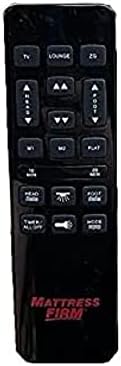
Figure 2: White Remote Control (Example with Mlily branding). This image displays the button layout and functions.

Figure 3: Black Remote Control (Example with Mattress Firm branding). This image displays the button layout and functions.
Ayyukan Maɓalli:
- TV / LOUNGE / ZG (Zero Gravity): Preset positions for watching TV, lounging, or achieving a zero-gravity posture.
- HEAD UP/DOWN Arrows: Adjust the head section of the bed upwards or downwards.
- FOOT UP/DOWN Arrows: Adjust the foot section of the bed upwards or downwards.
- M1 / M2: Memory preset buttons to save and recall your favorite bed positions.
- FLAT: Yana mayar da gadon zuwa matsayin da babu komai a ciki.
- 10 MIN / 20 MIN: Timer buttons for massage functions (if applicable to your base).
- HEAD / FOOT Massage: Activates or adjusts massage intensity for the head or foot sections.
- TIMER / ALL OFF: Turns off all active functions, including massage and under-bed lighting.
- LIGHT (Under Bed Light): Toggles the under-bed lighting on or off.
- kwatance: Cycles through different massage modes (if applicable).
Note: Button labels and specific functions may vary slightly depending on the adjustable base model. Refer to your adjustable base's manual for full details on its features.
5. Setup and Pairing Instructions
To use your new Richmat Wireless Remote Control, it must first be paired with your adjustable bed base. The pairing process is typically straightforward.
5.1. Shigar da Baturi
- Nemo sashin baturi a bayan ramut.
- Zamewa bude murfin baturin.
- Insert the required batteries (typically AAA, check markings inside the compartment) according to the polarity indicators (+ and -).
- Rufe murfin baturin amintacce.
5.2. Haɗa Ikon Nesa
The exact pairing procedure may vary slightly depending on your adjustable bed base model. Generally, the steps involve:
- Tabbatar da Ƙarfin Wuta: Make sure your adjustable bed base is plugged into a working power outlet.
- Locate Pairing Button: Find the pairing button on the control box of your adjustable bed base. This box is usually located under the bed frame, near the head or foot end. It may be labeled "PAIR," "SYNC," or have a small button.
- Activate Pairing Mode on Base: Press and hold the pairing button on the control box for approximately 3-5 seconds until you hear a beep or see an indicator light flash. This indicates the base is in pairing mode.
- Activate Pairing Mode on Remote: While the base is in pairing mode (within 10-20 seconds), press and hold the "FLAT" button on your new remote control. Some remotes may require pressing and holding the "HEAD UP" and "FOOT DOWN" buttons simultaneously, or a dedicated "PAIR" button if present.
- Tabbatar da Haɗawa: Release the button(s) on the remote when the indicator light on the control box stops flashing or you hear another beep, signifying successful pairing.
- Ayyukan Gwaji: Test all remote functions (head/foot adjustment, flat, presets) to ensure proper operation.
If you encounter difficulties, refer to the original instruction manual for your specific adjustable bed base model for precise pairing instructions.
6. Umarnin Aiki
Once paired, your Richmat Wireless Remote Control allows you to easily adjust your bed to your desired comfort position.
- Daidaita Kai/Ƙafa: Latsa ka riƙe KAI/KASA or ƘAFA SAMA/ƘASA arrows to move the respective sections. Release the button when the desired position is reached.
- Matsayi mai lebur: Danna maɓallin FLAT maɓalli don mayar da gadon zuwa matsayin da babu komai a ciki.
- Matsayin da aka saita: Latsa TV, FALO, ko ZG (Zero Gravity) to move the bed to these pre-programmed comfort positions.
- Saving Memory Presets (M1/M2):
- Adjust the bed to your desired position.
- Latsa ka riƙe M1 or M2 button for approximately 3 seconds until the bed slightly moves or the remote indicates the position is saved.
- To recall a saved position, simply press the M1 or M2 maballin.
- Massage Functions (if applicable):
- Latsa HEAD Massage or FOOT Massage to activate the massage for the respective section. Press again to cycle through intensity levels or modes.
- Yi amfani da 10 MIN or 20 MIN buttons to set a timer for the massage function.
- Latsa MODE to change massage patterns.
- Hasken Gado: Danna maɓallin HASKE maɓalli don kunna ko kashe fitilar ƙarƙashin gado.
- Duk A kashe: Latsa TIMER / ALL OFF to stop all active functions.
7. Kulawa
7.1. Madadin Baturi
When the remote control's range decreases or buttons become unresponsive, it's time to replace the batteries.
- Zamar da buɗe murfin batir a bayan nesa.
- Cire tsoffin batura.
- Insert new batteries (e.g., AAA) ensuring correct polarity (+ and -).
- Rufe murfin baturin amintacce.
- Zubar da tsoffin batura bisa ga alhaki bisa ga ƙa'idodin gida.
7.2. Tsaftacewa
To clean the remote control, use a soft, dry cloth. Do not use liquid cleaners, aerosols, or abrasive materials, as these can damage the remote's surface or internal components.
8. Shirya matsala
| Matsala | Dalili mai yiwuwa | Magani |
|---|---|---|
| Remote baya amsawa. |
|
|
| Bed base only moves in one direction or partially. |
|
|
| Nesa mai nisa ba shi da kyau. |
|
|
If troubleshooting steps do not resolve the issue, please refer to the support section for further assistance.
9. Ƙayyadaddun bayanai
- Lambar Samfura: 685650227221
- Mai ƙira: Richmat
- Na'urori masu jituwa: Mlily, Bed Tech, or Mattress Firm 3000 Richmat adjustable bases (specific models HJH55, Classic Brands Innova NU203CB, and others featuring identical remote as pictured).
- Matsakaicin Yawan Na'urori masu Tallafi: 1 (one remote per base)
- Zaɓuɓɓukan launi: White, Silver (Black)
- Siffa ta Musamman: Ergonomic zane
10. Garanti Bayani
Specific warranty details for this Richmat Wireless Remote Control are not provided in the product information. Please refer to the documentation that came with your adjustable bed base or contact the original seller/manufacturer of the remote for warranty terms and conditions.
11. Tallafin Abokin Ciniki
If you require further assistance, have questions, or need to report an issue that cannot be resolved using the troubleshooting guide, please contact the seller or manufacturer of your adjustable bed base or the remote control.
For purchases made through Amazon, you may contact the seller, UTAH RUSTIC FURNITURE, via your Amazon order history for support.