
EuroFone S2 Black
EuroFone S2 Motorcycle Bluetooth Headset User Manual
Model: S2 Black
1. Gabatarwa
The EuroFone S2 Motorcycle Bluetooth Headset is designed to provide seamless communication and entertainment for motorcycle riders. Featuring Bluetooth 5.1 technology, it offers stable connections, clear audio, and a range of functions including rider-to-rider intercom, hands-free calling, music playback, and FM radio. Its robust IP67 waterproof and dustproof design ensures reliable performance in various weather conditions.
2. Mabuɗin Siffofin
- 2-Rider Full Duplex Intercom: Communicate with a riding partner up to 800 meters away.
- IP67 Mai hana ruwa & Mai hana ƙura: Designed to withstand rain, dust, snow, and low temperatures.
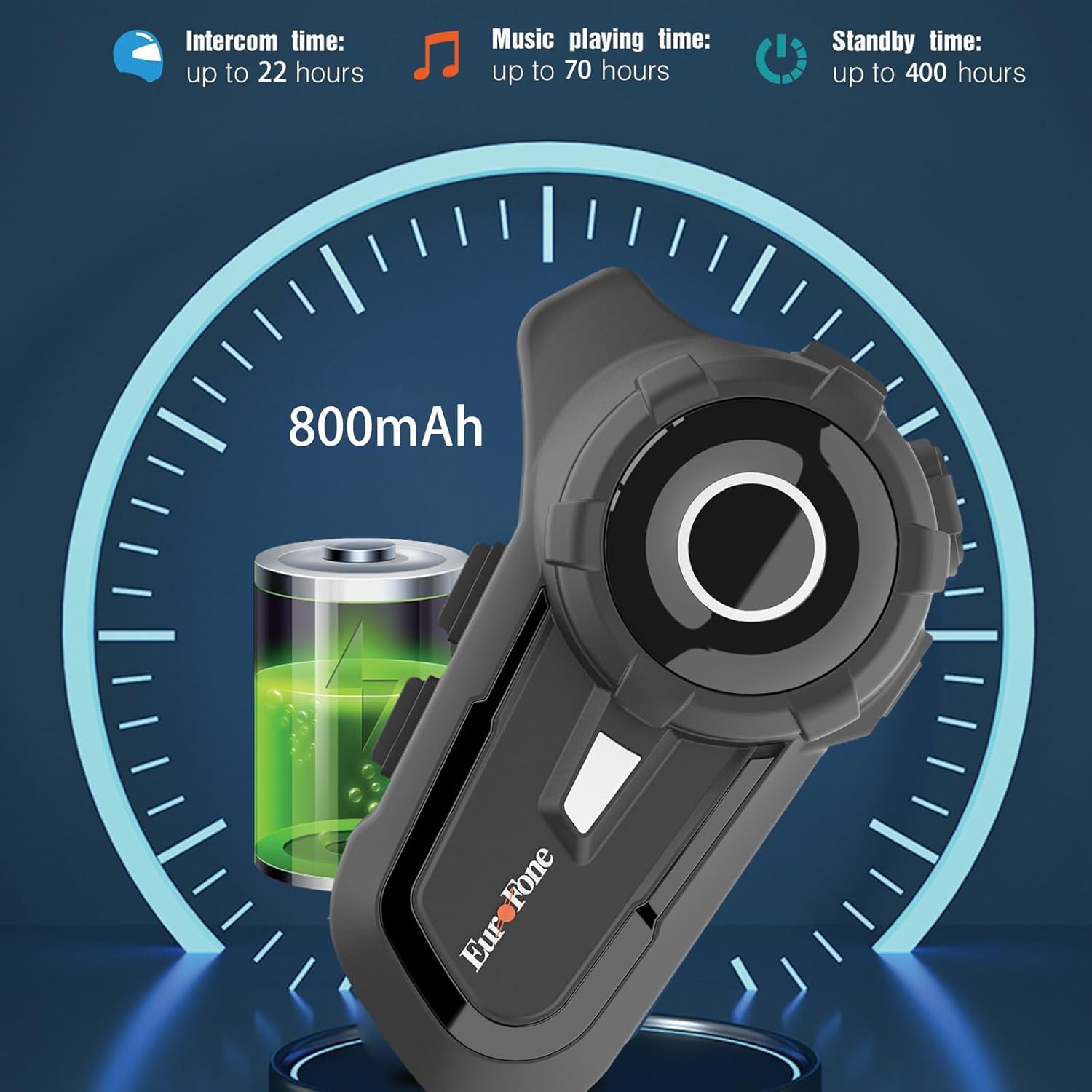
- Tsawon Rayuwar Baturi: 800 mAh battery provides up to 20 hours of working time and 18 months standby.
- Auto Answer & Voice Control: Automatically answers calls in 10 seconds and supports voice assistant/Siri.
- Noise Reduction & Hi-Fi Stereo Sound: CVC advanced noise cancellation for clear audio and high-fidelity sound quality.
- Bluetooth 5.1: Ensures stable and efficient wireless connection.
- Rediyon FM: Built-in FM radio for entertainment on the go.
- Matsayin GPS: Can connect to GPS devices for navigation.
3. Abubuwan Kunshin
Tabbatar cewa duk abubuwa suna nan a cikin kunshin ku:
- EuroFone S2 Bluetooth Headset Unit
- Hard Microphone (Boom Mic)
- Soft Microphone (Wired Mic)
- Saitin Majalisa
- USB Type-C Cajin caji
- Dutsen Clamp
- Velcro Pads don Masu Magana
- Manual mai amfani

4. Saita da Shigarwa
4.1 Cajin Na'urar
Before first use, fully charge the EuroFone S2 headset. Connect the provided USB Type-C cable to the charging port on the unit and to a USB power source. The indicator light will show charging status. A full charge takes approximately 2.5 hours.

4.2 Installing into Helmet
Follow these steps to install the headset into your motorcycle helmet:
- Prepare Helmet: Carefully remove the internal padding of your helmet to access the ear pockets and inner shell.
- Attach Speakers: Use the provided velcro pads to attach the speakers inside the helmet's ear pockets. Ensure they are positioned directly over your ears for optimal sound quality. Route the speaker wires neatly under the lining.
- Shigar da Makirufo: Choose either the hard boom microphone (for open-face/modular helmets) or the soft wired microphone (for full-face helmets). Attach the microphone to the helmet lining near your mouth using the adhesive base. Route the microphone cable along with the speaker wires.
- Mount Main Unit: Secure the main headset unit to the side of the helmet using the mounting clamp. Tighten the screws to ensure a firm attachment.
- Haɗa Kebul: Plug the speaker and microphone cables into the corresponding ports on the main headset unit. Ensure connections are secure.
- Reassemble Helmet: Carefully reinsert the helmet's internal padding, ensuring all wires are tucked away and do not interfere with comfort or safety.

5. Umarnin Aiki
5.1 Sarrafa Ƙarsheview
The EuroFone S2 features intuitive controls for easy operation:
| Sarrafa | Aiki |
|---|---|
| Kunnawa/Kashe Maɓalli | Kunna/Kashe Wuta |
| Maɓallin ayyuka da yawa | Play/Pause music, Answer/End calls, Activate voice assistant |
| Knob (Jog Dial) | Rotate clockwise for Volume Up, Counter-clockwise for Volume Down. Short press rotate for Next/Previous track. |
| FM Key | Activate/Deactivate FM Radio |
| Talkback Key (Intercom Button) | Initiate/End intercom communication |
| Charging Port & K-wire Interface | For charging and connecting external devices. |
| Jack waya | For wired audio connection (if applicable). |

5.2 Bluetooth Pairing (Phone)
To pair your EuroFone S2 headset with your mobile phone:
- Tabbatar cewa an kunna lasifikan kai.
- A lokaci guda danna ka riƙe Maballin Intercom da kuma Maɓallin ayyuka da yawa for approximately 5 seconds until you hear a "di di" voice prompt indicating factory settings restoration. Release the buttons.
- Turn on the power button until you hear a voice prompt. The indicator light will flash blue and red, indicating pairing mode.
- A kan wayar hannu, je zuwa saitunan Bluetooth kuma bincika samammun na'urori.
- Select "S2" from the list of Bluetooth devices.
- Once paired, the headset will confirm with a voice prompt, and the indicator light will show a steady blue light or slow flashes.
5.3 Intercom Pairing (Two Units)
To pair two EuroFone S2 units for intercom communication:
- Ensure both headsets are powered off.
- On the first headset, turn on the power button and press and hold the Maballin Intercom for approximately 5 seconds until the indicator flashes with a quick blue light. You will hear a "pairing mode" voice prompt.
- On the second headset, turn on the power button and press and hold the Maballin Intercom for approximately 5 seconds until the indicator flashes with a quick blue light. You will also hear a "pairing mode" voice prompt.
- Wait for a few seconds. The two headsets will automatically pair with each other. The indicator lights will change to a steady blue or slow flashes once connected.
5.4 Reconnecting Intercom
If the intercom connection is lost or you wish to re-establish it:
- Short click the Maɓallin ayyuka da yawa on either headset to hear the prompt "end intercom".
- Danna sau biyu Maballin Intercom on any one of the headsets.
- Sannan danna maɓallin Maɓallin ayyuka da yawa. You will hear the "start intercom" voice prompt again, indicating the connection is re-established.
5.5 Sake kunna waka
After pairing with your phone, you can control music playback:
- Kunna/Dakata: Danna Maɓallin ayyuka da yawa don kunna ko dakatar da kiɗa.
- Sarrafa ƙara: Juyawa da Jog Dial clockwise to increase volume, counter-clockwise to decrease volume.
- Next / Previous Track: Short press and rotate the Jog Dial counter-clockwise to play the next song. Short press and rotate clockwise to play the previous song.
5.6 Kiran waya
Manage phone calls hands-free:
- Amsa Kira: The headset will automatically answer incoming calls after 10 seconds. You can also click the Maɓallin ayyuka da yawa to answer immediately.
- Ƙarshen Kira: Danna Maɓallin ayyuka da yawa to end an ongoing call.
- Karɓar Kira: Latsa ka riƙe Maɓallin ayyuka da yawa na dakika 2 don ƙin kiran mai shigowa.
- Mataimakin Murya/Siri: Danna maɓallin Maɓallin ayyuka da yawa twice to activate your phone's voice assistant (Siri, Google Assistant, etc.).
5.7 FM Rediyo
Don amfani da rediyon FM da aka gina a ciki:
- Turn On/Off FM: Danna FM Key to activate or deactivate the FM radio.
- Scan Stations: While FM is on, press and hold the FM Key to automatically scan and save available stations.
- Change Station: Juyawa da Jog Dial to switch between saved FM stations.
6. Kulawa da Kulawa
- Tsaftacewa: Goge na'urar belun kunne da laushi, damp zane. Kada a yi amfani da sinadarai masu tsauri ko masu gogewa.
- Bayyanar Ruwa: While IP67 waterproof, avoid prolonged submersion. Ensure charging port cover is securely closed when not charging.
- Ajiya: Ajiye na'urar kai a wuri mai sanyi, busasshiyar nesa da hasken rana kai tsaye da matsanancin zafi.
- Kulawar Baturi: Don ingantacciyar rayuwar batir, yi cajin na'urar akai-akai, koda ba a yawan amfani da shi ba. Guji cikar cajin baturin na tsawon lokaci.
7. Shirya matsala
| Matsala | Dalili mai yiwuwa | Magani |
|---|---|---|
| Na'urar ba za ta kunna ba. | Ƙananan baturi. | Yi cajin na'urar gabaɗaya. |
| Ba za a iya haɗawa da waya ba. | Headset not in pairing mode; phone Bluetooth off; previously paired device interfering. | Ensure headset is in pairing mode (flashing blue/red). Turn phone Bluetooth off/on. Forget previous pairings on phone. Perform factory reset on headset. |
| Intercom not connecting. | Headsets not in intercom pairing mode; out of range. | Ensure both headsets are in intercom pairing mode. Move closer to each other. Re-initiate intercom connection as per section 5.4. |
| Babu sauti ko ƙaramin ƙara. | Volume too low; speakers not positioned correctly; loose connections. | Increase volume using the Jog Dial. Adjust speaker position in helmet. Check all cable connections. |
| Rashin ingancin sauti / amo. | Microphone not positioned correctly; excessive wind noise; interference. | Adjust microphone position. Ensure microphone foam cover is in place. Reduce speed if wind noise is excessive. |
8. Ƙayyadaddun bayanai
| Siffar | Daki-daki |
|---|---|
| Sunan Samfura | S2 Bakar |
| Sigar Bluetooth | 5.1 |
| Intercom Range | Up to 800 meters (2-riders) |
| Ƙarfin baturi | 800 mAh |
| Lokacin Caji | 2.5 Awanni |
| Working Time (Intercom) | Har zuwa awanni 22 |
| Working Time (Music) | Har zuwa awanni 70 |
| Lokacin jiran aiki | Har zuwa wata 18 |
| Matsayin Juriya na Ruwa | IP67 Waterproof & Dustfree |
| Sarrafa amo | Active Noise Cancellation (CVC) |
| Girma | 3.35 x 2.17 x 0.98 inci |
| Nauyin Abu | 12.7 oz |
| Mai ƙira | Shenzhen Goldstar Electronics Co., Ltd |
9. Garanti da Tallafawa
For warranty information and technical support, please refer to the official EuroFone website ko tuntuɓi sabis na abokin ciniki kai tsaye. Ajiye rasidin siyan ku azaman tabbacin siyan kowane da'awar garanti.
Kuna iya ziyarci EuroFone Store on Amazon don ƙarin bayanin samfur da albarkatun tallafi.
Ask a question about this manual
Ask about setup, troubleshooting, compatibility, parts, safety, or missing instructions. Manuals+ will review the question and use this page’s manual context to help answer it.