
1. Gabatarwa
Thank you for choosing the AIYIMA A05 TPA3221 Power Amplifier. This compact 2.0 channel stereo amplifier is designed to deliver high-fidelity audio to passive speakers, featuring both Bluetooth and RCA input options. This manual provides detailed instructions for setup, operation, and maintenance to ensure optimal performance and longevity of your device.
2. Umarnin Tsaro
- Tushen wutan lantarki: Use only the specified power adapter (DC 12-32V) to prevent damage. Ensure the power outlet voltage ya dace.
- Samun iska: Sanya amplifier in a well-ventilated area. Do not block ventilation openings. Avoid placing it on soft surfaces that may obstruct airflow.
- Danshi: Keep the device away from water, humidity, and liquids. Do not operate with wet hands.
- Zafi: Avoid direct sunlight, heat sources, or extreme temperatures.
- Tsaftacewa: Cire haɗin wuta kafin tsaftacewa. Yi amfani da laushi, bushe bushe. Kada a yi amfani da masu tsabtace ruwa ko iska.
- Hidima: Do not attempt to repair or disassemble the unit yourself. Refer all servicing to qualified personnel.
- Yara: A kiyaye nesa da yara.
3. Abubuwan Kunshin
Da fatan za a duba kunshin don abubuwa masu zuwa:
- AIYIMA A05 Bluetooth 5.0 Ampfawa x1
- Eriya ta Bluetooth x 1
- Manual mai amfani x 1
- Katin garanti x 1
- Adaftar wutar lantarki DC 32V x 1

Hoto 3.1: Contents of the AIYIMA A05 ampkunshin lifier, gami da amplifier unit, Bluetooth antenna, user manual, warranty card, and power adapter.
4. Samfurin Ya Ƙareview
4.1 Gudanar da Ƙungiyar Gaba
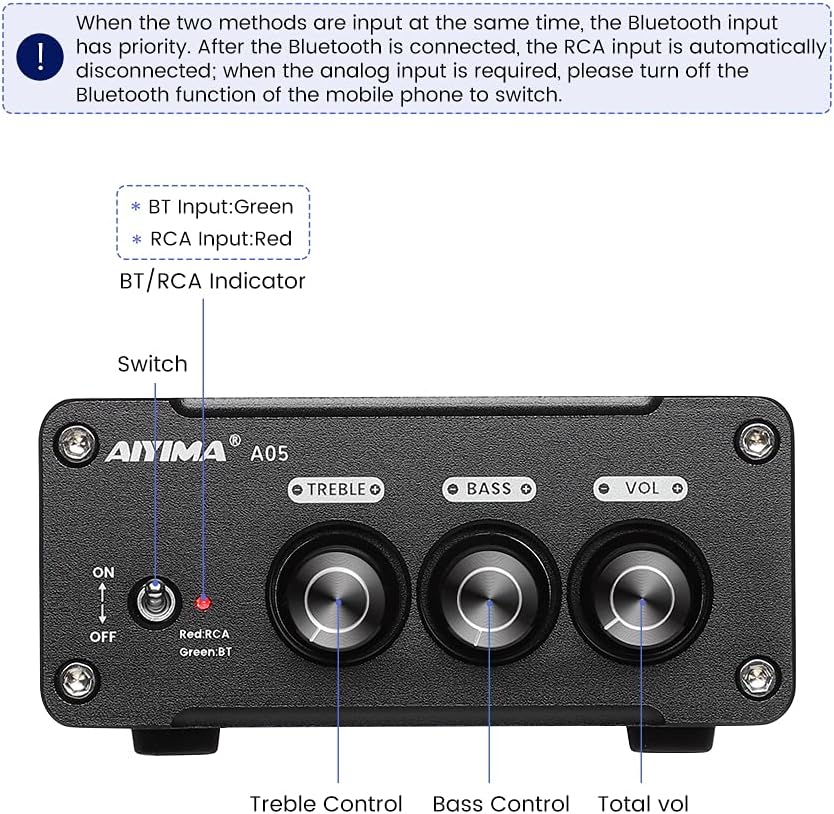
Hoto 4.1: Front panel of the AIYIMA A05 amplifier, showing the power switch, input indicator, treble, bass, and volume controls.
- Canjawar Wutar Lantarki (ON/KASHE): Kunnawa da ampwutar lantarki.
- BT/RCA Indicator: Displays the active input source. Green indicates Bluetooth (BT) input, Red indicates RCA input.
- Sarrafa Treble: Yana daidaita fitowar sauti mai yawan mita.
- Sarrafa Bass: Yana daidaita fitowar sauti mai ƙarancin mita.
- Sarrafa ƙara: Yana daidaita matakin fitarwa na sauti gaba ɗaya.

Hoto 4.2: Kusa view of the power switch and the BT/RCA input indicator on the front panel.

Hoto 4.3: Kusa view of the Treble, Bass, and Volume control knobs.
4.2 Haɗin Ƙungiyar Rear

Hoto 4.4: Rear panel of the AIYIMA A05 amplifier, showing the Bluetooth antenna port, RCA audio input, speaker outputs, and DC power input.
- ANT (Bluetooth Antenna Port): Connect the included Bluetooth antenna here for wireless audio reception.
- AUDIO IN (RCA Input): Connect audio sources (e.g., CD player, TV, DAC) using RCA cables.
- SPEAKER (Audio Output): Connect passive speakers using speaker wires. Ensure correct polarity (+ to + and - to -).
- DC 24-32V (Power Input): Connect the provided DC power adapter.
5. Saita Umarnin
Follow these steps to set up your AIYIMA A05 amplififi:
- Haɗa Bluetooth Eriya: Screw the included Bluetooth antenna into the ANT port on the rear panel.
- Haɗa Masu magana: Connect your passive speakers to the SPEAKER output terminals on the rear panel. Ensure the positive (+) terminal of the amplifier connects to the positive (+) terminal of the speaker, and the negative (-) terminal connects to the negative (-).
- Connect Audio Source (RCA): If using a wired audio source, connect it to the AUDIO IN (RCA) ports on the rear panel using appropriate RCA cables.
- Haɗa Ikon: Connect the DC power adapter to the DC 24-32V input port on the rear panel, then plug the adapter into a wall outlet.
- Kunna Wuta: Flip the power switch on the front panel to the "ON" position. The input indicator will light up.

Hoto 5.1: Allon baya na amplifier with Bluetooth antenna, RCA cables, speaker wires, and power adapter connected.
6. Umarnin Aiki
6.1 Kunnawa / Kashewa
Don iko a kan amplifier, flip the front panel switch to the "ON" position. To power off, flip the switch to the "OFF" position.
6.2 Haɗin Bluetooth
- Tabbatar da amplifier is powered on and the BT/RCA indicator is green, indicating Bluetooth mode. If it's red, ensure no RCA cable is connected or disconnect it.
- On your mobile device (phone, tablet, etc.), enable Bluetooth and search for available devices.
- Select "AIYIMA A05" from the list of devices to pair.
- Once paired, the indicator light will remain green, and you can play audio from your device through the ampmai sanyaya wuta.
6.3 RCA Input Usage
- Connect your audio source to the RCA input ports on the rear panel.
- Tabbatar da amplifier is powered on. The BT/RCA indicator should be red, indicating RCA input mode.
- If the indicator is green (Bluetooth mode), ensure Bluetooth is disconnected on any paired device, or turn off Bluetooth on your mobile device to switch to RCA input.
6.4 Daidaita Sauti
- Girma: Rotate the "VOL" knob clockwise to increase volume and counter-clockwise to decrease.
- Mai tsayi: Rotate the "TREBLE" knob to adjust high-frequency sounds to your preference.
- Bass: Rotate the "BASS" knob to adjust low-frequency sounds to your preference.
7. Kulawa
- Tsaftacewa: Disconnect the power adapter before cleaning. Use a soft, dry, lint-free cloth to wipe the surface of the amplifier. Do not use harsh chemicals or abrasive materials.
- Ajiya: If not in use for an extended period, store the amplifier a wuri mai sanyi da bushewa, nesa da hasken rana kai tsaye da yanayin zafi mai tsanani.
- Haɗin kai: A riƙa duba duk hanyoyin haɗin kebul lokaci-lokaci domin tabbatar da cewa suna da aminci kuma ba sa tsatsa.
8. Shirya matsala
If you encounter issues with your AIYIMA A05 amplifier, don Allah a duba waɗannan matsaloli da mafita na gama gari:
| Matsala | Dalili mai yiwuwa | Magani |
|---|---|---|
| Babu fitarwar sauti |
|
|
| Distorted or buzzing sound |
|
|
| Bluetooth ba ya haɗi |
|
|
| Loud noise/ticking on startup |
|
|
If the problem persists after trying these solutions, please contact AIYIMA customer support for further assistance.
9. Ƙayyadaddun bayanai

Hoto 9.1: Dimensions of the AIYIMA A05 amplifier: 107mm (4.2in) width, 87mm (3.4in) depth, 36mm (1.4in) height.
| Siffar | Ƙayyadaddun bayanai |
|---|---|
| Samfura | A05 |
| Ƙarfin fitarwa | 105 Watts (at 4 Ω) |
| Yawan Tashoshi | 2.0 (Stereo) |
| Sigar Bluetooth | QCC3034 APTX Bluetooth 5.0 |
| Chipset | TPA3221 |
| Mafi ƙarancin wadata Voltage | 12V (DC) |
| Matsakaicin Samarwa Voltage | 32V (DC) |
| Nauyin Abu | 500 Grams |
| Girma (Kimanin.) | 107mm (W) x 87mm (D) x 36mm (H) |
10. Garanti da Tallafawa
The AIYIMA A05 amplifier comes with a warranty. Please refer to the included Warranty Card for specific terms and conditions. For technical support, troubleshooting assistance, or warranty claims, please contact AIYIMA customer service through the retailer where the product was purchased or visit the official AIYIMA website.
Albarkatun Kan layi: For additional information and support, you may visit the AIYIMA store page: AIYIMA Official Store