
1. Gabatarwa
Thank you for choosing the iPega PG-P4008 Wireless Game Controller. This manual provides detailed instructions on how to set up, operate, and maintain your controller. The PG-P4008 offers broad compatibility with PS4, PS3, Android (10.0+), iOS (13.0+), and Windows PC, connecting wirelessly via Bluetooth for an enhanced gaming experience.
2. Samfurin Ya Ƙareview
The iPega PG-P4008 is designed for versatile gaming across multiple platforms. It features a comfortable ergonomic design, responsive controls, and several advanced functionalities to immerse you in your games.
Mabuɗin fasali:
- Wireless Bluetooth connectivity (BT2.1+EDR) with up to 8 meters range.
- No driver installation required for connection.
- Integrated colored LED light indicator for operational status.
- Dual motors for realistic vibration feedback during gameplay.
- Built-in three-dimensional acceleration sensor and gyroscope sensor with six-axis induction.
- Integrated speaker and 3.5mm earphone jack for game audio.
- Dual-point capacitive touchpad for enhanced control.
- Compatible with PS4, PS3, Android (10.0+), iOS (13.0+), and Windows PC.
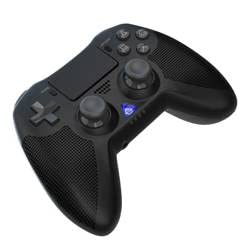
Hoto 1: Gaba view of the iPega PG-P4008 Wireless Game Controller. This image displays the controller's ergonomic design, dual analog sticks, D-pad, action buttons, touchpad, and the central LED indicator.
3. Saita da Haɗin kai
The PG-P4008 controller connects wirelessly via Bluetooth. Follow these steps to pair your controller with your device:
- Kunna Wuta: Ensure the controller is charged. Press and hold the Maɓallin PS (or equivalent power button) to turn on the controller.
- Yanayin Haɗa:
- For PS4/PS3: Connect the controller to the console using a USB cable. Once recognized, you can disconnect the cable for wireless play. The connection method is similar to the official P4 controller.
- For Android/iOS: Activate Bluetooth on your mobile device. On the controller, press and hold the SHARE button + PS button simultaneously until the LED indicator flashes rapidly, indicating pairing mode. Select "PG-P4008" (or similar) from your device's Bluetooth list to connect.
- For Windows PC: Ensure your PC has Bluetooth capability. On the controller, press and hold the PS button + OPTIONS button simultaneously until the LED indicator flashes rapidly. On your PC, go to Bluetooth settings, add a new device, and select "PG-P4008" (or similar) to pair.
- Haɗin Nasara: Once connected, the LED indicator on the controller will change to a solid color, indicating a successful pairing.
Lura: No additional driver software is required for operation. The controller supports a stable connection up to 8 meters.
4. Umarnin Aiki
Alamar LED:
The built-in colored LED light indicates the controller's operational status and player assignment, similar to the official PS4 controller. Different colors will signify different stages or player numbers.
Jawabin Jijjiga:
The controller features dual motors embedded in the handles, providing tactile vibration feedback to enhance your gaming immersion. This feedback will vary based on in-game events.
faifan taɓawa:
The dual-point capacitive touchpad allows for intuitive control in games that support touch input, offering an additional layer of interaction.
Audio Functionality:
Connect your 3.5mm earphones to the integrated jack on the controller to experience game audio directly, providing a private and immersive sound experience.
5. Kulawa
- Keep the controller dry and away from moisture to prevent damage to internal components.
- A riƙa tsaftace na'urar sarrafawa akai-akai da kyalle mai laushi da busasshe. A guji amfani da sinadarai masu ƙarfi ko kayan gogewa.
- Ajiye mai sarrafawa a wuri mai sanyi, bushe lokacin da ba a amfani da shi.
- A guji fallasa na'urar sarrafawa ga yanayin zafi mai tsanani ko hasken rana kai tsaye.
- Do not attempt to disassemble or modify the controller, as this will void any potential warranty and may cause damage.
6. Shirya matsala
- Mai sarrafawa baya haɗawa:
- Tabbatar da cikakken cajin mai sarrafawa.
- Tabbatar cewa an kunna Bluetooth akan na'urarka.
- Make sure the controller is in the correct pairing mode for your device (refer to Section 3).
- Gwada sake kunna mai sarrafawa da na'urarka.
- Cire haɗin da suka gabata daga jerin Bluetooth na na'urarka kuma gwada sake haɗawa.
- Lalacewar shigarwa ko cire haɗin gwiwa:
- Ensure you are within the 8-meter operating range.
- Rage tsangwama daga wasu na'urorin mara waya.
- Check for any physical obstructions between the controller and the device.
- Girgiza ba ta aiki:
- Tabbatar cewa wasan da kuke kunna yana goyan bayan amsawar girgiza.
- Duba saitunan cikin wasa don tabbatar da cewa an kunna rawar jiki.
- Audio not working via 3.5mm jack:
- Ensure your earphones are properly plugged in.
- Check the volume settings on your device and in-game.
- Test with another pair of earphones to rule out earphone issues.
7. Ƙayyadaddun bayanai
| Lambar Samfura | Saukewa: PG-P4008 |
| Alamar | iPega |
| Haɗuwa | Bluetooth (BT2.1+EDR) |
| Mara waya mara waya | Har zuwa mita 8 |
| Na'urori masu jituwa | PS4, PS3, Android (10.0+), iOS (13.0+), Windows PC |
| Siffofin Musamman | Wireless, Touchpad, Vibration, 6-axis Gyroscope, Built-in Speaker, 3.5mm Audio Jack |
| Adadin Maɓalli | 17 |
| Tushen wutar lantarki | Ana Karfin Batir |
8. Garanti da Tallafawa
Information regarding product warranty and customer support is not provided within this manual. Please refer to the product packaging or the retailer's webshafin yanar gizo don cikakkun bayanai kan garantin da kuma yadda ake tuntuɓar tallafin abokin ciniki don taimako.