
TOUCARE T9S
TOUCARE T9S Motorcycle Bluetooth Intercom User Manual
Model: T9S | Brand: TOUCARE
Gabatarwa
The TOUCARE T9S is a high-performance Bluetooth intercom system designed for motorcycle riders. It enables clear communication between up to four riders, offers music sharing, and integrates with your mobile phone for calls and GPS navigation. With advanced noise cancellation and a robust waterproof design, the T9S ensures a reliable and enjoyable riding experience in various conditions.
Mabuɗin Siffofin
- 1200M Maximum Distance: Equipped with Bluetooth 5.0 for high compatibility and stability, allowing group communication within a 1200m intercom range.
- Support 4-Riders Intercom: Full-duplex communication for up to 4 riders simultaneously. Universal pairing function ensures compatibility with most Bluetooth headsets and mobile phones.
- Raba Kiɗa: Share music with another rider, enjoy Hi-Fi stereo music, FM radio, or GPS voice guidance.
- Noise Reduction and IP67 Waterproof: DSP and CVC advanced noise reduction technology for clear communication up to 120km/h. IP67 waterproof rating for all-weather use.
- Ultra-Long Standby Battery: 800mAh rechargeable battery provides up to a week of standby time and 15 hours of working time.

Image: The T9S system supports communication for up to four riders over a distance of 1200 meters.

Image: CVC & DSP Noise Cancellation Technology ensures clear and smooth communication even at high speeds.

Image: The IP67 waterproof rating makes the T9S suitable for use in all weather conditions, including water sports.

Image: The T9S offers extended endurance times for talking, music playback, and standby, supporting long-distance travel.
Abubuwan Kunshin
Each TOUCARE T9S package includes the following components:
- 1 x Bluetooth Intercom Unit
- 1 x Hi-Fi Speaker Set
- 1 x Boom Microphone
- 1 x Button Microphone
- 1 x kebul na USB
- 1 x cketararrawar Dutse
- 1 x clamp Plate
- 1 x Allen Wrench

Image: All components included in the TOUCARE T9S package, ensuring you have everything needed for installation and use.
Samfurin Ƙarsheview da Ayyukan Button
Familiarize yourself with the buttons and indicators on your T9S intercom unit:
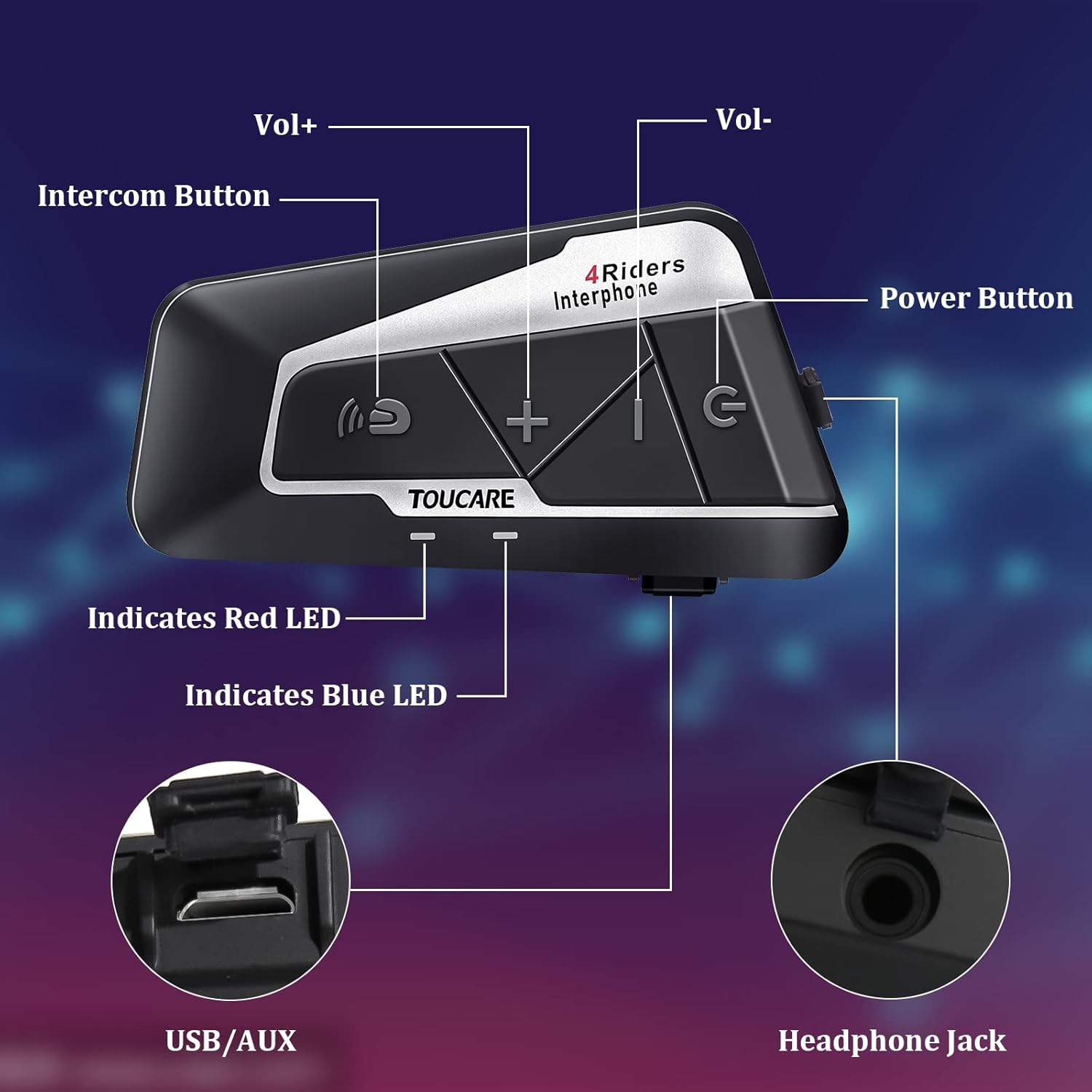
Image: Detailed diagram of the T9S unit, highlighting the location and labels of each button and port.
Power On/Off Button (G)
- Kunnawa/Kashewa: Latsa ka riƙe don kunna ko kashe na'urar.
- Paired Mobile Phone: Short press to connect/disconnect with a paired mobile phone.
- Ƙarfin Ƙarfi: Short press to hear battery level prompt.
- Hang up Bluetooth Intercom: Short press during an intercom call to end it.
- Kunna Kiɗa/Dakata: Shortan latsa don kunna ko dakatar da kiɗa.
- Call Answering/Third Party Answer/End/Reject: Manage phone calls.
Bluetooth Intercom Button (Intercom Icon)
- +ara +: Shortan latsa don ƙara ƙara.
- Wakar Karshe: Dogon latsa don zuwa waƙar da ta gabata.
- FM Turn Up: Short press during FM mode to tune up.
- FM Turn On/Off: Long press to turn FM radio on or off.
- Sake Lamba na Ƙarshe: Double press to redial the last dialed number.
Volume - Button (-)
- --Ara -: Latsa gajere don rage ƙarar.
- Waka ta gaba: Danna dogon don zuwa waƙa ta gaba.
- FM Turn Down: Short press during FM mode to tune down.
- FM Turn On/Off: Long press to turn FM radio on or off.
- Bugun murya: Double press to activate voice dialing (if supported by your phone).

Image: The T9S features ultra-large buttons, designed for easy operation even while wearing gloves.
Jagoran Shigarwa
Kafaffen Hanyar Shigarwa
Follow these steps to securely install the T9S intercom unit on your helmet:
- Locate and Clean: Identify a suitable flat area on the left side of your helmet for mounting. Ensure the surface is clean and dry.
- Shirya Adhesive: Peel off the protective film from the 3M adhesive on the back of the mounting bracket.
- Aiwatar da Matsi: Firmly press the mounting bracket onto the chosen location on your helmet. Apply consistent pressure for several seconds to ensure a strong bond.
- Amintaccen Sashe: Slide the T9S intercom unit onto the mounted bracket until it clicks securely into place.
- Install Speakers and Microphone: Route the speaker and microphone wires inside the helmet lining. Position the speakers inside the ear pockets and the microphone near your mouth for optimal audio.
Umarnin Aiki
Haɗawa da Wayar Hannu
- Ensure the T9S is powered off.
- Press and hold the Power On/Off button until the LED indicator flashes red and blue alternately, indicating pairing mode.
- On your mobile phone, enable Bluetooth and search for new devices. Select "TOUCARE T9S" from the list.
- Once paired, the LED will flash blue slowly.
Initiating Intercom Communication
- Ensure all T9S units are powered on and within range.
- To initiate a group intercom, short press the Bluetooth Intercom Button on your unit. The units will attempt to connect.
- To end an intercom call, short press the Power On/Off button.
Sake Sake kunnawa
- Kunna/Dakata: Short danna maɓallin Kunnawa/kashewa.
- Waka ta gaba: Danna maɓallin Ƙararrawa na dogon lokaci.
- Waƙar Baya: Long press the Bluetooth Intercom button.
- Daidaita Girma: Short press Volume + or Volume - buttons.
Rediyon FM
- Kunna/Kashe: Long press either the Bluetooth Intercom button or the Volume - button.
- Tuna Up: Short press the Bluetooth Intercom button.
- Tuna Down: Short press the Volume - button.
Amsa/Ƙarshen Kira
- Amsa Kira: Short press the Power On/Off button when a call comes in.
- Ƙarshen Kira: Short press the Power On/Off button during a call.
- Karɓar Kira: Long press the Power On/Off button when a call comes in.
- Bugun murya: Double press the Volume - button (requires phone support).
- Sake Lamba na Ƙarshe: Double press the Bluetooth Intercom button.
Ƙididdiga na Fasaha
| Siffar | Ƙayyadaddun bayanai |
|---|---|
| Sigar Bluetooth | 5.0 |
| Bluetooth Profiles Tallafawa | HSP, HFP, A2DP, AVRCP, AGHSP |
| Lokacin Aiki | 15 hours |
| Lokacin jiran aiki | 350 hours |
| Lokacin Caji | 3 hours |
| Nau'in Baturi | Rechargeable Lithium Battery, 800mAh, 3.7V |
| Girma | 89 x 46 x 30 mm |
| Nauyi | 85 g |
| Sarrafa amo | Active Noise Cancellation (DSP & CVC) |
| Matsayin Juriya na Ruwa | IP67 |
| Fasahar Haɗuwa | Mara waya |
| Kayan abu | Roba |
| Nau'in sarrafawa | Voice Control (via phone), Button Control |
Kulawa
To ensure the longevity and optimal performance of your TOUCARE T9S intercom, follow these maintenance guidelines:
- Tsaftacewa: Shafa naúrar da taushi, damp zane. Kada a yi amfani da sinadarai masu tsauri, masu kaushi mai tsafta, ko kayan wanka masu ƙarfi.
- Ajiya: Ajiye na'urar a wuri mai sanyi da bushewa, nesa da hasken rana kai tsaye da kuma yanayin zafi mai tsanani idan ba a amfani da ita.
- Kulawar Baturi: For long-term storage, charge the battery to about 50% every three months to prevent deep discharge and extend battery life.
- Bayyanar Ruwa: Although IP67 rated, avoid prolonged submersion. Ensure charging port is dry before charging.
- Na'urar USB: Riƙe kebul da mahaɗi a hankali don hana lalacewa.
Shirya matsala
If you encounter issues with your T9S intercom, try the following solutions:
Babu Ƙarfi
- Duba Baturi: Ensure the unit is fully charged. Connect it to a power source and check if the charging indicator lights up.
- Sake saitin: If unresponsive, try holding the Power On/Off button for an extended period (e.g., 10-15 seconds) to force a reset.
Cannot Pair with Mobile Phone/Other Intercoms
- Yanayin Haɗa: Ensure the T9S is in pairing mode (LED flashing red and blue alternately).
- Device Visibility: Make sure Bluetooth is enabled on your phone/other intercoms and they are discoverable.
- Share Tarihin Haɗawa: On your phone, forget the T9S device and try pairing again. For intercoms, consult the manual for clearing pairing history if available.
- Nisa: Ensure devices are within close proximity (e.g., 1 meter) during pairing.
Poor Audio Quality/No Sound
- Girma: Check if the volume is turned up on both the T9S and the connected device (phone/intercom).
- Matsayin Marufo: Ensure the microphone is correctly positioned near your mouth and not obstructed.
- Haɗin Magana: Verify that the speakers are securely plugged into the headphone jack.
- Tsangwama: Nisantar tushen tsangwama mai ƙarfi na lantarki.
- Firmware: Duba masana'anta website for any available firmware updates that might improve audio performance.
Garanti da Taimako
For warranty information, technical support, or service inquiries, please refer to the warranty card included with your product or visit the official TOUCARE website. Ajiye rasidin siyan ku azaman shaidar siyan don da'awar garanti.
For further assistance, you may also contact TOUCARE customer service through the contact information provided on their official channels.
Ask a question about this manual
Ask about setup, troubleshooting, compatibility, parts, safety, or missing instructions. Manuals+ will review the question and use this page’s manual context to help answer it.