
1. Gabatarwa
This manual provides detailed instructions for the safe installation, operation, and maintenance of your Lucci Air Peregrine 56-inch White Ceiling Fan with Remote, Model 21328001. The Peregrine fan features a modern design with three blades, energy-efficient direct current (DC) technology, six speeds, and high airflow. It is rated for both indoor and outdoor use in covered areas. The fan includes a 6-inch warm white GX53 light kit with 3-step dimming functionality and comes with a remote control and wall mount bracket.

Hoto 1.1: Gaba view of the Lucci Air Peregrine 56-inch White Ceiling Fan.
2. Bayanin Tsaro
Please read all instructions carefully before beginning installation and retain this manual for future reference. Improper installation or use can lead to electric shock, fire, or personal injury.
- Tsaron Wutar Lantarki: Ensure the power supply is disconnected at the circuit breaker before installation or maintenance. All electrical wiring must be performed by a qualified electrician and comply with local codes and regulations.
- hawa: The ceiling fan must be mounted to a structurally sound ceiling joist or outlet box capable of supporting the fan's weight (15.92 lbs).
- Tsabtace Ruwa: Maintain a minimum clearance of 7 feet from the floor to the fan blades and 18 inches from the fan blades to any walls or obstructions.
- Kit ɗin Haske: Use only the specified GX53 12W 3000K bulb. Do not exceed the maximum wattage.
- Amfanin Waje: This fan is rated for indoor and outdoor use in covered areas. Do not expose to direct water spray.
- Ikon nesa: Keep the remote control away from water and extreme temperatures. Replace batteries as needed.
3. Abubuwan Kunshin
Verify that all components are present and undamaged before proceeding with installation. If any parts are missing or damaged, contact customer support.
- Ceiling Fan Motor Housing with Downrod
- Fan Blades (3)
- Ikon nesa
- Wall Mount Bracket for Remote
- GX53 12W 3000K Light Kit (pre-installed or separate)
- Optional Metal Cap (for non-light use)
- Hawan Hardware
- Jagoran Jagora

Hoto na 3.1: Ƙarsheview of the remote control and its features, including 6 fan speeds, reverse switch, light on/off/dimming, fan on/off, and wall mount holster. A CP2032 battery is included.
4. Saita & Shigarwa
Professional installation is recommended for this ceiling fan. Ensure all power is disconnected at the main circuit breaker before beginning installation.
- Shirya Wuri Mai hawa: Securely attach the mounting bracket to a suitable ceiling joist or fan-rated outlet box. Ensure the structure can support the fan's weight.
- Assemble Downrod and Motor: Haɗa ƙasa zuwa gidan injin fan. A hankali ciyar da wayoyi na lantarki ta hanyar ƙasa.
- Haɗa Fanka: Ɗaga tarin fanka sannan ka rataye shi daga maƙallin hawa.
- Haɗin Wutar Lantarki: Haɗa wayoyin wutar lantarki na fanka zuwa wayoyin gida bisa ga jadawalin wayoyi da aka bayar a cikin jagorar shigarwa daban (ba a haɗa a cikin wannan littafin ba). Tabbatar cewa duk haɗin suna da aminci.
- Haɗa Ruwan Ruwa: Securely attach the three fan blades to the motor housing using the provided screws.
- Install Light Kit (Optional): If using the light, install the GX53 12W 3000K bulb into the light kit socket. Attach the light kit to the bottom of the fan motor housing. If not using the light, install the optional metal cap.
- Amintaccen Canopy: Slide the canopy up to the ceiling and secure it to the mounting bracket, covering all wiring.
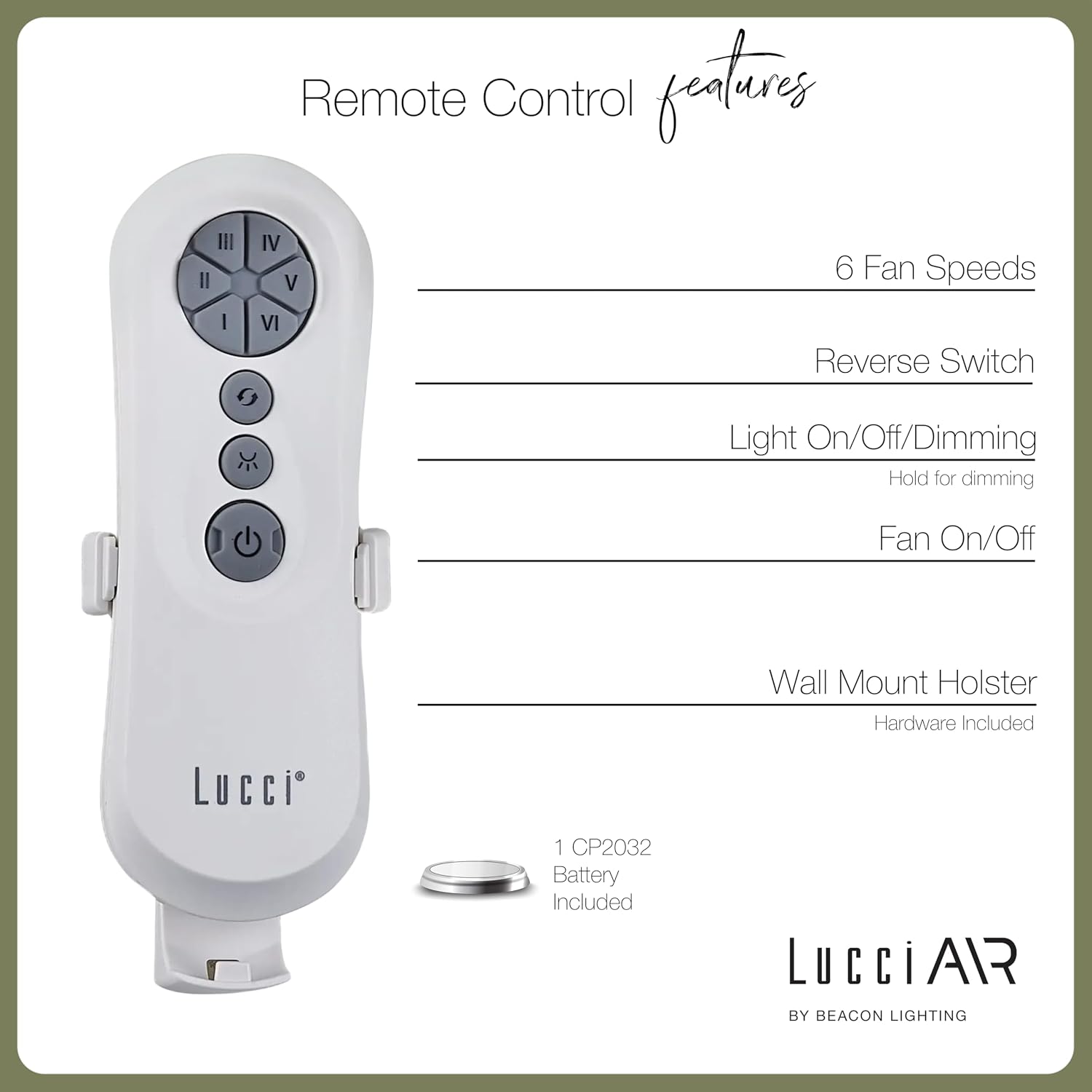
Image 4.1: Dimensional diagram of the Lucci Air Peregrine 56-inch Ceiling Fan, showing overall height, width, and blade length measurements.

Hoto 4.2: Kasa view of the Lucci Air Peregrine fan, highlighting the integrated light kit.
5. Aiki
The Lucci Air Peregrine fan is operated using the included remote control. Ensure the remote has a working CP2032 battery installed.
5.1 Ayyuka masu nisa
- Fan Kunna/Kashe: Press the power button (ⓘ) to turn the fan on or off.
- Gudun Masoya: Use buttons I, II, III, IV, V, VI to select one of the six available fan speeds. I is the lowest speed, VI is the highest.
- Juya Juya: Press the reverse button (↻) to change the direction of the fan blades. This function is typically used to switch between summer (downward airflow) and winter (upward airflow) modes. Note: Some models may have a manual switch on the motor housing for this function.
- Haske A Kashe/Kashe/Dimming: Press the light button (☀) to turn the light on or off. Hold the light button to dim or brighten the light through its 3-step dimming range.
5.2 Winter/Summer Mode
The fan features a manual switch on the motor housing to change between winter and summer modes. For summer operation, the blades should rotate counter-clockwise to push air downwards, creating a cooling breeze. For winter operation, the blades should rotate clockwise to draw cool air up, circulating warm air trapped near the ceiling. Adjust the switch accordingly.
6. Kulawa
Kulawa na yau da kullun yana tabbatar da kyakkyawan aiki kuma yana ƙara rayuwar fann rufin ku.
- Tsaftacewa: Kurar ruwan fanka da mahalli na mota lokaci-lokaci tare da taushi, damp zane. Kada a yi amfani da masu tsabtace abrasive ko abubuwan kaushi, saboda waɗannan na iya lalata ƙarshen.
- Matsewar ruwan wuka: Check all blade screws annually to ensure they are tight. Loose blades can cause wobbling and noise.
- Sauya Kwan fitila: Disconnect power before replacing the GX53 light bulb. Allow the bulb to cool completely before handling.
- Baturi Nesa: Replace the CP2032 battery in the remote control when its range decreases or it stops responding.
7. Shirya matsala
Koma zuwa tebur mai zuwa don batutuwan gama gari da mafitarsu.
| Matsala | Dalili mai yiwuwa | Magani |
|---|---|---|
| Fan ba ya farawa | Babu iko ga fan Sakkun hanyoyin haɗin waya Remote control battery dead | Duba mai watsewar kewayawa Verify all wire connections are secure (power off) Sauya baturin ramut |
| Fan ta girgiza | Sako da ruwa sukurori Ruwan da ba daidai ba Matsakaicin hawa mai sako-sako | Matsa duk skru na ruwa Ensure blades are installed correctly and balanced Verify mounting bracket is securely fastened |
| Haske ba ya aiki | Light bulb faulty Loose wire connection to light kit | Sauya kwan fitila Check light kit wiring (power off) |
| Ikon nesa baya aiki | Mataccen baturi Remote not paired (if applicable) | Sauya baturi Refer to separate remote pairing instructions (if provided with fan) |
8. Ƙayyadaddun bayanai
Key technical details for the Lucci Air Peregrine 56-inch White Ceiling Fan (Model 21328001).
| Siffar | Daki-daki |
|---|---|
| Sunan Samfura | Peregrine |
| Lambar Samfura | 21328001 |
| Alamar | Lucci Air |
| Launi | Fari |
| Fan Zane | Rufe Fan |
| Tushen wutar lantarki | DC (kai tsaye a halin yanzu) |
| Girman samfur | 56"D x 56"W x 15"H |
| Yawan Ruwa | 3 |
| Tsawon Ruwa | Inci 31.1 |
| Farancin Jirgin Sama | 6363 Cubic Feet Per Minute (CFM) |
| Yawan Gudu | 6 |
| Amfanin Wuta (Matsakaici) | 38W |
| Voltage | 120Vac, 60Hz |
| Kit ɗin Haske Haɗe | 1x GX53 12W 3000K bulb, 1100 Lumens, 3-step dimmable |
| Hanyar sarrafawa | Ikon nesa |
| Amfanin Cikin Gida/Waje | Indoor, Outdoor (covered areas) |
| Nauyin Abu | 15.92 fam |
| UPC | 811769032344 |
9. Garanti & Tallafi
The Lucci Air Peregrine 56-inch White Ceiling Fan comes with a garantin rayuwa iyaka. For warranty claims, technical support, or replacement parts, please contact Lucci Air customer service. Keep your proof of purchase for warranty validation.
Don ƙarin taimako, da fatan za a ziyarci Shagon Lucci Air a Amazon ko kuma tuntuɓi dillalin ku.