
Gabatarwa
This manual provides detailed instructions for the safe installation, operation, and maintenance of your bimar Wi-Fi Ceiling Fan, Model 1 (Ø 132). Please read this manual thoroughly before using the product and retain it for future reference.
Amfani da Niyya: This high-performance ceiling fan is designed for ventilation in indoor domestic environments. Any other use is considered improper and potentially hazardous. The manufacturer cannot be held responsible for any damages resulting from improper use or repairs performed by unqualified personnel.
Muhimman Umarnin Tsaro
Don rage haɗarin gobara, girgizar lantarki, ko rauni ga mutane, kiyaye waɗannan abubuwan:
- Karanta duk umarnin kafin shigar da fanka.
- Dole ne ƙwararren ma'aikacin lantarki ya yi shigarwa daidai da duk lambobin lantarki na gida da na ƙasa.
- Ensure the installation site can support the fan's weight (approximately 6.2 kg).
- Koyaushe a cire haɗin wutar lantarki a babban na'urar fashewa kafin a saka ko a yi aiki da ita.
- Kada a yi aiki da fanka tare da lalataccen igiyar wuta ko filogi.
- Keep hands, hair, and clothing away from moving blades.
- Do not insert any objects into the fan blades while it is operating.
- Wannan na'urar ba a yi niyya don amfani da mutane ba (ciki har da yara) tare da rage ƙarfin jiki, azanci ko tunani, ko rashin ƙwarewa da ilimi, sai dai idan an ba su kulawa ko umarni game da amfani da na'urar ta wurin mutumin da ke da alhakin amincin su.
- Ya kamata a kula da yara don tabbatar da cewa ba sa wasa da na'urar.
Me ke cikin Akwatin
Your bimar Wi-Fi Ceiling Fan package includes the following components:
- bimar Wi-Fi Ceiling Fan unit (with 3 blades)
- Ikon nesa
- Kayan aikin hawa (sukurori, maƙallan ƙarfe, da sauransu)
- Manual Umarni (wannan takarda)

Image: The bimar Wi-Fi Ceiling Fan, featuring three light-colored wooden blades and a brushed metal motor housing and downrod.
Saita da Shigarwa
1. Shigar Fan
Ana ba da shawarar sosai a shigar da ƙwararren ma'aikacin wutar lantarki. Ensure the ceiling structure can safely support the fan's weight and that all wiring complies with local electrical codes.
- Shirya Wuri Mai hawa: Turn off power at the circuit breaker. Securely attach the mounting bracket to a ceiling joist or a fan-rated outlet box.
- Haɗa Downrod da Motoci: Attach the downrod to the fan motor housing.
- Rataya Fan: A hankali a ɗaga tarin fanka sannan a rataye shi daga maƙallin hawa.
- Wayar Fan: Connect the electrical wires (live, neutral, ground) from the ceiling to the fan's wiring, following the wiring diagram provided in the separate installation guide (if applicable).
- Haɗa Ruwan Ruwa: Securely fasten the three blades to the motor housing.
- Tsare Canopy: Raise the canopy to cover the wiring and mounting bracket, securing it in place.

Hoto: Gefe view of the bimar ceiling fan, illustrating the angle of the light wood blades and the connection to the downrod.
2. Wi-Fi and App Connection
The bimar Wi-Fi Ceiling Fan is compatible with the Bimar Live Smart app for advanced control and scheduling.
- Sauke App: Bincika "Bimar Live Smart" in your smartphone's app store (iOS or Android) and install it.
- Ƙirƙiri Asusu: Bude app ɗin kuma bi umarnin kan allo don ƙirƙirar sabon asusun mai amfani ko shiga idan kuna da ɗaya.
- Ƙara Na'ura: Power on the ceiling fan. In the Bimar Live Smart app, tap "Add Device" or the "+" icon. Select "Ceiling Fan" or the appropriate device type.
- Haɗa zuwa Wi-Fi: Follow the app's instructions to put the fan into pairing mode (usually by pressing a button on the fan or remote for a few seconds). Connect the fan to your home 2.4GHz Wi-Fi network.
- Suna ga Na'urar: Once connected, you can name your fan for easy identification within the app.

Image: A modern living room featuring the bimar ceiling fan installed, with a smartphone displaying the Bimar Live Smart app interface, indicating Wi-Fi and voice control capabilities.
Umarnin Aiki
Your bimar Wi-Fi Ceiling Fan offers multiple control options for convenience.
1. Remote Control Aiki
The included remote control allows direct access to all fan functions.
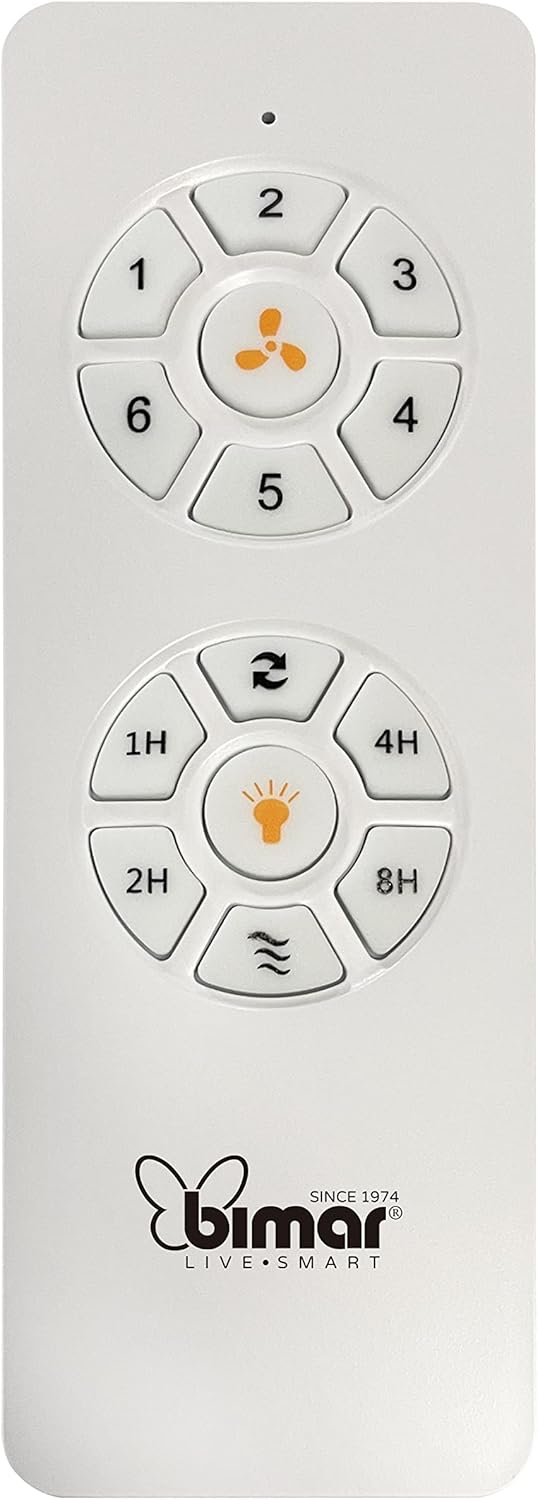
Image: The white remote control for the bimar ceiling fan, showing buttons for fan speed (1-6), fan on/off, timer (1H, 2H, 4H, 8H), mode selection, and reverse function.
- Kunnawa/Kashewa: Press the fan icon button to turn the fan on or off.
- Daidaita Sauri: Use buttons 1-6 to select one of the six available fan speeds.
- Aikin Mai ƙidayar lokaci: Press 1H, 2H, 4H, or 8H to set the fan to automatically turn off after the selected duration.
- Zaɓin Yanayin: Use the mode button (often represented by waves or arrows) to cycle through Normal, Natural, Sleep, and Breeze modes.
- Yanayin bazara/hunturu: The reverse button (often two arrows forming a circle) changes the blade rotation direction.
2. App Control (Bimar Live Smart)
Once connected to the Bimar Live Smart app, you can access enhanced features:
- Hanyar nisa: Control all fan functions from anywhere with an internet connection.
- Tsaraitawa: Program daily and weekly on/off times for automated operation.
- Mai ƙidayar lokaci: Adjust the timer from 1 to 8 hours.
- Mode and Speed Selection: Easily switch between the 6 speeds and 4 operating modes.
3. Sarrafa murya
The bimar Wi-Fi Ceiling Fan is compatible with popular voice assistants like Amazon Alexa and Google Assistant. After connecting the fan to the Bimar Live Smart app, link your Bimar account to your voice assistant app (e.g., Alexa app or Google Home app).
Example Dokokin Muryar:
- "Alexa, turn on the ceiling fan."
- "Hey Google, set ceiling fan speed to 3."
- "Alexa, turn off the ceiling fan in 1 hour."
4. Operating Modes and Speeds
- 6 Ventilation Speeds: Adjust the airflow intensity to your preference.
- Yanayin Al'ada: Consistent airflow at the selected speed.
- Yanayin Halitta: Yana kwaikwayon iskar halitta ta hanyar canza saurin fanka.
- Yanayin Barci: Operates at a lower, quieter speed for undisturbed rest.
- Yanayin Iska: Provides a gentle, intermittent airflow.
5. Summer/Winter Function
The reversible blade function allows for year-round use:
- Yanayin bazara (juyawa ta agogo baya): Creates a downward airflow, generating a cooling breeze.
- Yanayin hunturu (juyawa ta agogo): Creates an upward airflow, circulating warm air trapped near the ceiling, improving heating efficiency.

Image: A diagram illustrating the airflow patterns for summer (indirect ventilation, pushing air upwards) and winter (direct ventilation, pulling air downwards) modes of a ceiling fan.
Kulawa
Kulawa na yau da kullun yana tabbatar da kyakkyawan aiki da tsawon rayuwar fann rufin ku.
- Tsaftacewa: Before cleaning, ensure the fan is turned off and power is disconnected at the circuit breaker. Use a soft, damp cloth to wipe down the blades and motor housing. Do not use abrasive cleaners or solvents.
- Duban Ruwa: Periodically check the blades for any signs of damage or warping. Ensure all blade screws are tight.
- Ruwan Motoci: The fan's DC motor is designed for maintenance-free operation and does not require lubrication.
- Tsaftace Fasteners: Over time, some fasteners may become loose. Check and tighten all screws and connections annually.

Hoto: Kusanci view of the bimar ceiling fan's brushed metal motor housing and the attachment points for the light wood blades, highlighting areas for cleaning and inspection.
Shirya matsala
| Matsala | Dalili mai yiwuwa | Magani |
|---|---|---|
| Fan ba ya farawa | No power supply; Remote control battery low; Incorrect wiring. | Check circuit breaker and wall switch. Replace remote batteries. Verify wiring connections (consult electrician). |
| Fan ta girgiza | Ruwan wukake marasa daidaito ko kayan haɗin da aka sassauta; Ruwan wukake marasa daidaito. | Ensure all blade screws and mounting screws are tight. Use a balancing kit (not included) if necessary. |
| Ikon nesa baya aiki | Low battery; Obstruction between remote and receiver; Remote not paired. | Replace remote batteries. Ensure clear line of sight. Refer to pairing instructions in the full manual. |
| Matsalolin haɗin Wi-Fi | Incorrect Wi-Fi password; Router too far; 5GHz network selected. | Verify Wi-Fi password. Move router closer or use a Wi-Fi extender. Ensure you are connecting to a 2.4GHz network. Reset fan and re-attempt pairing. |
| Fan yana hayaniya | Loose screws; Blades hitting an obstruction; Motor issue. | Check and tighten all screws. Ensure nothing is obstructing the blades. If noise persists, contact customer support. |
Ƙayyadaddun bayanai
| Siffar | Daki-daki |
|---|---|
| Alamar | bimar |
| Lambar Samfura | 1 |
| Girman samfur | 132 x 132 x 27.5 cm (Diamita x Diamita x Tsawo) |
| Nauyi | 6.2 kg |
| Yawan Ruwa | 3 |
| Kayan abu | Itace |
| Launi | Black (Note: Blades are light wood finish as shown in images) |
| Nau'in Motoci | DC (Brushless, energy-saving) |
| Amfanin Wuta | 35W |
| Hanyoyin sarrafawa | Remote Control, Bimar Live Smart App, Voice Control (Amazon Alexa, Google Assistant) |
| Gudun Fan | 6 |
| Hanyoyin Aiki | Normal, Natural, Sleep, Breeze |
| Mai ƙidayar lokaci | 1 zuwa 8 hours |
| Ƙarin Halaye | Silent operation, Summer/Winter mode (reversible blades) |
| Tushen wutar lantarki | Lantarki |
| Nau'in Shigarwa | Rufin Dutsen |

Image: The three light wood fan blades, detached and laid flat, showcasing tsarinsu da yanayinsu.


Hoto: Biyu views of the bimar ceiling fan, illustrating different downrod lengths: one with a 25 cm downrod and another with a 13 cm downrod, affecting the overall height of the fan.
Garanti da Taimako
For warranty information, technical support, or service inquiries, please refer to the warranty card included with your product or visit the official bimar website. Ajiye shaidar siyan ku don da'awar garanti.
Mai ƙira: Bimar S.r.l.
Tuntuɓar: Da fatan za a ziyarci the bimar store on Amazon or the official bimar webshafin don cikakkun bayanai.