
1. Gabatarwa
This manual provides essential information for setting up, operating, maintaining, and troubleshooting your Alienware X17 R2 Gaming Laptop. Please read this guide thoroughly to ensure optimal performance and longevity of your device.
The Alienware X17 R2 is designed for high-performance gaming and demanding tasks, featuring advanced cooling technologies, powerful processors, and dedicated graphics.
2. Samfurin Ya Ƙareview
The Alienware X17 R2 is engineered to deliver an immersive gaming experience in a thin 17-inch form factor. Key features include:
- Powerful Intel CPUs: Experience high-performance action across all your favorite games with 12th Gen Intel Core processors.
- Next-Gen GPUs: Game unrestrained with NVIDIA GeForce RTX 3070Ti graphics, Dynamic Boost 2.0, and Deep Learning Super Sampling technology.
- Patented Quad Cooling: An industry-first design uses four intelligently controlled and programmable fans to dissipate heat.
- Tsawon Lokacin Wasa: Improve battery life with Advanced Optimus technology from NVIDIA—now available on all display options.
- Legend 2.0 Industrial Design: A fresh evolution in design with a high-endurance finish and customizable AlienFX lighting.

Hoto 2.1: Gaba view of the Alienware X17 R2 Gaming Laptop displaying a game.
3. Saita
3.1 Unboxing da Farko dubawa
- Cire kwamfutar tafi-da-gidanka a hankali da duk na'urorin haɗi daga marufi.
- Verify that all items listed in the "What's in the Box" section are present.
- Inspect the laptop for any physical damage. If damage is found, contact your retailer immediately.
3.2 Haɗin Wuta
- Connect the power adapter to the charging port located at the rear of the laptop.
- Toshe igiyar wutar lantarki cikin mashin bango.
- The power indicator light will illuminate, indicating the laptop is receiving power.
3.3 Boot na Farko da Saitin Tsarin Aiki
- Press the Alienware head power button to turn on the laptop.
- Bi umarnin da ke kan allo don kammala tsarin saitin Windows 11 Home. Wannan ya haɗa da zaɓar yankinku, haɗawa zuwa hanyar sadarwar Wi-Fi, da ƙirƙirar asusun mai amfani.
- Allow the system to download and install any necessary updates.
4. Yin aiki da Laptop ɗin ku
4.1 Keyboard da Touchpad
The Alienware X17 R2 features a backlit keyboard and a responsive touchpad. The AlienFX lighting allows for customizable colors and effects across the keyboard and other zones.

Hoto 4.1: Cikakken bayani view na keyboard mai haske da touchpad.
4.2 Nuni da Zane-zane
Enjoy stunning visuals on the 17.3-inch FHD display with a 480Hz refresh rate and 3ms response time. The NVIDIA GeForce RTX 3070Ti graphics card ensures smooth gameplay and high-fidelity rendering. The laptop supports Dolby Vision for optimized color profiles.
4.3 Audio
Experience immersive 3D sound via Dolby Atmos, designed to deliver audio as studios intended.
4.4 Tashoshi da Haɗuwa
The laptop offers a variety of ports for peripherals and external displays:

Hoto 4.2: Na baya view illustrating the various connectivity ports.
- USB 3.0 Ports: 3 ports for connecting various USB devices.
- Tashar jiragen ruwa na USB-C: For versatile connectivity, including Thunderbolt 4.
- HDMI 2.1: Supports up to 4K/120Hz output for external displays.
- Ethernet: Killer E3100 RJ45 Ethernet for stable wired network connections.
- Mara waya: Killer Wi-Fi 6 (802.11ax) and Bluetooth for wireless connectivity.
5. Kulawa
5.1 Tsaftacewa
- Yi amfani da laushi mai laushi mara laushi don tsaftace allon da saman.
- Ka guji yin amfani da sinadarai masu tsauri ko kayan shafa.
- Regularly clean the cooling vents to prevent dust buildup, which can affect performance.
5.2 Sabunta software
Ensure your operating system and drivers are kept up-to-date. Windows Update will handle OS updates, and Alienware Command Center can assist with driver and firmware updates.
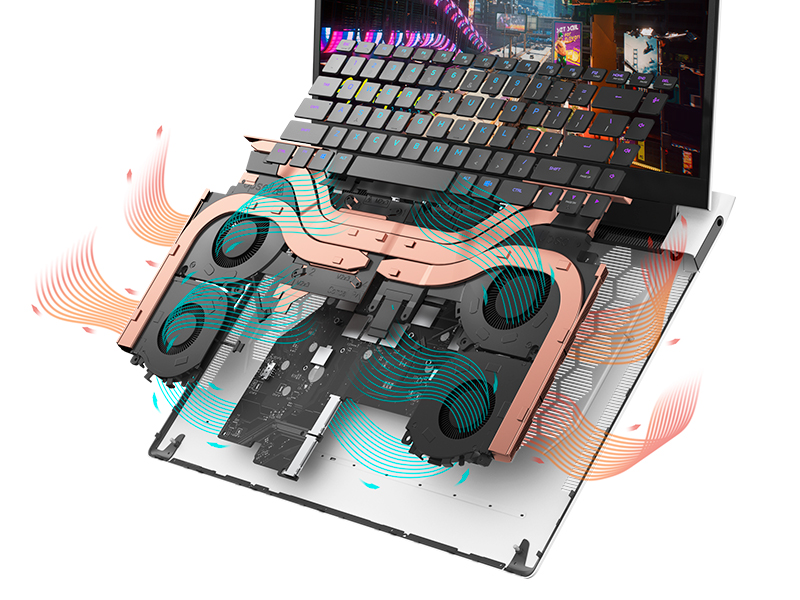
Figure 5.1: Alienware Command Center for system management.
6. Shirya matsala
If you encounter issues with your Alienware X17 R2, consider the following basic troubleshooting steps:
- Babu Ƙarfi: Tabbatar cewa an haɗa adaftar wutar da aminci zuwa duka kwamfutar tafi-da-gidanka da kuma tashar wutar lantarki mai aiki. Duba hasken wutar lantarki.
- Abubuwan Nuni: If the screen is black, try connecting an external monitor to verify if the issue is with the laptop's display or the graphics card. Update graphics drivers.
- Yin zafi fiye da kima: Ensure cooling vents are clear of obstructions. Use Alienware Command Center to monitor temperatures and adjust fan profiles.
- Rage Ayyuka: Close unnecessary applications. Check for background processes consuming high CPU or RAM. Ensure sufficient free space on the SSD.
- Matsalolin Software: Restart the laptop. If issues persist, consider performing a system restore or reinstalling the problematic software.
7. Ƙayyadaddun bayanai
| Siffar | Ƙayyadaddun bayanai |
|---|---|
| Girman allo | Inci 17.3 |
| Tsarin allo | 1920 x 1080 pixels (FHD) |
| Mai sarrafawa | Intel Core i9-12900H (3.8 GHz, 14 Cores) |
| RAM | 16 GB DDR5 (4800 MHz) |
| Hard Drive | 1 TB SSD (Solid State) |
| Mai sarrafa Graphics | NVIDIA GeForce RTX 3070 Ti (8 GB GDDR6) |
| Tsarin Aiki | Windows 11 Gida |
| Nau'in Mara waya | 802.11ax (Killer Wi-Fi 6), Bluetooth |
| USB 3.0 Ports | 3 |
| Nauyin Abu | 6.82 fam |
| Girman samfur | 11.79 x 15.72 x 0.58 inci |
8. Abin da ke cikin Akwatin
- Alienware X17 R2 Kwamfyutan Ciniki
- Adaftar Wuta
- Igiyar Wutar Lantarki
- Takaddun bayanai
9. Bidiyon Samfur na hukuma
Alienware X17 R2 Gaming Laptop Overview
Bidiyo 9.1: An gama aikin hukumaview of the Alienware X17 R2 Gaming Laptop, highlighting its design, cooling, and performance features.
About Alienware X17 R2 Gaming Laptop
Video 9.2: A detailed look at the Alienware X17 R2 Gaming Laptop, showcasing its features and design elements.
10. Garanti da Tallafawa
Your Alienware X17 R2 Gaming Laptop comes with a standard manufacturer's warranty. For detailed warranty information, please refer to the documentation included with your product or visit the official Alienware support website.
For technical support, driver downloads, and service requests, please visit the Alienware support portal. You can also find FAQs and community forums for additional assistance.