
1. Gabatarwa
This manual provides essential information and instructions for the safe and efficient use of your Blackview BV7200 Rugged Smartphone. The BV7200 is designed for durability and performance in challenging environments, featuring advanced water and dust resistance, a powerful processor, and a high-capacity battery.
Babban fasali sun haɗa da:
- IP68 & IP69K Certification: Advanced water and dust resistance for outdoor and demanding conditions.
- MediaTek Helio G85 Processor: Ensures smooth performance for gaming, multitasking, and general use.
- 50MP Dual Camera: Capture high-quality photos, even in low-light conditions.
- 5180mAh baturi: Long-lasting power with 18W fast charging support.
- 6.1-inch HD+ Display: Durable screen with Corning Gorilla Glass 3, optimized for comfortable viewing.
- Glove Mode: Allows screen operation even when wearing gloves.

Hoto: Overview of the Blackview BV7200 Rugged Smartphone, highlighting its MediaTek Helio G85 processor, 50MP camera, IP68/IP69K ratings, 5180mAh battery, 6.1-inch display, and Glove Mode.
2. Saita
2.1. Katin SIM da MicroSD Card Installation
To install your SIM card(s) and/or MicroSD card:
- Nemo tiren SIM a gefen na'urar.
- Yi amfani da kayan aikin fitarwa na SIM don buɗe tire.
- Carefully place your Nano-SIM card(s) and/or MicroSD card into the designated slots, ensuring correct orientation.
- A hankali tura tiren baya cikin na'urar har sai ya danna wurin.
2.2. Cajin Farko da Kunnawa
Kafin amfani da farko, ana ba da shawarar a yi cikakken caji na'urarka.
- Connect the USB Type-C cable to the charging port at the bottom of the phone. Ensure the port cap is securely opened before inserting the cable and closed after charging to maintain water resistance.
- Haɗa ɗayan ƙarshen kebul ɗin zuwa adaftar wutar lantarki mai dacewa kuma toshe shi cikin mashin bango.
- Once sufficiently charged, press and hold the Power button (usually on the right side) for a few seconds until the Blackview logo appears.
- Bi saƙon kan allo don kammala saitin farko, gami da zaɓin harshe, haɗin Wi-Fi, da saitin asusun Google.
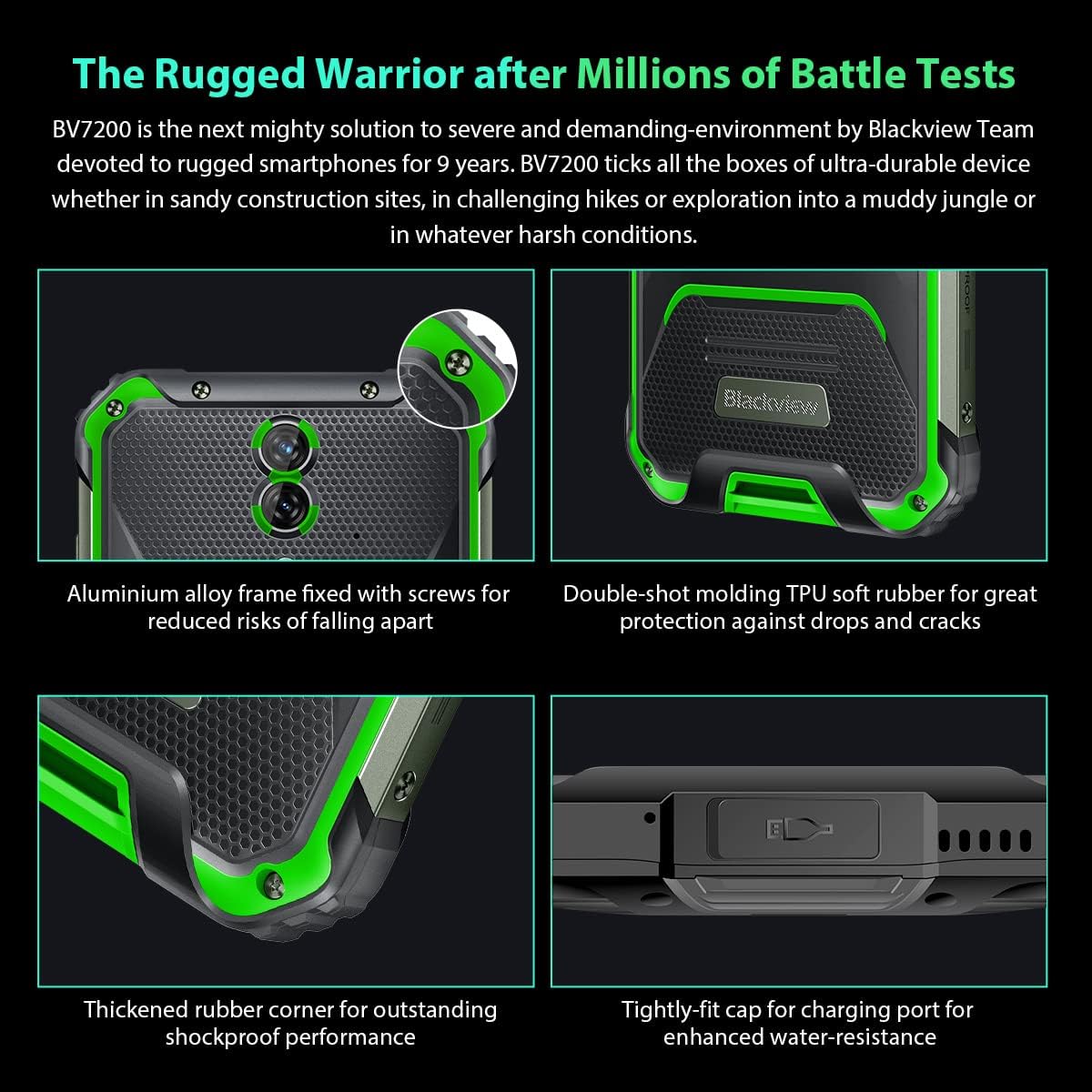
Hoto: Rufewa views of the Blackview BV7200's rugged construction, including aluminum alloy frame, double-shot molding TPU rubber, thickened rubber corners, and the tightly-fit cap for the charging port, emphasizing its durability and water resistance.
3. Umarnin Aiki
3.1. Navigation na asali
Baƙar fataview BV7200 operates on Doke OS 3.0, based on Android 12. Use touch gestures for navigation:
- Taɓa: Zaɓi abu ko buɗe app.
- Doke shi gefe: Gungura ta cikin allo ko jerin.
- Tsunkule: Zuƙowa ko rage hotuna da kuma web shafuka.
- Dogon Latsa: Samun dama ga menu na mahallin ko matsar da gumakan app.
3.2. Amfanin Kamara
The BV7200 features a 50MP main rear camera and an 8MP ultra-wide/macro rear camera.
- Bude app ɗin kamara daga allon gida ko aljihunan app.
- Select your desired mode (Photo, Video, Portrait, Pro, etc.).
- Danna allon don mayar da hankali kan wani yanki na musamman.
- Press the Shutter button to capture a photo or start/stop video recording.

Image: Diagram illustrating the Blackview BV7200's 50MP Samsung ISOCELL JN1 main rear camera, 8MP ultra-wide and ultra-macro rear camera, and rear flash, highlighting its photographic capabilities.
3.3. Glove Mode
The BV7200 supports Glove Mode, allowing you to operate the touchscreen while wearing gloves.
- To activate/deactivate Glove Mode, navigate to Settings > Smart Assistant > Glove Mode.
- Ensure this mode is enabled when using gloves for optimal touch responsiveness.

Image: Collage demonstrating the Blackview BV7200's Glove Mode in various scenarios, showing users operating the phone while wearing different types of gloves, emphasizing its utility in cold or industrial environments.
3.4. Water and Dust Resistance (IP68 & IP69K)
The BV7200 is certified IP68 and IP69K, making it resistant to water immersion and high-pressure water jets. This allows for use in aquatic sports or dusty environments.
- Always ensure all port caps (charging port, SIM tray) are securely closed before exposing the device to water or dust.
- Rinse the phone with clean water after exposure to saltwater or chemicals.
- Do not charge the phone if the charging port is wet. Allow it to dry completely.
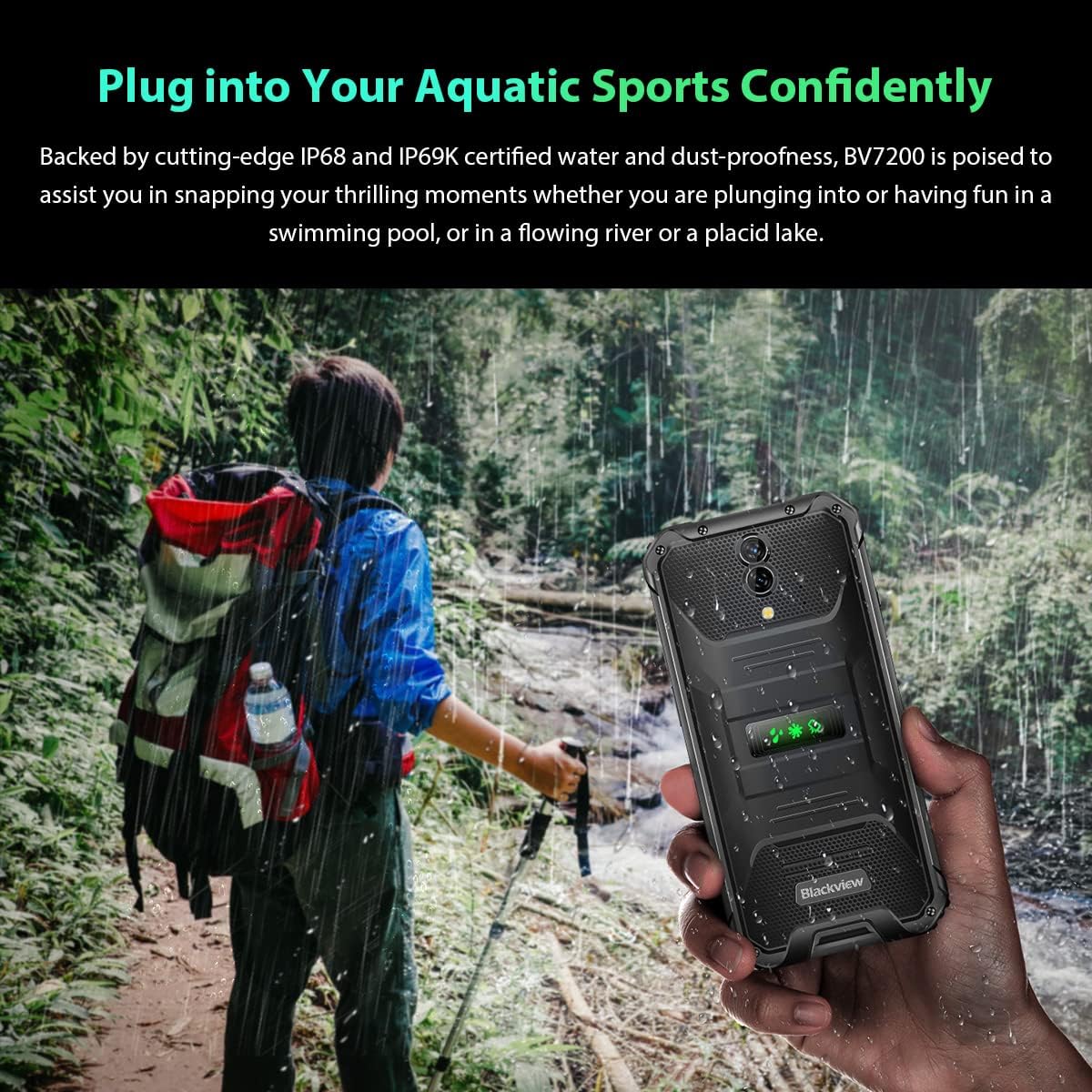
Image: A person holding the Blackview BV7200 near a stream or waterfall, illustrating its water resistance and suitability for outdoor and aquatic activities.
3.5. Gudanar da Baturi
The 5180mAh battery provides extended usage. The device supports 18W fast charging.
- Use the original charger and cable for optimal charging speed and safety.
- The battery is designed to withstand temperatures down to -10°C.
- To prolong battery life, avoid extreme temperatures and fully discharging the battery regularly.
3.6. Fadada ƙwaƙwalwar ajiya
The BV7200 features 6GB of RAM with an additional 4GB virtual memory expansion, totaling 10GB, for enhanced multitasking and performance.

Image: Graphic illustrating the memory expansion feature of the Blackview BV7200, showing 6GB of physical RAM and an additional 4GB of virtual RAM, combining for a total of 10GB for improved performance.
4. Kulawa
4.1. Tsabtace Na'urarka
To clean your Blackview BV7200:
- Shafa allon da jiki tare da laushi, yadi mara lint.
- Don datti mai taurin kai, yi amfani da ɗan damp zane da sabulu mai laushi, sannan a goge shi da busasshe.
- Kada a yi amfani da sinadarai masu ƙarfi, masu narkewa, ko masu tsaftace muhalli.
- Ensure all port caps are closed before cleaning with liquids.
4.2. Sabunta software
Regularly check for and install software updates to ensure optimal performance, security, and access to new features.
- Je zuwa Saituna > Tsari > Sabunta tsarin don duba samuwa updates.
- Tabbatar cewa na'urarka tana da isasshen baturi da haɗin Wi-Fi mai ƙarfi kafin fara sabuntawa.
5. Shirya matsala
5.1. Matsalolin gama gari da Mafita
- Na'urar baya kunna: Tabbatar da cajin baturi. Haɗa zuwa caja na akalla mintuna 15, sannan a sake gwada kunnawa.
- Allon baya amsa: Restart the device by holding the Power button for about 10-15 seconds. If the issue persists, try a factory reset (data will be lost).
- Connectivity issues (Wi-Fi/Bluetooth/Mobile Data):
- Toggle Wi-Fi/Bluetooth/Mobile Data off and on.
- Sake kunna na'urar.
- Check router/network settings.
- For mobile data, ensure SIM card is correctly inserted and activated.
- Apps suna yin karo: Share cache da bayanan app (Saituna > Manhajoji > [Sunan App] > Ajiya > Share Cache/Share Bayanai). If the problem continues, uninstall and reinstall the app.
5.2. Sake saitin masana'anta
Sake saitin masana'anta zai goge dukkan bayanai daga wayarka kuma ya mayar da ita zuwa saitunan masana'anta na asali. Ajiye muhimman bayanai kafin a ci gaba.
- Je zuwa Saituna > Tsari > Sake saitin zaɓuɓɓuka > Goge duk bayanai (sake saitin masana'anta).
- Confirm your decision. The device will restart and perform the reset.
6. Ƙayyadaddun bayanai
Below are the technical specifications for the Blackview BV7200:
| Siffar | Ƙayyadaddun bayanai |
|---|---|
| Alamar | Bakiview |
| Girman RAM | 6 GB (expandable to 10GB with virtual RAM) |
| Samfurin CPU | MediaTek Helio G85 |
| Ƙarfin ajiya | 128 GB (expandable up to 1TB with TF card) |
| Girman allo | Inci 6.1 |
| Ƙaddamarwa | 720 x 1560 HD+ |
| Fasahar salula | 4G |
| Fasahar Sadarwa Mara Waya | GSM, LTE, Wi-Fi |
| Ƙarfin baturi | 5180 mAh |
| Tsarin Aiki | Android 12 (Doke OS 3.0) |
| Resistance Ruwa/Kura | IP68, IP69K |

Hoto: Dalla-dalla view of the MediaTek Helio G85 processor, highlighting its specifications including RAM, ROM, GPU, and expandable storage, emphasizing its strong performance capabilities.

Image: Graphic detailing the Blackview BV7200's 6.1-inch HD+ display specifications, including resolution (720x1560), screen-to-body ratio (83%), brightness (380cd/cm2), and PPI (283), emphasizing its visual quality and durability with Corning Gorilla Glass 3.
7. Garanti da Tallafawa
For warranty information and technical support, please refer to the warranty card included with your product or visit the official Blackview website. Ajiye shaidar siyan ku don da'awar garanti.
For further assistance, you may contact Blackview customer service through their official channels.