
Gabatarwa
This manual provides instructions for the setup, operation, and maintenance of your Azwok BN59-01014A replacement remote control. This remote is designed to function as a direct replacement for the original Samsung BN59-01014A remote control, offering full functionality without the need for programming.
Saita
Shigar da baturi
The Azwok BN59-01014A remote control requires two AAA batteries (not included) for operation. Follow these steps to install the batteries:
- Nemo sashin baturi a bayan ramut.
- Danna ƙasa akan shafin kuma zame murfin baturin zuwa ƙasa don buɗe shi.
- Saka baturan AAA guda biyu, yana tabbatar da ingantattun (+) da korau (-) tashoshi suna daidaita daidai da alamomin cikin ɗakin.
- Zamar da murfin baturin zuwa wuri har sai ya danna amintacce.

Image: Back of the remote control with the battery cover removed, illustrating the correct orientation for AAA battery insertion.
Umarnin Aiki
Aiki na asali
Once batteries are installed, the remote control is ready for immediate use. No programming or pairing is required. Point the remote control directly at your Samsung LCD TV and press the desired function buttons.
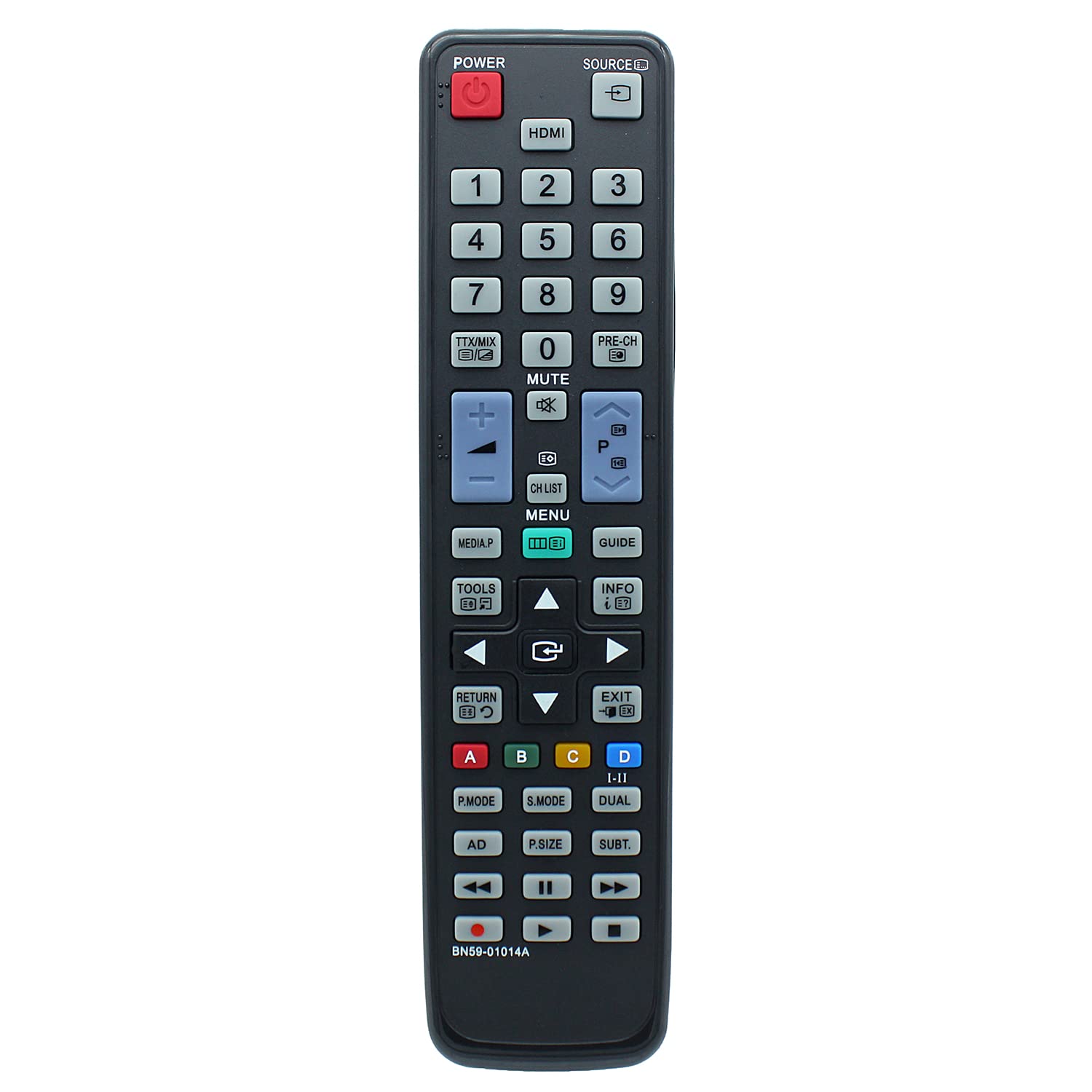
Hoto: Gaba view of the remote control, displaying the layout of all operational buttons.
Samfuran TV masu jituwa
This replacement remote control is compatible with a wide range of Samsung LCD TV models, including but not limited to:
- LA32C530F1F, LA32C530F1M, LA32C550J1F, LA32C630K1F, LA32C630K1M
- LA37C530F1M, LA37C550J1F
- LA40C530F1F, LA40C530F1M, LA40C550J1F, LA40C550J1M, LA40C630K1F, LA40C630K1M
- LA46C550J1F, LA46C550J1M, LA46C630K1F, LA46C630K1M
- LA55C630K1F, LA55C630K1M
- PS50C531C2F, PS50C550G1F, PS50C550G1M
- UA22C4000PD, UA22C4000PM, UA26C4000PD, UA26C4000PM, UA32C4000PD, UA32C4000PM
- LA32C530F1FXXY, LA32C530F1MXRD, LA32C550J1FXXY, LA32C630K1FXXY, LA32C630K1MXRD
- LA37C530F1MXRD, LA37C550J1FXXY
- LA40C530F1FXXY, LA40C530F1MXRD, LA40C550J1FXXY, LA40C550J1MXRD, LA40C630K1FXXY, LA40C630K1MXRD
- LA46C550J1FXXY, LA46C550J1MXRD, LA46C630K1FXXY, LA46C630K1MXRD
- LA55C630K1FXXY, LA55C630K1MXRD
- PS50C531C2FXXY, PS50C550G1FXXY, PS50C550G1MXRD
- UA22C40000PDXXY, UA22C4000PMXRD, UA26C4000PDXXY, UA26C4000PMXRD, UA32C4000PDXXY, UA32C4000PMXRD
Kulawa
Tsaftacewa
To clean the remote control, use a soft, dry cloth. Do not use liquid cleaners or abrasive materials, as these may damage the remote's surface or internal components.
Madadin Baturi
Replace batteries when the remote control's response becomes inconsistent or stops working. Always replace both batteries simultaneously with new AAA alkaline batteries. Do not mix old and new batteries or different battery types.
Shirya matsala
- Remote baya amsawa: Ensure batteries are installed correctly with the proper polarity. Replace old batteries with new AAA alkaline batteries. Check for any obstructions between the remote control and the TV's infrared sensor. Ensure you are within the maximum operating range of 10 meters.
- Takamaiman ayyuka ba sa aiki: Verify that your TV model is listed as compatible. If your original remote had unique functions not present on this replacement, those functions will not be available. If your TV model is not listed, contact support for compatibility confirmation.
Ƙayyadaddun bayanai
| Alamar | Azwok |
| Lambar Samfura | AU-BN59-01014A-SM073 (BN59-01014A) |
| Na'urori masu jituwa | Samsung LCD Televisions |
| Fasahar Haɗuwa | Infrared |
| Nau'in Mai Gudanarwa | Ikon Maɓalli |
| Matsakaicin Yawan Na'urori masu Tallafi | 1 |
| Matsakaicin Rage | Mita 10 |
| Ana Bukata Batura | 2 x AAA (Alkaline recommended) |
| Nauyin Abu | 89 Grams |
| Siffa ta Musamman | Babu Shirye-shiryen da ake buƙata |
| Mai ƙira | Azwok |
| UPC | 710421391891 |
| ASIN | B0BPNNLPXB |
Garanti da Taimako
This remote control comes with a 12-month warranty. For warranty claims, troubleshooting assistance, or to confirm compatibility for unlisted TV models, please contact the seller or manufacturer directly. Provide your product model number (BN59-01014A) and purchase details for efficient support.