
1. Gabatarwa
Na gode da siyaasing the Klipsch Reference Premiere RP-1400SW 14-inch High Excursion Subwoofer. This subwoofer is designed to deliver powerful and accurate low-frequency sound, enhancing your home theater or music listening experience. This manual provides essential information for proper setup, operation, and care of your new subwoofer.

Figure 1.1: Klipsch Reference Premiere RP-1400SW Subwoofer (Grille Removed)
2. Muhimman Bayanan Tsaro
Please read all safety instructions before operating this product. Keep these instructions for future reference.
- Tushen wutar lantarki: Connect the subwoofer only to a power supply of the type described in the operating instructions or as marked on the appliance.
- Samun iska: Tabbatar da samun iska mai kyau. Kada a toshe duk wata hanyar samun iska. Sanya ta bisa ga umarnin masana'anta.
- Zafi: Kada a shigar kusa da kowane tushen zafi kamar radiators, rajistan zafi, murhu, ko wasu na'urori (ciki har da amplifiers) masu samar da zafi.
- Ruwa da Danshi: Kar a yi amfani da wannan na'urar kusa da ruwa ko danshi.
- Tsaftacewa: Tsaftace kawai da bushe bushe.
- Hidima: Koma duk hidima ga ƙwararrun ma'aikatan sabis. Ana buƙatar sabis lokacin da na'urar ta lalace ta kowace hanya, kamar igiyar samar da wutar lantarki ko toshe ta lalace, ruwa ya zube ko abubuwa sun fada cikin na'urar, na'urar ta fallasa ruwan sama ko danshi, ba ya aiki yadda ya kamata. , ko kuma an jefar da shi.
- Abu mai nauyi: This subwoofer is heavy (85 lbs). Exercise caution when moving to prevent injury.
3. Abin da ke cikin Akwatin
Tabbatar cewa duk abubuwan da aka gyara suna nan:
- Klipsch Reference Premiere RP-1400SW Subwoofer
- Igiyar Wutar Lantarki
- Manual Umarni (wannan takarda)
4. Saita
4.1 Sanya Subwoofer
The Klipsch RP-1400SW features a front-firing driver and Aerofoil front slot port, allowing for flexible placement within your room. Experiment with different locations to find the optimal bass response for your listening environment. Generally, corner placement can enhance bass output, while placement along a wall can provide a more balanced sound. The shock-absorbing rubber feet help isolate the subwoofer from the floor.

Figure 4.1: Front-Firing Driver and Aerofoil Front Slot Port

Figure 4.2: Subwoofer Design Features (Rounded Corners, Shock-Absorbing Feet)
4.2 Haɗi
Your RP-1400SW subwoofer offers both wired and wireless connectivity options.

Figure 4.3: Subwoofer Rear Panel Connections and Controls
- Wired Connection (RCA/LFE):
Connect an RCA cable from the LFE output of your AV receiver to the LFE input on the subwoofer's rear panel. If your receiver does not have an LFE output, use a standard RCA stereo cable to connect the receiver's pre-out (subwoofer output) to both the left and right RCA inputs on the subwoofer.
- Wireless Connection (Optional WA-2 Kit):
For wireless operation, you can connect your subwoofer with a Klipsch WA-2 Wireless Subwoofer Kit (sold separately). This allows for flexible placement without the need for long RCA cables. Refer to the WA-2 kit's instructions for pairing and setup.

Figure 4.4: Wireless Connectivity with Optional WA-2 Kit
- Haɗin Wuta:
Once audio connections are made, plug the supplied power cord into the subwoofer's power inlet and then into a suitable wall outlet.
5. Operating Your Subwoofer
5.1 Sarrafa Ƙarsheview
The rear panel of your subwoofer features several controls to fine-tune its performance:

Figure 5.1: Easy-to-Use Controls on Rear Panel
- GAIN (Volume): Yana daidaita matakin fitarwa na subwoofer. Fara da ƙaramin saiti kuma a hankali ƙara har sai bass ɗin ya haɗu ba tare da matsala ba tare da manyan lasifikan ku.
- LOW-PASS (Crossover): This control sets the upper frequency limit for the subwoofer. If using an AV receiver with LFE output, set this to LFE (or bypass if available on your receiver). If connecting via stereo RCA, adjust this to blend with your main speakers' low-frequency cutoff.
- MATAKI (0°/180°): Yana daidaita yanayin fitowar subwoofer idan aka kwatanta da manyan lasifikokinka. Gwada saitunan biyu don nemo wanda ke samar da mafi tasiri da kuma daidaitaccen bass.
- POWER (ON/AUTO/OFF):
- A: Subwoofer remains continuously on.
- Auto: Subwoofer automatically turns on when an audio signal is detected and enters a low-power standby mode after a period of inactivity.
- KASHE: Subwoofer is powered off.
The 1/2-watt standby mode in AUTO setting ensures exceptional efficiency and reduces energy costs.
5.2 Initial Power On and Adjustment
- Tabbatar cewa duk haɗin gwiwa amintattu ne.
- Set the GAIN control to its minimum position.
- Set the LOW-PASS control to LFE if using an AV receiver, or to a suitable frequency (e.g., 80Hz) if connecting via stereo RCA.
- Set the PHASE switch to 0°.
- Set the POWER switch to AUTO.
- Play some audio with significant bass content. Gradually increase the GAIN control until the subwoofer output blends with your main speakers.
- Experiment with the PHASE switch (0° vs. 180°) to determine which setting provides the most impactful and seamless bass response in your listening position.
For optimal performance, consider using your AV receiver's automatic room correction system (if available) after initial setup.
5.3 Product Video: Reference Premiere Subwoofers
Video 5.1: An official Klipsch video showcasing the features and design of the Reference Premiere Subwoofers, including the RP-1400SW. This video highlights advanced acoustics, balanced performance, front-firing Cerametallic woofers, high-efficiency Class D amplifier, front-firing slot port, detailed design, and easy-to-use controls.
6. Kulawa
To ensure the longevity and optimal performance of your Klipsch RP-1400SW subwoofer, follow these simple maintenance guidelines:
- Tsaftacewa: Dust the cabinet regularly with a dry, soft cloth. Avoid using abrasive cleaners, solvents, or strong detergents, as these can damage the ebony vinyl finish.
- Wuri: Avoid placing the subwoofer in direct sunlight or near heat sources, which can cause discoloration or damage to the cabinet.
- Samun iska: Tabbatar cewa baya amplifier panel has adequate airflow. Do not block the heat sink.
- Grille: The durable woven cloth grille can be gently cleaned with a soft brush or vacuum cleaner attachment to remove dust.
7. Shirya matsala
If you experience issues with your subwoofer, consult the following table for common problems and solutions:
| Matsala | Dalili mai yiwuwa | Magani |
|---|---|---|
| Babu sauti daga subwoofer |
|
|
| Weak or distorted bass |
|
|
| Subwoofer hums or buzzes |
|
|
If the problem persists after trying these solutions, please contact Klipsch customer support.
8. Ƙayyadaddun bayanai
Key technical specifications for the Klipsch Reference Premiere RP-1400SW Subwoofer:
| Siffar | Daki-daki |
|---|---|
| Lambar Samfura | Saukewa: RP-1400SW |
| Alamar | Klipsch |
| Nau'in Kakakin | Subwoofer |
| Woofer Diamita | Inci 14 |
| Nau'in Direba Audio | Dynamic Driver (Cerametallic) |
| Matsakaicin Ƙarfin Fitar da Kakakin | 600 Watts |
| RMS ikon | 500 Watts |
| Amsa Mitar | 20Hz - 1kHz (approximate, based on A+ content) |
| Fasahar Haɗuwa | Wired RCA, LFE, and WA-2 Wireless Port |
| Yanayin Fitarwa na Audio | Sitiriyo, Kewaye Sauti |
| Nau'in hawa | Tsaye Tsaye |
| Kayayyakin Rufe | Itace |
| Launi | Ebony |
| Tushen wutar lantarki | Corded Electric |
| Girman Abu (D x W x H) | 25.67"D x 20"W x 21.34"H |
| Nauyin Abu | 85 fam |
| UPC | 743878047424 |
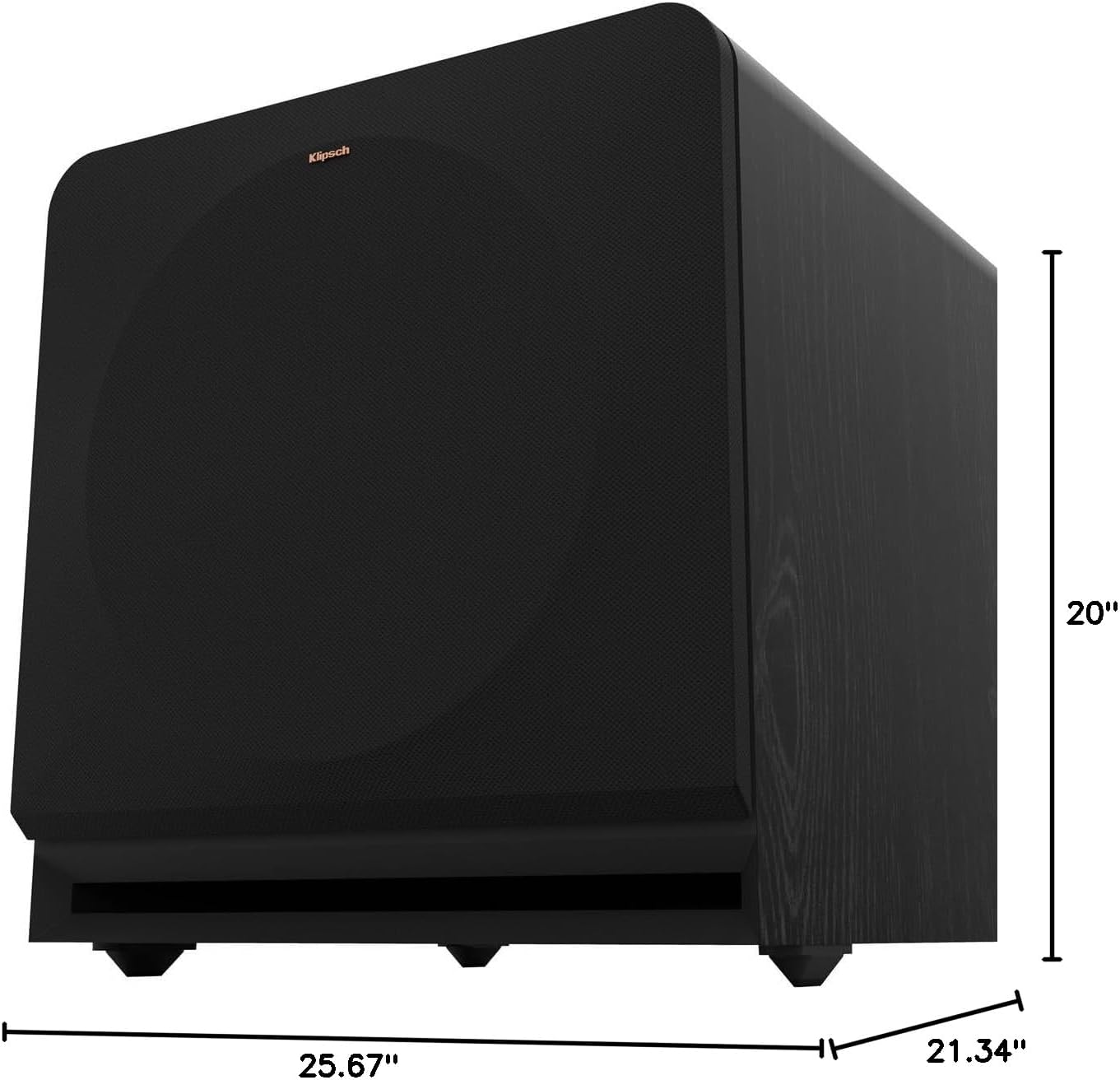
Figure 8.1: Subwoofer Dimensions
9. Garanti & Tallafi
9.1 Bayanin Garanti
The Klipsch Reference Premiere RP-1400SW Subwoofer comes with a limited warranty:
- Kayan lantarki: Shekaru biyu (2).
- Woofer, Cabinet, and Non-Electrical Mechanics: Shekaru biyar (5).
Please retain your proof of purchase for warranty claims. For full warranty terms and conditions, refer to the official Klipsch website ko tuntuɓi goyon bayan abokin ciniki.
9.2 Tallafin Abokin Ciniki
For further assistance, technical support, or warranty inquiries, please visit the official Klipsch website or contact their customer service department. Contact details can typically be found on the Klipsch website under the "Support" or "Contact Us" section.


