
1. Gabatarwa
Thank you for choosing the Aigo AC SE 360 Rainbow 360mm Water Cooler. This all-in-one liquid cooling solution is designed to provide efficient thermal management for your high-performance CPU, featuring a 360mm triple radiator and vibrant ARGB lighting. This manual provides essential information for proper installation, operation, and maintenance to ensure optimal performance and longevity of your product.

Image 1.1: Aigo AC SE 360 Rainbow 360mm Water Cooler assembled view.
2. Bayanin Tsaro
- Koyaushe cire haɗin wuta daga kwamfutarka kafin shigarwa ko kiyayewa.
- Handle components with care to avoid damage.
- Tabbatar da ƙasa mai kyau don hana haɗarin lantarki.
- Ka kiyaye samfurin daga danshi da matsanancin zafi.
- Do not attempt to open the pump or radiator, as this may void the warranty and cause leaks.
- A kiyaye nesa da yara.
3. Abubuwan Kunshin
Tabbatar cewa duk abubuwan da aka jera a ƙasa suna nan a cikin kunshin ku:
- 1x Aigo AC SE 360 Water Cooler Unit (Radiator, Pump/CPU Block, Tubing)
- 3x 120mm ARGB Fans
- Mounting Hardware for Intel Sockets (LGA 115X, 1200, 1700, 2011, 2066)
- Mounting Hardware for AMD Sockets (AM2, AM3, AM4, AM5)
- Thermal Manna
- Fan Screws and Radiator Screws
- ARGB Controller (if included with your specific model)
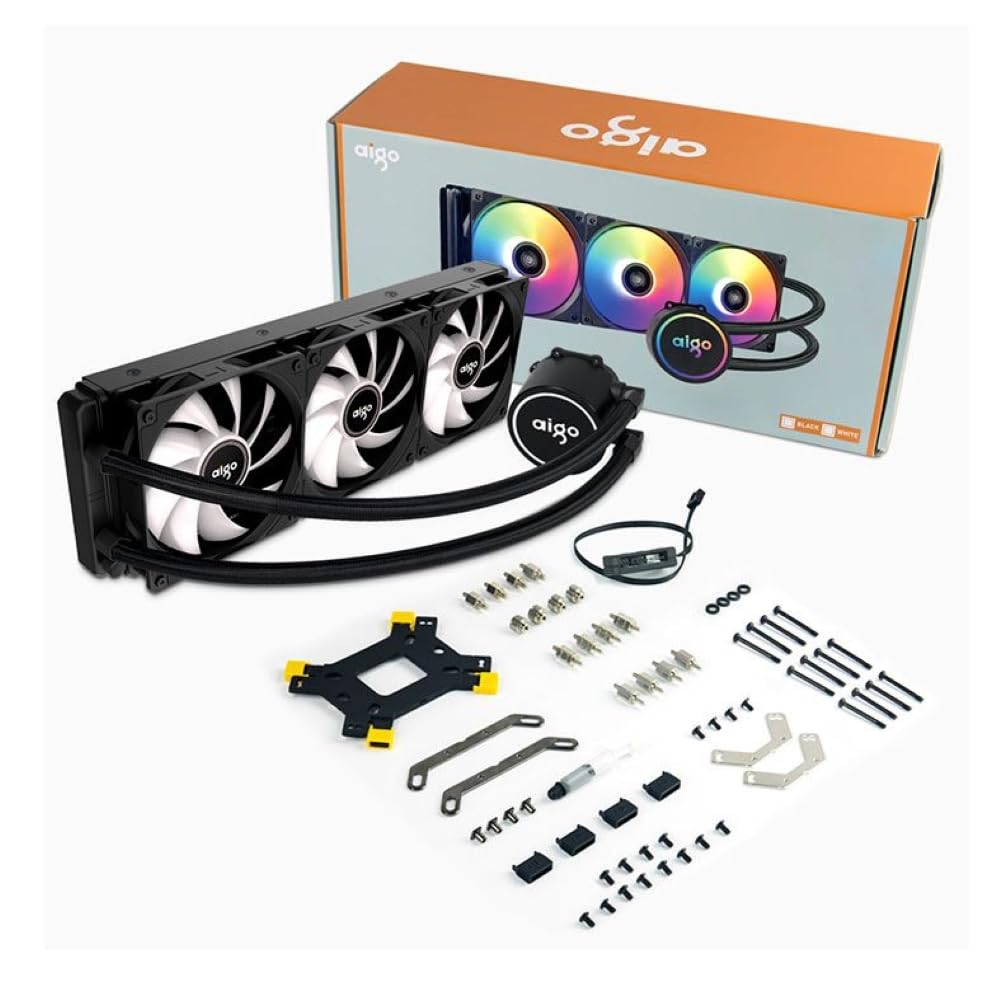
Image 3.1: All components included in the Aigo AC SE 360 package.
4. Saita da Shigarwa
Follow these steps for proper installation of your Aigo AC SE 360 Water Cooler:
- Shirya Motherboard: Install the appropriate backplate and standoffs for your CPU socket (Intel: 115X, 1200, 1700, 2011, 2066; AMD: AM2, AM3, AM4, AM5). Refer to your motherboard manual for specific instructions.
- Aiwatar da Thermal Manna: Clean the CPU surface. Apply a small amount of thermal paste to the center of the CPU IHS (Integrated Heat Spreader).
- Mount the CPU Block/Pump: Carefully place the CPU block onto the CPU, aligning it with the standoffs. Secure it with the provided screws, tightening them in a diagonal pattern until snug. The magnetic block design allows for easy rotation to align the logo or tubing as desired.
- Install Fans to Radiator: Attach the three 120mm ARGB fans to the radiator using the longer screws provided. Ensure the fan airflow direction is correct for your case configuration (typically blowing air through the radiator).
- Mount Radiator: Install the radiator assembly into your PC case. The 360mm radiator is compatible with most ATX cases that support this size. Secure it with the appropriate screws.
- Connect Fans (Daisy Chain): The fans feature a daisy chain connection system. Connect the fans to each other in series, then connect the final fan's cable to the motherboard's fan header or an ARGB controller. This simplifies cable management by reducing the number of cables.
- Haɗa Hasken ARGB: Connect the ARGB cables from the fans and pump to a 3-pin, 5V ARGB header on your motherboard or a dedicated ARGB controller. Ensure the voltage daidai ne (5V) don hana lalacewa.
- Connect Pump Power: Connect the pump's 4-pin power connector to a dedicated AIO_PUMP or CPU_FAN header on your motherboard.
- Na'urar USB: Organize all cables neatly to ensure proper airflow and a clean build.
5. Umarnin Aiki
Once installed, the Aigo AC SE 360 Water Cooler operates automatically to maintain optimal CPU temperatures. Here are key operational aspects:
- Automatic Cooling: The pump and fans will adjust their speed based on CPU temperature, ensuring efficient cooling. The pump operates at 12V with 3200 RPM, and fans operate between 800-1800 RPM.
- Sarrafa Hasken ARGB: The Rainbow ARGB lighting can be controlled via your motherboard's ARGB software (if connected to a compatible header) or through an included ARGB controller. This allows for various lighting effects and synchronization with other ARGB components.
- Matsayin Surutu: The cooler is designed for quiet operation, with a noise level of approximately 30 dB.
6. Kulawa
Regular maintenance helps ensure the longevity and performance of your water cooler:
- Tsaftace kura: Periodically clean the radiator fins and fan blades to prevent dust buildup, which can impede airflow and cooling performance. Use compressed air or a soft brush.
- Duba Tubing: Check the tubing for any signs of kinks, leaks, or damage.
- Kula da Zazzabi: Use monitoring software to keep an eye on your CPU temperatures. Significant increases may indicate a need for further inspection or cleaning.
- Manna Thermal: While not frequently required, reapplying thermal paste every few years can help maintain optimal thermal transfer.
7. Shirya matsala
If you encounter issues with your Aigo AC SE 360 Water Cooler, refer to the following common problems and solutions:
| Matsala | Dalili mai yiwuwa | Magani |
|---|---|---|
| Babban Yanayin Zafin CPU | Insufficient thermal paste, poor contact, dust buildup, pump failure, fan failure. | Reapply thermal paste, ensure CPU block is securely mounted, clean radiator and fans, check pump/fan connections. |
| Fans Not Spinning | Loose fan connection, incorrect fan header, faulty fan. | Check fan cables and connections, ensure connected to appropriate motherboard header, test fans individually if possible. |
| No ARGB Lighting | Loose ARGB connection, incorrect ARGB header (e.g., 12V instead of 5V), faulty ARGB component. | Verify ARGB cables are securely connected to a 3-pin, 5V ARGB header. Check motherboard manual for correct header. |
| Hayaniyar da ba a saba gani ba | Air bubbles in loop, fan rubbing, pump issue. | Gently tilt the PC case to help dislodge air bubbles. Check for obstructions around fans. If pump noise persists, contact support. |
8. Ƙayyadaddun bayanai
| Siffar | Daki-daki |
|---|---|
| Samfura | AC SE 360 |
| Girman Radiator | 360 mm (394 x 120 x 27 mm) |
| Girman Fan | mm120 ku |
| Fan Speed | 800-1800 RPM |
| Gunadan iska | 64.05 CFM |
| Matsin lamba a tsaye | 1.85mmH₂O |
| Matsayin Surutu | 30db ku |
| Pump Voltage | 12 Volts |
| Gudun famfo | 3200 RPM |
| Amfanin Wuta | 3.24 Watts |
| Nau'in Hali | Ƙunƙarar yumbura |
| TDP Supported | 280 W |
| Sockets masu jituwa | Intel (LGA 115X, 1200, 1700, 2011, 2066), AMD (AM2, AM3, AM4, AM5) |
| Mai Haɗin Wuta | 4-fini |
| ARGB Connector | 3-pin, 5V |
9. Garanti da Tallafawa
The Aigo AC SE 360 Water Cooler comes with a Garanti na watanni 12 daga ranar sayayya. Wannan garanti ya ƙunshi lahani na masana'antu a ƙarƙashin yanayin amfani na yau da kullun.
For technical support, warranty claims, or any questions not covered in this manual, please contact your retailer or the Aigo customer support team. Please have your proof of purchase and product model number (ACSE360) ready when contacting support.