1. Gabatarwa
This document provides essential information for the use and care of your Generic replacement infrared remote control. This remote is designed to function with specific projector models, including Toumei Cocar C800S, C800W, C800A, C800, C900, and Missyee C900. It operates using infrared (IR) technology and requires two AAA batteries (not included).
Please note that this is a replacement remote control and may not offer all the functionalities or an identical user experience as the original remote. It is crucial to verify your projector's model number against the listed compatible models before use.
2. Saita: Shigar Baturi
The remote control requires two AAA batteries for operation. Batteries are not included with this product.
- Nemo sashin baturi a bayan ramut.
- Zame murfin ɗakin batirin zuwa ƙasa ko kuma a cikin alkiblar da kibiya ta nuna don buɗe shi.
- Saka batura biyu na AAA, don tabbatar da cewa tashoshin da ke da kyau (+) da kuma marasa kyau (-) sun daidaita daidai da alamun da ke cikin ɗakin. Shigar da ba daidai ba na iya hana na'urar nesa aiki.
- Replace the battery compartment cover by sliding it back into position until it clicks securely.

Hoto: Na baya view of the remote control with the battery cover removed, revealing the slots for two AAA batteries. Ensure correct polarity when inserting batteries.
3. Umarnin Aiki
Point the remote control directly at the projector's IR receiver for optimal performance. Obstructions between the remote and the projector may interfere with the signal.
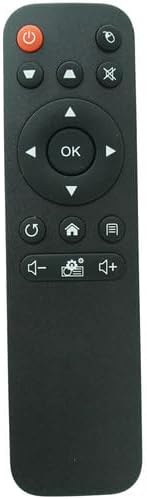
Hoto: Gaba view na na'urar sarrafawa ta nesa, tana nuna tsarin maɓallin sa.
Ayyukan Maɓalli:
- Maɓallin Wuta (⏻): Turns the projector on or off.
- Source/Input Button (⌖): Selects the input source (e.g., HDMI, USB).
- Maɓallin shiru (🔇): Mutes or unmutes the audio output.
- Kushin Hannu (Sama, Kasa, Hagu, Dama): Navigates through menus and options.
- Maballin Ok: Confirms selections or enters menus.
- Maɓallin Komawa/Baya (↺): Returns to the previous menu or screen.
- Maballin Gida (⌂): Accesses the projector's main home screen.
- Maɓallin Menu/Saituna (☰): Opens the projector's settings or options menu.
- Juz'i na ƙasa Button (🔉): Decreases the audio volume.
- Button Maɓallin Upara (🔊): Increases the audio volume.
- Settings/Gear Button (⚙): Likely provides quick access to specific settings or modes.
4. Kulawa
- Tsaftacewa: Shafa ramut ɗin tare da taushi, bushe bushe. Kada a yi amfani da masu tsabtace ruwa ko kayan goge-goge, saboda suna iya lalata saman ko abubuwan ciki.
- Madadin Baturi: Replace batteries when the remote's response becomes sluggish or stops working. Always replace both batteries simultaneously with new AAA batteries.
- Ajiya: If the remote control will not be used for an extended period, remove the batteries to prevent leakage and potential damage to the device. Store in a cool, dry place.
- Kauce ma bayyana: Keep the remote away from direct sunlight, extreme temperatures, and moisture.
5. Shirya matsala
- Remote baya amsawa:
- Tabbatar an saka batura daidai da polarity ɗin da ya dace.
- Sauya tsoffin batura da sabbin batura na AAA.
- Check for any obstructions between the remote control and the projector's IR receiver.
- Ensure you are within the effective range and pointing the remote directly at the projector.
- Wasu ayyuka ba sa aiki:
- This is a replacement remote; some advanced or specific functions of your original projector remote may not be supported.
- Verify that your projector model is listed as compatible.
6. Ƙayyadaddun bayanai
| Alamar | Generic |
| Na'urori masu jituwa | Toumei Cocar C800S, C800W, C800A, C800, C900 & Missyee C900 Projectors |
| Fasahar Haɗuwa | Infrared (IR) |
| Nau'in Mai Gudanarwa | Ikon Maɓalli |
| Ana Bukata Batura | 2 x AAA (ba a haɗa shi ba) |
7. Muhimmin Bayani
- This remote control is a replacement unit and is specifically designed for the listed projector models. It may not be compatible with other devices.
- No batteries or additional instructions are included with the product. Please refer to this manual for setup and operation.
- The functionality of this replacement remote may differ slightly from the original remote control that came with your projector.
- Kafin sayaasing or using, ensure your projector's model number is explicitly mentioned in the compatibility list to avoid issues.


