
1. Gabatarwa
Thank you for choosing the Defender Enjoy S200 Portable Bluetooth Speaker. This manual provides essential information for setting up, operating, and maintaining your speaker to ensure optimal performance and longevity. Please read this manual thoroughly before use.
The Defender Enjoy S200 is a versatile portable speaker featuring Bluetooth 5.3 connectivity, True Wireless Stereo (TWS) pairing, an integrated FM radio, and MP3 playback capabilities via USB flash drive or microSD card. It also includes an LED light and supports hands-free calling. Designed for portability, it offers up to 9 hours of playback on a single charge and convenient USB Type-C charging.
2. Samfurin Ya Ƙareview
2.1 Maɓalli Maɓalli
- Bluetooth 5.3: For stable and efficient wireless audio streaming.
- Sitiriyo mara waya ta gaskiya (TWS): Connect two Enjoy S200 speakers for a stereo sound experience.
- Hanyoyin sake kunnawa da yawa: Bluetooth, FM Radio, USB Flash Drive, MicroSD Card (up to 32GB).
- Haɗin Hasken LED: Provides visual ambiance.
- Kiran Kyauta Ba Hannu: Microphone da aka gina don kiran waya.
- Tsawon Rayuwar Baturi: Up to 9 hours of continuous music playback.
- USB Type-C Cajin: Modern and convenient charging port.
- Zane Mai šaukuwa: Compact and lightweight with a carrying strap.
Abubuwan Kunshin 2.2
- Defender Enjoy S200 Portable Bluetooth Speaker
- Type-C Cajin caji
- Jagoran Fara Mai Sauri
- Dauke madauri

Image: The Defender Enjoy S200 Portable Bluetooth Speaker, showcasing its compact design and front grille with an illuminated LED ring.

Image: An infographic highlighting key features such as multi-colored LED lighting, True Wireless Stereo (TWS) pairing, Bluetooth 5.3, MP3 player, FM receiver, and hands-free calling.
3. Saita
3.1 Cajin Shugaban Majalisa
- Locate the Type-C charging port on the back of the speaker.
- Connect the provided Type-C charging cable to the speaker and the other end to a USB power adapter (not included) or a computer's USB port.
- The LED indicator will show charging status. A full charge typically takes approximately 3-4 hours.
- Cire haɗin kebul ɗin da zarar an cika caji.
3.2 Kunnawa / Kashewa
- To power on, slide the ON/OFF switch located on the back of the speaker to the 'ON' position.
- To power off, slide the ON/OFF switch to the 'OFF' position.
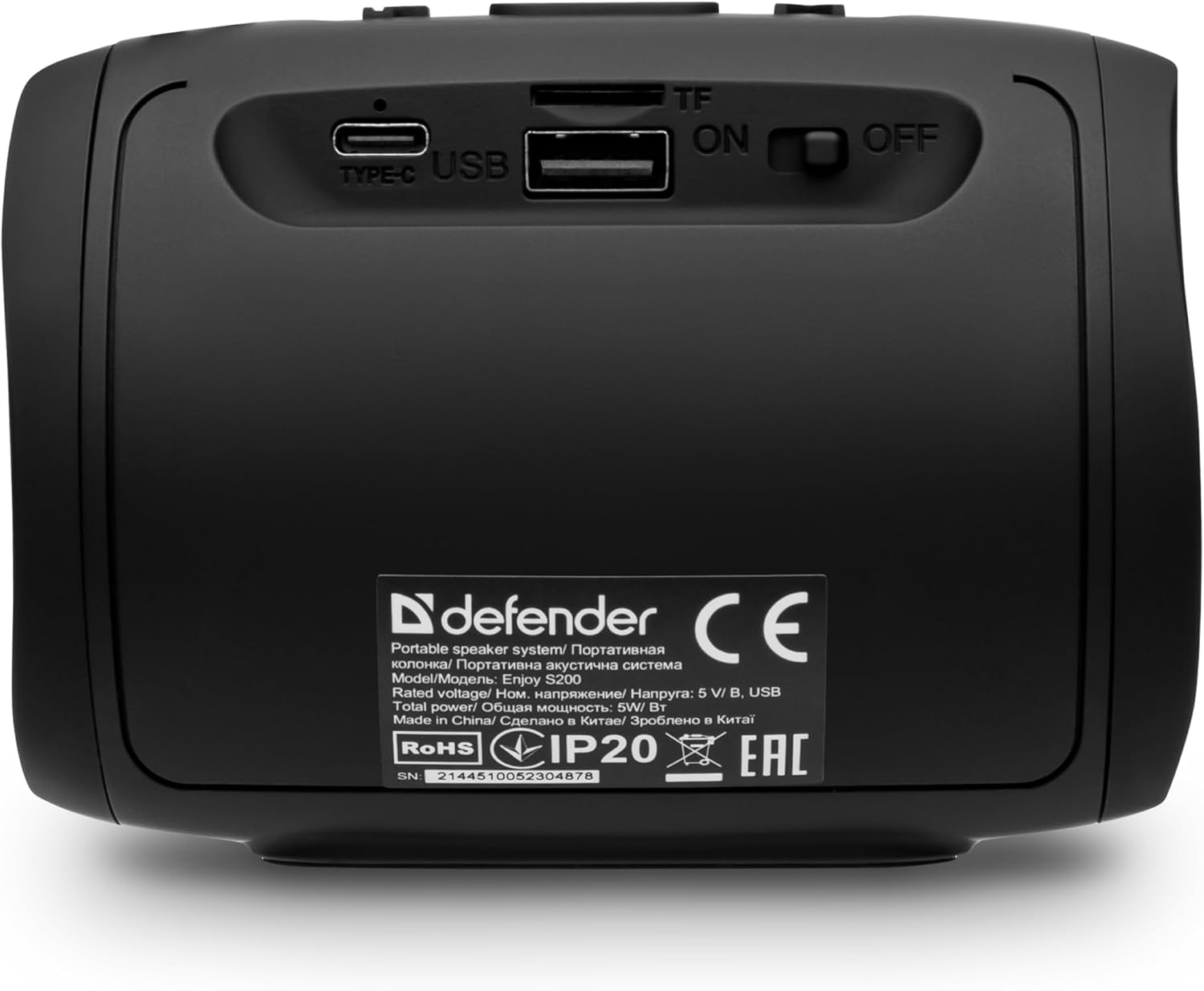
Hoto: Na baya view of the Defender Enjoy S200 speaker, showing the Type-C charging port, USB port, TF (microSD) card slot, and the ON/OFF power switch.
3.3 Haɗin Bluetooth
- Tabbatar cewa lasifikar tana kunne kuma tana cikin yanayin haɗin Bluetooth (wanda LED mai walƙiya ya nuna).
- A kan na'urarka (wayar hannu, kwamfutar hannu, da sauransu), kunna Bluetooth kuma bincika samammun na'urori.
- Select "Defender Enjoy S200" from the list of devices.
- Da zarar an haɗa su, lasifikar za ta fitar da sautin tabbatarwa, kuma LED ɗin zai daina walƙiya.
3.4 Haɗin Sitiriyo Mara waya ta Gaskiya (TWS).
To pair two Defender Enjoy S200 speakers for stereo sound:
- Tabbatar cewa duka lasifikan biyu suna kunne kuma basu haɗa su da kowace na'urar Bluetooth ba.
- On one speaker (this will be the primary speaker), press and hold the TWS button (often indicated by a double-arrow icon) until you hear a pairing tone.
- The two speakers will automatically search and connect to each other. A confirmation tone will sound once connected.
- Yanzu, haɗa na'urarka da babban lasifikar ta Bluetooth kamar yadda aka bayyana a sashe na 3.3. Sauti zai kunna a cikin sitiriyo ta hanyar lasifikar biyu.

Image: A visual representation of two Defender Enjoy S200 speakers pairing wirelessly to create a True Wireless Stereo system, alongside icons for Bluetooth 5.3, MP3 player, FM receiver, and hands-free calling.
4. Umarnin Aiki
4.1 Button Functions (Refer to top panel controls)
- Maɓallin Wuta: Long press to power on/off. Short press to play/pause in music mode, or answer/end calls.
- Ƙara girma (+): Short press to increase volume. Long press for next track/station.
- Ƙarƙashin ƙara (-): Short press to decrease volume. Long press for previous track/station.
- Maɓallin Yanayi (M): Short press to switch between Bluetooth, FM Radio, USB, and MicroSD modes.
- Button Hasken LED: Short press to cycle through LED light modes or turn off the LED.
4.2 sake kunnawa ta Bluetooth
After successful Bluetooth pairing (Section 3.3), open your music application on your device and begin playback. Use the speaker's volume buttons or your device's volume controls to adjust the audio level.
Yanayin Rediyon FM 4.3
- Press the 'M' (Mode) button until you hear the FM radio prompt.
- Long press the Play/Pause button to automatically scan and save available FM stations.
- Use the Volume Up (+) and Volume Down (-) buttons (long press) to navigate between saved stations.
4.4 USB/MicroSD Playback
- Insert a USB flash drive or a microSD card (up to 32GB) containing MP3 audio files into the respective port on the back of the speaker.
- Press the 'M' (Mode) button until the speaker automatically switches to USB or MicroSD mode and begins playback.
- Use the speaker's control buttons for play/pause, next track, and previous track.
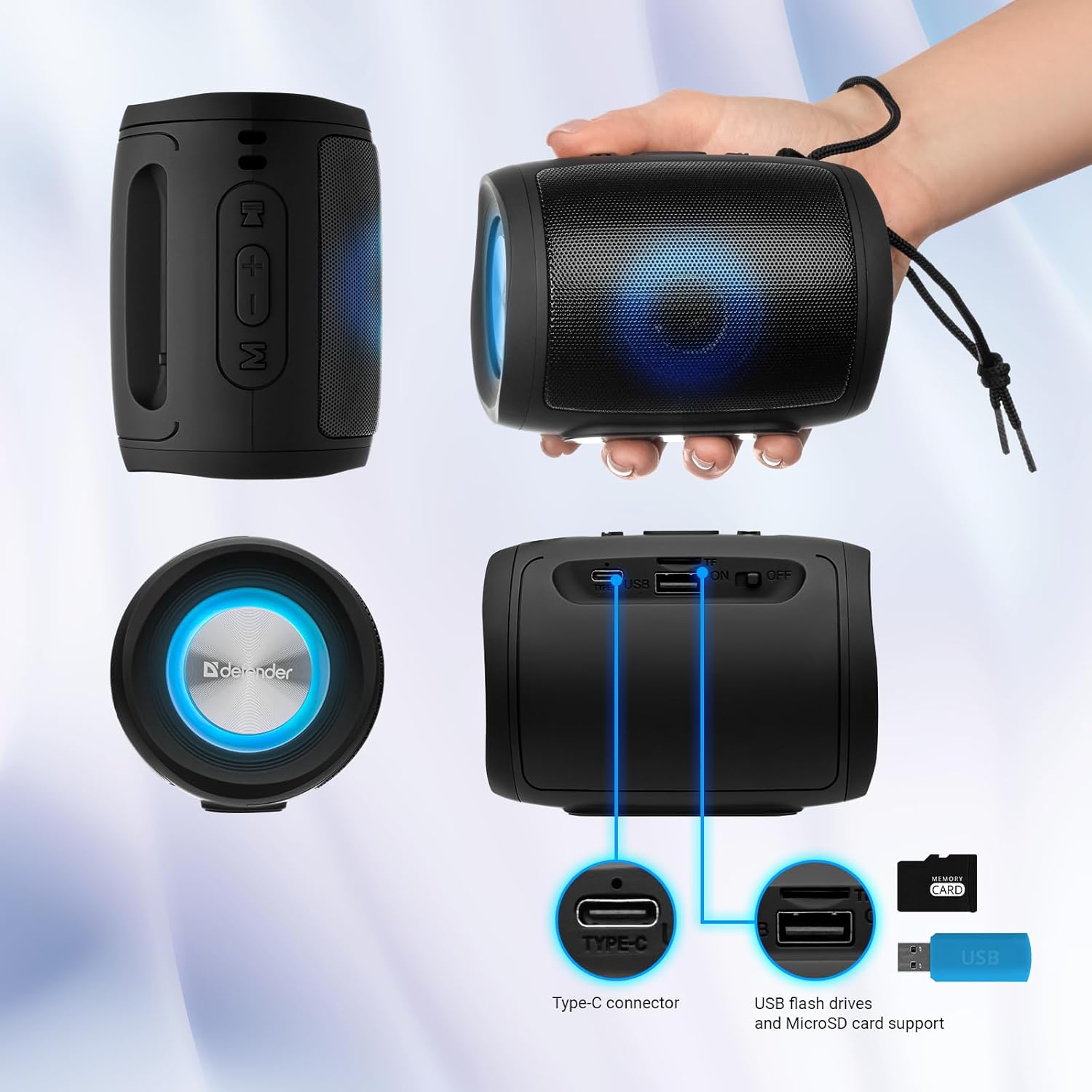
Image: A detailed diagram illustrating the Type-C connector, USB flash drive port, and MicroSD card slot on the Defender Enjoy S200 speaker.
4.5 Kiran Kyauta ta Hannu
When connected to your smartphone via Bluetooth, the speaker's built-in microphone allows for hands-free calls.
- Amsa Kira: A takaice danna maɓallin Kunna/Dakata.
- Ƙarshen Kira: A takaice danna maɓallin Kunna/Dakata.
- Karɓar Kira: Dogon danna maɓallin Kunna/Dakata.
5. Kulawa
- Tsaftacewa: Yi amfani da kyalle mai laushi da busasshe don tsaftace saman lasifikar. Kada a yi amfani da masu tsaftace lasifikar ko abubuwan da ke rage zafi.
- Ajiya: Ajiye lasifikar a wuri mai sanyi, busasshiyar nesa da hasken rana kai tsaye da matsanancin zafi.
- Juriya na Ruwa: The speaker has an IP20 rating, meaning it is protected against solid objects larger than 12.5mm but has no protection against water. Avoid exposure to rain, splashes, or immersion in water.
- Kulawar Baturi: To prolong battery life, fully charge the speaker before first use and recharge it at least once every three months if not used regularly.
6. Shirya matsala
- Babu Ƙarfi: Ensure the speaker is charged. Connect the Type-C cable and allow it to charge for a few minutes before attempting to power on again.
- Babu Sauti: Check the volume levels on both the speaker and your connected device. Ensure the speaker is in the correct mode (Bluetooth, FM, USB, MicroSD).
- Matsalolin Haɗin Bluetooth: Ensure the speaker is in pairing mode. Turn off Bluetooth on your device and turn it back on. Try unpairing and re-pairing the speaker. Move closer to the speaker to ensure you are within the 10-meter range.
- Ɗaukar Rediyon FM Ba shi da kyau: Ensure you are in an area with good signal. The charging cable can sometimes act as an antenna; try connecting it for improved reception.
- USB/MicroSD Not Playing: Tabbatar da sautin files are in a compatible format (e.g., MP3). Check that the USB drive or microSD card is inserted correctly and is not corrupted.
7. Ƙayyadaddun bayanai
| Sunan Samfura | Ji daɗin S200 |
| Lambar Samfurin Abu | 65200 |
| Alamar | Mai tsaron gida |
| Fasahar Haɗuwa | Bluetooth 5.3, USB |
| Fasahar Sadarwa mara waya | Bluetooth, Radio Frequency |
| Nau'in Kakakin | Multimedia |
| Girman Kakakin | Inci 2 |
| Fitar wutar lantarki | 5 Watts |
| Yanayin Fitarwa na Audio | Sitiriyo |
| Tushen wutar lantarki | Baturi Mai Aiki da Shi (Batirin Lithium-ion 1 ya haɗa) |
| Siffofin Musamman | Integrated Microphone, USB Port, Portable Bluetooth, LED Light, FM Radio, MicroSD Card Support, TWS |
| Girman samfur (L x W x H) | 8 x 11 x 8 cm |
| Nauyi | 330g ku |
| Matsakaicin Rage | Mita 10 |
| IP Rating | IP20 |
8. Garanti da Tallafawa
8.1 Bayanin Garanti
Ana bayar da takamaiman bayanai game da garanti tare da takaddun siyan ku ko kuma a ofishin masana'anta. website. Please refer to these resources for information regarding warranty coverage and duration.
8.2 Tallafin Abokin Ciniki
For technical assistance, troubleshooting beyond this manual, or inquiries about your Defender Enjoy S200 speaker, please contact Defender Global customer support. Contact information can usually be found on the product packaging, the manufacturer's website, ko rasidin sayan ku.