
Gabatarwa
Na gode da siyaasing the Funistree Cell Phone Stand with Wireless Bluetooth Speaker. This device combines a versatile phone stand with a high-quality Bluetooth speaker and a white noise machine, designed to enhance your audio and viewing experience. Please read this manual carefully before use to ensure proper operation and to maximize the product's lifespan.
Samfurin Ƙarsheview
The Funistree H77 is a multi-functional device featuring a detachable phone stand and a wireless Bluetooth speaker. Its innovative design allows for independent use of the speaker and the stand, or combined for an integrated entertainment solution.
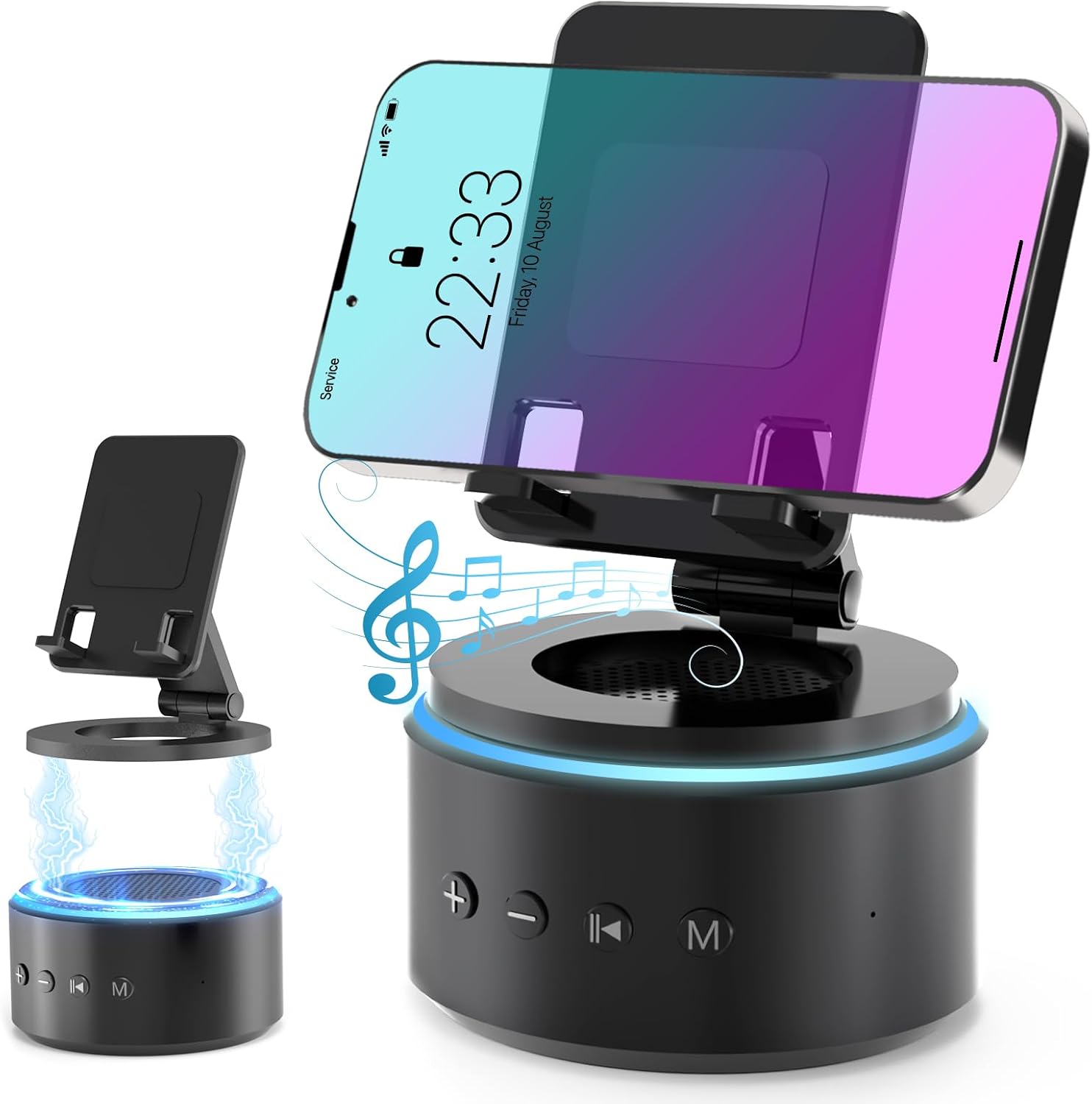
Image: The Funistree H77 device, illustrating its 2-in-1 design with the phone stand attached to the speaker base and also shown detached.
Mabuɗin fasali:
- 2-in-1 Detachable Design: The phone stand magnetically connects to the Bluetooth speaker, allowing for combined or separate use.
- Adjustable & Portable Stand: Yana bayar da yawa viewing angles and includes a hanging design for easy portability.
- HD Sautin Sitiriyo: Equipped with a dual stereo system for enhanced bass, clear highs, and balanced midrange.
- Injin Farin Surutu: Features 10 soothing white noise sounds with an auto-off timer (15, 30, or 60 minutes).
- Tsayayyen Tushe: Anti-slip silicone pads ensure device stability.
- Tsawon Rayuwar Baturi: Optimized 1800 mAh battery for extended use.
Abubuwan Kunshin
Da fatan za a duba kunshin don abubuwa masu zuwa:
- Funistree Cell Phone Stand with Wireless Bluetooth Speaker (Model H77)
- Kebul na Caji
- Manual mai amfani
Note: Contents may vary slightly. If any items are missing or damaged, please contact customer support.
Saita
Cajin Na'urar:
- Locate the charging port on the speaker base.
- Connect the provided USB charging cable to the speaker.
- Haɗa ɗayan ƙarshen kebul na USB zuwa cikin adaftar wutar USB mai jituwa (ba a haɗa shi ba) ko tashar USB ta kwamfuta.
- The charging indicator light will illuminate. Once fully charged, the light may change color or turn off.
Initial charge time is approximately 2-3 hours.
Assembling the Phone Stand and Speaker:
The phone stand and speaker connect magnetically.
- Align the magnetic base of the phone stand with the top surface of the speaker.
- The magnets will snap the two components together securely.
- To detach, simply pull the phone stand upwards from the speaker base.

Hoto: Rufewa view demonstrating the magnetic connection between the phone stand and the speaker base.
Umarnin Aiki
Kunnawa/Kashewa:
- To power on, press and hold the Power button (usually marked with a power symbol) on the speaker base for a few seconds until you hear an audible prompt or see an indicator light.
- Don kashe wuta, danna maɓallin Wuta kuma ka sake riƙewa na ɗan lokaci.
Haɗin Bluetooth:
- Ensure the speaker is powered on and in pairing mode (indicated by a flashing LED light, usually blue). If not, briefly press the Bluetooth button (if available) or power cycle the device.
- On your mobile device (smartphone, tablet, etc.), go to Bluetooth settings.
- Bincika available devices. The speaker will appear as "H77" or "Funistree H77".
- Select the speaker from the list to pair. Once paired, you will hear a confirmation sound, and the LED light will become solid.
- Yanzu kuna iya kunna sauti daga na'urar ku ta lasifikar.

Image: The Funistree H77 in use, with a smartphone mounted on the stand, playing music, and a laptop nearby, illustrating its versatile functionality.
Aikin Farin Hayaniya:
The speaker includes 10 built-in white noise sounds to aid relaxation or concentration.
- Press the 'M' (Mode) button to cycle through the white noise sounds.
- To set a timer for the white noise, press the Timer button (if available) or refer to the specific button layout on your device. The available timer settings are 15, 30, or 60 minutes. The device will automatically turn off after the selected duration.

Image: Visual representation of the 10 white noise options (Ocean, Wind, Rain, Bird, Heartbeat, Campfire, Thunderstorm, Brook, Fan, Piano) and timer settings, with a person sleeping, indicating the relaxation benefits.
Daidaita Girma da sake kunnawa:
- Upara sama: Danna maɓallin '+'.
- Downara ƙasa: Danna maɓallin '-'.
- Kunna/Dakata: Press the Play/Pause button (usually marked with a triangle/two vertical bars).
- Waƙa ta gaba: Press the '>>|' button.
- Tafiya ta baya: Press the '|<<' button.
Amfani da Tsayayyen Waya:
The phone stand is adjustable to provide optimal viewkusurwoyi.
- Place your smartphone or tablet securely on the stand's cradle.
- Adjust the angle of the stand by gently pushing or pulling the articulated arm to your desired viewmatsayi.
- The stand features anti-slip silicone pads to prevent your device from sliding.

Hoto: Dalla-dalla view highlighting the adjustable angle mechanism and the anti-slip silicone pads on the phone stand and base for secure device placement.
Abun iya ɗauka:
The speaker can be carried easily using its integrated hanging design.

Image: A woman outdoors, holding the Funistree speaker by its hanging rope, demonstrating its portability for outdoor activities.
Kulawa
- Tsaftacewa: Use a soft, dry cloth to wipe the surface of the device. Do not use abrasive cleaners, alcohol, or chemical solvents, as these may damage the finish.
- Ajiya: Lokacin da ba'a amfani da shi na tsawon lokaci, adana na'urar a wuri mai sanyi, busasshiyar nesa da hasken rana kai tsaye da matsanancin yanayin zafi.
- Kulawar Baturi: Don tsawaita rayuwar baturi, kauce wa cikar cajin baturin akai-akai. Yi cajin na'urar akai-akai, koda kuwa ba a cikin aiki mai ƙarfi ba.
- Guji Ruwa: This device is not waterproof. Keep it away from water, moisture, and excessive humidity.
- Gudanar da Kulawa: Guji faduwa ko ƙaddamar da na'urar zuwa tasiri mai ƙarfi.
Shirya matsala
| Matsala | Dalili mai yiwuwa | Magani |
|---|---|---|
| Na'urar baya kunnawa. | Ƙananan baturi. | Yi cajin na'urar gabaɗaya. |
| Ba za a iya haɗa ta Bluetooth ba. | Speaker not in pairing mode; Bluetooth disabled on source device; device too far. | Ensure speaker is in pairing mode. Enable Bluetooth on your device. Move devices closer (within 10 meters). Forget previous pairings and try again. |
| Babu sauti ko ƙaramin ƙara. | Volume too low on speaker or source device; device not properly paired. | Increase volume on both speaker and source device. Re-pair the device. |
| White noise function not working. | An zaɓi yanayin da ba daidai ba. | Press the 'M' (Mode) button to cycle to the white noise function. |
| Phone stand is unstable. | Device not placed correctly; surface is uneven. | Ensure phone is centered on the cradle. Place the stand on a flat, stable surface. |
If the problem persists, please contact Funistree customer support.
Ƙayyadaddun bayanai
| Lambar Samfura | H77 |
| Girman samfur | 4.53 x 4.13 x 4.37 inci |
| Nauyin Abu | 15.8 oz |
| Nau'in Baturi | 1 baturin lithium ion (an haɗa) |
| Ƙarfin baturi | 1800 mAh |
| Haɗuwa | Bluetooth |
| Farin Hayaniyar Sauti | 10 types (Ocean, Wind, Rain, Bird, Heartbeat, Campfire, Thunderstorm, Brook, Fan, Piano) |
| Saitunan Mai ƙidayar lokaci | Mintuna 15, 30, 60 |
| Na'urori masu jituwa | Smartphones, Tablets (iPhone, Galaxy, LG, iPad, Samsung Tab, Sony, etc.) |
Bayanin Tsaro
- Do not disassemble, repair, or modify the device. This may cause damage, electric shock, or fire.
- Keep the device away from heat sources, direct sunlight, and high temperatures.
- Kada a bijirar da na'urar ga ruwa ko wasu ruwaye.
- Do not use the device in environments with strong electromagnetic interference.
- Ka kiyaye yara da dabbobin da ba za su iya isa ba.
- A zubar da na'urar da batirinta bisa ga ƙa'idojin gida. Kar a zubar da ita da sharar gida.
Garanti da Taimako
Funistree products are designed and manufactured to the highest quality standards. For warranty information and customer support, please refer to the warranty card included with your purchase or visit the official Funistree website. If you encounter any issues or have questions regarding your product, please contact our customer service team.
Don ƙarin taimako, da fatan za a ziyarci: Funistree Official Store on Amazon