
SZSINOCAM B0CPXDFVRP
Szsinocam Wi-Fi Camera Outdoor/Indoor User Manual
Model: B0CPXDFVRP | Brand: SZSINOCAM
1. Gabatarwa
This manual provides detailed instructions for the installation, operation, and maintenance of your Szsinocam Wi-Fi Camera. Designed for both outdoor and indoor surveillance, this camera offers advanced features to enhance your security and monitoring needs. Please read this manual thoroughly before using the product to ensure proper setup and optimal performance.

Figure 1: Szsinocam Wi-Fi Camera and Mobile Application Interface
2. Kayan Samfura
The Szsinocam Wi-Fi Camera is equipped with a range of features designed for comprehensive surveillance:
- Dual Lens & Dual Screen Monitoring: Features two independent lenses allowing simultaneous monitoring of two different areas.
- Hoto Mai Girma: Yana kama foo bayyananne da cikakken bayanitage with 4-megapixel resolution.
- Flexible Pan & Tilt: Offers a 355° horizontal rotation and 60° vertical tilt for extensive coverage.
- 6x Zuƙowa Dijital: Allows for closer inspection of details within the monitored area.
- Three Night Vision Modes: Supports infrared, full-color, and intelligent night vision for clear viewing a cikin ƙananan haske yanayi.
- Gano Motsi & Faɗakarwa: Automatically detects movement and sends instant notifications to your connected device.
- Audio Hanyoyi Biyu: Enables real-time communication through the camera's built-in microphone and speaker.
- Zaɓuɓɓukan Ajiya Da yawa: Supports both cloud storage and local storage via a Micro SD card (up to 256GB, sold separately).
- Shigarwa iri-iri: Can be mounted on a wall, placed on a flat surface, or installed on the ceiling.

Figure 2: Dual Lens and Dual Screen Capability

Figure 3: High-Resolution 4MP Image Quality
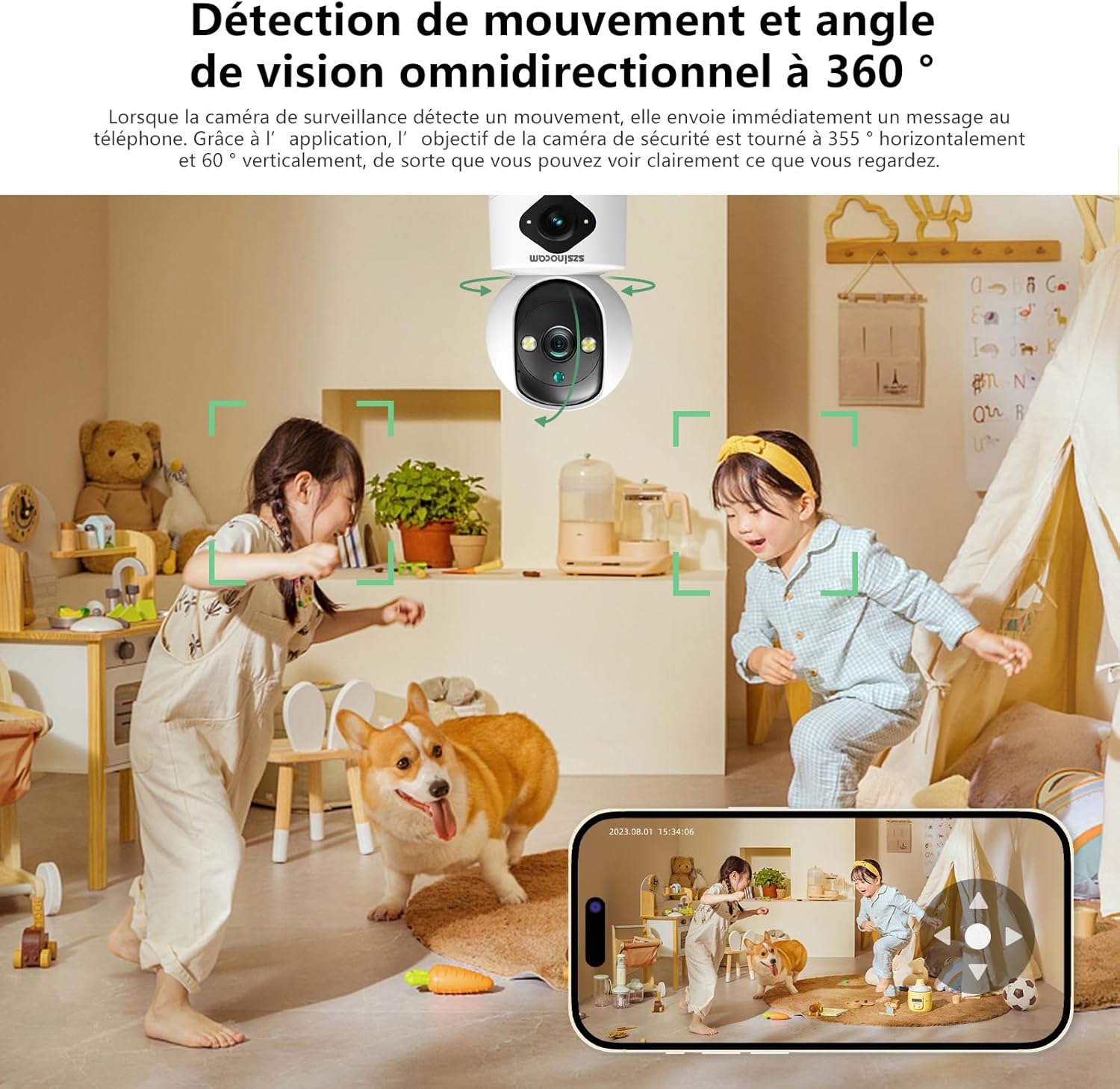
Figure 4: Three Night Vision Modes
3. Jagorar Saita
Abubuwan Kunshin 3.1
Kafin ci gaba, tabbatar da duk abubuwa suna cikin kunshin:
- Szsinocam Wi-Fi Camera
- Adaftar Wuta
- Kebul na USB
- Dutsen Bracket da Skru
- Jagorar mai amfani (wannan takaddar)
3.2 Ƙarfafa Kan Kyamara
- Connect the USB cable to the camera's power port.
- Plug the other end of the USB cable into the provided power adapter.
- Plug the power adapter into a standard electrical outlet. The camera will power on and initiate its startup sequence.
3.3 Mobile Application Installation
Don sarrafawa da view your camera, you need to install the dedicated mobile application:
- Scan the QR code provided on the camera packaging or in the quick start guide to download the official application. Alternatively, search for the application name (e.g., "OKAM PRO" or similar) in your device's app store (App Store for iOS, Google Play Store for Android).
- Shigar da aikace-aikacen a wayarku ta hannu ko kwamfutar hannu.
- Yi rijistar sabon asusu ko shiga idan kuna da ɗaya.
3.4 Haɗin Kamara
Follow these steps to pair your camera with the mobile application:
- Ensure your mobile device is connected to a 2.4GHz Wi-Fi network. The camera supports both 2.4GHz and 5GHz Wi-Fi.
- Open the mobile application and select "Add Device" or the '+' icon.
- Choose the camera type (e.g., "Wi-Fi Camera" or "Smart Camera").
- Follow the on-screen prompts to enter your Wi-Fi network name (SSID) and password.
- The application will generate a QR code. Position your camera's lens approximately 15-20 cm (6-8 inches) in front of your phone screen, ensuring the QR code is clearly visible to the camera.
- Wait for the camera to emit a confirmation sound or voice prompt indicating successful connection.
- Da zarar an haɗa, za ku iya sanya wa kyamarar ku suna kuma ku fara kai tsaye viewing.
4. Umarnin Aiki
4.1 Rayuwa View da Gudanarwa
After successful pairing, tap on the camera's name in the application to access the live view. From here, you can:
- Tankama & karkatar: Use the directional controls on the screen to rotate the camera horizontally (355°) and vertically (60°).
- Zuƙowa Dijital: Pinch to zoom in or out on the live feed (up to 6x).
- Audio Hanyoyi Biyu: Tap the microphone icon to speak through the camera's speaker, and listen through your phone's speaker.
- Snapshot & Record: Capture still images or record video clips directly to your phone's gallery.
4.2 Rikodi da Ajiyewa
The camera supports two primary recording methods:
- Ma'ajiyar Katin Micro SD: Insert a Micro SD card (up to 256GB, Class 10 or higher recommended) into the designated slot on the camera. The camera will automatically begin recording based on your settings (continuous, motion-triggered).
- Ma'ajiyar gajimare: Subscribe to the cloud storage service through the mobile application for secure, off-site video backup. This ensures your footage is safe even if the camera is damaged or stolen.

Figure 5: Recording Options: Cloud and Micro SD Card
4.3 Gano Motsi da Faɗakarwa
Configure motion detection settings in the application:
- Kunna/A kashe: Turn motion detection on or off.
- Hankali: Adjust the detection sensitivity to minimize false alarms.
- Fadakarwa: Receive push notifications on your mobile device when motion is detected.
- Yankunan Ayyuka: Bayyana takamaiman yankuna a cikin kyamarar view don gano motsi.

Figure 6: Motion Detection and Wide Angle View
4.4 Hanyoyin Hangen Dare
The camera offers three night vision modes for optimal viewing in various low-light conditions:
- Yanayin Infrared: Provides clear black and white images in complete darkness using infrared LEDs.
- Cikakken Launi na Dare: Utilizes built-in spotlights to provide full-color images even in very low light.
- Yanayin Wayo: Automatically switches between infrared and full-color modes based on detected motion or light conditions.
5. Zaɓuɓɓukan Shigarwa
The Szsinocam Wi-Fi Camera offers flexible installation to suit your needs:
- Hawan bango: Use the provided mounting bracket and screws to secure the camera to a wall.
- Wurin Lantarki Sama: Kawai sanya kyamarar akan kowane wuri mai faɗi kamar tebur, shiryayye, ko tebur.
- Hawan Rufi: Attach the camera to the ceiling using the mounting bracket for an overhead view.

Hoto na 7: Zaɓuɓɓukan Shigarwa Masu Sauƙi
6. Kulawa
- Tsaftacewa: Yi amfani da kyalle mai laushi da busasshe don tsaftace ruwan tabarau na kyamara da jiki. Kada a yi amfani da masu tsaftace ruwa ko kayan gogewa.
- Sabunta Firmware: Regularly check the mobile application for firmware updates. Keeping your camera's firmware updated ensures optimal performance, new features, and security enhancements.
- Yanayin Muhalli: Ensure the camera is operated within its specified temperature and humidity ranges. Avoid direct exposure to extreme weather conditions if installed outdoors without proper protection.
7. Shirya matsala
| Matsala | Dalili mai yiwuwa | Magani |
|---|---|---|
| Kamara baya kunnawa. | Power adapter or cable faulty; no power from outlet. | Check power connection. Try a different outlet or USB cable/adapter. |
| Unable to pair camera with app. | Incorrect Wi-Fi password; camera too far from router; 5GHz network used; QR code not scanned properly. | Ensure correct 2.4GHz Wi-Fi password. Move camera closer to router. Ensure QR code is clear and camera lens is clean. Reset camera if necessary. |
| Ingancin hoto mara kyau. | Dirty lens; insufficient lighting; network bandwidth issues. | Clean the camera lens. Ensure adequate lighting or enable appropriate night vision mode. Check Wi-Fi signal strength. |
| Ba a karɓi faɗakarwar gano motsi ba. | Motion detection disabled; app notifications turned off; incorrect sensitivity. | Kunna gano motsi a cikin app. Duba saitunan sanarwar waya. Daidaita hankali. |
| SD card not recording. | SD card full, faulty, or not formatted; recording settings incorrect. | Format SD card via app. Replace SD card if faulty. Check recording schedule/settings. |
8. Ƙayyadaddun bayanai
| Siffar | Daki-daki |
|---|---|
| Alamar | SZSINOCAM |
| Samfura | B0CPXDFVRP |
| Ingancin Har yanzu Ƙaddamarwa | 3 MP |
| Matsakaicin Gudun Shutter | 1/30 seconds |
| Girman Kunshin (L x W x H) | 12.8 x 10.6 x 8.7 santimita |
| Kunshin Nauyin | 0.36 kilogiram |
| Haɗuwa | Wi-Fi (2.4GHz/5GHz) |
| Adana | Katin Micro SD (har zuwa 256GB), Ma'ajiyar girgije |
| Kwanan Watan Farko | 16 Disamba 2023 |
Lura: Ƙayyadaddun bayanai suna iya canzawa ba tare da sanarwa ta gaba ba.
9. Garanti da Tallafawa
For warranty information and technical support, please refer to the contact details provided with your purchase or visit the official SZSINOCAM website. Ajiye rasidin siyan ku azaman shaidar siyan don da'awar garanti.
For further assistance, you may also contact the seller through the platform where the product was purchased.
Ask a question about this manual
Ask about setup, troubleshooting, compatibility, parts, safety, or missing instructions. Manuals+ will review the question and use this page’s manual context to help answer it.