
Gabatarwa
Thank you for choosing the OUTON Dimmable 3-Light Floor Lamp. This manual provides detailed instructions for the safe assembly, operation, and maintenance of your new floor lamp. Da fatan za a karanta wannan littafin sosai kafin amfani da shi kuma a riƙe shi don tunani na gaba.
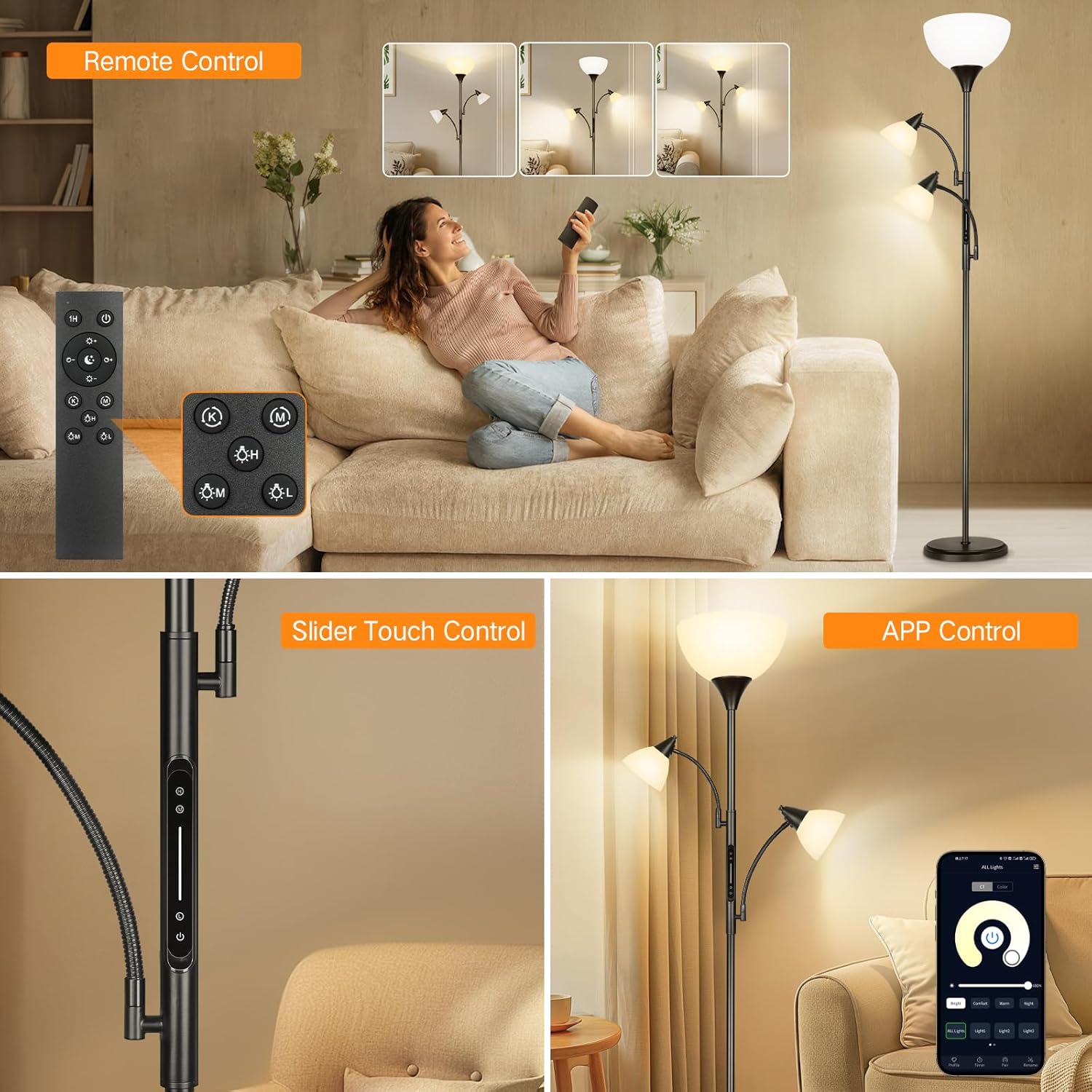
Image: The OUTON Dimmable 3-Light Floor Lamp featuring a main torchiere light and two adjustable reading lights, shown in a modern living room.
Umarnin Tsaro
- Tabbatar da lamp an cire haɗin kafin a haɗa, a goge, ko a maye gurbin kwan fitila.
- Kada ku yi amfani da lamp tare da lalatacce igiya ko toshe.
- Wannan lamp is designed for indoor use only. Do not expose to water or high humidity.
- Sanya lamp on a stable, level surface to prevent tipping. The heavy base is designed for stability.
- Use only the specified bulb type (E26 LED, 9W max per bulb).
- Ka nisantar da kayan wuta.

Image: A mother and child with a dog near the lamp, highlighting the heavy-weighted base for stability, ensuring safety around children and pets.
Abubuwan Kunshin
Tabbatar cewa duk abubuwan da aka gyara suna nan kafin fara taro:
- Falo Lamp Tushen
- Lamp Poles (multiple sections)
- Main Torchiere Light Head with Lampinuwa
- Two Adjustable Reading Lights
- 3 x 9W E26 LED Bulbs
- Ikon nesa
- Jagorar mai amfani (wannan takaddar)
Saita da Majalisa
The OUTON Dimmable 3-Light Floor Lamp is designed for quick and easy assembly without the need for additional tools. Follow these steps:
- Mataki 1: Carefully screw all pole sections together from top to bottom, ensuring they are securely tightened.
- Mataki 2: Dunƙule da aka haɗa lamp pole into the heavy base, turning clockwise until firm.
- Mataki 3: Place the top torchiere lampinuwa zuwa lamp mariƙin.
- Mataki 4: Screw the fixing ring onto the holder to secure the lampshade. Install the provided LED bulbs into all three light sockets (E26 standard).

Image: Visual guide for lamp assembly, illustrating screwing poles, attaching to base, placing the top shade, and installing bulbs.
Umarnin Aiki
Your OUTON floor lamp offers multiple control options for convenience and versatility.
Control Methods: Remote, Touch, and App
- Ikon nesa: The magnetic remote allows full control over brightness, color temperature, and individual lights from a distance. It also includes preset scene modes and a 1-hour timer.
- Ikon taɓawa: A touch-sensitive panel is integrated into the lamp pole, providing direct control for power, brightness, and individual light activation.
- Ikon App: Download the compatible app to control your lamp via your smartphone, offering advanced customization and scheduling features.
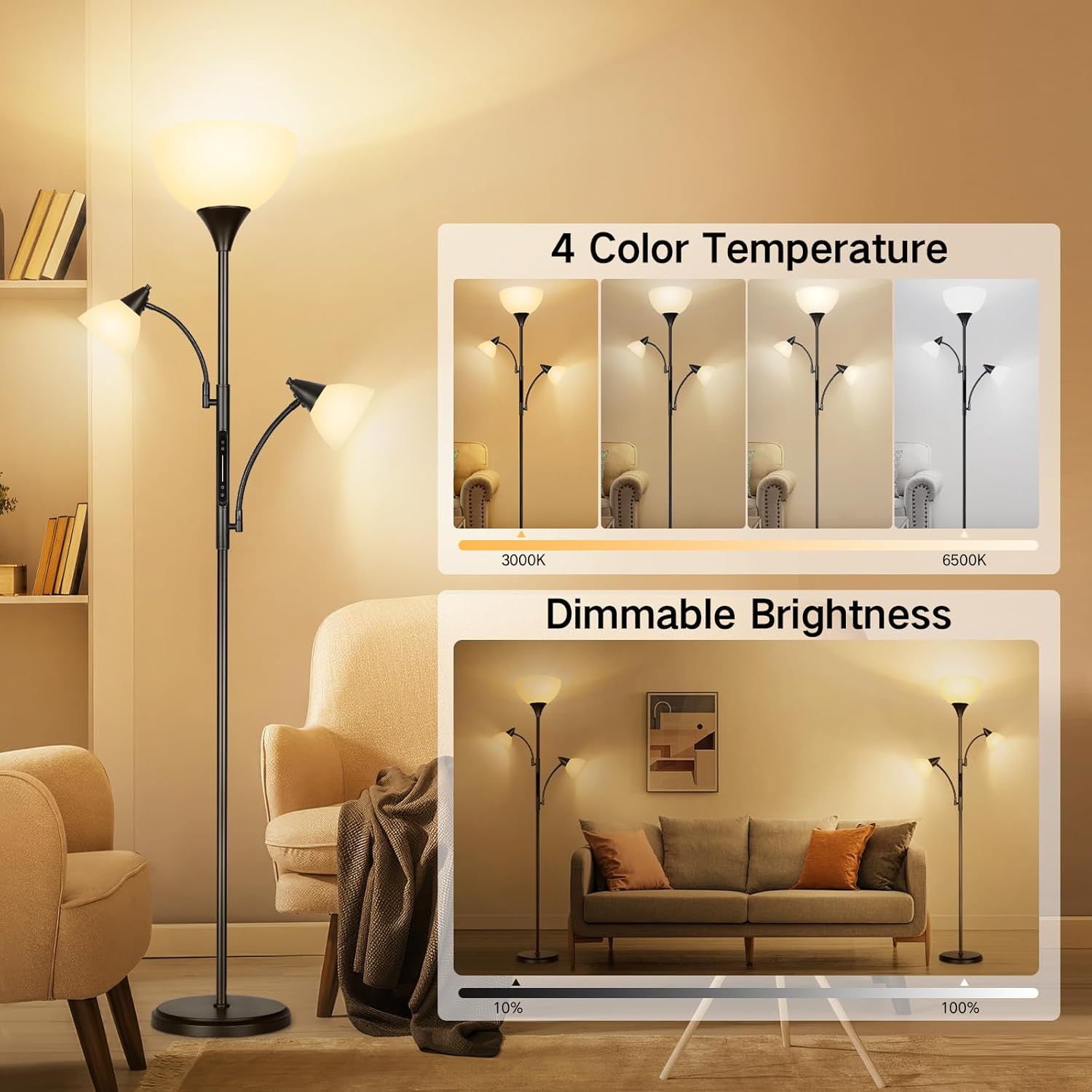
Image: Demonstrates the three control methods: a remote control, a slider touch control on the lamp pole, and a smartphone app interface.
Haskaka da Daidaita Yanayin Zazzabi
Adjust the lighting to suit your needs:
- Haske mai Dimmable: Lamp supports brightness adjustment from 10% to 100%. Use the '+' and '-' buttons on the remote or slide your finger on the touch panel to change intensity.
- 4 Yanayin Zazzabi: Choose from 3000K (Warm White), 4500K (Natural White), 5000K (Daylight), and 6500K (Cool White). Cycle through these settings using the 'K' button on the remote or the color temperature control on the app.
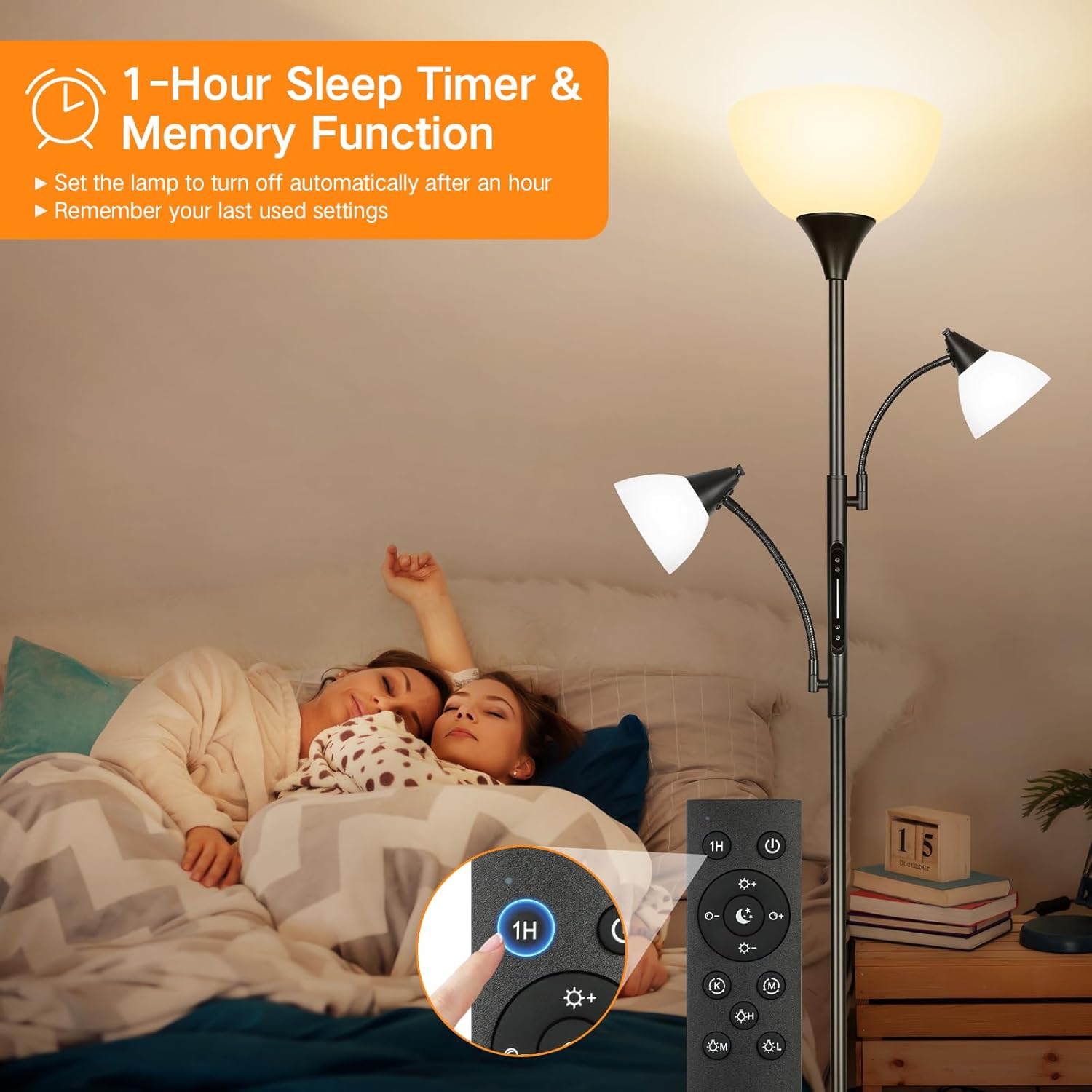
Image: Illustrates the four available color temperatures and the dimmable brightness range of the lamp.
1-Hour Timer and Memory Function
- Lokacin Awa 1: Activate the 1-hour timer via the remote control to automatically turn off the lamp after one hour. This is useful for bedtime or when leaving a room.
- Ayyukan ƙwaƙwalwa: Lamp remembers your last used brightness and color temperature settings. When you turn the lamp back on, it will resume these settings.

Image: Shows the 1-hour sleep timer and memory function, with a close-up of the remote control's timer button.
Individual Light Control
The OUTON floor lamp features three individually controlled lights:
- Top Torchiere Lamp: Provides general ambient illumination for the room.
- Two Adjustable Reading Lamps: These lights have flexible goosenecks, allowing you to direct light precisely where needed for tasks like reading or crafting. Each reading light can be turned on/off and dimmed independently.

Image: Illustrates the torchiere floor lamp with two adjustable reading lights, showing their flexibility and independent control.
Video Demonstration: Touch and Remote Control
Video: This video demonstrates the functionality of the touch control panel on the lamp pole and the remote control, showing how to adjust brightness and color temperature for the individual lights and the main torchiere.
Kulawa
- Tsaftacewa: Tabbatar da lamp is unplugged. Wipe the lamp and shades with a soft, dry cloth. Do not use abrasive cleaners or solvents.
- Sauyawa Bulb: Koyaushe cire plug ɗin lamp before replacing bulbs. Allow old bulbs to cool before handling. Replace with E26 standard LED bulbs, 9W maximum.
Shirya matsala
| Matsala | Dalili mai yiwuwa | Magani |
|---|---|---|
| Lamp baya kunnawa. | Power cord not plugged in; outlet not active; bulb loose or faulty. | Check power connection; test outlet with another device; tighten or replace bulb. |
| Ikon nesa baya aiki. | Batteries dead; remote out of range; obstruction. | Replace remote batteries; move closer to the lamp; remove obstructions. |
| Fitillu suna kyalli ko dushewa ba zato ba tsammani. | Loose bulb; unstable power supply. | Tighten bulbs; try a different power outlet. |
| Ikon app baya haɗawa. | Wi-Fi issue; incorrect app settings; lamp ba a cikin yanayin daidaitawa ba. | Check Wi-Fi connection; ensure correct app setup; refer to app instructions for pairing. |
Ƙayyadaddun bayanai
| Siffar | Daki-daki |
|---|---|
| Alamar | FITOWA |
| Samfura | B0CTKJN2XM |
| Lamp Nau'in | Falo Lamp |
| Yawan Tushen Haske | 3 |
| Nau'in Tushen Haske | LED |
| Tushen Bulb | E26 Standard |
| Watatage (kowane kwan fitila) | 9 watts |
| Lumen Output (per bulb) | 810 lumen |
| Yanayin launi | 3000K-6500K (4 settings) |
| Dimmable | Ee (10%-100%) |
| Hanyoyin sarrafawa | Remote, Touch, App |
| Ƙarin Halaye | 1-Hour Timer, Memory Function, Adjustable Reading Lights |
| Nau'in Abu | Metal, Plastic, Resin |
| Nau'in Ƙarshe | Matte |
| Nauyin Abu | 10 fam |
| Tushen wutar lantarki | Corded Electric |
| Amfanin Cikin Gida/Waje | Cikin gida |
Garanti da Taimako
This OUTON Dimmable 3-Light Floor Lamp zo da a Garanti na masana'anta na shekara 1 from the date of purchase. This warranty covers defects in materials and workmanship under normal use. It does not cover damage caused by misuse, accidents, unauthorized modifications, or improper installation.
For warranty claims, technical support, or any questions regarding your product, please contact OUTON customer service through the retailer where the product was purchased or visit the official OUTON website don bayanin lamba.