
Gabatarwa
This manual provides detailed instructions for the HiFuture YACHT Rose Gold earbuds. Please read this manual carefully before using the product to ensure proper operation and to maximize its lifespan. Keep this manual for future reference.
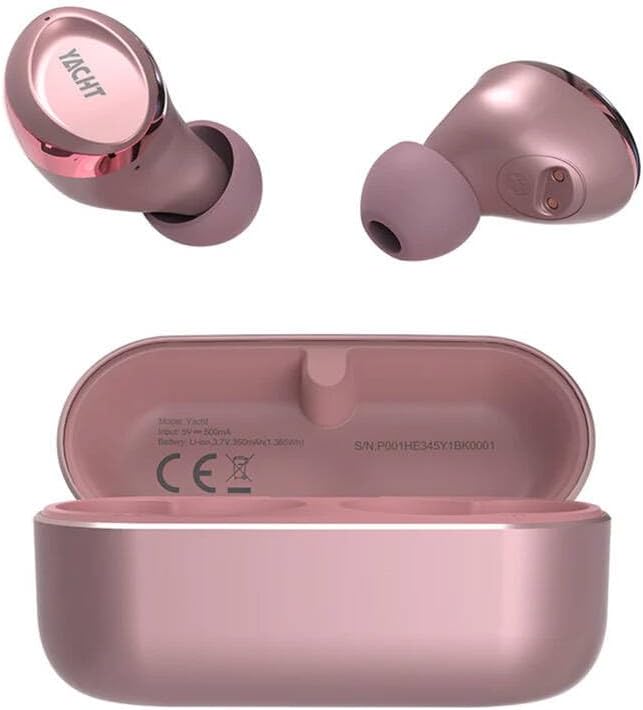
Hoto 1: HiFuture YACHT Rose Gold Earbuds and Charging Case. The image displays two rose gold earbuds, one showing the 'YACHT' branding on its outer surface, and the other showing its inner contact points. Below them is the open rose gold charging case, revealing the charging cradles and internal specifications such as 'Model: Yacht', 'Input: 5V ≈ 500mA', 'Battery: Li-ion 3.7V 350mAh/1.36Wh', and 'S/N: P001HE345Y1BK0001'.
Abubuwan Kunshin
The HiFuture YACHT Earbuds package typically includes:
- HiFuture YACHT Rose Gold Earbuds (Left and Right)
- Cajin Cajin
- Kebul na Caji
- Jagorar mai amfani (wannan takaddar)
- Eartips (various sizes, if applicable, though not specified)
Saita
1. Cajin Farko
Before first use, fully charge the earbuds and the charging case. The charging case has an input requirement of 5V at 500mA. The internal battery of the case is a Li-ion 3.7V 350mAh (1.36Wh).
- Sanya belun kunne biyu a cikin cajin caji.
- Haɗa kebul na caji na USB zuwa tashar caji da ke kan akwati da kuma zuwa tushen wutar lantarki na USB mai jituwa (misali, kwamfuta, adaftar bango).
- The indicator lights on the case and/or earbuds will show the charging status. Refer to the indicator light section for details (if available, otherwise assume standard behavior).
- Da zarar an cika caji, cire haɗin kebul ɗin caji.
2. Haɗa Bluetooth
To connect your HiFuture YACHT earbuds to a device:
- Tabbatar cewa an caje belun kunne kuma an sanya su a cikin akwati na caji.
- Open the charging case lid. The earbuds will automatically enter pairing mode, indicated by a flashing LED light (usually on one earbud).
- Akan na'urarka (wayar hannu, kwamfutar hannu, kwamfuta), je zuwa saitunan Bluetooth.
- Kunna Bluetooth.
- Bincika available devices. You should see "HiFuture YACHT" or a similar name appear in the list.
- Select "HiFuture YACHT" to connect.
- Once connected, the LED indicator on the earbuds will typically stop flashing or change to a solid color.
- An shirya belun kunne yanzu don amfani.
Lura: If pairing fails, place the earbuds back in the case, close the lid, wait a few seconds, then reopen and try again. Ensure no other devices are actively trying to connect to the earbuds.
Umarnin Aiki
1. Kunnawa / Kashewa
- Kunna Wuta: Open the charging case lid, or take the earbuds out of the case. They will automatically power on and attempt to reconnect to the last paired device.
- Kashe Wuta: Sanya belun kunne a baya cikin akwati na caji kuma rufe murfin. Za su cire haɗin kai ta atomatik kuma su kashe wuta.
2. Saka abin kunne
Gently insert each earbud into the corresponding ear canal (L for left, R for right). Rotate them slightly until they fit snugly and comfortably. A proper fit ensures optimal sound quality and secure placement.
3. Basic Controls (Touch/Button)
The HiFuture YACHT earbuds feature touch-sensitive controls. Specific functions may vary slightly, but common operations include:
- Kunna/Dakata: Matsa guda ɗaya akan ko wane belun kunne.
- Waƙa ta gaba: Matsa sau biyu akan belun kunne na dama.
- Tafiya ta baya: Matsa sau biyu akan belun kunne na hagu.
- Amsa/Ƙarshen Kira: Matsa guda ɗaya akan ko wane belun kunne yayin kira mai shigowa.
- Karɓar Kira: Latsa ka riƙe kowane belun kunne na daƙiƙa 2 yayin kira mai shigowa.
- Kunna Mataimakin Murya: Matsa sau uku akan na'urar kunne (misali, Siri, Mataimakin Google).
- Sarrafa ƙara: (If supported) Tap and hold the right earbud to increase volume, tap and hold the left earbud to decrease volume. Refer to specific product documentation for exact volume control methods.
Kulawa
1. Tsaftacewa
Tsaftacewa akai-akai yana taimakawa kula da ingancin sauti da tsafta.
- Yi amfani da laushi, busasshe, zane mara lullube don goge belun kunne da akwati na caji.
- Don datti mai taurin kai, ɗan dampA shafa ruwan a cikin zane ko kuma wani mai tsabtacewa mai laushi wanda ba ya gogewa. A guji shigar da ruwa cikin ramuka.
- A hankali cire duk wani tarkacen kunne ko tarkace daga kunnen kunne da ragamar lasifikar ta yin amfani da ƙaramar goga mai laushi ko swab auduga.
- Ensure all components are completely dry before placing earbuds back in the case or charging.
2. Adana
Lokacin da ba a yi amfani da su ba, adana belun kunne a cikin cajin su don kare su daga ƙura, lalacewa, da kiyaye su caji.
3. Kula da baturi
- Avoid exposing the earbuds and case to extreme temperatures (hot or cold).
- Do not fully deplete the battery for extended periods. Charge regularly.
- Yi amfani da kebul ɗin caji kawai da aka bayar ko ingantaccen daidai.
Shirya matsala
| Matsala | Magani mai yiwuwa |
|---|---|
| Kayan kunne ba sa haɗawa da na'ura. |
|
| Babu sauti ko ƙaramin ƙara. |
|
| Kunnen kunne baya caji. |
|
| One earbud not working. |
|
Ƙayyadaddun bayanai
| Siffar | Daki-daki |
|---|---|
| Alamar | HiFuture |
| Sunan Samfura | YACHT |
| Launi | Rose Gold |
| Nauyin Abu | 80 Grams (jimlar fakitin) |
| Adadin Abubuwan | 1 (package) |
| Cajin shigar da shari'ar | 5V ≈ 500mA |
| Cajin Cajin Batir | Li-ion 3.7V 350mAh (1.36Wh) |
| Serial Number (Example) | P001HE345Y1BK0001 (may vary by unit) |
Garanti da Taimako
HiFuture products are designed for reliability and performance. For warranty information, please refer to the warranty card included with your purchase or visit the official HiFuture website. For technical support or inquiries, please contact HiFuture customer service through their official channels.
- Taimako kan layi: Visit the official HiFuture website for FAQs, support resources, and contact options.
- Tallafin Imel: Koma zuwa marufin samfurin ku ko na hukuma webshafin yanar gizo don adiresoshin imel na sabis na abokin ciniki.