1. Muhimman Bayanan Tsaro
Please read all instructions carefully before using the Inventum Mini Oven. Retain this manual for future reference.
- Always place the appliance on a stable, heat-resistant surface, away from walls and other appliances to ensure proper ventilation.
- Do not touch hot surfaces. Use oven mitts or gloves when handling hot components or food.
- Tabbatar cewa igiyar wutar lantarki ba ta lalace ba kuma an nisanta ta daga saman zafi.
- Kada a nutsar da na'urar, igiya, ko toshe cikin ruwa ko wasu ruwaye.
- Kulawa na kusa yana da mahimmanci lokacin da kowace na'ura ke amfani da ko kusa da yara.
- Cire toshe daga kanti lokacin da ba a amfani da shi kuma kafin tsaftacewa. Bada damar yin sanyi kafin saka ko cire sassa.
- Kada a yi amfani da kowace na'ura mai igiya ko filogi da ta lalace, ko bayan na'urar ta lalace ko ta lalace ta kowace hanya.
- Do not use accessories or attachments not recommended by the manufacturer, as this may cause injuries.
- Do not place any of the following materials in the oven: paper, cardboard, plastic, or similar flammable materials.
- Exercise extreme caution when removing trays or disposing of hot grease.
2. Samfurin Ya Ƙareview da kuma abubuwan da aka gyara
The Inventum Mini Oven is designed for versatile cooking, including baking, frying, and roasting. Familiarize yourself with its components for optimal use.

Hoto na 2.1: The Inventum Mini Oven with its door open, displaying chicken pieces, sliced vegetables, and french fries on its internal trays.

Hoto na 2.2: Gaba view of the Inventum Mini Oven, showcasing its compact design and the food items arranged on the internal racks.
Abubuwan da aka haɗa:
- Babban Sashe: The primary oven body with a 12-liter capacity, touch control panel, and viewcikin window.

Hoto na 2.3: Gede view of the Inventum Mini Oven, highlighting its sleek black and stainless steel exterior.
- Kwamitin Gudanarwa: Touch-sensitive interface for setting temperature, time, and selecting cooking programs.
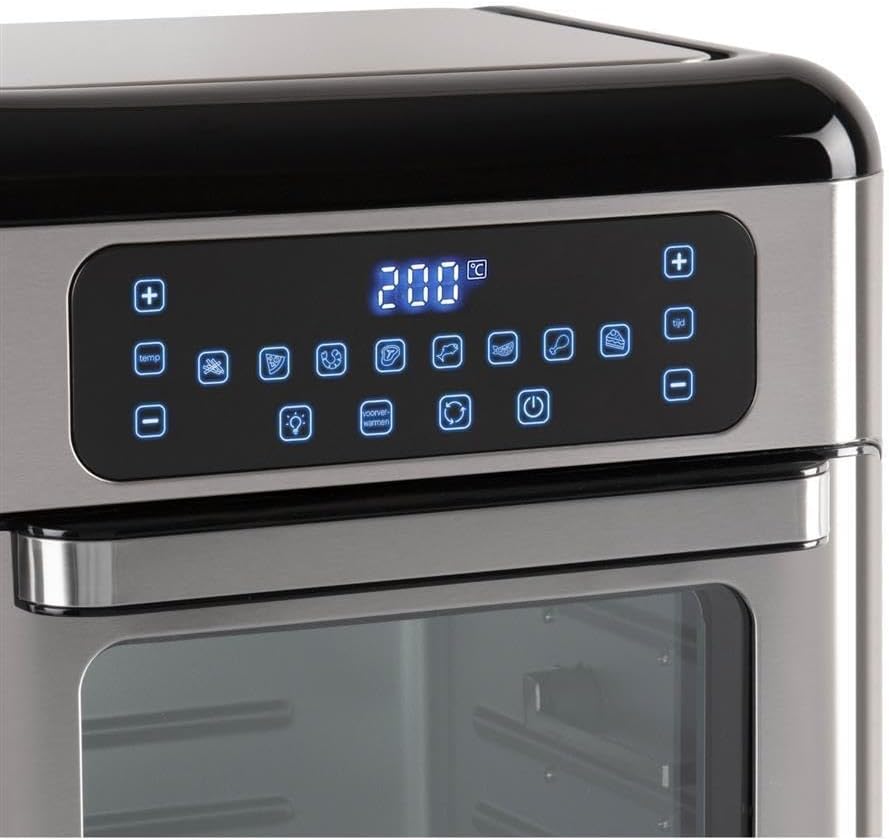
Hoto na 2.4: Dalla-dalla view of the touch control panel with digital display and various function icons.
- Baking Shelves (Perforated Trays): Two perforated trays for air frying and baking, allowing for even heat circulation.

Hoto na 2.5: Two perforated baking trays, ideal for air frying and ensuring crispy results.
- Crumb Tray (Solid Baking Tray): A solid tray designed to catch crumbs and drips, also suitable for baking.

Hoto na 2.6: A solid baking tray, which also functions as a crumb tray to collect food debris.
- Kwandon Rotisserie: A mesh basket for tumbling smaller items like fries or nuts during rotisserie cooking.

Hoto na 2.7: The rotisserie mesh basket, designed for even cooking of smaller food items.
- Rotisserie Spit and Handle: Don gasa kajin gaba ɗaya ko yankan nama mafi girma.

Hoto na 2.8: The rotisserie spit with forks and the removal handle for safe handling.
- Littafin mai amfani: Wannan takarda.
3. Saita da Amfani na Farko
3.1 Buɗewa
- Cire duk kayan marufi, lambobi, da alamomi daga na'urar.
- A duba cewa duk abubuwan da aka lissafa suna nan kuma ba su lalace ba.
3.2 Wuri
- Place the mini oven on a flat, stable, and heat-resistant surface.
- Ensure there is at least 10 cm (4 inches) of clear space on all sides of the oven for proper ventilation.
- Do not place the oven near flammable materials or under wall cabinets.
3.3 Tsaftace Kafin Amfani da Farko
- Shafa wajen tanda tare da tallaamp zane.
- Wash all removable accessories (baking shelves, crumb tray, rotisserie basket, spit) in warm, soapy water. Rinse thoroughly and dry completely.
- Insert the crumb tray at the very bottom of the oven.
3.4 Kashe Farko
Before cooking food, it is recommended to run the oven empty for approximately 15 minutes to burn off any manufacturing residues.
- Toshe igiyar wutar lantarki cikin mashin wutar lantarki.
- Set the temperature to 200°C (390°F) and the timer to 15 minutes.
- A slight odor or smoke may be present during this initial use; this is normal. Ensure the area is well-ventilated.
- After 15 minutes, turn off the oven and unplug it. Allow it to cool completely before proceeding.
4. Umarnin Aiki
4.1 Sarrafa panelview
The Inventum Mini Oven features an intuitive touch control panel. Refer to Figure 2.4 for a visual guide.
- Maɓallin Wuta: Yana kunna/kashe tanda.
- Kula da Zazzabi (+/-): Adjusts the cooking temperature.
- Ikon Lokaci (+/-): Adjusts the cooking duration.
- Zaɓin Shirin: Icons representing 8 pre-set cooking programs (e.g., fries, chicken, fish, steak, cake, pizza, toast, dehydrate).
- Maɓallin Haske: Turns the internal oven light on/off.
- Convection Fan Button: Activates/deactivates the convection fan for even cooking.
- Maballin Rotisserie: Yana kunna/ kashe aikin rotisserie.
4.2 Basic Aiki
- Shirya Abinci: Place your food on the appropriate accessory (baking shelf, crumb tray, rotisserie basket, or spit).
- Saka Kayan haɗi: Carefully slide the accessory with food into the desired rack position inside the oven. Ensure the crumb tray is always at the bottom.
- Rufe Kofa: Rufe kofar tanda da aminci.
- Kunna Wuta: Danna maɓallin wuta. Allon zai haskaka.
- Zaɓi Shirin ko Saitunan Manual:
- Pre-set Program: Touch one of the 8 program icons. The oven will automatically set a recommended temperature and time.
- Saitin Manual: Use the Temperature (+/-) buttons to set the desired temperature and the Time (+/-) buttons to set the cooking duration.
- Fara Dafa abinci: The oven will typically start automatically after a few seconds of setting the time/temperature or selecting a program. Some models may require pressing the Power button again to start.
- Kula da dafa abinci: Use the internal light button to check on your food without opening the door.
- Ƙarshen dafa abinci: The oven will beep when the timer expires and automatically turn off the heating elements.
- Cire Abinci: Carefully open the oven door. Using oven mitts, remove the cooked food and accessories. Be aware of hot steam.
- Kashe Wuta: Press the Power button to turn off the oven completely, then unplug it from the wall outlet.
4.3 Amfani da Aikin Rotisserie
The rotisserie function is ideal for even cooking of whole chickens or other roasts using the rotisserie spit, or for items like fries using the rotisserie basket.
- Shirya Abinci:
- For Spit: Skewer the food (e.g., whole chicken) onto the rotisserie spit, securing it with the forks. Ensure the food is centered and balanced.
- For Basket: Place smaller items like fries or vegetables into the rotisserie basket and secure the lid.
- Insert Rotisserie: Carefully insert the rotisserie spit or basket into the designated rotisserie slots inside the oven. Ensure it is properly seated and can rotate freely.
- Set Cooking Parameters: Saita yawan zafin jiki da lokacin da ake so ta amfani da kwamitin kulawa.
- Activate Rotisserie: Press the Rotisserie button on the control panel. The rotisserie mechanism will begin to rotate.
- Fara Dafa abinci: Begin the cooking cycle as described in "4.2 Basic Operation".
- Cire Abinci: Once cooking is complete, use the rotisserie handle (Figure 2.8) to carefully lift and remove the hot rotisserie assembly from the oven. Place it on a heat-resistant surface before removing the food.
5. Kulawa da Tsaftacewa
Regular cleaning and maintenance will ensure the longevity and optimal performance of your Inventum Mini Oven.
5.1 Gabaɗaya Tsabtace
- Koyaushe cire haɗin tanda kuma bar shi ya yi sanyi gaba ɗaya kafin tsaftacewa.
- Do not use abrasive cleaners, scouring pads, or harsh chemicals, as these can damage surfaces.
5.2 Tsabtace Cikin Gida
- The oven features a stainless steel interior, which is durable and easy to clean.
- Remove the crumb tray and all other accessories. Wash them in warm, soapy water, rinse, and dry.
- Goge bangon ciki tare da tallaamp cloth and a mild detergent. For stubborn stains, a non-abrasive oven cleaner designed for stainless steel can be used, following the product instructions.
- Shafa bushe da zane mai tsabta.
5.3 Tsabtace Waje
- Shafa saman waje da taushi, damp zane.
- For the control panel, use a slightly damp cloth and wipe gently. Do not spray water directly onto the control panel.
- A bushe sosai.
5.4 Tire mai Crumb
- The crumb tray should be emptied and cleaned regularly to prevent grease buildup and potential fire hazards.
- Slide out the crumb tray from the bottom of the oven, discard crumbs, and wash as described above.
6. Shirya matsala
If you encounter issues with your Inventum Mini Oven, consult the following table before contacting customer support.
| Matsala | Dalili mai yiwuwa | Magani |
|---|---|---|
| Tanda baya kunna. | Ba a toshe ba; iko kutage; mara kyau kanti. | Tabbatar cewa an toshe igiyar wutar lantarki amintacciya cikin wurin aiki. Bincika na'urar hanawa. |
| Ba a dafa abinci daidai gwargwado. | Overcrowding; incorrect temperature/time; convection fan off. | Do not overcrowd the oven. Adjust temperature and time as needed. Ensure the convection fan is active for even cooking. Rotate food halfway through cooking. |
| Shan taba ko wari mai zafi yayin aiki. | Food residue on heating elements; crumb tray not cleaned; excessive grease. | Unplug and allow to cool. Clean the interior and crumb tray thoroughly. Ensure food is not touching heating elements. |
| Aikin Rotisserie baya aiki. | Rotisserie not properly seated; function not activated. | Ensure the rotisserie spit/basket is correctly inserted into the drive slots. Press the Rotisserie button on the control panel to activate. |
| Kwamitin sarrafawa ba ya amsawa. | Temporary electronic glitch; power issue. | Unplug the oven for 5 minutes, then plug it back in. If the issue persists, contact customer support. |
7. Ƙayyadaddun samfur
| Siffar | Daki-daki |
|---|---|
| Alamar | Ƙaddamarwa |
| Sunan Samfura | Saukewa: GF1200HLD |
| Siffa ta Musamman | Girman Karami |
| Nau'in sarrafawa | Taɓa Control |
| Abubuwan da aka haɗa | Baking shelves, crumb tray, user manual |
| Tushen wutar lantarki | Lantarki |
| Fitar wutar lantarki | 1500W |
| Iyawa | 12 lita |
| Kayan Cikin Gida | Bakin Karfe |
| Nauyin Abu | 2.2 fam |
| GTIN | 08712876094305 |
8. Garanti da Abokin ciniki Support
8.1 Bayanin Garanti
Inventum products are manufactured to high-quality standards. For specific warranty details regarding your Inventum Mini Oven (Model GF1200HLD), please refer to the warranty card included with your purchase or visit the official Inventum website. Ajiye shaidar siyan ku don da'awar garanti.
8.2 Tallafin Abokin Ciniki
If you have any questions, require technical assistance, or need to report a problem with your appliance, please contact Inventum customer support. Contact information can typically be found on the official Inventum website ko a kan marufi na samfur.
When contacting support, please have your product model number (GF1200HLD) and purchase date available.