
1. Gabatarwa
This manual provides detailed instructions for the proper installation, operation, and maintenance of your DAIKIN Wireless Remote Controller, model BRC082A42W. This device is designed to offer convenient wireless control over your Daikin ceiling cassette air handler, enhancing your comfort and energy management.
2. Samfurin Ya Ƙareview
2.1 Maɓalli Maɓalli
- Convenient Wireless Control: Manage your ceiling cassette air handler from anywhere in the room.
- Wall-Mounted Holder: Includes a holder for secure and accessible storage.
- Ayyuka da yawa: ON/OFF, mode selection, temperature setting, fan speed control, timer, and more.
- Daidaituwa: Designed for Daikin ceiling cassette units.
- Gudanar da Makamashi: Includes scheduling options like auto on/off timer for better energy control.
2.2 Abubuwan
The DAIKIN Wireless Remote Controller BRC082A42W package includes:
- Wireless Remote Controller Unit
- Wall-Mounted Holder
- Signal Receiver (integrates with the decorative grille)
- Batteries (may be included or sold separately)
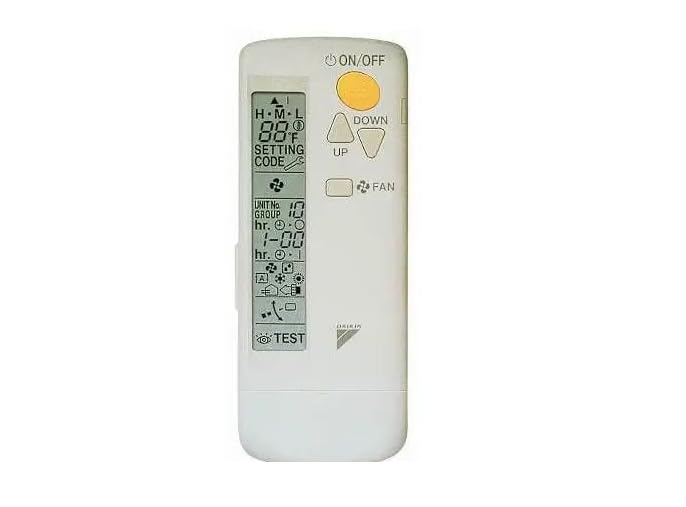
Figure 1: DAIKIN Wireless Remote Controller BRC082A42W. This image shows the compact, white remote control unit.
3. Saita da Shigarwa
3.1 Shigar da Baturi
- Buɗe murfin ɗakin batirin da ke bayan na'urar sarrafawa ta nesa.
- Saka batura da aka ƙayyade, don tabbatar da daidaiton polarity (+/-).
- Rufe murfin ɗakin baturi amintacce.
3.2 Wall-Mounted Holder Installation
- Choose a convenient location for the holder, ensuring the remote signal can reach the air handler's receiver.
- Use the provided screws to securely attach the holder to the wall.
- Place the remote controller into the holder.
3.3 Signal Receiver Integration
The signal receiver for the wireless remote controller integrates seamlessly with the decorative grille of your Daikin ceiling cassette air handler. Refer to your air handler's installation manual for specific instructions on how to install or confirm the presence and connection of the signal receiver.
3.4 Compatibility with Wired Controllers
If a wired controller is also in use with the same Daikin ceiling cassette unit, the wireless remote controller BRC082A42W must be configured as a Sub Controller. Consult your Daikin air handler's technical documentation or a qualified technician for proper configuration to avoid operational conflicts.
4. Umarnin Aiki
The remote controller provides various functions to manage your Daikin air handler. Point the remote towards the air handler's signal receiver when operating.
4.1 Aiki na asali
- Maballin KUNNA/KASHE: Press to turn the air handler ON or OFF.
- Zaɓin Yanayin: Use the 'MODE' button to cycle through operating modes (e.g., Cool, Heat, Fan, Dry, Auto).
- Saitin Zazzabi: Use the 'TEMP UP' and 'TEMP DOWN' buttons to adjust the desired room temperature.
- Sarrafa Gudun Fan: Press the 'FAN' button to select desired fan speed (e.g., Low, Medium, High, Auto).
4.2 Ayyukan Mai ƙidayar lokaci
The timer function allows you to program the air handler to turn ON or OFF automatically at specified times, contributing to energy efficiency.
- Setting ON Timer: Press the 'TIMER ON' button, then use temperature/time adjustment buttons to set the desired ON time. Confirm with 'SET'.
- Setting OFF Timer: Press the 'TIMER OFF' button, then use temperature/time adjustment buttons to set the desired OFF time. Confirm with 'SET'.
- Canceling Timer: Press the 'CANCEL' button or the 'TIMER' button again to cancel an active timer.
4.3 Manyan Ayyuka
Refer to the display on your remote controller for additional functions such as swing control, powerful mode, or economy mode, if available. Specific button labels and functions may vary slightly.
5. Kulawa
5.1 Tsaftace Mai Kula da Nesa
To clean the remote controller, gently wipe its surface with a soft, dry cloth. Do not use liquid cleaners, abrasive materials, or chemical sprays, as these can damage the unit.
5.2 Sauya Baturi
When the display dims or the remote controller becomes unresponsive, it is time to replace the batteries. Always replace all batteries at the same time with new ones of the same type. Dispose of used batteries according to local regulations.
6. Shirya matsala
If you encounter issues with your DAIKIN Wireless Remote Controller, refer to the following common problems and solutions:
- Remote baya amsawa:
- Check if batteries are correctly inserted and have sufficient charge. Replace if necessary.
- Ensure there are no obstructions between the remote and the air handler's signal receiver.
- Confirm the remote is pointed directly at the receiver.
- Incorrect temperature display:
- Verify the temperature unit setting (Celsius/Fahrenheit) if applicable.
- Air handler not responding to commands:
- Ensure the air handler itself is powered on.
- If a wired controller is also present, confirm the wireless remote is set as a Sub Controller.
For persistent issues, contact Daikin customer support or a qualified service technician.
7. Ƙayyadaddun bayanai
| Lambar Samfura | BRC082A42W |
| Alamar | DAIKIN |
| Nauyin Abu | 3.68 oz |
| Girman Kunshin | 6 x 2.4 x 0.69 inci |
| Fasahar Haɗuwa | Adadin Rediyo |
| Nau'in Mai Gudanarwa | Ikon Maɓalli |
| Na'urori masu jituwa | Daikin Ceiling Cassette Air Handlers |
8. Garanti da Tallafawa
This DAIKIN Wireless Remote Controller BRC082A42W is manufactured by Daikin. For specific warranty information, please refer to the warranty card included with your product or visit the official Daikin website. Sharuɗɗan garanti yawanci suna rufe lahani na masana'anta na ƙayyadadden lokaci daga ranar siyan.
For technical support, service, or to inquire about replacement parts, please contact Daikin customer service directly. Contact information can usually be found on the manufacturer's webshafin ko a cikin marufi na samfur.