
1. Gabatarwa
Welcome to the WONNIE DC105P Digital Camera user manual. This guide provides essential information for setting up, operating, and maintaining your new camera. Designed for ease of use, this camera captures vivid 56MP photos and Full HD 1080P videos, making it perfect for young photographers to explore their creativity.
2. Bayanin Tsaro
- Kada a bijirar da kyamara ga ruwa ko matsanancin zafi.
- Tsare kamara daga filaye masu ƙarfi masu ƙarfi.
- Use only the specified batteries and charging cable.
- Ka guji jefar da kyamarar ko sanya ta ga tasiri mai ƙarfi.
- Tsaftace ruwan tabarau tare da laushi, bushe bushe.
3. Abin da ke cikin Akwatin
Upon unboxing your WONNIE DC105P Digital Camera, please ensure all the following items are present:
- WONNIE DC105P Digital Camera
- Katin 32GB TF
- Rechargeable Batteries (x2)
- Rubuta-C kebul na USB
- Lanyard
- Jakar Ajiya
- Jagorar mai amfani (wannan takarda)
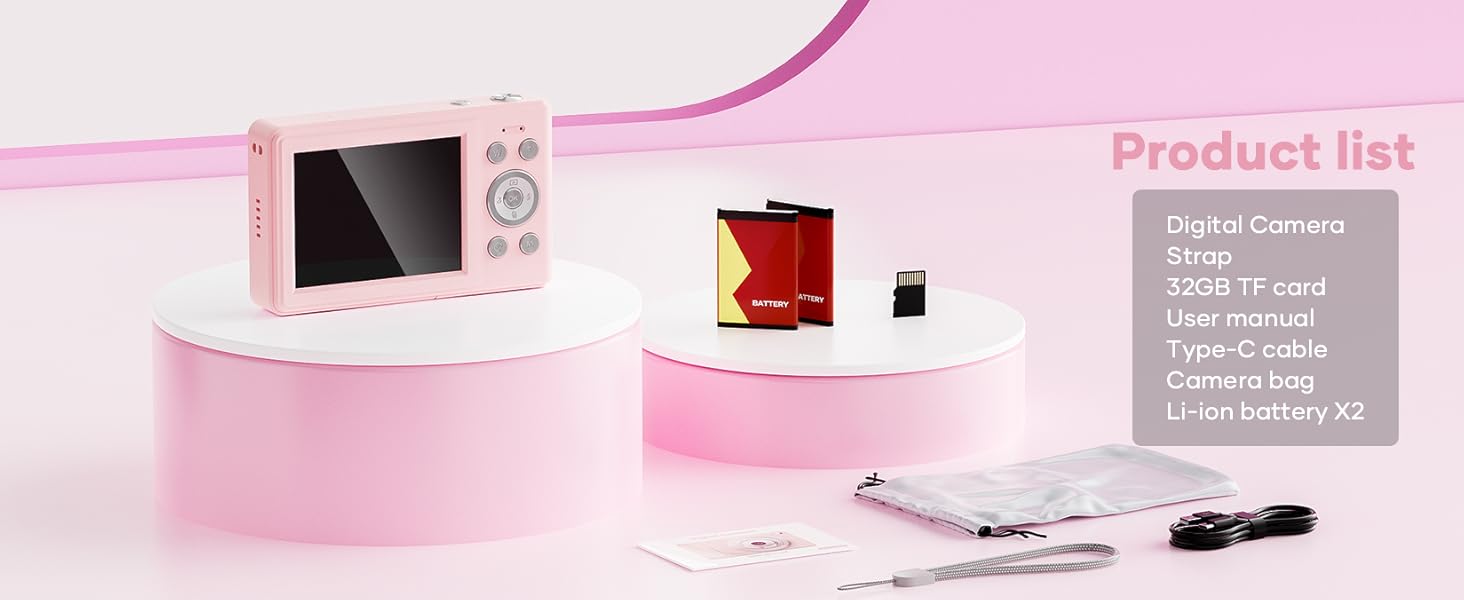
This image displays the WONNIE DC105P Digital Camera alongside its accessories: two rechargeable batteries, a 32GB TF card, a Type-C USB cable, a lanyard, and a soft storage bag, all neatly arranged.
4. Samfurin Ya Ƙareview
Ka saba da kayan aikin kyamara da kuma abubuwan da ke sarrafa ta.
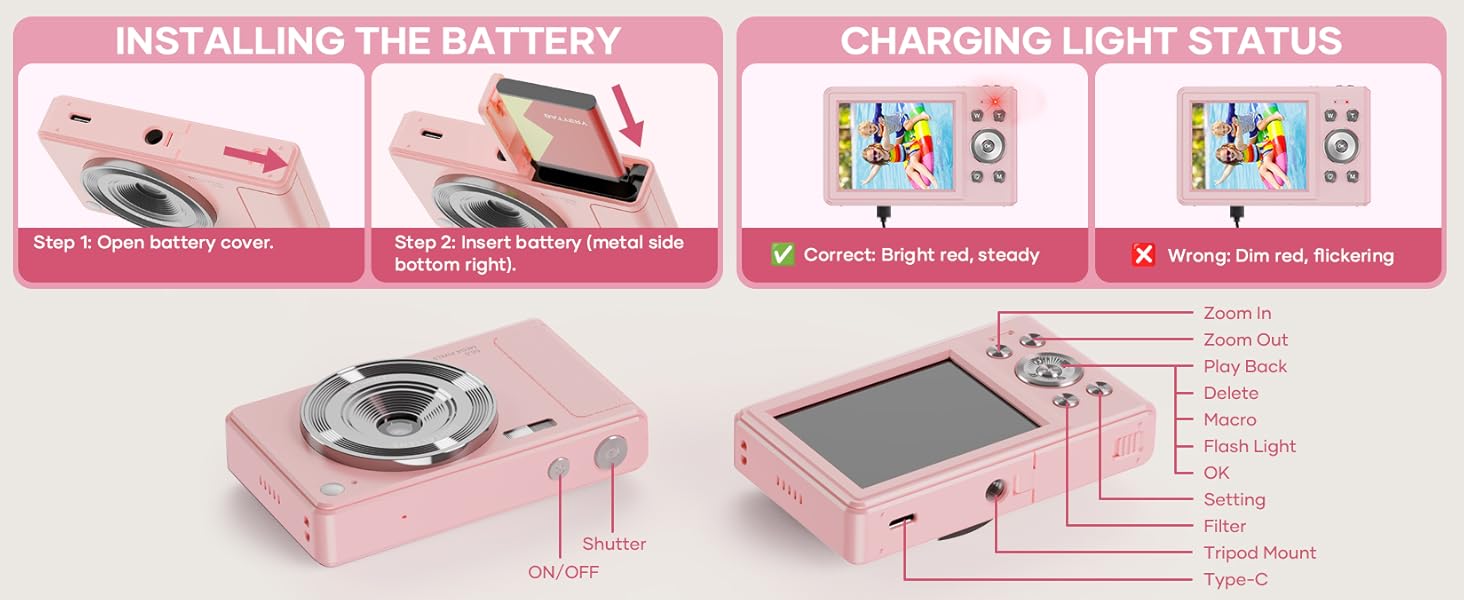
This diagram highlights the various buttons and ports on the WONNIE DC105P Digital Camera, including the power button, shutter button, zoom controls, playback button, menu button, OK button, flash light, tripod mount, and Type-C port.
Mabuɗin Abubuwan:
- Lens: Yana ɗaukar hotuna da bidiyo.
- Filashi: Yana ba da haske a cikin ƙananan haske.
- Maballin Rufewa: Press to take a photo or start/stop video recording.
- Maɓallin Wuta: Yana kunna ko kashe kyamara.
- Allon LCD: Yana nunawa kai tsaye view, menus, and playback.
- Maɓallan kewayawa (Sama/Ƙasa/Hagu/ Dama/Ok): Used for menu navigation and selecting options.
- Zoom Buttons (W/T): Adjusts digital zoom.
- Maɓallin sake kunnawa: Yana shigar da yanayin sake kunnawa zuwa view captured media.
- Maballin Menu: Yana shiga saitunan kyamara.
- Nau'in-C Port: Don caji da canja wurin bayanai.
- Dutsen Tripod: For attaching the camera to a tripod.
5. Saita
5.1 Shigar da Baturi
- Buɗe murfin ɗakin baturi dake gefen kamara.
- Insert the rechargeable battery with the metal contacts facing down and to the right, ensuring it clicks into place.
- Rufe murfin ɗakin baturi amintacce.
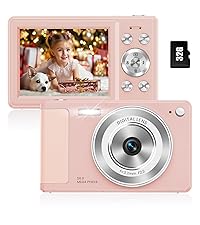
This image illustrates the two steps for battery installation: first, opening the battery cover, and second, inserting the battery with the metal side facing down and to the right.
5.2 Shigar da Katin SD
The camera supports a 32GB TF (Micro SD) card. Insert the TF card into the designated slot in the battery compartment until it clicks.
5.3 Cajin Baturi
- Connect the camera to a power source using the provided Type-C USB cable.
- The charging indicator light will show the charging status. A bright red, steady light indicates correct charging. A dim, flickering light indicates an issue.
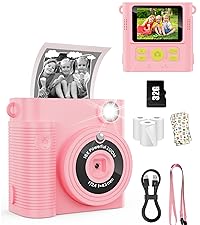
This image displays the camera's charging light status: a bright red, steady light for correct charging, and a dim, flickering light indicating an incorrect status.
5.4 Haɗe Lanyard
Thread the lanyard through the designated loop on the camera body to prevent accidental drops.
6. Aiki da Kamara
6.1 Kunnawa / Kashewa
Press and hold the Power button (labeled ON/OFF) on the top of the camera to turn it on or off.
6.2 Ɗaukar Hotuna
In photo mode, frame your shot using the LCD screen and press the Shutter button to capture an image. The camera features 56MP resolution for clear photos.

This image shows a child holding the pink WONNIE DC105P Digital Camera, with the screen displaying a photo of children. Other children are in the foreground, emphasizing the camera's ease of use for capturing vibrant 56MP photos and smooth FHD 1080P videos.
Special Photo Features:
- 16x Zuƙowa Dijital: Use the 'W' and 'T' buttons to zoom in or out.
- 20 Fun Filters: Apply various creative filters to your photos via the menu.
- Mai ƙidayar lokaci: Set a delay (2s, 5s, 10s) before taking a photo, ideal for group shots.
- Continuous Shooting (Burst Mode): Capture a rapid sequence of 3 photos.
- Anti-Shake: Digital image stabilization helps reduce blur from camera movement.
- Cika Haske: Activate the built-in fill light for brighter photos in dim environments. (Note: Fill light won't activate in macro mode or when battery is too low.)
- Smile Recognition: Automatically captures a photo when a smile is detected.

This image showcases three key features: Self Timer for perfect selfies, Continuous Shooting to capture every moment, and Anti Shake for steady shots.

This image illustrates the camera's 16x digital zoom capability with examples at 4x, 8x, and 16x, alongside a selection of 20 fun filters like Normal, Cold Filter, Warm Filter, and more, for endless creativity.
6.3 Rikodin Bidiyo
Switch to video mode (usually indicated by a camcorder icon in the menu) and press the Shutter button to start recording. Press again to stop. Videos are recorded in FHD 1080P with a built-in microphone.
6.4 Playback/Viewin Media
Press the Playback button to enter playback mode. Use the navigation buttons to scroll through your photos and videos. Press the OK button to play videos.
6.5 Canja wurin Files
You have several options to transfer your media:
- USB to PC: Connect the camera to your computer using the Type-C cable. The camera will appear as a removable disk.
- OTG to Phone: Use a compatible OTG cable adapter (sold separately) to connect the camera to your smartphone (e.g., iPhone 15, Samsung).
- Karatun Karanta: Remove the TF card and insert it into a card reader to transfer files to a computer or phone.

This image illustrates three convenient ways to view and transfer media: directly connecting the camera via USB to a PC, using an OTG adapter to connect to a smartphone, or using a card reader with a smartphone.
6.6 Webcam Aiki
Connect the camera to a computer via the Type-C USB cable. Select 'Webcam' mode on the camera (if prompted) to use it for video calls or live streaming.

This image demonstrates the WONNIE DC105P Digital Camera's capability to function as a webcam, showing it mounted on a laptop for a video call and for live streaming.
7. Muzaharar Bidiyo
Wannan bidiyon yana ba da cikakken bayaniview of the WONNIE Digital Camera, highlighting its features and suitability for kids and teens.
This video offers an introduction to the digital camera, demonstrating its basic functions and design.
8. Kulawa
- Tsaftacewa: Use a soft, lint-free cloth to clean the camera body and screen. For the lens, use a specialized lens cleaning cloth and solution.
- Ajiya: Store the camera in its provided storage bag in a cool, dry place away from direct sunlight and humidity. Remove the battery if the camera will not be used for an extended period.
- Kulawar Baturi: Fully charge batteries before first use. Avoid completely draining the battery frequently to prolong its lifespan.
9. Shirya matsala
| Matsala | Magani mai yiwuwa |
|---|---|
| Kamara baya kunnawa. | Tabbatar an shigar da baturin daidai kuma an yi caji sosai. |
| Ba za a iya ɗaukar hotuna/rikodin bidiyo ba. | Check if the SD card is inserted correctly and has sufficient free space. Ensure the battery is not critically low. |
| Hotuna ba su da kyau. | Ensure the lens is clean. Use the anti-shake feature. Hold the camera steady while shooting. |
| Ba za a iya canja wurin ba files to computer/phone. | Verify the USB cable connection. Ensure the camera is in the correct mode for data transfer (if prompted). Try a different USB port or cable. For phones, ensure OTG compatibility and adapter. |
| Charging indicator is flickering. | Refer to Figure 5.2 for correct charging status. Re-insert the cable or try a different power source. |
10. Ƙayyadaddun bayanai
| Siffar | Daki-daki |
|---|---|
| Ƙimar Sensor Hoto | 56 MP |
| Tsarin Bidiyo | 1080p FHD |
| Zuƙowa na gani | 16x Zuƙowa Dijital |
| Girman allo | 2.8 Inci LCD |
| Tabbatar da Hoto | Dijital |
| Kafofin watsa labaru na ajiya | 32GB TF Card (included), Max 32GB supported |
| Haɗuwa | OTG, USB Type-C |
| Siffofin Musamman | Lokaci St.amp, Anti-shake, Time-lapse, Continuous Shoot, Face Detection, Self-timer, Webcam, Filter Effect, Fill light, Selfie mirror, Auto Shut-off, Built-in Microphone |
| Nauyin Abu | 0.22 Kilogram (kimanin 0.48 lbs) |
| Girma | Approx. 3.8 x 0.78 x 2.4 inches (based on image) |
| Nau'in Baturi | Lithium Ion (1000mAh, 3.8V) |
11. Garanti da Tallafawa
Your WONNIE DC105P Digital Camera comes with a Garanti na shekaru 1. We are committed to providing excellent customer service and offer a hassle-free replacement policy. For any inquiries, missing accessories, or support needs, please contact our customer service team. We aim to respond within 24 hours.
For further assistance, please visit the official WONNIE Store on Amazon: WONNIE Store