
1. Gabatarwa
Welcome to the user manual for your Emerson CKSS7071 Sunrise Smartset Alarm Clock Radio. This device is designed to enhance your daily routine with its unique features, including a sunrise simulation, soothing sound options, Bluetooth connectivity, and an 8-color dimmable LED display. Please read this manual thoroughly to understand the full functionality and ensure proper use and care of your new alarm clock radio.
Fim na 1: Ƙarsheview of the Emerson CKSS7071 Sunrise Smartset Alarm Clock Radio. This video demonstrates the key features and design of the product.
2. Muhimman Bayanan Tsaro
- Karanta duk umarnin kafin kayi aiki da na'urar.
- Ajiye waɗannan umarnin don tunani na gaba.
- Kar a yi amfani da wannan na'urar kusa da ruwa.
- Tsaftace kawai da bushe bushe.
- Kar a toshe kowane buɗewar samun iska. Shigar daidai da umarnin masana'anta.
- Kada a shigar kusa da kowane tushen zafi kamar radiators, rajistan zafi, murhu, ko wasu na'urori (ciki har da amplifiers) masu samar da zafi.
- Kare igiyar wutar lantarki daga tafiya a kai ko a dunƙule, musamman a matosai, madaidaitan ma'auni, da wurin da suke fita daga na'urar.
- Yi amfani da haɗe-haɗe-haɗe-haɗe/na'urorin haɗi kawai da mai ƙira ya ƙayyade.
- Cire wannan na'urar yayin guguwar walƙiya ko lokacin da ba a yi amfani da ita na dogon lokaci ba.
- Koma duk hidima ga ƙwararrun ma'aikatan sabis. Ana buƙatar sabis lokacin da na'urar ta lalace ta kowace hanya, kamar igiyar samar da wutar lantarki ko toshe ta lalace, ruwa ya zube ko abubuwa sun fada cikin na'urar, na'urar ta fallasa ruwan sama ko danshi, ba ya aiki yadda ya kamata. , ko kuma an jefar da shi.
3. Abubuwan Kunshin
Tabbatar cewa duk abubuwa suna nan yayin buɗe kunshin:
- Emerson CKSS7071 Sunrise Smartset Alarm Clock Radio
- Adaftar wutar AC
- Manual mai amfani
4. Samfurin Ya Ƙareview
4.1 Gaba View

Hoto 1: Gaba view of the alarm clock, featuring the digital time display and the sunrise simulation light panel.
The front of the unit features the main 1.2-inch LED time display and the large circular light panel for sunrise simulation and ambient lighting. Indicators for AM/PM, Alarm 1/2, and Bluetooth status are also visible.
4.2 Side View (Masu sarrafawa)
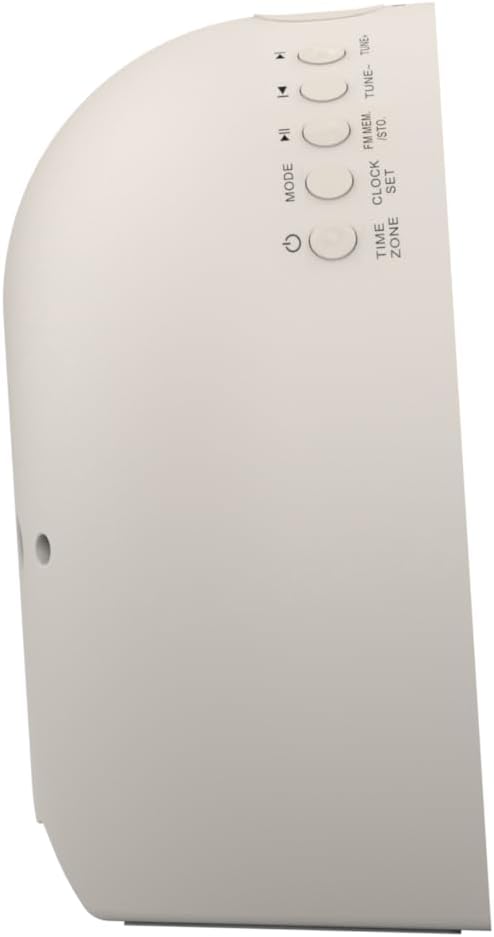
Hoto 2: Gede view na agogon ƙararrawa, yana nuna maɓallan sarrafawa don ayyuka daban-daban.
The side panel houses the primary control buttons, including Power, Mode, Clock Set, Time Zone, Tune/Skip, and Volume controls. These buttons are used for setting time, alarms, and navigating audio functions.
4.3 Na baya View

Hoto 3: Na baya view of the alarm clock, showing the speaker grille and power connection port.
The rear of the unit features the main speaker grille and the power input port for connecting the AC adapter.
5. Saita
5.1 Haɗin Wuta
- Plug the AC power adapter into the DC IN jack located on the back of the unit.
- Plug the other end of the adapter into a standard wall outlet (AC 100-240V, 50/60Hz).
- Naúrar zata kunna ta atomatik.
5.2 SmartSet Automatic Time Setting
The SmartSet system automatically sets the correct time and date as soon as you plug in the unit. It also maintains time and alarm settings during power disruptions or outages, provided the button cell battery is installed.
5.3 Shigar da Ajiyayyen Baturi
A button cell battery (CR2032, included) is required for battery backup. This ensures that time and alarm settings are retained during a power outage.
- Nemo sashin baturi a kasan naúrar.
- Bude murfin ɗakin baturi.
- Saka batirin wayar CR2032 guda ɗaya, don tabbatar da daidaiton polarity (+/-).
- Rufe murfin ɗakin baturi amintacce.
6. Umarnin Aiki
6.1 Setting the Clock Manually
- Latsa ka riƙe SET agogon maballin. Lambobin sa'a za su yi haske.
- Yi amfani da TUNE -/+ maɓalli don daidaita sa'a. Latsa SET agogon don tabbatarwa.
- Lambobin mintuna za su yi walƙiya. Yi amfani da TUNE -/+ maɓalli don daidaita mintuna. Latsa SET agogon don tabbatarwa.
- Continue this process to set the year, month, and day.
- Latsa SET agogon sake zuwa yanayin saita lokacin fita.
6.2 Saita Ƙararrawa (Ƙararrawa ta 1 & Ƙararrawa ta 2)
The unit features dual alarms. Follow these steps for each alarm:
- Latsa ka riƙe KARATUN 1 or KARATUN 2 maballin. Lambobin sa'ar ƙararrawa za su yi haske.
- Yi amfani da TUNE -/+ buttons to adjust the alarm hour. Press the respective Ƙararrawa button don tabbatarwa.
- The alarm minute digits will flash. Use the TUNE -/+ buttons to adjust the alarm minutes. Press the respective Ƙararrawa button don tabbatarwa.
- Select the alarm source (Buzzer, FM Radio, or Soothing Sound). Press the respective Ƙararrawa button don tabbatarwa.
- Daidaita ƙarar ƙararrawa ta amfani da VOL -/+ buttons. Press the respective Ƙararrawa button don tabbatarwa.
- The alarm is now set. The alarm indicator (AL1 or AL2) will appear on the display.
6.3 Kwaikwayon Fitowar Rana
The sunrise simulation feature gradually brightens the light panel before your set alarm time, mimicking a natural sunrise to gently wake you.
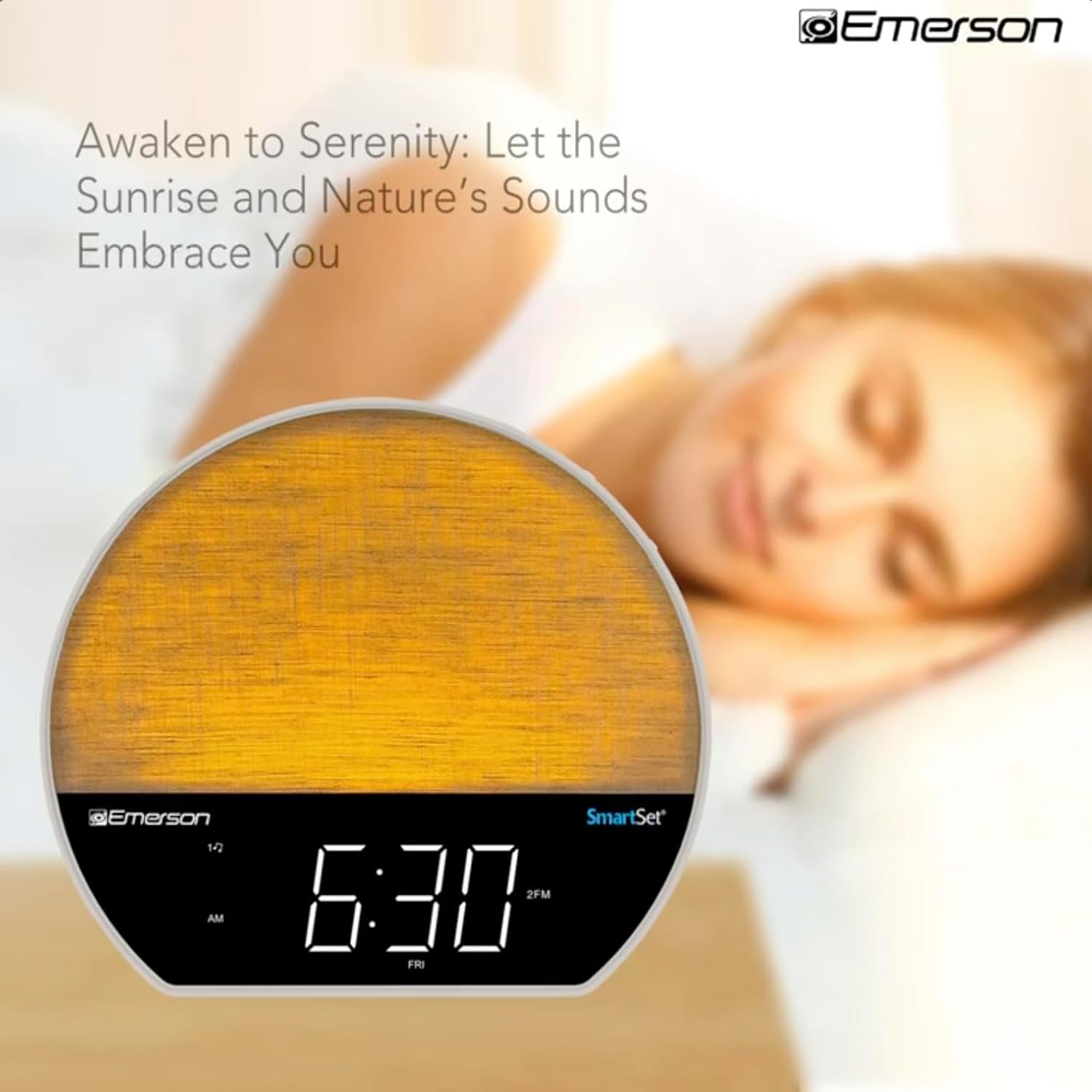
Hoto 4: The alarm clock simulating a sunrise with a warm, increasing ƙarfin haske.
To activate, ensure the sunrise option is selected during alarm setup. The light will begin to brighten 30 minutes before the alarm sounds.
6.4 Soothing Sounds and White Noise
The unit includes 6 soothing sounds and white noise to help with relaxation or waking up.
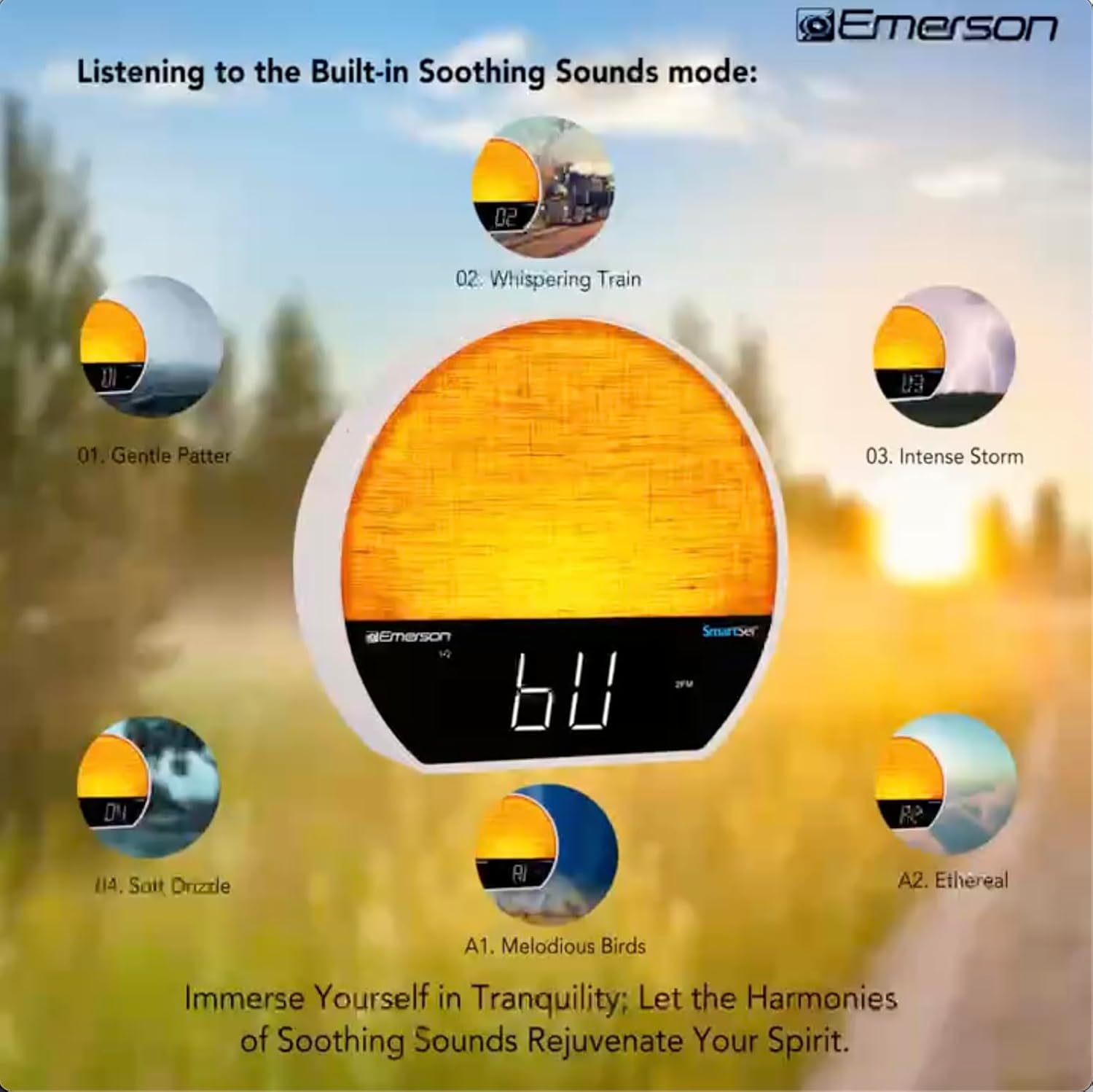
Hoto 5: Visual representation of the six soothing sound modes available on the alarm clock.
- Danna maɓallin MODE button repeatedly until the Soothing Sound mode is selected.
- Yi amfani da TUNE -/+ buttons to cycle through the available sounds (e.g., Gentle Patter, Whispering Train, Intense Storm, Soft Drizzle, Melodious Birds, Ethereal, White Noise).
- Daidaita ƙara ta amfani da VOL -/+ maɓalli.
6.5 Aikin lasifikar Bluetooth
Connect your smartphone or other Bluetooth-enabled device to stream audio wirelessly.

Hoto 6: The alarm clock in Bluetooth mode, paired with a mobile device for audio streaming.
- Danna maɓallin MODE button until 'BT' appears on the display, indicating Bluetooth mode.
- On your device, enable Bluetooth and search for 'Emerson CKSS7071'.
- Select the device to pair. A confirmation tone will sound upon successful pairing.
- You can now play audio from your device through the alarm clock's speaker.
6.6 FM Radio Aiki
Tune into your favorite FM radio stations.
- Danna maɓallin MODE maɓalli har sai 'FM' ya bayyana akan allon.
- Danna maɓallin TUNE -/+ buttons briefly to manually tune to a station.
- Latsa ka riƙe TUNE -/+ maɓalli don bincika ta atomatik na gaba da ke akwai.
- To save a station, press and hold the FM MEM Maɓallin har sai lambar da aka saita ta yi haske. Yi amfani da TUNE -/+ domin zaɓar lambar da aka saita, sannan a danna FM MEM sake ajiyewa.
6.7 LED Decor and Dimmer Control
Customize the ambient light with 8 different colors and adjust the brightness.

Hoto 7: The alarm clock demonstrating its 8-color dimmable LED decor options.
- Danna maɓallin HASKE button to cycle through the 8 available colors or turn the light off.
- To adjust the brightness of the LED decor light, press and hold the HASKE button. The brightness will cycle through 5 levels. Release the button at your desired brightness.
6.8 Display Dimmer Control
Adjust the brightness of the 1.2-inch LED time display.

Hoto 8: The alarm clock illustrating the five distinct levels of display luminescence.
Danna maɓallin DIMMER button (often combined with another function, refer to button labels) to cycle through 4 levels of display brightness (Bright, Moderate, Dim, Faint).
6.9 Mai saita lokacin bacci
Set a timer for the audio to automatically turn off after a specified duration.

Hoto 9: The alarm clock set for a sunset sleep timer, providing a harmonious end to the day.
- While audio is playing (FM or Soothing Sound), press the BARCI maballin.
- akai-akai danna maɓallin BARCI button to cycle through available sleep timer durations (e.g., 15, 30, 60, 90 minutes, or OFF).
- The audio will automatically turn off after the selected time.
6.10 Aikin Snooze
Lokacin da ƙararrawa yayi sauti, danna maɓallin faɗakarwar gajeren barci button (usually a large button on top) to temporarily silence the alarm for a few minutes. The alarm will sound again after the snooze period.
7. Kulawa
7.1 Tsaftacewa
- Koyaushe cire haɗin naúrar daga tashar wutar lantarki kafin tsaftacewa.
- Yi amfani da busasshiyar kyalle mai laushi don tsaftace saman waje.
- Kada a yi amfani da masu tsabtace ruwa, masu gogewa, ko feshin sinadarai, saboda waɗannan na iya lalata ƙarshen.
7.2 Sauya Baturi
If the time and alarm settings are not retained during a power outage, the button cell backup battery may need to be replaced. Follow the instructions in section 5.3 to replace the CR2032 battery.
8. Shirya matsala
| Matsala | Dalili mai yiwuwa | Magani |
|---|---|---|
| Unit baya kunnawa. | Ba a haɗa adaftar wuta ko kuskure. | Ensure the AC adapter is securely plugged into the unit and a working wall outlet. |
| Saitunan lokaci/ ƙararrawa sun ɓace bayan kunna kutage. | Backup battery is dead or not installed. | Install or replace the CR2032 button cell battery (see section 5.3). |
| Ƙararrawa baya yin sauti. | Ƙararrawa ba ta kunna ba ko kuma ƙarar ta yi ƙasa sosai. | Ensure the alarm is set and activated (AL1/AL2 indicator on). Increase alarm volume. |
| Na'urar Bluetooth ba zata iya haɗawa ba. | Unit not in Bluetooth mode or device too far. | Ensure the unit is in Bluetooth mode ('BT' displayed). Move your device closer to the unit. Try unpairing and re-pairing. |
| Mara kyau liyafar rediyon FM. | Eriya ba a tsawaita ko tsangwama. | Extend the FM wire antenna fully and reposition it for better reception. Avoid placing near other electronic devices. |
| Nuni yana da haske/rasa sosai. | Display dimmer setting needs adjustment. | Danna maɓallin DIMMER button to cycle through brightness levels (see section 6.8). |
9. Ƙayyadaddun bayanai
| Siffar | Daki-daki |
|---|---|
| Lambar Samfura | Saukewa: CKSS7071 |
| Tushen wutar lantarki | AC 100-240V, 50/60Hz (via AC adapter) |
| Ajiyayyen baturi | 1 x CR2032 Button Cell Battery (included) |
| Nau'in Nuni | 1.2-inch LED Display |
| Sigar Bluetooth | V5.4 |
| Sauti masu kwantar da hankali | 6 Nature Sounds + White Noise |
| LED Decor Colors | 8 Dimmable Colors |
| Girman samfur (W x D x H) | 7.09" x 3.15" x 6.37" |
| Nauyi | Ba a kayyade ba |
10. Garanti Bayani
Emerson products are manufactured to the highest quality standards. This product is covered by a limited warranty against defects in materials and workmanship for a period of one (1) year from the original date of purchase. This warranty does not cover damage caused by misuse, accident, unauthorized modification, or normal wear and tear. Proof of purchase is required for all warranty claims. Please retain your receipt.
11. Tallafin Abokin Ciniki
If you have any questions, require assistance, or experience issues with your Emerson CKSS7071 Sunrise Smartset Alarm Clock Radio, please contact our customer support team.
- Website: Visit the official Emerson webshafin don FAQs da albarkatun tallafi.
- Imel: Koma zuwa marufin samfurin ku ko na hukuma website for customer service email contact.
- Waya: Koma zuwa marufin samfurin ku ko na hukuma website don lambobin sabis na abokin ciniki.
Please have your model number (CKSS7071) and proof of purchase ready when contacting support.