
1. Samfurin Ya Ƙareview
The ANJIELO SMART 94218B is a 4-wire video intercom system designed for enhanced home security and convenience. It features a 7-inch touchscreen indoor monitor and an HD 1080P outdoor doorbell camera. The system supports WiFi connectivity for remote access via a mobile application, allowing you to monitor and interact with visitors from anywhere. Key features include a 148° wide-angle lens, integrated infrared sensor for night vision, and robust IP65 waterproof and dustproof construction for the outdoor unit. It is compatible with 12V electronic locks for integrated access control.
2. Abubuwan Kunshin
Carefully unpack the box and ensure all items listed below are present and in good condition. If any items are missing or damaged, please contact customer support.

Hoto: Overview of the ANJIELO SMART 94218B package contents, including the doorbell, IC cards, wiring, user manual, screwdriver, screws, and connection lines.
- Outdoor Doorbell Unit
- Indoor Monitor (7-inch Touchscreen)
- IC Cards (Multiple for access control)
- 4-Core Wiring Cable
- External Power Supply (1.2m)
- Manual mai amfani
- Screwdriver
- Hawan Screws da Wall Plugs
- Connection Lines for electronic locks
3. Bayanin Tsaro
Please read and understand all safety instructions before installation and operation. Failure to follow these instructions may result in electric shock, fire, or damage to the product.
- Tsaron Wutar Lantarki: Ensure power is disconnected before performing any wiring or installation. All electrical work should be performed by a qualified electrician if you are unsure.
- Bayyanar Ruwa: While the outdoor unit is waterproof (IP65), avoid submerging it in water. Ensure all connections are sealed properly during installation.
- Zazzabi: Do not expose the device to extreme temperatures or direct sunlight for prolonged periods, which could affect performance and lifespan.
- Tsaftacewa: Yi amfani da kyalle mai laushi da busasshe don tsaftacewa. A guji masu tsaftace ko abubuwan da ke da sinadarin blessing.
- Yara: Keep packaging materials and small components away from children to prevent choking hazards.
4. Product Components and Dimensions
Familiarize yourself with the different parts of your outdoor doorbell unit and its physical dimensions.

Hoto: Dalla-dalla view of the outdoor doorbell unit with labels for the rain cover, IR-LED, camera, speaker, keypad, card reader, microphone, call button, and fingerprint sensor.
- Rufin ruwan sama: Provides additional protection against weather elements.
- IR-LED: Infrared LEDs for night vision illumination.
- Kamara: 1080P HD camera for video capture.
- Mai magana: Don sadarwar murya ta hanyoyi biyu.
- Madanni: Numeric keypad for password-based unlocking.
- Karatun Karanta: For IC card access control.
- Makarafo: Don sadarwar murya ta hanyoyi biyu.
- Maballin Kira: To alert the indoor monitor and mobile app.
- Firikwensin yatsa: For fingerprint-based unlocking.
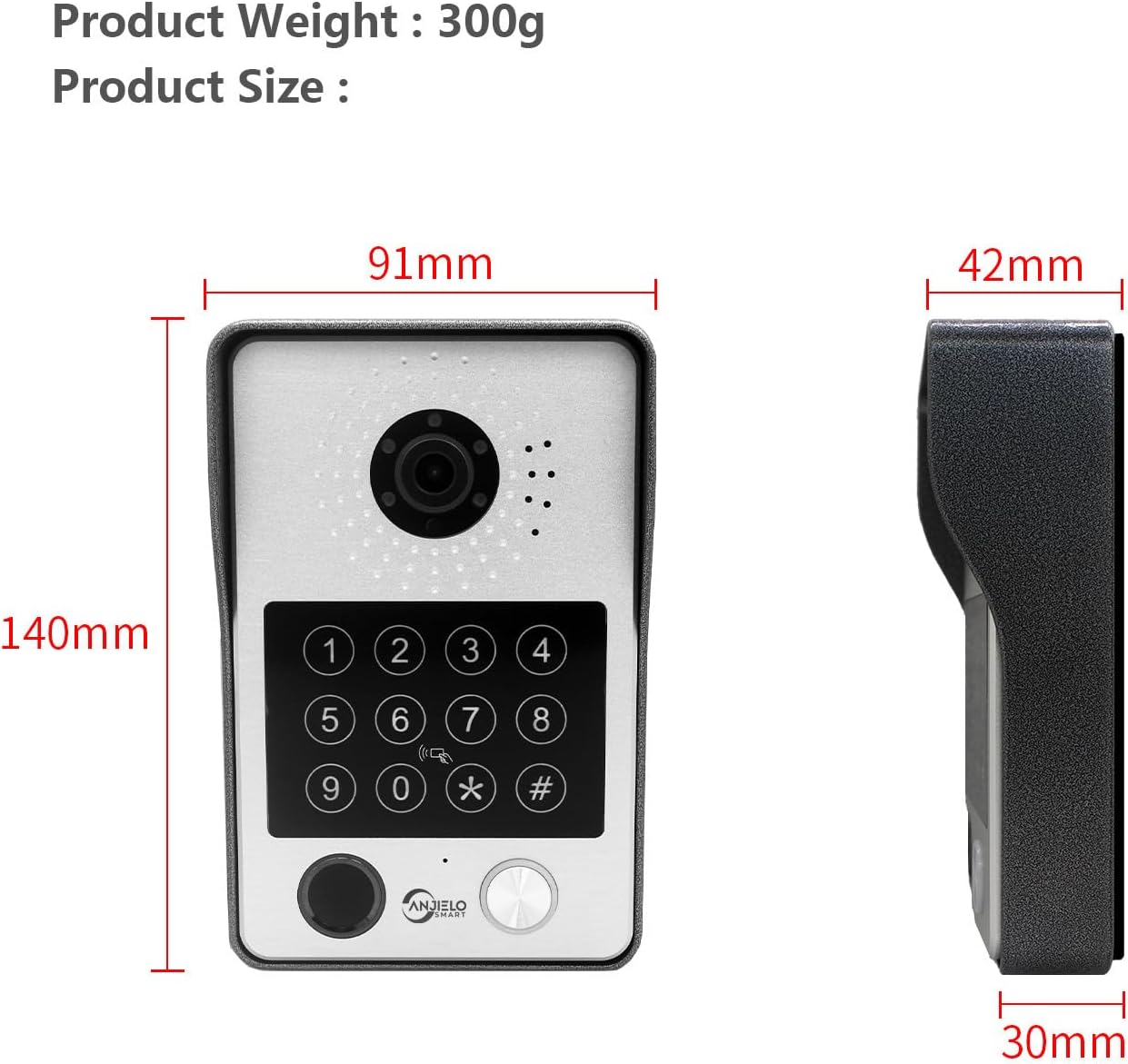
Image: Dimensions of the outdoor doorbell unit: 140mm (height) x 91mm (width) x 42mm (depth, including rain cover) / 30mm (unit depth).
5. Saita da Shigarwa
5.1 Umarnin Waya
The ANJIELO SMART 94218B system uses a 4-wire connection between the outdoor doorbell unit and the indoor monitor. Ensure all power is disconnected before beginning wiring.
- Shirya Waya: Use the provided 4-core cable to connect the outdoor unit to the indoor monitor. For extended distances, a high-quality 4-core wire is recommended.
- Haɗa Ikon: Connect the external 1.2m power supply to the indoor monitor.
- Electronic Lock Connection: If connecting to a 12V electronic lock, use the provided connection lines. Refer to the lock's manual for specific wiring requirements.
- Amintattun Haɗi: Ensure all wire connections are secure and properly insulated to prevent short circuits.
5.2 Mounting the Outdoor Unit
The outdoor unit is designed for wall mounting and features IP65 waterproofing.

Image: The outdoor unit is IP65 waterproof, dustproof, and anti-vandal, featuring an aluminum alloy shell with a rain cover.
- Zaɓi Wuri: Select a suitable location near your door, ensuring the camera has a clear view of visitors and is at an appropriate height.
- Ramin Fasa: Use the mounting bracket (if provided, or mark holes directly) to mark and drill holes for the mounting screws.
- Amintaccen Sashe: Attach the outdoor unit securely to the wall using the provided screws and wall plugs. Ensure the rain cover is correctly positioned.
5.3 Initial Configuration (Wi-Fi and App)
The main indoor monitor can connect to your home Wi-Fi network for remote access via the mobile application.
- Kunna Wuta: Once all wiring is complete, connect the power supply to an electrical outlet.
- Saitin Kulawa: Follow the on-screen prompts on the 7-inch touchscreen monitor to complete the initial setup.
- Haɗin Wi-Fi: Navigate to the network settings on the monitor and connect to your home Wi-Fi network.
- App Download: Download the dedicated mobile application (e.g., Tuya APP) from your smartphone's app store.
- Na'urar Haɗa: Follow the instructions within the app to pair your video intercom system. This typically involves scanning a QR code displayed on the monitor or entering a device ID.
6. Umarnin Aiki
6.1 5-in-1 Unlocking Methods
The ANJIELO SMART 94218B offers multiple convenient ways to unlock your door.

Image: Visual representation of the five unlocking methods: Fingerprint, Password, IC Card, unlocking via the Indoor Monitor, and unlocking via the Tuya mobile application.
- Wurin yatsa: Place your registered fingerprint on the sensor on the outdoor unit.
- Kalmar wucewa: Enter your pre-set password on the keypad of the outdoor unit.
- Katin IC: Tap a registered IC card on the card reader area of the outdoor unit.
- Saka idanu: Use the unlock function on the indoor touchscreen monitor.
- Mobile App: Use the unlock function within the paired mobile application.
6.2 Two-Way Audio and Monitoring
Communicate with visitors and monitor your entrance from various devices.

Image: The system enables two-way audio communication with visitors through the indoor monitor or a connected mobile phone, showing live views on both devices.
- Visitor Call: When a visitor presses the call button on the outdoor unit, all connected indoor monitors and paired mobile phones will ring.
- Amsa Kira: You can answer the call from any indoor monitor or your mobile phone to see, hear, and speak with the visitor.
- Ayyukan Intercom: Indoor monitors support call forwarding and internal audio-only conversations between multiple monitors within the home.
6.3 Motion Detection and Recording
The system provides security by detecting motion and recording events.

Image: The system's smart PIR motion detection sends alerts to your mobile phone and monitor when movement is detected, automatically recording video or snapshots.
- Rikodi ta atomatik: When motion is detected or the doorbell is pressed, the camera automatically records video or captures snapshots.
- Ajiya: Recordings are saved to an additional Micro SD card (not included, or included as a component) for later review.
- ViewRikodi: Za ka iya view recorded events directly on the indoor monitor or through the mobile application.
6.4 Hangen Dare
The outdoor unit provides clear visibility even in low-light conditions.

Image: Comparison of day and night vision capabilities, highlighting the 1080P resolution and 148-degree wide-angle view provided by the outdoor unit's integrated IR-LEDs.
The integrated infrared sensor and IR-LEDs enable clear night vision, ensuring you can identify visitors and monitor your entrance effectively, even in complete darkness.
7. Kulawa
7.1 Kulawa da Tsaftacewa
- Unungiyar waje: Periodically wipe the camera lens and keypad with a soft, damp zane don cire ƙura da datti. Ka guji amfani da magunguna masu tsauri.
- Kulawar Cikin Gida: Clean the touchscreen with a microfiber cloth. Do not spray cleaning solutions directly onto the screen.
- Haɗin kai: Regularly check wiring connections for any signs of wear or corrosion, especially for outdoor components.
8. Shirya matsala
If you encounter issues with your ANJIELO SMART video intercom system, refer to the following common problems and solutions.
| Matsala | Dalili mai yiwuwa | Magani |
|---|---|---|
| No power to monitor/doorbell | Power adapter unplugged; wiring issue; power outage. | Check power connections; verify power outlet; inspect wiring for damage. |
| No video/audio from outdoor unit | Loose wiring connection; camera/microphone fault. | Ensure 4-core wiring is securely connected; restart the system. |
| Cannot unlock door | Incorrect password/fingerprint/IC card; electronic lock issue; wiring problem. | Verify credentials; check electronic lock power and wiring; ensure correct unlock method is selected. |
| Mobile app not connecting | Monitor not connected to Wi-Fi; incorrect app pairing; internet issue. | Check monitor's Wi-Fi status; re-pair device in app; verify home internet connection. |
| Poor night vision | IR-LEDs obstructed or faulty; dirty camera lens. | Clean camera lens; ensure no obstructions; contact support if IR-LEDs are not functioning. |
If the problem persists after trying these solutions, please contact ANJIELO SMART customer support for further assistance.
9. Bayanan fasaha
Detailed technical specifications for the ANJIELO SMART 94218B video intercom system.
| Siffar | Ƙayyadaddun bayanai |
|---|---|
| Alamar | ANJIELO SMART |
| Lambar Samfura | 94218B |
| Fasahar Haɗuwa | Waya, Mara waya (Wi-Fi) |
| Ƙimar Ɗaukar Bidiyo | 1080p |
| Siffofin Musamman | Night Vision, Motion Detection, 5-in-1 Unlock (Fingerprint, Password, IC Card, App, Monitor) |
| Amfani na cikin gida/Waje | Indoor (Monitor), Outdoor (Doorbell) |
| Na'urori masu jituwa | Wayar hannu |
| Nau'in Dutsen Dutse | Dutsen bango |
| Launi | Baki |
| Nau'in larararrawa | Motsi Kawai |
| Hanyar sarrafawa | App |
| Ka'idar Haɗuwa | Wi-Fi |
| Voltage | 12 Volt |
| Watatage | 2 watts |
| Yawan Tashoshi | 2 |
| Tsarin Ɗaukar Bidiyo | AVI |
| Girman Abu | 27 x 2 x 18 cm |
| Unit Volume/Weight | 1.0 ƙidaya |
| Ƙasar Asalin | China |
| Mai ƙira | ANJIELO SMART |
10. Garanti da Tallafawa
10.1 Bayanin Garanti
For specific warranty details regarding your ANJIELO SMART 94218B video intercom system, please refer to the warranty card included in your package or contact the seller directly. Warranty terms typically cover manufacturing defects for a specified period from the date of purchase.
10.2 Tallafin Abokin Ciniki
If you require technical assistance, have questions about installation, or need to report a product issue, please contact ANJIELO SMART customer support. You can usually find contact information on the product packaging, the seller's website, or within the mobile application.