
Gabatarwa
This manual provides essential information for the safe and efficient use of your Blackview BV7300 Rugged Smartphone. Please read this guide thoroughly before operating the device to ensure proper functionality and to understand its features.
Baƙar fataview BV7300 is designed for durability and performance, featuring a robust construction, a large battery, and advanced camera capabilities, including night vision and powerful campfitilu.
Samfurin Ƙarsheview
Baƙar fataview BV7300 is a rugged smartphone built to withstand challenging environments. It features a 6.67-inch HD+ IPS display, a powerful processor, and a triple camera system.

Hoto na 1: Gaba da baya view of the Blackview BV7300 Rugged Smartphone, highlighting its robust design and camera module.
Kayan Aiki na Jiki
- Nunawa: 6.67-inch HD+ IPS screen with 90Hz refresh rate.
- Kyamara: 50MP main rear camera, 20MP night vision camera, 32MP front camera.
- Camping Lights: Two 800 lumen LED camping lights located on the rear.
- Tashoshi: Tashar USB Type-C don caji da canja wurin bayanai.
- Maɓalli: Power button, volume buttons, customizable function button.
- Ramin Katin SIM: Tallafin SIM biyu.
- Masu magana: Dual box speakers.
Saita
1. Saka katin SIM da MicroSD Card
- Nemo tiren katin SIM a gefen na'urar.
- Yi amfani da kayan aikin fitarwa na SIM don buɗe tire.
- Carefully place your Nano-SIM cards and/or a MicroSD card (up to 2TB) into the designated slots. Ensure correct orientation.
- A hankali a tura tiren a cikin na'urar har sai ya yi laushi.
2. Kunna Wutar Farko da Saita
- Press and hold the Power button until the Blackview logo appears.
- Bi umarnin da ke kan allo don zaɓar yarenka, haɗawa da Wi-Fi, da kuma saita asusun Google ɗinka.
- Configure security settings, including facial recognition or a PIN/pattern/password.
3. Cajin Na'urar
Connect the USB Type-C cable to the phone's charging port and the other end to a compatible power adapter. The device supports fast charging. A full charge of the 15000mAh battery provides extended usage.
Umarnin Aiki
Nuni da Kewayawa

Figure 2: Details of the 6.67-inch HD+ IPS display, showing resolution, brightness, screen-to-body ratio, panel type, and dynamic refresh rate.
The 6.67-inch HD+ IPS display offers a resolution of 1280x720 pixels and a 90Hz dynamic refresh rate for smooth visuals. Navigate the Android 14 operating system using touch gestures.
Ayyukan Kamara
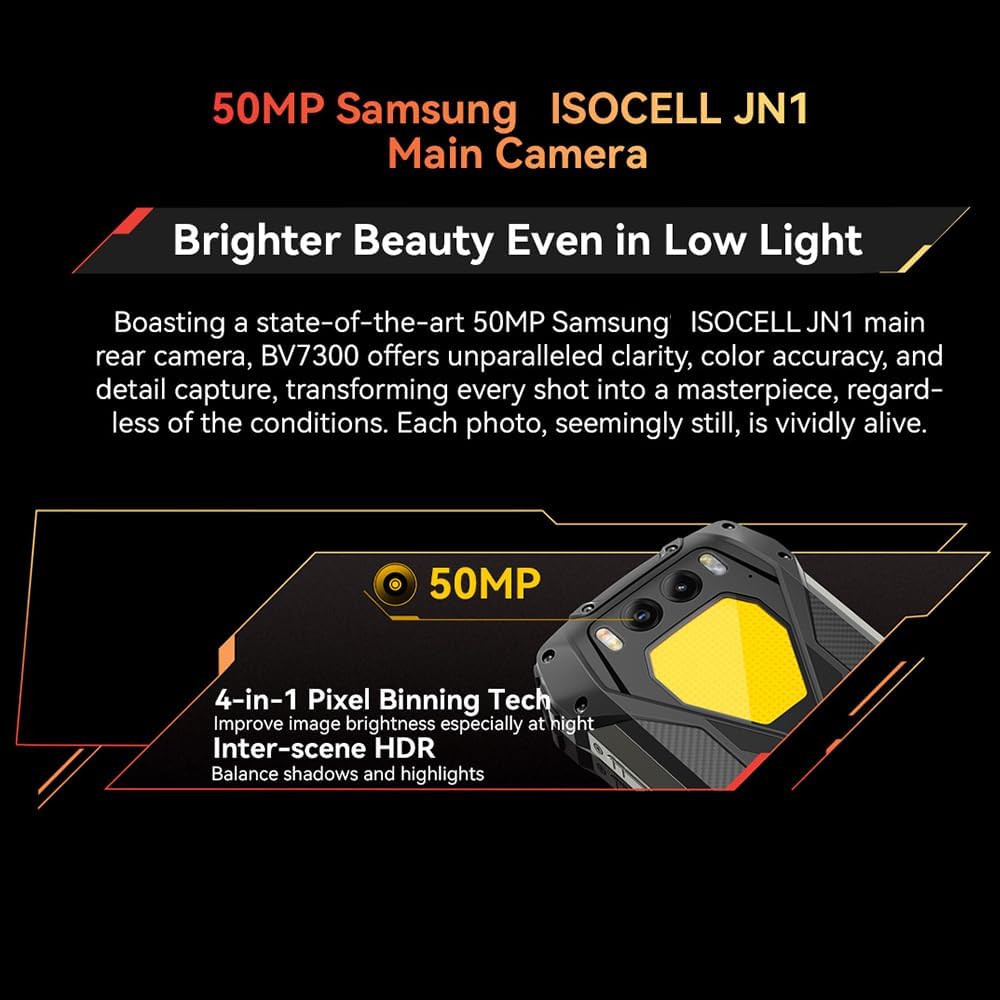
Figure 3: Close-up of the Blackview BV7300's rear camera module, featuring the 50MP main camera.

Figure 4: Diagram illustrating the Blackview BV7300's triple camera setup, including 32MP front, 50MP main, and 20MP night vision cameras.
- Main Camera (50MP): For high-resolution photos and 1080p video recording. Features 4-in-1 Pixel Binning and Inter-scene HDR for improved image quality in various lighting conditions.
- Night Vision Camera (20MP): Activates in low-light or complete darkness to capture clear images. Access this mode through the camera application.
- Kyamara ta Gaba (32MP): For selfies and video calls, includes beauty mode features.
- To switch between camera modes, open the Camera app and select the desired option (Photo, Video, Night Vision, Portrait, etc.).
Dual Camping Lights
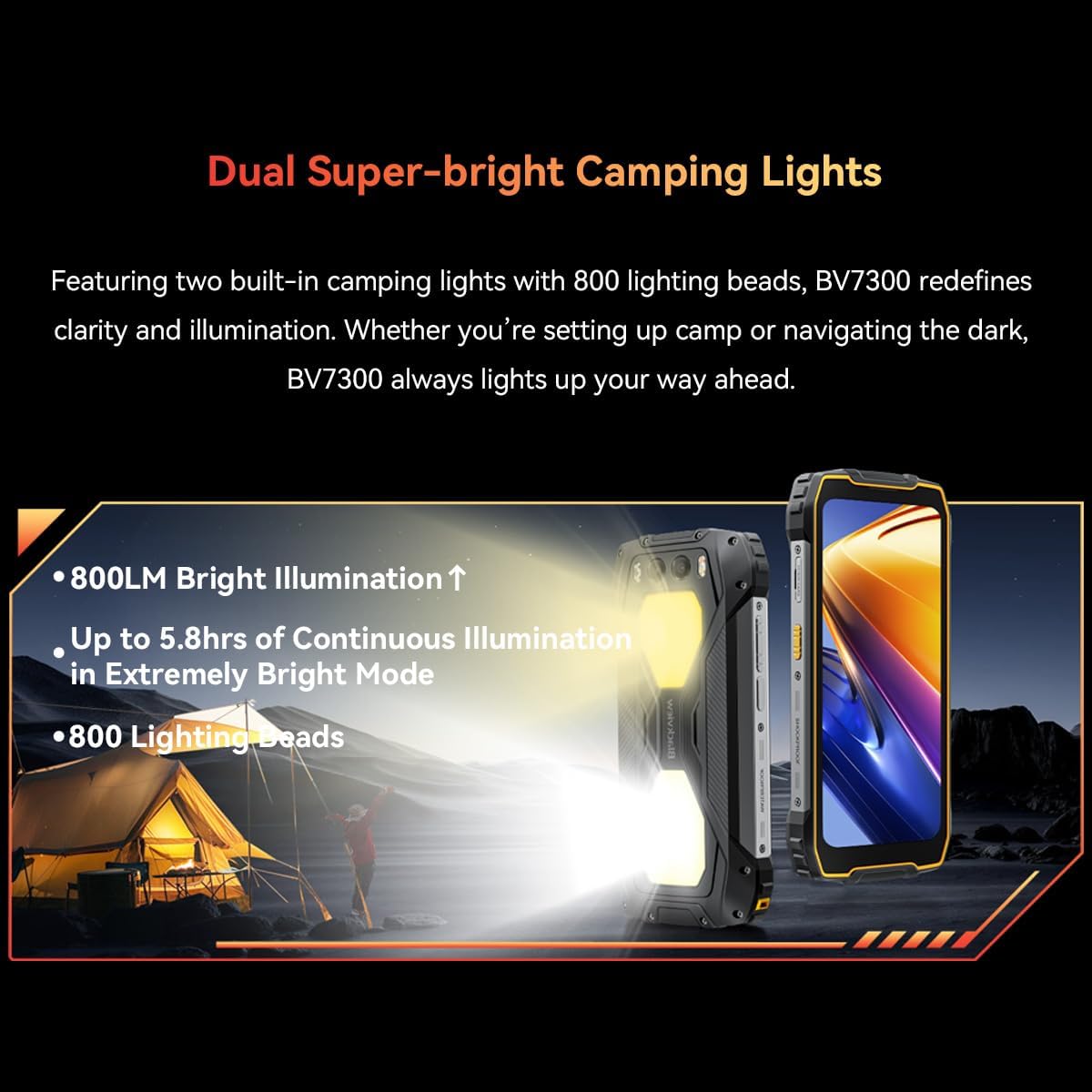
Figure 5: The Blackview BV7300 with its dual 800 lumen camping lights activated, providing strong illumination.

Figure 6: Illustration detailing the dual super-bright camping lights, highlighting 800LM brightness, up to 5.8 hours of continuous illumination in extremely bright mode, and 800 lighting beads.
The BV7300 features two powerful 800 lumen LED camping lights on its rear. These lights offer three lighting modes and three brightness levels. To activate and adjust the lights, use the dedicated function button or access the quick settings panel.
Gudanar da Baturi

Hoto 7: Na ciki view of the Blackview BV7300 highlighting its 15000mAh battery and charging port.

Figure 8: Graphic showing estimated usage times for the 15000mAh battery: 18 hrs game, 16.5 hrs video, 28 hrs website, 56.5 hrs calling, 32.5 hrs music, 1368 hrs standby.
The BV7300 is equipped with a 15000mAh battery. For optimal battery life, use the provided charger and cable. The device supports OTG (On-The-Go) functionality, allowing it to act as a power bank to charge other devices.
Audio

Figure 9: Image depicting the Blackview BV7300 with sound waves emanating from its dual box speakers, illustrating its audio capabilities.
The device features dual box speakers for enhanced audio output. Adjust volume using the dedicated volume buttons on the side of the phone.
Kulawa
- Tsaftacewa: Yi amfani da laushi mai laushi mara laushi don tsaftace allon da jiki. Guji munanan sinadarai.
- Juriya na Ruwa: The BV7300 is waterproof. Ensure all port covers are securely closed before exposing the device to water. Do not intentionally submerge the device beyond its rated depth and time limits.
- Sabunta software: Bincika akai-akai don shigar da sabunta tsarin don tabbatar da ingantaccen aiki da tsaro.
- Gudanar da Ajiya: Yana share lokaci-lokaci ba dole ba files and applications to maintain sufficient storage space. The device supports up to 2TB TF expansion.
Shirya matsala
| Matsala | Magani |
|---|---|
| Na'urar baya kunnawa. | Ensure the battery is charged. Connect the device to a charger for at least 30 minutes. If it still doesn't power on, perform a forced restart by holding the Power button for 10-15 seconds. |
| Siginar cibiyar sadarwa mara kyau. | Check if SIM cards are correctly inserted. Ensure you are in an area with network coverage. Restart the device. |
| Apps are slow or crashing. | Close background applications. Clear app cache. Ensure sufficient storage space is available. Restart the device. |
| Baturi yana gudu da sauri. | Reduce screen brightness. Disable unused features like Wi-Fi, Bluetooth, GPS. Close power-intensive applications. Check for background app activity. |
| Camping lights not working. | Ensure the battery has sufficient charge. Check settings or dedicated button for activation. |
Ƙayyadaddun bayanai
| Siffar | Daki-daki |
|---|---|
| Sunan Samfura | BV7300 |
| Tsarin Aiki | Android 14 |
| Mai sarrafawa | MediaTek Kompanio 800T Octa Core, 2 GHz |
| RAM | 18 GB (6GB fixed + 12GB virtual expansion) |
| Ma'ajiyar Ciki | 256 GB |
| Ma'ajiyar Faɗawa | Up to 2 TB via MicroSD card |
| Girman Nuni | 6.67 inci |
| Nuni Resolution | 1280x720 (HD+), 263 PPI |
| Matsakaicin Sassauta | 90 Hz Dynamic |
| Kamara ta baya | 50 MP (Samsung ISOCELL JN1) |
| Kamara hangen nesa | 20 MP (Sony IMX376) |
| Kamara ta gaba | 32 MP |
| Ƙarfin baturi | 15000 mAh |
| Cajin | Type-C, Fast Charging, OTG support |
| Haɗuwa | 4G, Dual SIM, GPS, NFC, USB |
| Siffofin Musamman | Dual 800LM Camping Lights, Stereo Speakers, Rugged Construction, Waterproof, Facial Recognition |
| Girma | 186 x 85 x 24 mm |
| Nauyi | 528g ku |
Garanti da Taimako
Baƙar fataview BV7300 comes with a 24-month warranty in Europe. For warranty claims or technical support, please contact Blackview customer service or the retailer from whom you purchased the device. Keep your proof of purchase for warranty validation.
For further assistance, visit the official Blackview webshafin yanar gizo ko duba bayanin hulɗa da aka bayar tare da siyan ku.