
1. Gabatarwa
Thank you for choosing the bjlysk 1080P Thumb Camera. This compact and versatile action camera is designed to capture your life's moments in high definition with ease. Featuring a 180° rotatable lens, magnetic design, and Wi-Fi connectivity, it offers a unique and convenient way to record your adventures from a first-person perspective. Please read this manual carefully to understand the camera's functions and ensure optimal performance.
2. Abubuwan Kunshin
Upon unpacking your bjlysk Thumb Camera, please verify that all the following items are included:
- D70 Device (Thumb Camera)
- Recharging Cable (USB-C)
- Manual mai amfani
- Magnetic Halterneck
- Lanyard

Hoto na 2.1: Contents of the bjlysk Thumb Camera package. This image displays the camera unit, charging cable, user manual, magnetic halterneck, and lanyard, which are all included in the gift box.

Hoto na 2.2: The bjlysk Thumb Camera, often bundled with a 128GB MicroSD card and a USB card reader for data transfer. Note that the MicroSD card and card reader may be sold separately or included depending on the specific product variant.
3. Samfurin Ya Ƙareview & Fasali
The bjlysk Thumb Camera (Model S70) is a lightweight and portable device designed for capturing high-quality video and images. Key features include:
- 180° Rotatable Lens: Capture multi-angle perspectives with ease.
- 2.7K HD Video Recording: Ensures clear and detailed footage.
- 1.47" IPS HD Display: Real-lokaci preview da sake kunnawa.
- Zane Mai Sauƙi Mai Sauƙi: Weighing only 35g for maximum portability.
- Haɗin Magnetic Mai ƙarfi: Don zaɓuɓɓukan hawa masu yawa.
- Mobile APP Connectivity (Wi-Fi): Remote control, live view, and sharing.
- Hands-Free First-Person Perspective: Ideal for sports, travel, and daily activities.
- Baturi mai ɗorewa: Up to 60 minutes of continuous recording.
- Loop Recording & Interval Recording: Advanced recording modes.

Hoto na 3.1: Ƙarsheview of the bjlysk Thumb Camera's main features, including its video resolution, lens rotation capability, magnetic design, screen size, app connectivity, and lightweight nature.
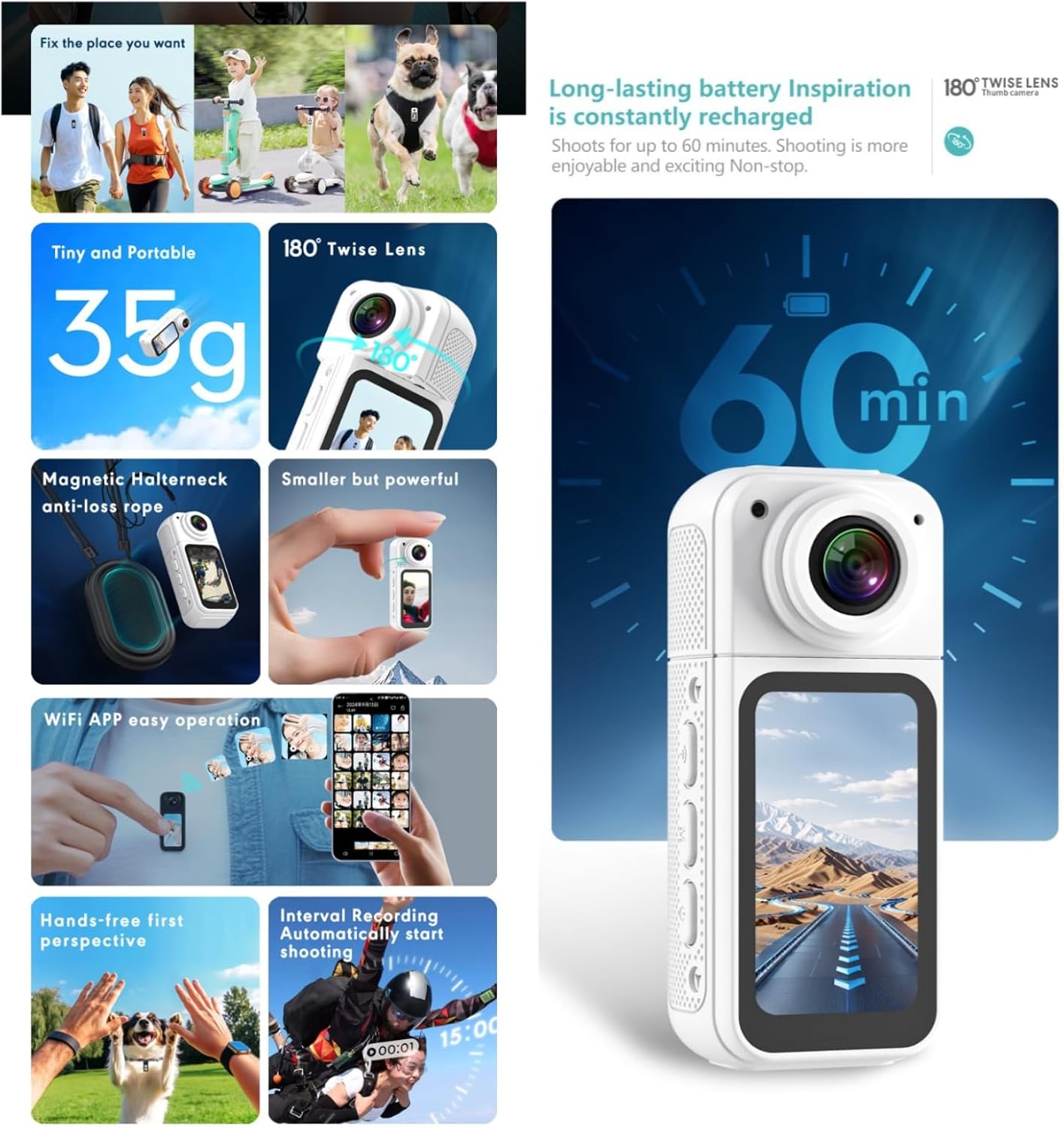
Hoto na 3.2: A visual summary of the camera's practical benefits, such as its portability, rotating lens, secure magnetic attachment, easy app control, hands-free operation, advanced recording modes, and battery endurance.
4. Farawa
4.1 Cajin kamara
Before first use, fully charge the camera. Connect the provided USB-C cable to the camera's charging port and the other end to a USB power adapter (not included) or a computer's USB port. The charging indicator light will show the charging status and turn off when fully charged.
4.2 Saka/Cire Katin MicroSD
The camera requires a MicroSD card (up to 128GB, U1 recommended) for storing recordings. Locate the MicroSD card slot on the side of the camera. Gently insert the card with the gold contacts facing down until it clicks into place. To remove, push the card in slightly until it springs out.
4.3 Kunnawa / Kashewa
To power on the camera, press and hold the Power button for a few seconds until the screen lights up. To power off, press and hold the Power button again until the screen turns off.
5. Basic Aiki
5.1 Rikodin Bidiyo
Once the camera is powered on, press the Record button once to start video recording. The recording indicator will flash. Press the Record button again to stop recording. Videos are saved automatically to the MicroSD card.
5.2 Ɗaukar Hotuna
While in standby mode, a short press of the Mode button may switch to photo mode (if available). Press the Shutter button to take a photo.
5.3 Amfani da Nuni
The 1.47" IPS HD display provides a real-time preview of your footage. You can also use it to navigate menus and review recorded content. Use the navigation buttons (if present) to browse through options.
5.4 Rotating the Lens
The camera features a 180° rotatable lens. Gently twist the lens module to adjust the shooting angle, allowing for front-facing, rear-facing, or any angle in between. This flexibility is ideal for capturing selfies or diverse perspectives.

Hoto na 5.1: The 180° degree twist lens allows for free rotation to discover the perfect angle for precise composition.
6. Na gaba Features
6.1 Connecting to the Mobile App (Wi-Fi)
The bjlysk Thumb Camera can connect to a dedicated mobile application via Wi-Fi for enhanced control and sharing. Download the app from your smartphone's app store. Enable Wi-Fi on the camera and connect your phone to the camera's Wi-Fi network. The app allows for remote control of recording, live view, playback, and direct sharing of content.
6.2 Magnetic Design & Hands-Free Use
The camera's magnetic design allows it to be easily attached to metallic surfaces. For hands-free recording, use the included magnetic halterneck or lanyard to wear the camera, capturing a first-person perspective during various activities like cycling, hiking, or daily commutes.

Hoto na 6.1: Examples of hands-free usage and the magnetic halterneck accessory. The sturdy rope design with magnetic and wearable double insurance helps avoid dropping and losing the camera.
6.3 Loop Recording & Interval Recording
The camera supports advanced recording functions:
- Rikodin madauki: Records video in segments (e.g., 1, 3, or 5 minutes). When the MicroSD card is full, the camera automatically overwrites the oldest files.
- Rikodin tazarar: Allows the camera to automatically start recording at set intervals, useful for time-lapse or monitoring.
7. Kulawa
7.1 Tsaftacewa
Use a soft, dry cloth to clean the camera body. For the lens, use a specialized lens cleaning cloth and solution. Avoid using harsh chemicals or abrasive materials.
7.2 Adana
Store the camera in a cool, dry place away from direct sunlight and extreme temperatures. If storing for an extended period, ensure the battery is partially charged (around 50%) to prolong its lifespan.
8. Shirya matsala
- Kamara baya kunnawa: Tabbatar cewa batirin yana da caji. Haɗa zuwa tushen wuta kuma sake gwadawa.
- Ba za a iya yin rikodi ba: Check if a MicroSD card is inserted and properly formatted. Ensure there is sufficient storage space.
- Rashin ingancin bidiyo: Ensure the lens is clean. Check recording resolution settings.
- Matsalolin haɗin Wi-Fi: Ensure the camera's Wi-Fi is enabled. Restart both the camera and your smartphone.
- Camera freezes: Use a thin object (like a paperclip) to press the reset button (if available) or hold the power button for an extended period to force a shutdown and restart.
9. Ƙayyadaddun bayanai
Below are the technical specifications for the bjlysk Thumb Camera (Model S70):
| Siga | Daraja |
|---|---|
| Samfura | S70 |
| Sensor | Gc2083 |
| Tsarin Bidiyo | 2.7K (2720x1520/15fps), 1080P (1920*1080/30fps) |
| Rikodin madauki | 1 min / 3 min / 5 min |
| Tsarin Bidiyo | MP4 |
| Compressure Format | H.264 |
| Lens Angle | 180° |
| Nunawa | 1.47" IPS screen |
| Baturi | 350mAh Li-ion battery built-in |
| MIC | MIC Support, MIC-2X4MM,42+-3dB |
| Ma'ajiyar Waje | MAX 128G, U1 |
| Shoot image | Ee |
| Tsarin Hoto | 12M (4032x3024) / 10M (3648x2736) / 8M (3264x2448) / 5M (2592x1944) / 3M (2048x1536) |
| Tsarin Hoto | JPG |
| Kebul na USB | Na USB-Type |
| APP WIFI | Ee |
| Cikakken nauyi | 35 g |
Hoto na 9.1: Detailed technical specifications of the bjlysk Thumb Camera, including its dimensions, video capabilities, and other hardware parameters.
10. Garanti da Tallafawa
The bjlysk Thumb Camera comes with a standard manufacturer's warranty. Please refer to the warranty card included in your package for specific terms and conditions. For technical support, troubleshooting assistance, or warranty claims, please contact the retailer or manufacturer directly through their official support channels. Keep your purchase receipt as proof of purchase.