
1. Gabatarwa
Na gode da siyaasing the ELECOM LBT-ECOWS01MBK Open-Ear Bluetooth 5.4 Wireless Headphones. These headphones are designed to allow you to enjoy audio content while remaining aware of your surroundings. This manual provides essential information for the safe and effective use of your new device.

Image: The ELECOM LBT-ECOWS01MBK open-ear wireless headphones and their transparent charging case.
2. Abubuwan Kunshin
- ELECOM LBT-ECOWS01MBK Open-Ear Wireless Headphones (Left and Right)
- Cajin Cajin
- USB Charging Cable (USB-A to USB Type-C™)
- Jagoran Fara Mai Sauri
3. Kayan Samfura
- Zane-Buɗe-Kunne: Listen to music or videos while simultaneously hearing ambient sounds, ensuring awareness of your surroundings.
- Ta'aziyya mara nauyi: Each earbud weighs approximately 9.8g, providing a comfortable fit for extended wear without pressure or stuffiness.
- Sauti mai inganci: Equipped with a large 16mm diameter driver for clear sound and supports AAC codec for high-quality audio on compatible devices like iPhones.
- Yanayin Murya: Optimizes audio frequencies to make human voices clearer, ideal for radio, audiobooks, and conversations.
- Ƙananan Latency Yanayin: Reduces audio-visual delay, enhancing the experience for videos and games.
- Ƙwararren sake kunnawa: Up to 10 hours of continuous playback on a single charge, and up to 25 hours with the charging case.
- Taɓa Sensor Controls: Conveniently manage music playback, volume, and calls directly from the earbuds.
- Taimakon Mataimakin Murya: Compatible with Siri and Google Assistant for hands-free control.
- Amfani da Kulun kunne guda ɗaya: Ana iya amfani da na'urar kunne da kanta.
- USB Type-C™ Charging: The charging case features a USB Type-C™ port for convenient charging.

Image: A man wearing the open-ear headphones, demonstrating the ability to hear ambient sounds while enjoying media.
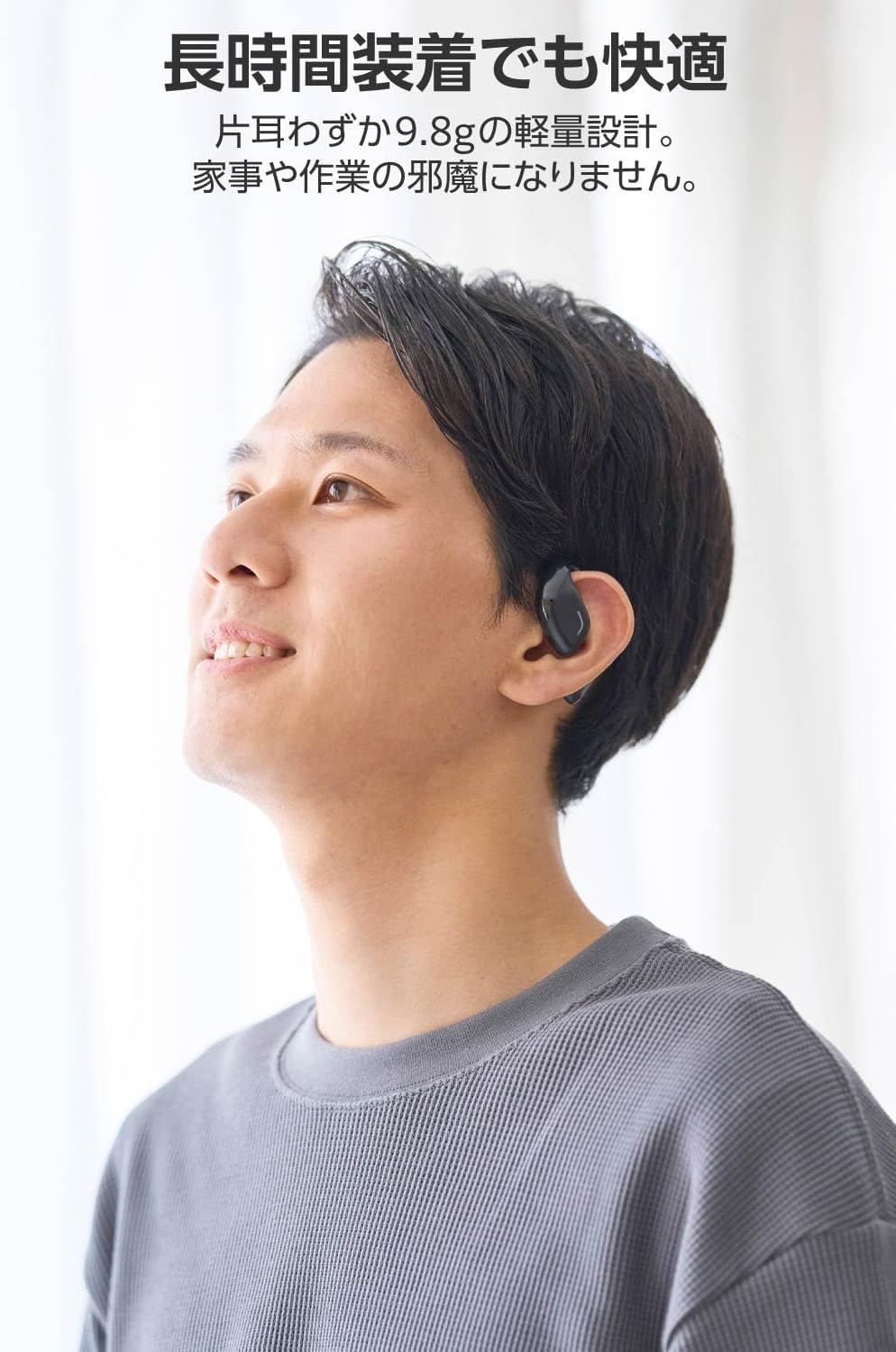
Image: A man wearing the lightweight open-ear headphones, highlighting their comfortable design for long-term use.
4. Saita
4.1. Cajin belun kunne da Case
Kafin amfani da farko, cikakken cajin belun kunne da akwati na caji.
- Sanya belun kunne biyu a cikin cajin caji.
- Connect the supplied USB Type-C™ cable to the charging port on the case and a USB power adapter (not included).
- The LED indicator on the charging case will show the charging status.
Lokacin Caji:
- Headphones: Approximately 1.5 hours
- Charging Case: Approximately 1.5 hours

Image: Illustration of the charging process for the headphones and case, showing the USB-C port and LED indicators.
4.2. Haɗawa da Na'urar Bluetooth
- Tabbatar ana cajin belun kunne.
- Open the charging case. The headphones will automatically enter pairing mode. The LED indicator on the earbuds will flash.
- On your device (smartphone, PC, tablet), enable Bluetooth and search for available devices.
- Select "LBT-ECOWS01MBK" from the list of found devices.
- Once connected, the LED indicator on the earbuds will stop flashing.
- After initial pairing, the headphones will automatically connect to the last paired device when removed from the case.
4.3. Sanya belun kunne
The headphones are designed to hook over your ears.
- Gane belun kunne na Hagu (L) da Dama (R).
- With the LED facing outwards, hook the earbud over the top of your ear.
- Adjust the earbud for a comfortable and secure fit.

Image: Step-by-step guide on correctly wearing the open-ear headphones.
5. Umarnin Aiki
5.1. Sarrafa Na'urorin Firikwensin Taɓawa
The headphones feature touch sensors on each earbud for various functions.
| Aiki | Aiki | Kunshin kunne |
|---|---|---|
| Kunna/Dakata | Taɓa guda ɗaya | L ko R. |
| Waƙa ta gaba | Taɓa sau biyu | R |
| Waƙar da ta gabata | Taɓa sau biyu | L |
| Ƙara girma | Dogon latsawa (kimanin daƙiƙa 2) | R |
| Saukar da ƙara | Dogon latsawa (kimanin daƙiƙa 2) | L |
| Amsa/Ƙarshen Kira | Taɓa guda ɗaya | L ko R. |
| Karɓi Kira | Dogon latsawa | L ko R. |
| Kunna Mataimakin Murya | Sau uku | L ko R. |

Image: Visual representation of the touch sensor areas and corresponding music and volume controls.
5.2. Switching Audio Modes
The headphones offer three distinct audio modes:
- Yanayin Al'ada: Standard audio playback.
- Ƙananan Latency Yanayin: Reduces audio-visual delay, suitable for watching videos or playing games.
- Yanayin Murya: Enhances human voice frequencies for clearer dialogue, ideal for audiobooks, podcasts, or calls.
To switch between modes, refer to the quick start guide or the official product page for specific touch gestures, as these can sometimes be customized.

Hoto: An overview of the three available audio modes and their recommended uses.
5.3. Amfani da Kunnen kunne Guda ɗaya
You can use either the left or right earbud independently. When using only one earbud, ensure the other earbud is powered off or stored in the charging case.
6. Kulawa
Domin tabbatar da tsawon rai da kuma ingantaccen aiki na belun kunne:
- Tsaftace belun kunne da caji akai-akai tare da laushi, bushe bushe.
- Kada a yi amfani da masu tsabtace abrasive ko sauran ƙarfi.
- Guji fallasa belun kunne ga matsanancin zafi, zafi, ko hasken rana kai tsaye.
- Kiyaye lambobin caji akan belun kunne da cikin akwati a tsafta kuma babu tarkace.
- Ajiye belun kunne a cikin akwatin caji idan ba a amfani da su don kare su da kuma ci gaba da caji.
7. Shirya matsala
Idan kun ci karo da al'amura tare da belun kunne, koma zuwa mafita gama gari masu zuwa:
- Babu Sauti:
- Tabbatar ana cajin belun kunne.
- Check that the headphones are properly paired and connected to your device.
- Daidaita ƙarar a kan belun kunne da kuma na'urar da aka haɗa.
- Ba za a iya Haɗa:
- Ensure the headphones are in pairing mode (LED flashing).
- Turn off Bluetooth on other nearby devices that may have previously connected.
- Sake kunna na'urar ku kuma gwada haɗawa kuma.
- Haɗin Kai Tsaye:
- Tabbatar babu wani cikas tsakanin belun kunne da na'urarka.
- Move closer to your device (maximum communication distance is approximately 10m).
- Guji muhallin da ke da tsangwama mai ƙarfi ta hanyar amfani da na'urar lantarki.
- Gudanarwar taɓawa Ba Amsa ba:
- Tabbatar da cewa yatsunka suna da tsabta kuma sun bushe.
- Try restarting the headphones by placing them in the case and then taking them out again.
- Low Battery Voice Prompt: If you hear a repeated "Low Battery, please charge" prompt, place the earbuds in the charging case immediately.
If the issue persists, please refer to the official ELECOM support website don ƙarin taimako.
8. Ƙayyadaddun bayanai
| Siffar | Ƙayyadaddun bayanai |
|---|---|
| Sunan Samfura | LBT-ECOWS01MBK |
| Fasahar Haɗuwa | Wireless (Bluetooth® Version 5.4) |
| Bluetooth Profiles | A2DP, AVRCP, HFP |
| Codecs masu goyan baya | AAC, SBC |
| Max Communication Distance | Approx. 10m (without obstacles) |
| Frequency Response (A2DP) | 20-20,000Hz |
| Ci gaba da Lokacin sake kunnawa | Approx. 10 hours (Approx. 25 hours with charging case) |
| Lokacin Caji (Wayoyin kunne) | Kimanin 1.5 hours |
| Lokacin Caji (Cikin) | Kimanin 1.5 hours |
| Nau'in Makarufo | Nau'in MEMS |
| Rukunin Direba | φ16mm Full Range |
| Nauyi (kowace abin kunne) | Kimanin 9.8 g |
| Nauyi (Cajin Cajin) | Kimanin 59.0 g |
| Launi | Matte Black |
| Resistance Ruwa | Mara ruwa |
| Yanayin Aiki | 5 ℃ zuwa 35 ℃ |
| Humidity Mai Aiki | 20% zuwa 80% (ba mai tauri) |
9. Garanti da Tallafawa
9.1. Garanti Bayani
Wannan samfurin ya zo tare da a Garanti na shekaru 1 from the date of purchase. Please retain your proof of purchase for warranty claims. The warranty covers manufacturing defects but does not cover damage caused by misuse, accidents, unauthorized modifications, or normal wear and tear.
9.2. Tallafin Abokin Ciniki
For further assistance, technical support, or detailed product information, please visit the official ELECOM website:
You may also find additional FAQs and troubleshooting tips on the product support pages.