
1. Gabatarwa
This manual provides detailed instructions for the installation, operation, and maintenance of your ESX Vision VMX900DAB Universal 1-DIN Multimedia Receiver. Please read this manual thoroughly before using the device to ensure proper functionality and to maximize your user experience.
The ESX Vision VMX900DAB is a versatile 1-DIN multimedia receiver featuring a 9-inch multi-angle touchscreen display. It integrates advanced connectivity options including wireless Apple CarPlay and Android Auto, DAB+ digital radio, Bluetooth hands-free calling and audio streaming, and a comprehensive media player. The unit is designed for universal compatibility and offers a removable monitor for enhanced security.
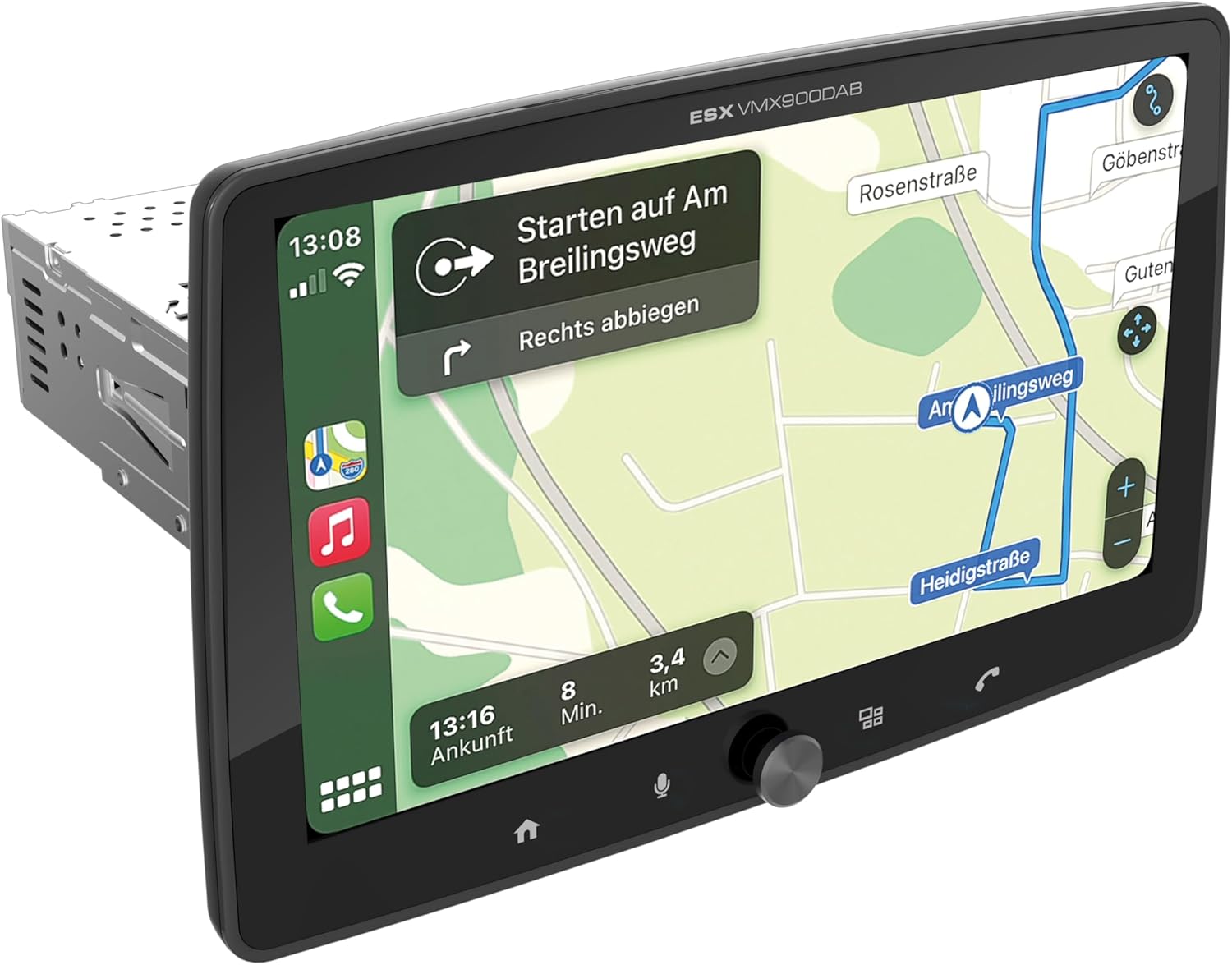
Figure 1.1: ESX Vision VMX900DAB with navigation interface.
2. Saita da Shigarwa
Abubuwan Kunshin 2.1
Kafin shigarwa, tabbatar da cewa duk abubuwan da aka haɗa suna nan:
- ESX Vision VMX900DAB Main Unit
- Detachable 9-inch Touchscreen Monitor
- Power/Speaker Wiring Harness
- Microphone na waje
- GPS Eriya
- DAB+ Antenna
- USB Extension Cables
- Kayan Haɗawa (maƙallan, sukurori)
- Jagorar mai amfani (wannan takaddar)

Hoto na 2.1: Kayan haɗi da kayan haɗin da aka haɗa.
2.2 Mounting the Main Unit
- Ensure the vehicle's battery is disconnected before starting installation.
- Insert the 1-DIN main unit into the vehicle's dashboard opening.
- Secure the main unit using the provided mounting brackets and screws.
2.3 Haɗa Mai Kulawa
The 9-inch monitor is detachable and connects to the main unit via a click system.
- Align the monitor's connector with the slot on the main unit.
- Gently push the monitor until it clicks securely into place.
- To remove, press the release button (if applicable) and pull the monitor away.

Figure 2.2: Detachable monitor with click system.
2.4 Haɗin Waya
Refer to the wiring diagram provided with the unit for specific connections. Key connections include:
- Power and Speakers: Connect the main wiring harness to the vehicle's power supply and speakers.
- Makirufo na waje: Plug the external microphone into its dedicated input for optimal hands-free call quality.
- Antenna GPS: Haɗa eriyar GPS ɗin kuma saka ta a wuri mai haske view na sararin sama don daidaitaccen matsayi.
- DAB+ Antenna: Connect the DAB+ antenna for digital radio reception.
- Tashoshin USB: Two USB-A ports are available. One for media playback and charging (1.5A), and another specifically for Apple CarPlay/Android Auto and charging (1.5A).
- RCA Pre-ampAbubuwan da aka inganta: Six 4V RCA outputs (FL/FR/RL/RR/SUB1/SUB2) are available for connecting external ampmasu rayarwa.
- AUX RCA Inputs: Stereo audio and video inputs (L/R/VIDEO) for external audio/video sources.
- Camera RCA Inputs: Dedicated inputs for front and rear cameras.
- Sarrafa Tuƙi: Analog steering wheel remote control input (learnable) for integration with vehicle controls.
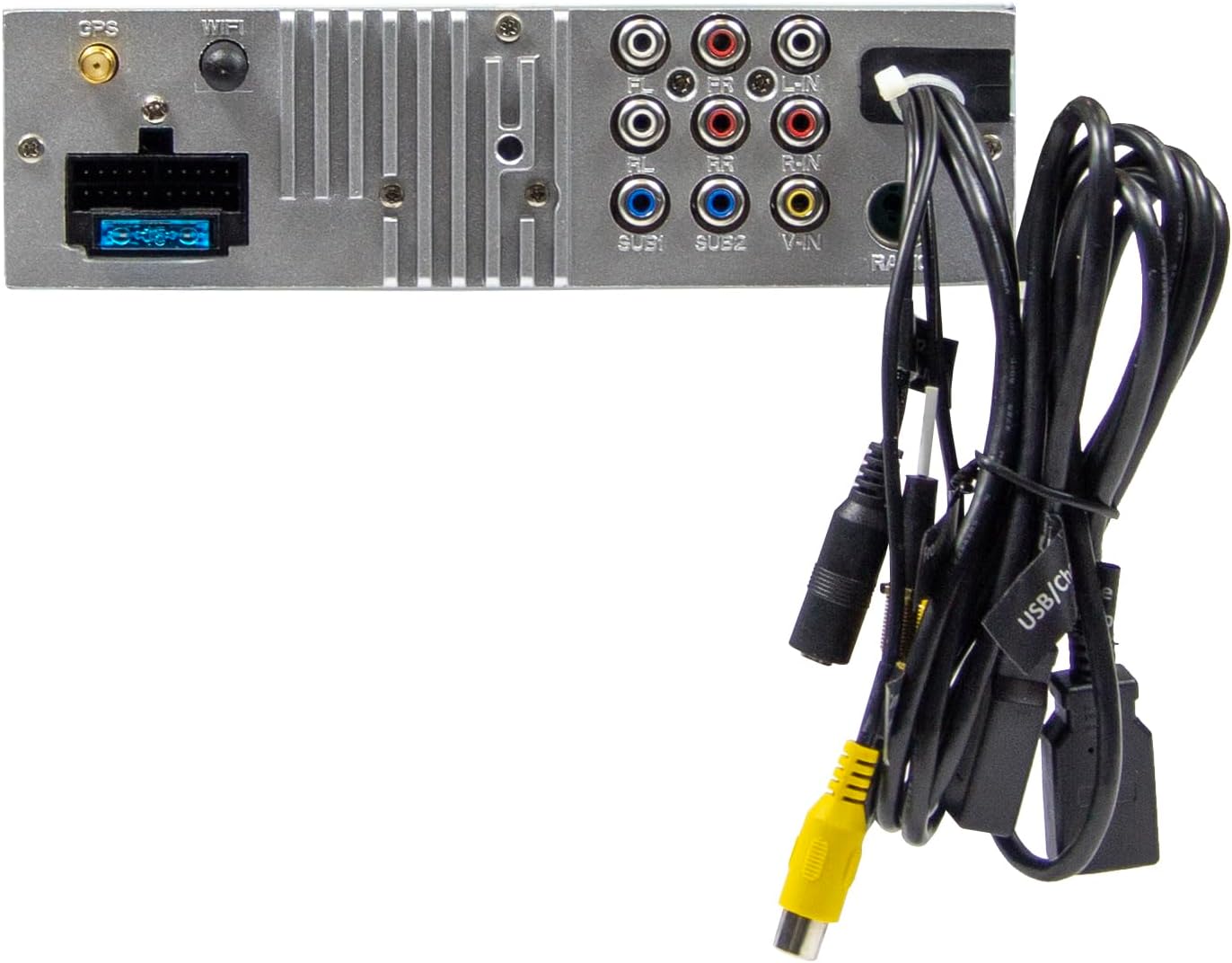
Hoto 2.3: Haɗin baya na babban naúrar.
3. Umarnin Aiki
3.1 Power On/Off and Basic Controls
- Kunna Wuta: The unit will power on automatically with the vehicle's ignition.
- Kashe Wuta: The unit will power off automatically with the vehicle's ignition.
- Sarrafa ƙara: Use the large rotary knob on the front panel to adjust the volume.
- Maɓallan Aiki: Four function keys on the front panel provide quick access to common features.
- Kariyar tabawa: All primary functions are controlled via the 9-inch touchscreen.
3.2 Allon Gida da Kewayawa
The home screen provides access to all main functions and applications.

Figure 3.1: Main menu/home screen.
3.3 Apple CarPlay da Android Auto
The VMX900DAB supports both wireless and wired (via USB) Apple CarPlay and Android Auto.
- Haɗin Mara waya: Enable Bluetooth and Wi-Fi on your smartphone and follow the on-screen prompts to connect.
- Haɗin Waya: Connect your smartphone to the dedicated USB-A port using a compatible USB cable.
- Once connected, your smartphone's compatible apps (navigation, music, calls, messages) will be mirrored on the receiver's display.

Figure 3.2: Apple CarPlay interface.
3.4 Radio Functions (DAB+/FM/AM)
- DAB+ Radio: Select the DAB+ icon from the home screen. The unit will scan for available digital radio stations.
- Rediyon FM/AM: Select the Radio icon. Use the touchscreen to tune to stations, save presets, and access RDS functions.
3.5 Bluetooth Hands-Free and Audio Streaming
- Haɗin kai: Enable Bluetooth on your smartphone and search for the VMX900DAB. Select the device and confirm pairing.
- Kiran Kyauta Ba Hannu: Once paired, you can make and receive calls directly through the receiver. The external microphone ensures clear voice transmission. Your phonebook can be synchronized.
- Saukar Audio: Stream music wirelessly from your smartphone to the receiver.
3.6 Maida sake kunnawa
The unit supports various audio, video, and photo formats via USB.
- Tallafawa File Tsarukan: AVI, FLV, MOV, MKV, WMV, WMA, MP3, FLAC, JPEG, PNG, BMP.
- Insert a USB drive into the media USB-A port. Select the USB icon from the home screen to browse and play media files.
3.7 Monitor Adjustment
The monitor can be tilted and adjusted in height to achieve the optimal viewing angle and prevent obstruction of vehicle controls.

Figure 3.3: Adjustable monitor mechanism.
3.8 Keɓancewa
- Startup Logo: Customize the startup logo in the settings menu.
- RGB Key Illumination: Select from various RGB colors and animation effects for the key illumination.
- Yarukan menu: Supported languages include DEU, ENG, SWE, ITA.
4. Kulawa
4.1 Tsabtace Sashen
- Use a soft, dry cloth to wipe the display and unit surfaces.
- For stubborn marks on the screen, use a screen cleaner specifically designed for electronic displays and a microfiber cloth.
- Do not use abrasive cleaners, solvents, or harsh chemicals, as these can damage the finish or screen.
4.2 Babban Kulawa
- Guji fallasa naúrar zuwa matsanancin yanayin zafi, hasken rana kai tsaye na tsawon lokaci, ko babban zafi.
- Tabbatar da samun iska mai kyau a kusa da naúrar don hana zafi fiye da kima.
- When removing the monitor, handle it carefully to avoid damage to the connectors.
5. Shirya matsala
If you encounter issues with your VMX900DAB, refer to the following common problems and solutions:
| Matsala | Dalili mai yiwuwa | Magani |
|---|---|---|
| Babu iko | Incorrect wiring; Blown fuse; Vehicle ignition off | Check power connections; Replace fuse; Turn on vehicle ignition |
| Babu sauti | Volume too low; Mute activated; Speaker wiring issue | Increase volume; Deactivate mute; Check speaker connections |
| Bluetooth ba ya haɗi | Bluetooth off on phone/unit; Incorrect pairing process | Ensure Bluetooth is on; Re-attempt pairing process |
| Apple CarPlay/Android Auto not starting | Incorrect USB port; Faulty USB cable; Phone not compatible/configured | Use the dedicated USB port; Try a different USB cable; Check phone settings for CarPlay/Android Auto |
| Mara kyau liyafar rediyo | Antenna not connected; Poor antenna placement; Weak signal area | Check antenna connection; Adjust antenna position; Try in a different location |
| Monitor not displaying | Monitor not securely attached; Connector issue | Ensure monitor is fully clicked into place; Check for debris in connector |
If the problem persists after attempting these solutions, please contact ESX customer support or your authorized dealer.
6. Ƙayyadaddun bayanai
| Siffar | Ƙayyadaddun bayanai |
|---|---|
| Lambar Samfura | Saukewa: VMX900DAB |
| Nunawa | 9-inch Multi-angle Touchscreen |
| Factor Factor | 1-DIN Universal |
| Haɗuwa | USB, Bluetooth, Auxiliary |
| Siffofin Musamman | Wireless Apple CarPlay, Wireless Android Auto, Detachable Monitor with Click System |
| Rediyo Tuner | DAB+ (Digital Radio), FM/AM with RDS |
| Bluetooth | Hands-free function, Audio Streaming |
| USB Ports | 2x USB-A (1.5A charging, one dedicated for CarPlay/Android Auto) |
| Max Music Power | 4 x80w |
| Pre-ampAbubuwan da aka inganta | 6x RCA (4V) (FL/FR/RL/RR/SUB1/SUB2) |
| Abubuwan shigar da AUX | RCA (L/R/VIDEO) |
| Abubuwan Shigar Kamara | RCA (Front/Rear) |
| Tallafawa File Tsarin tsari | AVI, FLV, MOV, MKV, WMV, WMA, MP3, FLAC, JPEG, PNG, BMP |
| Microphone na waje | Kunshe |
| Sarrafar Tuƙi | Analog (learnable) |
| Mai karɓar GPS | Kunshe |
| Yarukan menu | DEU, ENG, SWE, ITA |
| Jimlar Ƙarfin fitarwa | 320 Watts |
| Kewaye Sauti Kanfigareshan | 4.2 |
| Yanayin Fitarwa na Audio | Sitiriyo |
7. Garanti da Tallafawa
For warranty information, please refer to the documentation provided at the time of purchase or contact your authorized ESX dealer. Warranty terms and conditions may vary by region and retailer.
For technical support or further assistance, please contact ESX customer service or visit the official ESX website don albarkatun tallafi.