
TenHutt 20V 6.0Ah Battery and Multi-Functional Charger Kit
TenHutt 20V 6.0Ah Lithium-ion Battery and Multi-Functional Charger Kit for Craftsman V20 Tools Instruction Manual
1. Gabatarwa
This manual provides essential instructions for the safe and efficient operation, maintenance, and troubleshooting of your TenHutt 20V 6.0Ah Lithium-ion Battery and Multi-Functional Charger Kit. Please read this manual thoroughly before using the product to ensure proper handling and to prevent damage or injury.
The kit includes one 20V 6.0Ah Lithium-ion battery and one multi-functional charger designed for compatibility with Craftsman V20 series power tools and original Craftsman V20 batteries and chargers.
2. Muhimman Umarnin Tsaro
GARGADI: Karanta duk gargaɗin aminci da duk umarni. Rashin bin gargaɗin da umarni na iya haifar da girgiza wutar lantarki, wuta, da/ko mummunan rauni.
- Always use the charger indoors in a dry location.
- Kar a yi cajin batura a damp ko yanayin jika.
- Use only the charger provided with this kit or a compatible Craftsman V20 charger to charge the battery.
- Kada kayi ƙoƙarin cajin batura marasa caji.
- Keep the battery and charger away from heat sources, direct sunlight, and flammable materials.
- Kada a yi gajeriyar kewaya tashoshin baturi.
- Do not disassemble, crush, or incinerate the battery.
- Idan baturi casing ya fashe ko ya lalace, kar a yi amfani da shi.
- A zubar da batura cikin aminci bisa ga ƙa'idojin gida.
- Cire caja daga wurin wutar lantarki lokacin da ba a amfani da shi ko kafin tsaftacewa.
- Do not allow liquid to enter the charger.
3. Samfurin Ya Ƙareview
The TenHutt 20V 6.0Ah Lithium-ion Battery and Multi-Functional Charger Kit is designed to provide reliable power for your Craftsman V20 tools and convenient charging for various USB-powered devices.
3.1 Abubuwan Kit
- 1 x TenHutt 20V 6.0Ah Lithium-ion Battery
- 1 x TenHutt Multi-Functional Battery Charger
3.2 Maɓalli Maɓalli
- Babban Ƙarfin Baturi: 6.0Ah (6000mAh) Lithium-ion battery for extended runtime.
- Nunin Batir LED: 3 LED lights on the battery to check charge status.
- Multi-Functional Charger: Features a standard battery charging port, a USB-A port, and a Type-C port for charging external devices.
- Faɗin Daidaitawa: Designed to be compatible with Craftsman V20 series tools and original Craftsman V20 batteries and chargers.
- Kariyar Tsaro: Integrated intelligent chip provides protection against short circuits, overcharging, over-discharging, over-voltage, da zafi fiye da kima.
- Gina Mai Dorewa: Robust PC+ABS outer shell for impact and wear resistance.

Figure 1: TenHutt 20V 6.0Ah Lithium-ion Battery and Multi-Functional Charger Kit.
4. Bayanan fasaha
| Bangaren | Ƙayyadaddun bayanai |
|---|---|
| Fitar da Baturi Voltage | 20V |
| Nau'in Baturi | Lithium-ion |
| Ƙarfin baturi | 6000mAh (6.0Ah) |
| Baturi Wattage | 120 da Wh |
| Caja AC Input | 100V-240V / 50-60Hz |
| Caja DC fitarwa | 21V Max / 2.5A Max |
| Charger USB-A Output | 5V / 2.4A Max |
| Charger Type-C Output | 5V / 2.4A Max |
| Girman samfur | 6.57 x 8.35 x 4.72 inci |
| Nauyin Abu | 2.88 fam |

Hoto 2: Samaview of battery and charger specifications.
5. Saita da Amfani na Farko
5.1 Farkon Cajin Baturi
- Unpack the battery and charger from the packaging.
- Plug the charger into a standard 100-240V AC power outlet. The charger's LED indicator will illuminate to show it is powered.
- Align the battery with the charging port on the charger and slide it in until it clicks securely into place.
- The charger's LED indicator will change to show that charging has begun. Allow the battery to fully charge before first use.
- Once fully charged, the charger's LED indicator will change again (e.g., solid green). Remove the battery by pressing the quick release button and sliding it out.

Figure 3: Charger with USB-A and Type-C ports for versatile charging.
6. Umarnin Aiki
6.1 Cajin Baturi
To charge the battery, follow the steps outlined in Section 5.1. The charger is compatible with TenHutt 20V batteries and original Craftsman V20 batteries (e.g., CMCB201, CMCB202, CMCB204, CMCB205, CMCB206, CMCB209).
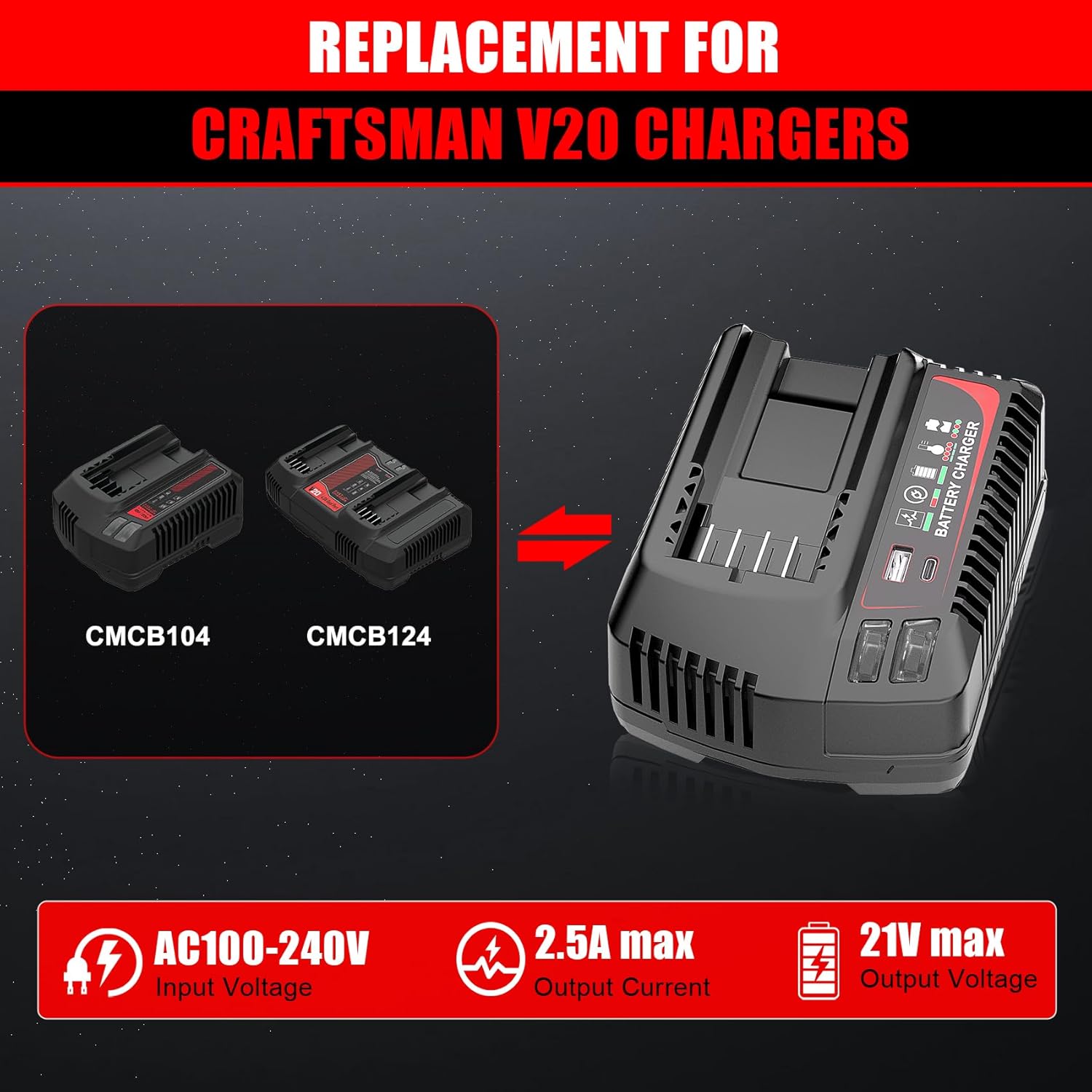
Figure 4: The TenHutt charger is a replacement for Craftsman V20 chargers like CMCB104 and CMCB124.

Figure 5: The TenHutt battery is compatible with various Craftsman V20 battery models.
6.2 Using the Battery with Power Tools
- Tabbatar cewa an cika cajin baturi.
- Align the battery with the battery port on your Craftsman V20 power tool.
- Zamar da baturin cikin kayan aiki har sai ya danna cikin amintaccen wuri.
- To remove the battery, press the quick release button on the battery and slide it out of the tool.

Figure 6: The TenHutt battery and charger are compatible with a wide range of Craftsman V20 tools.
6.3 Using the Charger's USB Ports
The charger features a USB-A port and a Type-C port, allowing you to charge smartphones, tablets, and other USB-powered devices simultaneously while charging a power tool battery or independently.
- Plug the charger into a standard 100-240V AC power outlet.
- Connect your USB-powered device to either the USB-A or Type-C port on the charger using an appropriate USB cable.
- The charger will begin providing power to your device.
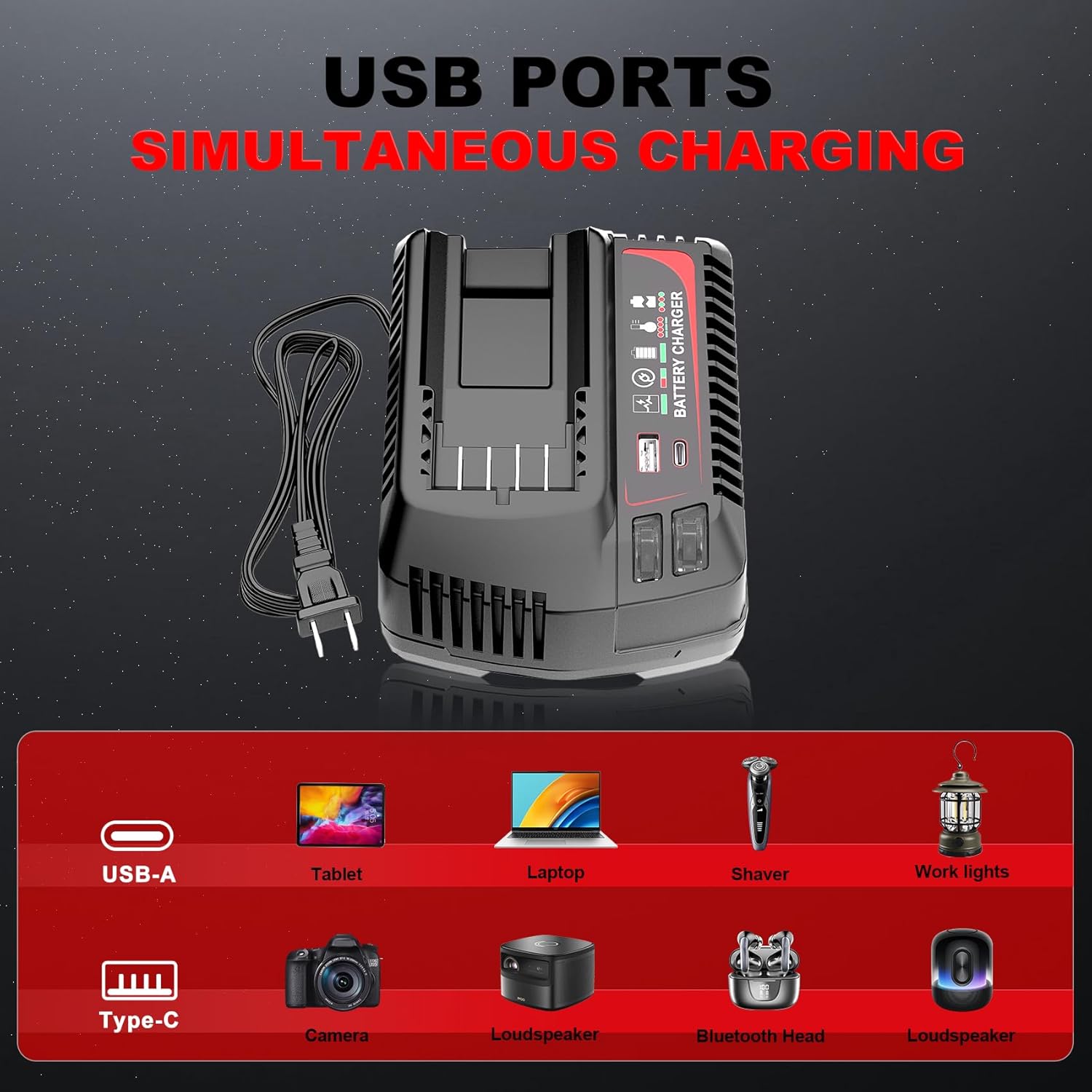
Figure 7: The charger's USB-A and Type-C ports allow for simultaneous charging of various electronic devices.
7. Kulawa da Adanawa
7.1 Gabaɗaya Kulawa
- Keep the battery and charger clean and free from dust and debris. Use a dry cloth to wipe surfaces.
- Do not use cleaning agents or solvents that could damage plastic parts.
- Regularly inspect the battery and charger for any signs of damage, such as cracks, frayed cables, or loose connections. Do not use damaged components.
7.2 Adana
- Store the battery and charger in a cool, dry place, away from direct sunlight and extreme temperatures.
- For long-term storage, charge the battery to approximately 50-70% capacity. Avoid storing fully charged or completely discharged batteries for extended periods.
- A kiyaye nesa da yara.
8. Shirya matsala
If you encounter issues with your TenHutt battery or charger, refer to the following common problems and solutions:
| Matsala | Dalili mai yiwuwa | Magani |
|---|---|---|
| Baturi baya caji | Ba a shigar da caja ba; rashin kuskure; baturi bai zauna daidai ba; lalace baturi/caja. | Ensure charger is securely plugged into a working outlet. Re-seat the battery. Inspect for damage. If damaged, discontinue use. |
| Charger LED not indicating charge status | Battery fully charged; charger malfunction. | Check battery LED indicator. If battery is full, remove it. If not, try another battery or contact support. |
| Batirin ba ya aiki da kayan aiki | Battery discharged; battery not seated correctly in tool; tool malfunction. | Charge the battery. Ensure battery is fully inserted into the tool. Test with another battery if available. |
| Tashoshin USB ba cajin na'urorin | Charger not powered; faulty USB cable; device not compatible. | Ensure charger is plugged in. Try a different USB cable. Verify device compatibility with 5V/2.4A output. |
9. Garanti da Abokin ciniki Support
The product comes with a replacement warranty. Please refer to the product packaging or purchase documentation for specific warranty terms and duration. For technical assistance, troubleshooting beyond this manual, or warranty claims, please contact TenHutt customer support through your retailer or the official TenHutt website.
Lura: The product description mentions a "Free Refund for 1.5 YEAR New Replacement". Please verify this information with your purchase documentation.
Ask a question about this manual
Ask about setup, troubleshooting, compatibility, parts, safety, or missing instructions. Manuals+ will review the question and use this page’s manual context to help answer it.