
1. Gabatarwa
The HTVRONT Phone Case Heat Press Machine is an advanced auto 3D vacuum heat press designed for sublimation printing on various items, including phone cases, badges, and coasters. It features precise temperature control and a universal mold compatible with popular iPhone models, ensuring high-quality, full-surface transfers with vibrant colors.
This manual provides detailed instructions for the safe and effective use of your HTVRONT heat press machine. Please read it thoroughly before operation.

Image: The HTVRONT Phone Case Heat Press Machine in lavender purple, shown with included accessories such as a phone case fixture, heat-resistant gloves, and sublimation film.
2. Bayanin Tsaro
Always observe the following safety precautions to prevent injury or damage to the machine:
- Keep hands and fingers away from the heating plates during operation. The plates reach high temperatures.
- Use heat-resistant gloves when handling hot items or components.
- Tabbatar cewa an sanya na'ura a kan barga, mai jure zafi.
- Kada a yi aiki da injin kusa da kayan da za a iya ƙonewa.
- Cire na'urar daga wutar lantarki lokacin da ba a amfani da ita ko kafin tsaftacewa.
- Kada a nutsar da injin cikin ruwa ko wani ruwa.
- A kiyaye nesa da yara.
- Only use the machine for its intended purpose as described in this manual.
3. Abubuwan Samfur
The HTVRONT Phone Case Heat Press Kit includes the following items:
- HTVRONT H17 Phone Case Heat Press (x1)
- Phone Case Fixture Set (x1)
- Badge Fixture Set (x1)
- Sublimation Film (A4) (x5)
- Heat-resistant Gloves (x1 pair)
- Sublimation Badge (58 mm) (x3)
- Tweezers (x1)
- Heat-resistant Tape (x1)

Image: A visual representation of all components included in the HTVRONT Phone Case Heat Press Kit, neatly arranged with quantities.
4. Saita
Follow these steps to set up your heat press machine:
- Shirya: A hankali cire duk abubuwan da aka gyara daga marufi. Rike marufi don ajiya ko sufuri na gaba.
- Wuri: Place the heat press machine on a flat, stable, and heat-resistant surface. Ensure there is adequate ventilation around the machine.
- Haɗin Wuta: Toshe igiyar wutar lantarki cikin mashin wutar lantarki. Tabbatar da voltage ya dace da buƙatun injin.
- Binciken Farko: Before first use, inspect the machine for any visible damage. Do not operate if damage is present.
5. Umarnin Aiki
5.1 Basic Operation (Quick Start Guide)
The HTVRONT heat press is designed for ease of use, even for beginners. Follow these general steps for heat transfer:
- Power On and Set Parameters: Turn on the machine and use the control panel to set the desired temperature and time according to your material's requirements.
- Preheat and Mount: Place the appropriate fixture (e.g., phone case fixture) into the device. Allow the machine to preheat. Once preheated, mount the item (e.g., phone case) onto the fixture.
- Apply Sublimation Film: Carefully place the printed sublimation film with your design onto the item. Ensure proper alignment.
- Begin Transfer: Close the lid to initiate the heat transfer process. The machine will automatically apply 3D vacuum pressure.
- Completion and Peel: Once the transfer is complete, the machine will signal. Open the lid and carefully peel off the sublimation film while the item is still hot, using heat-resistant gloves.

Image: A visual guide illustrating the four key steps of the 6-minute heat press process, from setting parameters to peeling the film.
5.2 Material-Specific Settings (Quick Reference Chart)
Refer to the table below for recommended temperature and time settings for common sublimation materials:
| Substrate | Kayan abu | Kayan aiki | Upper Heat Plate Temp | Lower Heat Plate Temp | Lokacin Preheat | Lokacin Canja wurin | Peeling Method |
|---|---|---|---|---|---|---|---|
| Cajin waya | TPU/PC | Universal phone case fixture set | 135°C/275°F | 135°C/275°F | 2-10s | 300-350s | Kwasfa mai zafi |
| Alama | Karfe | Badge fixture set | 140°C/285°F | 140°C/285°F | 2-10s | 330s | Kwasfa mai zafi |
| Farantin yumbura | yumbu | Maballin kasa | 140°C/285°F | 140°C/285°F | 2-10s | 300s | Kwasfa mai zafi |
| Coaster | Fata | Maballin kasa | 135°C/275°F | 125°C/255°F | 2-10s | 300s | Kwasfa mai zafi |
| Keychain | MDF | Maballin kasa | 135°C/275°F | 135°C/275°F | 2-10s | 300s | Kwasfa mai zafi |
Table: Quick Reference Chart for recommended heat press settings based on substrate material.
5.3 Universal Mold and Compatibility
The HTVRONT H17 features an adjustable phone case mold designed for compatibility with a wide range of iPhone models (iPhone 12 and above). This single fixture reduces the need for multiple molds.

Image: Illustration showing the heat press's universal adaptation for different iPhone models, highlighting its versatility.
The phone case fixture set includes a main fixture, lens pads, and filler blocks to ensure a snug fit for various phone sizes. Refer to the Model Compatibility Chart for specific recommendations:
| Samfura | Lens Pad | Toshe Filler | Samfura | Lens Pad | Toshe Filler |
|---|---|---|---|---|---|
| iPhone 16 | I-9 | ② + ③ | iPhone 14 Pro | I-4 | ② + ③ |
| iPhone 16 Plus | I-9 | ① + ② + ③ + ④ + ⑤ | iPhone 14 Pro Max | I-4 | ① + ② + ③ + ④ + ⑤ |
| iPhone 16 Pro | I-8 | ② + ③ | iPhone 13 | I-2 | ② + ③ |
| iPhone 16 Pro Max | I-8 | ① + ② + ③ + ④ + ⑤ | iPhone 13 Pro | I-3 | ② + ③ |
| iPhone 15 | I-6 | ② + ③ | iPhone 13 Pro Max | I-3 | ① + ② + ③ + ④ + ⑤ |
| iPhone 15 Plus | I-6 | ① + ② + ③ + ④ + ⑤ | iPhone 12 | \ | ② + ③ |
| iPhone 15 Pro | I-7 | ② + ③ | iPhone 12 Pro | I-1 | ② + ③ |
| iPhone 15 Pro Max | I-7 | ① + ② + ③ + ④ + ⑤ | iPhone 12 Pro Max | I-1 | ① + ② + ③ + ④ + ⑤ |
| iPhone 14 | I-5 | ② + ③ | |||
| iPhone 14 Plus | I-5 | ① + ② + ③ + ④ + ⑤ |
Table: Model Compatibility Chart for iPhone models, indicating recommended Lens Pad and Filler Block combinations.
5.4 Smart Alignment Feature
The machine is equipped with phone-specific templates and pattern adjustment tools within its software. This feature ensures perfect alignment and complete coverage of your design, significantly improving the accuracy and efficiency of your creative process.
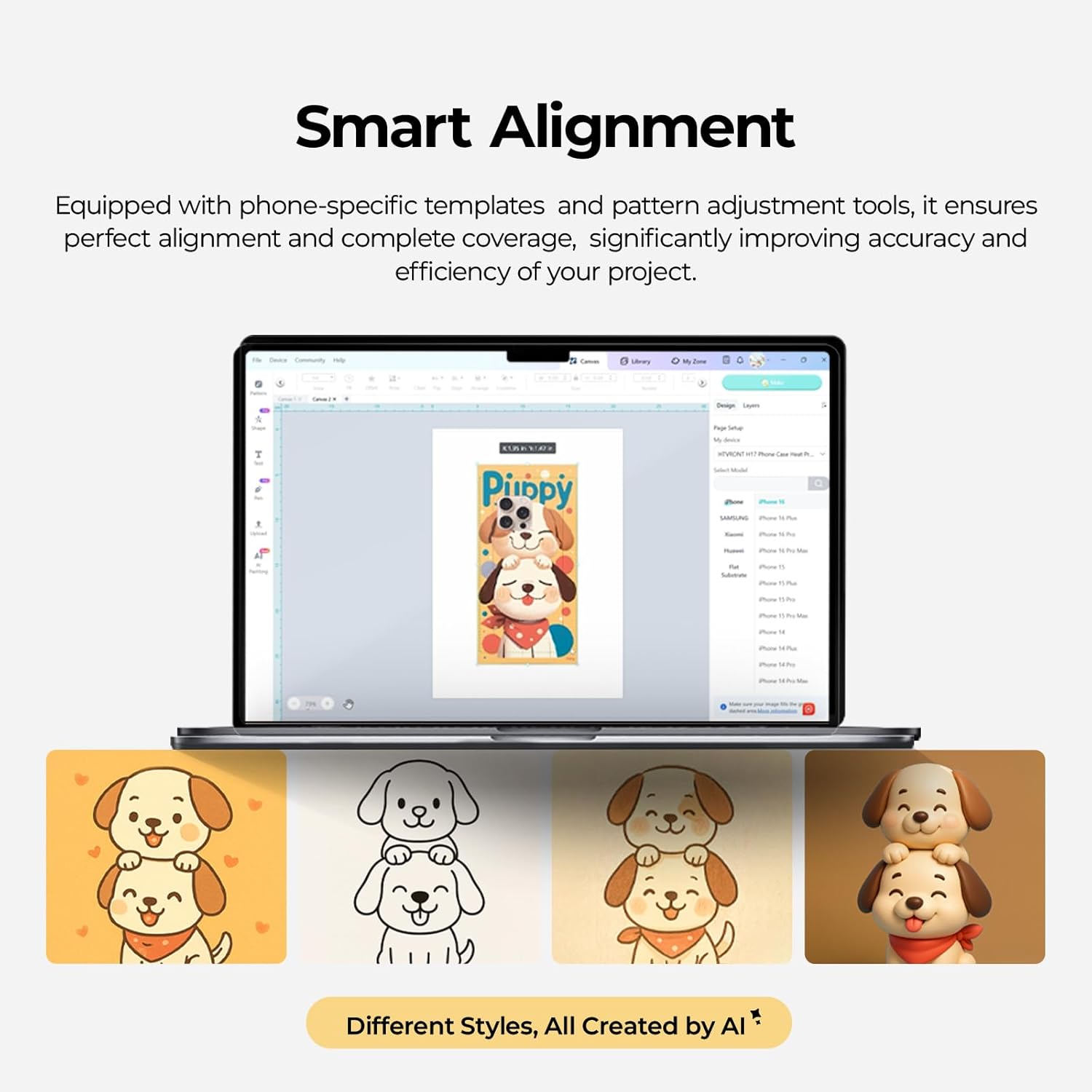
Image: A screenshot of the Smart Alignment software interface, demonstrating how users can adjust pattern size and position for perfect alignment on phone cases.
6. Kulawa
Proper maintenance ensures the longevity and optimal performance of your HTVRONT heat press machine:
- Tsaftacewa: After each use, allow the machine to cool completely. Wipe down the heating plates and exterior with a soft, damp zane. Kada a yi amfani da masu tsabtace abrasive ko sauran ƙarfi.
- Kulawa na Kaya: Clean the phone case and badge fixtures regularly to prevent residue buildup.
- Ajiya: Store the machine in a dry, dust-free environment when not in use. Keep it in its original packaging if possible to protect it from damage.
- Dubawa: Periodically check the power cord for any signs of damage. If damaged, contact customer support for assistance.
7. Shirya matsala
Wannan sashe yana magance batutuwan gama gari da zaku iya fuskanta. Don matsalolin da ba a lissafa a nan ba, tuntuɓi tallafin abokin ciniki.
- Injin Baya Aiki:
- Tabbatar cewa an haɗa igiyar wutar lantarki da kyau a cikin injin da kuma wurin fitar da wutar lantarki mai aiki.
- Check if the power switch is in the 'On' position.
- Tabbatar da hanyar wutar lantarki tana aiki ta hanyar toshe a wata na'ura.
- Uneven Heat Transfer/Faded Design:
- Confirm that the temperature and time settings are correct for your specific material (refer to the Quick Reference Chart).
- Ensure the sublimation film is properly aligned and securely taped to the item.
- Check that the item is placed correctly and snugly within the fixture.
- Ensure the item has a sublimation coating, as this machine is only suitable for such items.
- Injin Ba Dumama ba:
- Verify the temperature setting is not at 0 or minimum.
- Allow sufficient time for the machine to preheat to the set temperature.
- Idan batun ya ci gaba, tuntuɓi tallafin abokin ciniki.
- Yawan Hayaniya:
- The machine operates quietly, typically below 65 dB. If unusual loud noises occur, discontinue use and contact support.
8. Ƙayyadaddun bayanai
- Lambar Samfura: RY-SJKJ-0651-US
- Alamar: HTVRONT
- Abu: Karfe
- Launi: Lavender Purple
- Nauyin Abu: 15.22 fam (kimanin 6.9 kg)
- Girman samfur: 1.2"L x 1"W x 0.8"H
- Matsayin Surutu: <65 dB (Quiet Operation)
- Abubuwan Amfani: Sublimation Phone Cases, Badges, Coasters, Keychains, Slates
- Fasaha: Auto 3D Vacuum Heat Press
- Sarrafa zafin jiki: Precise digital control
- Daidaituwa: Universal mold for iPhone 12 and above models
9. Garanti da Tallafawa
HTVRONT is committed to providing excellent customer service. If you have any questions or require assistance with your Phone Case Heat Press Machine, please do not hesitate to contact us.
- Taimakon Abokin Ciniki: We provide 24/7 customer support to assist with any issues or inquiries.
- Bayanin Garanti: For detailed warranty terms and conditions, please refer to the warranty card included with your product or contact HTVRONT customer service directly.
Thank you for choosing HTVRONT. We hope you enjoy creating with your new heat press machine!