
1. Gabatarwa
Thank you for choosing the VAVA 5.5" 720P HD Video Baby Monitor. This manual provides essential information for the safe and effective use of your device. Please read it thoroughly before operation and retain it for future reference.
This monitor offers a secure and clear way to observe your baby with its 5.5-inch 720p display, two-way audio, night vision, and pan/tilt/zoom capabilities. It operates on a dedicated wireless connection, ensuring privacy and reliability.
Me ke cikin Akwatin
- Baby Monitor (Parent Unit)
- Camera (Baby Unit)
- Adaftar Wutar AC x2
- Dutsen Kit
- Dutsen Kamara
- Cable Power x2
- Jagorar Mai Amfani

Image 1.1: VAVA 5.5" 720P HD Video Baby Monitor components, including the parent unit (monitor) and baby unit (camera).
2. Bayanin Tsaro
Please observe the following safety precautions to prevent electric shock, injury, or damage to the product:
- Keep the monitor and camera out of reach of children.
- Do not place the camera or power cords within 3 feet (1 meter) of the crib.
- Use only the provided AC power adapters.
- Kada a bijirar da samfurin ga ruwa ko danshi.
- Guji sanya samfurin kusa da tushen zafi ko hasken rana kai tsaye.
- Ensure proper ventilation; do not cover the product with blankets or other materials.
- Do not attempt to repair or modify the product yourself. Contact customer support for assistance.
3. Samfurin Ya Ƙareview
Sashin Iyaye (Mai Kula)
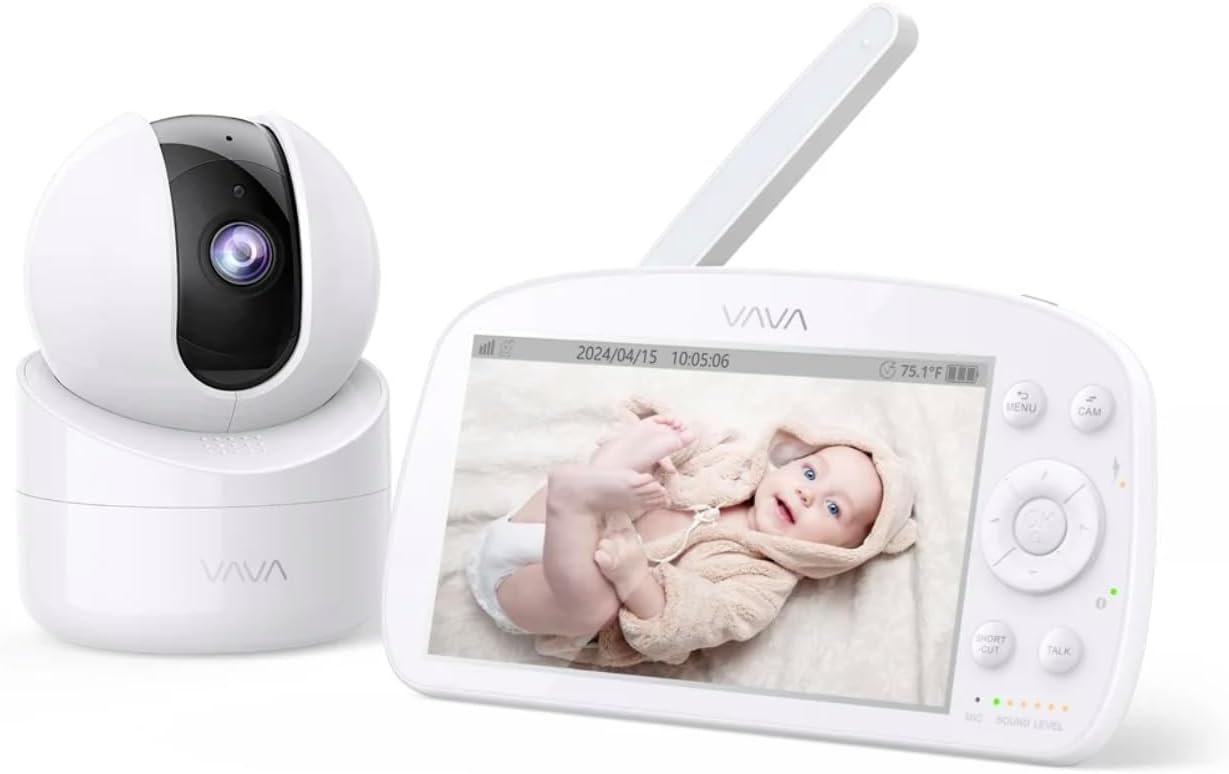
Image 3.1: The VAVA parent unit (monitor) and baby unit (camera) shown together.
The parent unit features a 5.5-inch HD display, control buttons, a microphone, speaker, and an antenna for signal reception.
Sashin Jariri (Kyamara)

Image 3.2: The VAVA baby unit (camera) with its pan/tilt base, featuring the lens and microphone.
The baby unit includes a 720p camera with infrared LEDs for night vision, a microphone, speaker, and a temperature sensor. It supports pan, tilt, and digital zoom functions.
4. Saita
4.1 Sanya Kyamara
Place the baby unit (camera) in a location that provides a clear view of your baby in the crib. Ensure it is at least 3 feet (1 meter) away from the crib to prevent entanglement with cords. The camera can be placed on a flat surface or mounted to a wall using the included mount kit.

Hoto 4.1: Example of camera placement, mounted above a crib for optimal viewing.
4.2 Kunnawa
- Connect one AC power adapter to the baby unit and plug it into a power outlet.
- Connect the second AC power adapter to the parent unit and plug it into a power outlet. The parent unit has a built-in rechargeable battery for portable use.
- Press and hold the power button on the parent unit to turn it on. The display will activate.
4.3 Pairing (If Necessary)
The baby unit and parent unit are pre-paired at the factory. If the connection is lost or you are adding an additional camera (up to 4 cameras supported), follow these steps:
- On the parent unit, press the MENU maballin.
- Navigate to the camera icon (Pairing) and select it.
- Choose an available camera channel (e.g., CAM 2, CAM 3, CAM 4).
- Press the pairing button on the back of the baby unit within 10 seconds.
- Once paired, the image from the camera will appear on the parent unit display.
5. Umarnin Aiki
5.1 Sarrafa Nau'in Iyaye

Image 5.1: The parent unit in use, displaying the live feed from the baby unit.
- Maballin MENU: Access settings, pairing, lullabies, and other functions.
- Maɓallan kewayawa (Na sama/Ƙasa/Hagu/Dama): Move through menus and control camera pan/tilt.
- Ok Button: Tabbatar da zabuka.
- TALK Button: Press and hold to speak to your baby through the camera's speaker (Two-Way Audio).
- Maballin ZOOM: Magnify the image (2X-4X digital zoom).
- Yanayin VOX: Voice Operated eXchange. The screen will turn on automatically when sound is detected from the baby unit. Adjust sensitivity in the menu.
- Lullabies: Select and play lullabies from the menu to soothe your baby.
- Hangen Dare: Automatically activates in low light conditions, providing a clear black and white image.
- Yanayin tuƙi ta atomatik: Cycles through connected cameras automatically.
5.2 Camera Control (Pan & Tilt)
From the parent unit, use the navigation buttons to remotely adjust the camera's viewkusurwar kusurwa:
- Latsa Sama/Ƙasa to tilt the camera vertically.
- Latsa Hagu/Dama to pan the camera horizontally.
6. Kulawa
6.1 Tsaftacewa
- Disconnect both units from power before cleaning.
- Use a soft, dry cloth to wipe the surfaces of the monitor and camera.
- For the camera lens, use a lens cleaning cloth to avoid scratches.
- Kada a yi amfani da masu tsabtace abrasive ko sauran ƙarfi.
6.2 Kula da Baturi (Na'urar Iyaye)
- Don tsawaita rayuwar baturi, kauce wa cikar cajin baturin akai-akai.
- Charge the parent unit regularly.
- If storing the unit for an extended period, charge the battery to approximately 50% and store in a cool, dry place.
7. Shirya matsala
| Matsala | Dalili mai yiwuwa | Magani |
|---|---|---|
| No image on parent unit | Parent unit is off; Camera is off; Out of range; Not paired. | Ensure both units are powered on. Move units closer. Re-pair the camera (see Section 4.3). |
| Orarancin hoto | Weak signal; Obstructions; Dirty lens. | Move units closer. Remove obstructions. Clean camera lens. |
| Babu sauti ko muryayyen sauti | Volume too low; Out of range; Interference. | Increase parent unit volume. Move units closer. Avoid placing near other electronic devices. |
| Parent unit battery drains quickly | High screen brightness; VOX mode off; Old battery. | Reduce screen brightness. Enable VOX mode. Contact support for battery replacement if necessary. |
| Camera not responding to pan/tilt | Batun haɗin kai; Rashin aikin kyamara. | Check connection. Power cycle both units. If issue persists, contact support. |
8. Ƙayyadaddun bayanai
| Siffar | Daki-daki |
|---|---|
| Sunan Samfura | VAVA 5.5" 720P Video Baby Monitor |
| Lambar Samfura | 83-24011-022 |
| Girman Nuni | 5.5 inci |
| Tsarin Bidiyo | 720p HD |
| Yanayin watsawa | Har zuwa 900 ft (layin gani) |
| Fasahar Haɗuwa | Wireless (Dedicated 2.4GHz FHSS) |
| Tushen wutar lantarki | Corded Electric, Rechargeable (Parent Unit) |
| Siffofin Musamman | 2-Way Audio, Night Vision, Pan & Tilt, Zoom (2X-4X), VOX Mode, Lullabies, Temperature Sensor |
| Amfanin Cikin Gida/Waje | Cikin gida |
| Nau'in hawa | Dutsen Tabletop |
| Girman samfur | 8.46 x 8 x 5 inci |
| Nauyin Abu | 2.2 fam |
| UPC | 191280045666 |
9. Garanti da Tallafawa
9.1 Bayanin Garanti
VAVA products are designed and manufactured to the highest quality standards. This product is covered by a manufacturer's warranty from the date of purchase. Please refer to the warranty card included in your package or visit the official VAVA website don cikakken garanti sharuɗɗa da sharuɗɗa.
9.2 Tallafin Abokin Ciniki
If you encounter any issues or have questions regarding your VAVA 5.5" 720P HD Video Baby Monitor, please contact VAVA Customer Support. Our team is available to assist you with troubleshooting, technical support, and warranty claims.
For the most up-to-date contact information, please visit: www.vava.com/support