
SIMO SolHero24
Jagorar Umarnin SIMO Solis Hero 4G LTE Mai Ɗauki da Hotspot na Wayar Salula
Model: SolHero24 | Brand: SIMO
1. Samfurin Ya Ƙareview
The SIMO Solis Hero is a versatile 2-in-1 device designed to provide reliable global Wi-Fi connectivity and serve as a portable power bank. It offers seamless internet access in over 140 countries without the need for a SIM card or contract, automatically connecting to the strongest available network. Its robust design is suitable for various travel and remote work scenarios.
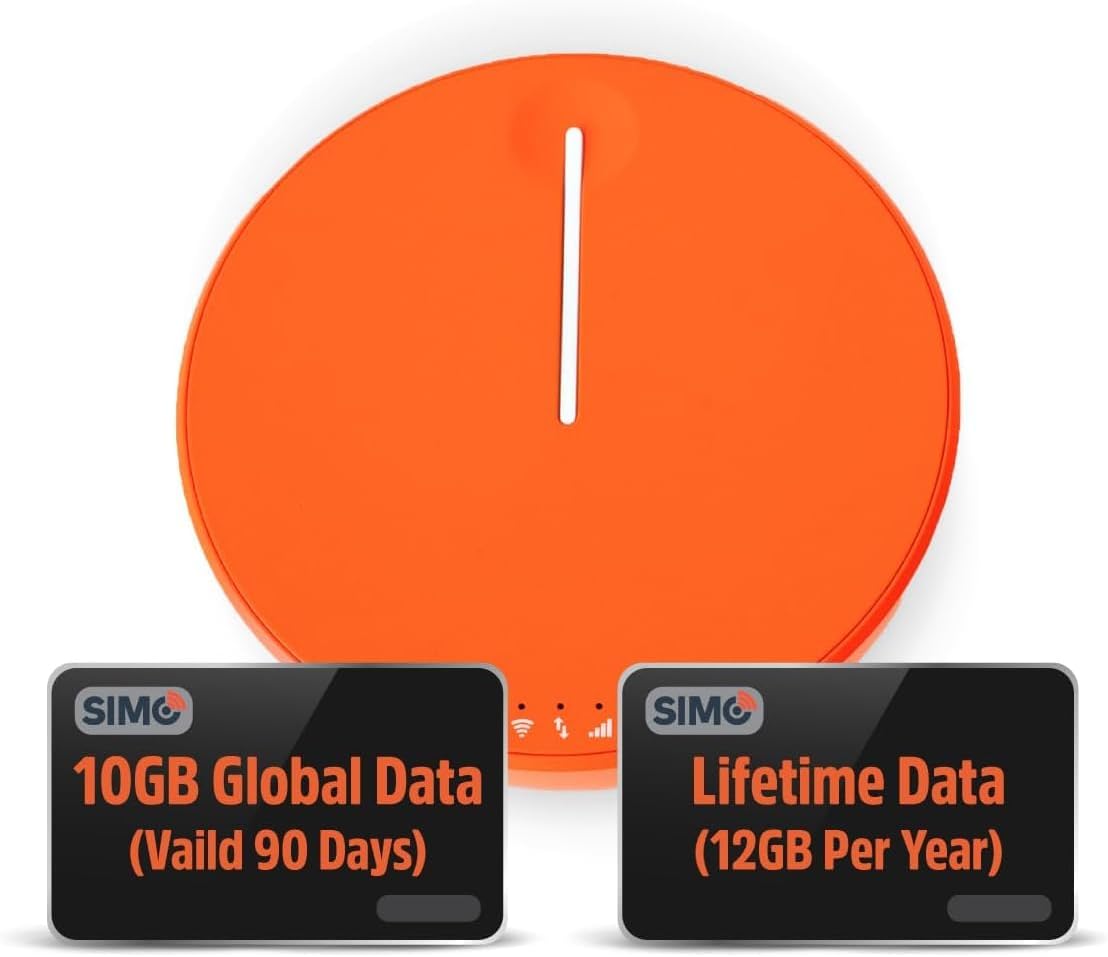
Figure 1.1: SIMO Solis Hero 4G LTE Portable Mobile Hotspot device.
Mabuɗin fasali:
- Na'urar 2-in-1: Functions as a mobile hotspot and a 5250mAh power bank.
- Global Connectivity: Access to 300+ mobile networks in 140+ countries with SignalScan technology.
- No SIM Card or Contract: Utilizes virtual SIM technology for hassle-free connection.
- Lifetime Data Plan: Includes 1GB of global data every month for the life of the device.
- Zane Mai Dorewa: IP68-rated for dust, water, and drop protection.
- Tallafin Na'ura da yawa: Yana haɗa har zuwa na'urori 10 a lokaci guda.

Hoto 1.2: Samaview of Solis Hero key features.
2. Abin da ke cikin Akwatin
Upon opening your SIMO Solis Hero package, you will find the following components:
- SIMO Solis Hero Hotspot Device
- Harkar Dauka
- USB-C Cajin Cable
- Jagoran Fara Mai Sauri
- Registration & Support Card
Video 2.1: Official unboxing and setup guide for the SIMO Solis Hero. This video demonstrates the contents of the box and initial steps to get started.

Figure 2.1: Visual representation of the Solis Hero components and initial setup steps.
3. Jagorar Saita
3.1 Kunna Na'urar Farko
- Cajin Na'urar: Before first use, fully charge your Solis Hero using the provided USB-C charging cable. Connect the cable to the device and a compatible USB power adapter (not included).
- Kunna Wuta: Press and hold the power button on the device until the indicator lights illuminate.
- Download the Solis App: Scan the QR code on the Registration & Support Card or search for 'Solis Wi-Fi' in your device's app store (available for iOS and Android).
- Yi rijistar Na'urarka: Open the Solis app and follow the on-screen instructions to create an account and register your Solis Hero using its serial number. This step is crucial for activating your Lifetime Data plan and any included global data.
3.2 Haɗa zuwa Wi-Fi
- Locate Wi-Fi Network: On your smartphone, tablet, or laptop, go to your Wi-Fi settings.
- Select Solis Hero Network: Find the Wi-Fi network name (SSID) broadcast by your Solis Hero device. The SSID and password are typically found on a sticker on the device or in the Quick Start Guide.
- Shigar da kalmar wucewa: Input the Wi-Fi password when prompted.
- Haɗa: Your device should now be connected to the Solis Hero's Wi-Fi network.
4. Umarnin Aiki
4.1 Haɗin Wi-Fi
- The Solis Hero automatically connects to the strongest 4G LTE network available in your location using SignalScan technology.
- You can manage connected devices and monitor data usage through the Solis app.
4.2 Aikin Bankin Wutar Lantarki
- The built-in 5250mAh battery allows you to charge other devices.
- Connect your device to the Solis Hero using a compatible charging cable.
- The Solis Hero can provide over 16 hours of battery life for its own operation, or it can be used to charge external devices.
4.3 Data Plans and Management
Your Solis Hero comes with a Lifetime Data plan (1GB per month) and an additional 10GB of global data (valid for 90 days). Additional data can be purchased as needed via the Solis app.

Figure 4.1: Flexible data plans are available through the Solis app to suit various usage needs.
5. Kulawa da Kulawa
- Tsaftacewa: Yi amfani da kyalle mai laushi da busasshe don tsaftace na'urar. A guji masu tsaftace kayan gogewa ko abubuwan da ke rage zafi.
- Ajiya: Ajiye na'urar a wuri mai sanyi, busasshiyar nesa da hasken rana kai tsaye da matsanancin zafi.
- Kulawar Baturi: Domin tsawaita rayuwar batirin, a guji fitar da cikakken caji na'urar akai-akai. A riƙa caja ta akai-akai, koda kuwa ba a amfani da ita na tsawon lokaci.
- Juriya da Ruwa da ƙura: While IP68-rated, avoid intentional submersion or exposure to harsh environments to maintain device integrity.
6. Shirya Matsalar gama gari
| Matsala | Dalili mai yiwuwa | Magani |
|---|---|---|
| Babu haɗin intanet | No data plan active or data exhausted. Weak signal. Device not powered on. | Check data plan status in Solis app. Move to an area with better signal. Ensure device is powered on and fully charged. |
| Na'urar ba ta caji | Faulty cable or adapter. Charging port obstruction. | Try a different USB-C cable and power adapter. Check charging port for debris. |
| A hankali gudun intanet | Congested network. Data throttling after high usage. Too many connected devices. | Move to a less congested area. Check data plan details for speed limitations. Disconnect unused devices. |
| Ba za a iya haɗi zuwa cibiyar sadarwar Wi-Fi ba | Incorrect Wi-Fi password. Device too far from hotspot. | Verify Wi-Fi password. Move closer to the Solis Hero device. |
7. Bayanan fasaha
| Siffar | Daki-daki |
|---|---|
| Lambar Samfura | SolHero24 |
| Ƙarfin baturi | 5250mAh Lithium Ion (an haɗa) |
| Girma | 4.41 x 4.37 x 2.05 inci |
| Nauyin Abu | 9.7 oz |
| Haɗuwa | 4G LTE, Wi-Fi (connects to 300+ mobile networks) |
| Mafi Haɗin Na'urorin | 10 |
| Ƙimar Dorewa | IP68 (Dust, Water, Drop Protection) |
8. Garanti da Abokin ciniki Support
SIMO products are backed by responsive customer service. For any inquiries, technical assistance, or warranty claims, please refer to the contact information provided on your Registration & Support Card or visit the official SIMO website.
Hakanan zaka iya ziyartar wurin SIMO Store on Amazon don ƙarin bayani da albarkatun tallafi.
Ask a question about this manual
Ask about setup, troubleshooting, compatibility, parts, safety, or missing instructions. Manuals+ will review the question and use this page’s manual context to help answer it.