
AJAZZ 308i
AJAZZ 308i Wireless Bluetooth Keyboard User Manual
Samfura: 308i
Gabatarwa
Na gode da siyaasing the AJAZZ 308i Wireless Bluetooth Keyboard. This manual provides detailed instructions on how to set up, operate, and maintain your keyboard. Please read this manual carefully before use to ensure optimal performance and longevity of your device.
Samfurin Ƙarsheview
The AJAZZ 308i is a compact 84-key wireless Bluetooth keyboard featuring a unique typewriter-inspired design with round keycaps. It offers multi-system compatibility and a comfortable typing experience.

Figure 1: AJAZZ 308i Wireless Bluetooth Keyboard (Gradient Green)
Mabuɗin fasali:
- Tsarin Rubutu Mai Wahayi: Round keycaps provide a retro aesthetic and comfortable typing feel.
- Tsarin Maɓallan 84 Mai Ƙaramin Sauri: Lightweight and portable, measuring 32cm x 13.6cm x 3cm, making it easy to carry.
- Haɗin Bluetooth mara waya: Stable connection up to 10 meters, compatible with various devices.
- Dacewar Tsarin da Yawa: Supports Windows, Mac OS, iOS, and Android operating systems.
- Smart Power Ajiye: Automatically enters sleep mode after 15 minutes of inactivity to conserve battery.
- Rubutun shiru: Soft chocolate keys ensure a smooth and silent typing experience.
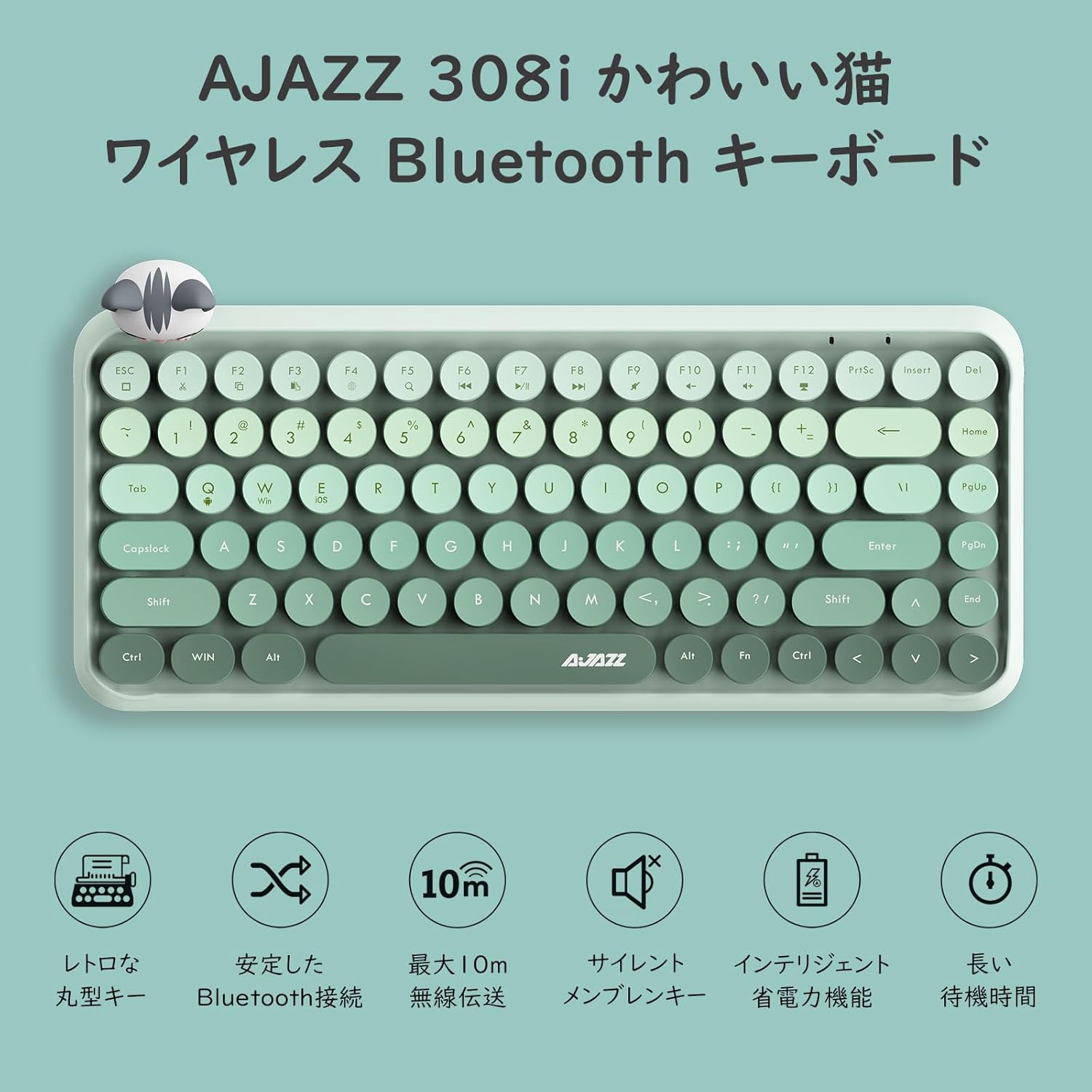
Hoto 2: Samaview of AJAZZ 308i Keyboard Features
Setup: Bluetooth Pairing
Follow these steps to connect your AJAZZ 308i keyboard via Bluetooth:
- Ensure your device's Bluetooth is turned ON.
- Juyawa ON the power switch on the keyboard.
- Latsa ka riƙe FN + C keys simultaneously on the keyboard. The keyboard will enter Bluetooth device search mode.
- On your device (tablet, smartphone, computer), search for Bluetooth devices.
- When "AJAZZ BLUETOOTH 5.0 KEYBOARD" appears in the list of available devices, tap or click on it to initiate pairing.
- A code will be displayed on your device's screen. Type this code using the AJAZZ 308i keyboard and press SHIGA.
- The keyboard is now successfully connected to your device.

Figure 3: Multi-device compatibility and connection example
Umarnin Aiki
Makullan Mai jarida:
The keyboard includes dedicated media function keys, accessible by pressing the FN key in combination with the F-keys:
- FN+F1: Yanke
- FN+F2: Kwafi
- FN+F3: Manna
- FN+F5: search
- FN+F6: Waƙar da ta gabata
- FN+F7: Kunna/Dakata
- FN+F8: Waƙa ta gaba
- FN+F9: Yi shiru
- FN+F10: Saukar da ƙara
- FN+F11: Ƙara girma
- FN+F12: Kulle
Note: On some devices like iPad, certain F-keys (e.g., F2, F3) might function directly without the FN key for copy/paste. Experimentation may be required depending on your operating system.
Yanayin Ajiye Wuta:
The AJAZZ 308i features a smart power-saving mechanism. If there is no key operation for more than 15 minutes, the keyboard will automatically enter sleep mode. To reactivate it, simply double-click any key.
Kulawa
Shigarwa da Sauyawa Baturi:
The keyboard is powered by two AAA alkaline batteries. To install or replace batteries:
- Nemo sashin baturi a ƙasan madannai.
- Bude murfin ɗakin baturi.
- Saka sabbin baturan alkaline AAA guda biyu, yana tabbatar da daidaitaccen polarity (+/-).
- Rufe murfin ɗakin baturi amintacce.
With smart power-saving technology, two AAA alkaline batteries can last for several months under normal use. Avoid using rechargeable lithium batteries as their performance degradation can lead to keyboard malfunction.
Shirya matsala
Key Layout Differences (English vs. Japanese Input):
The AJAZZ 308i keyboard has an English layout. When using Japanese input, some characters output may not match the characters printed on the keycaps. In such cases:
- Switch your device's input method to English and type according to the characters displayed on the keycaps.
- Alternatively, for Japanese input, refer to the standard Japanese keyboard layout for character mapping.
If you encounter any other issues or have questions, please refer to the warranty and support section for assistance.
Ƙayyadaddun bayanai
| Siffar | Daki-daki |
|---|---|
| Alamar | AJAZZ |
| Lambar Samfura | 308i |
| Fasahar Haɗuwa | Bluetooth 5.0 |
| Na'urori masu jituwa | Windows, Mac OS, iOS, Android (Bluetooth function required) |
| Yawan Maɓallai | 84 |
| Tsarin Allon madannai | QWERTY (English Layout) |
| Kullin Maɓallin Juya | Membrane (Chocolate Key) |
| Mara waya mara waya | Har zuwa mita 10 |
| Tushen wutar lantarki | 2 x AAA Batirin Alkaline |
| Nauyin Abu | 590g ku |
| Girma | 32cm x 13.6cm x 3cm |
| Abubuwan da aka haɗa | Magnetic Cat Figurine |
| Launi | Gradient Green |
Garanti da Taimako
The AJAZZ 308i Wireless Bluetooth Keyboard comes with a Garanti na watanni 12 daga ranar sayayya.
If you have any questions, concerns, or require technical assistance, please do not hesitate to contact our customer support. Contact details can typically be found on the product packaging or the retailer's webrukunin yanar gizon da kuka yi siyan ku.
Ask a question about this manual
Ask about setup, troubleshooting, compatibility, parts, safety, or missing instructions. Manuals+ will review the question and use this page’s manual context to help answer it.